

No products in the cart.

Jinlong
How to DTF Print White Ink with Jinlong Best Practices Guide
Understanding the Chemistry: Why White Ink is Different
White ink in DTF printing is unique due to its chemical composition, primarily the presence of Titanium Dioxide (TiO2). TiO2 is a dense, heavy pigment that provides excellent opacity and brightness, essential for strong white coverage on any fabric. However, its weight also impacts the ink’s flow and handling characteristics.
| Factor | Impact on White Ink |
|---|---|
| Titanium Dioxide (TiO2) | Adds weight, improves opacity but slows flow |
| Sedimentation Risk | Pigment particles settle when ink is static |
| Ink Weight & Flow | Heavier ink needs proper circulation and agitation |
Because TiO2 is heavier than typical CMYK pigments, white ink tends to settle quickly if left still. This sedimentation can cause clogging, inconsistency in print quality, and wasted ink. Without proper agitation, the white ink separates, leading to uneven white layers on transfers.
That’s why employing a high-quality ink formulation, like the one by jinlong DTF, is critical. Jinlong’s white ink uses advanced chemistry to reduce settling, improve pigment suspension, and maintain consistent flow. Their inks are optimized specifically for DTF systems, supporting the white ink circulation system (WIMS) to keep pigment evenly distributed.
Understanding these chemical and physical aspects of white ink ensures better printing reliability and vibrant, opaque DTF transfers, every time.
Pre-Print Preparation: Crucial First Steps
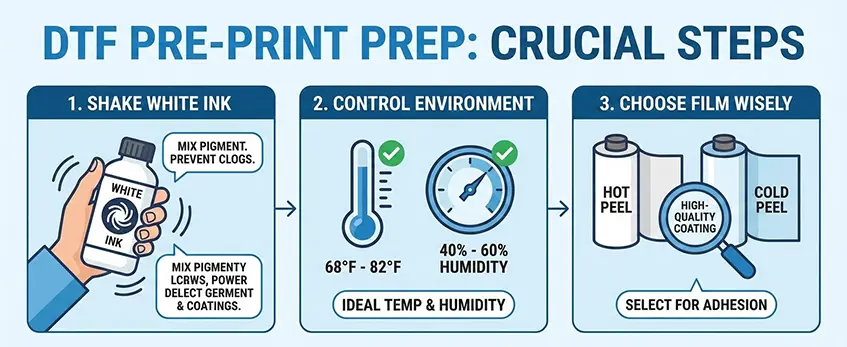
Before you start your DTF print job with white ink, preparation is key to avoiding common issues like nozzle clogging and poor print quality. Always manually shake your white ink bottles well before use. This re-mixes the titanium dioxide pigment, preventing sedimentation that can cause inconsistent ink flow.
Environmental control plays a big role too. Keep your workspace temperature between 68°F and 82°F (20°C – 28°C) and maintain humidity around 40% to 60%. These conditions help prevent the printhead nozzles from clogging and ensure smooth ink transfer.
Choosing the right DTF film matters as much as the ink. Decide between hot peel and cold peel films based on your production speed and fabric type. Also, opt for films with a high-quality coating that promotes better ink adhesion and reduces issues with ink layering. Proper film choice directly impacts your print\’s opacity and durability.
For a deeper dive into powder application during the finishing stage, check out detailed tips on hot melt glue powder in DTF printing. This will help you get the best results after pre-print prep.
Optimizing RIP Software Settings for White Ink
Getting your RIP software dialed in is key to nailing the white ink layer in DTF printing. Start by deciding how you want your white ink layer generated. For the best DTF transfer underbase, a solid 100% white layer gives maximum opacity and sharp colors, perfect when you want that bright, bold white. If you prefer a softer feel, use a gradient white layer—this lets some film and fabric texture show through for a lighter hand.
Next, adjust your white mask choke settings carefully. Retracting the white ink layer by 2 to 4 pixels helps avoid the dreaded halo effect around your design edges. This little tweak prevents white ink from spilling beyond the colored areas, keeping prints clean and professional-looking.
When setting ink density or volume, aim for a white ink load around 40-60%. This balance delivers strong opacity without causing pooling or bleeding during printing. Too much ink can clog nozzles or create messy prints, while too little makes the white appear transparent.
By fine-tuning these RIP software settings, you enhance your print’s direct-to-film opacity and ensure smooth runs with minimal waste. For those using Jinlong printers, pairing this with quality films like the DTF Transfer Film 60cm Pro Series can make a big difference in final results.
The Printing Workflow: Best Practices
To get the best results when you print with white ink on your DTF printer, following a solid workflow is key. Start every day with a nozzle check test—this makes sure all white ink channels are firing correctly. White ink is thicker and prone to clogging, so catching issues early keeps your prints clean and sharp.
When printing, always lay down the CMYK colors first, followed by the white ink layer. The white layer acts as your DTF transfer underbase, giving the colors opacity and pop on dark fabrics. Printing white last helps avoid smudging and ensures the ink adheres properly to the film.
Keep a close eye on your DTF film\’s flatness throughout printing. Warped or curled film can cause the printhead to strike the surface, which damages the white ink channels and can clog nozzles. Using high-quality PET film with good coating can help maintain flatness and improve your overall print quality.
For more insights on achieving flawless white ink prints and preventing printhead issues, check out this detailed complete guide to custom T-shirt printing with DTF printers.
Powdering and Curing: Locking in the White
To get the best results when you print with white ink in DTF, applying powder evenly while the white ink is still wet is key. This ensures that the powder melts properly and bonds well during curing, which locks in vibrant, opaque whites. After applying the powder, make sure to shake off any excess powder thoroughly—this helps prevent ghosting or unwanted powder marks on your final print.
Curing the print correctly is just as important. The ideal DTF curing temperature is between 120°C and 130°C (about 250°F to 265°F). At this range, the powder melts smoothly without boiling the ink, which can cause bubbles or cracks. Keeping your curing process within this window helps maintain crisp, clean prints with durable white layers that last.
For selecting the right powder and film, consider high-quality DTF powder and PET film like those found in the jinlong DTF transfer film series to optimize adhesion and final print durability. This combination supports the smooth hot melt powder application necessary for strong, long-lasting white underbase in direct to film printing.
Maintenance: Keeping the White Ink Flowing
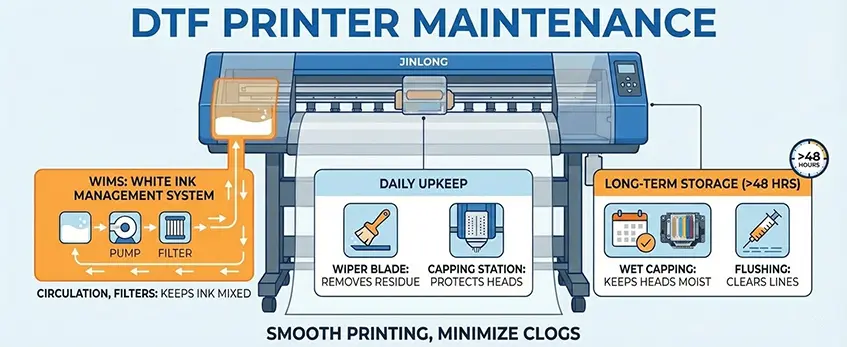
Proper maintenance is key to a smooth DTF printing experience, especially with white ink, which can clog more easily than CMYK. Jinlong DTF printers come equipped with a White Ink Management System (WIMS) that uses circulation pumps and filters to keep the white ink well mixed and prevent sediment buildup. This system helps maintain consistent flow and reduces nozzle clogging risks.
For daily upkeep, focus on cleaning the wiper blade and the capping station. These parts remove ink residue and protect printheads from drying out. Skipping this step can lead to dried ink buildup, causing poor print quality or head damage.
When your printer will be idle for more than 48 hours, like over weekends or holidays, follow proper protocols:
- Use wet capping to keep the printheads moist and avoid ink drying inside nozzles.
- If anticipating a longer break, perform a flushing cycle to clear ink from the lines and prevent sedimentation.
These simple maintenance steps help prevent expensive downtime and keep your white ink printing crisp and reliable. For more tips on optimizing your DTF printer setup and consumables, check out Jinlong’s detailed guidance on best DTF heat press settings and DTF film options.
Troubleshooting Common White Ink Issues
Running into problems with white ink during your DTF print process? Here’s how to fix the most common issues effectively.
Gray or Transparent White Ink
- First, check if the white ink is properly agitated. White ink contains titanium dioxide pigment, which settles quickly if left still. Shake or stir the ink bottles well before use.
- Increase the ink density settings in your RIP software to boost opacity, ensuring the white layer prints solid and vibrant.
Pooling or Bleeding White Ink
- Sometimes too much white ink can cause pooling or bleeding on the film. Reduce the ink volume to around 40-60% density to avoid excess buildup.
- Also, double-check your DTF curing temperature—maintain around 120°C to 130°C to properly melt the hot melt powder without overheating the ink, which can cause feathering.
Banding in the White Layer
- Banding often points to clogged nozzles or ink flow issues. Run strong cleaning cycles on the printhead to clear blockages.
- Inspect and, if necessary, replace ink dampers to stabilize white ink flow and prevent inconsistent printing.
Maintaining a smooth white ink flow not only improves your print quality but also extends the life of your DTF printer components. For detailed maintenance tips like wiping the printhead and managing your white ink circulation system (WIMS), ensure you follow your printer’s recommended routine closely.





 English
 Español
 Deutsch
 Français