
No products in the cart.


Jinlong
DTF Printer for Shirts Guide Benefits Features and Best Models
If you’re looking to break into custom apparel printing, understanding how a DTF printer for shirts works can open up a world of creative and business opportunities. Direct-to-Film (DTF) printing is changing the game with vibrant colors, durable prints, and compatibility across all fabric types—without the hassle of pre-treatment. Whether you’re a home-based hobbyist or a small business owner ready to scale, this complete guide will walk you through everything from essential equipment and step-by-step printing to professional tips that guarantee standout results. Ready to unleash your custom t-shirt printing potential with reliable, affordable solutions like jinlong DTF printers? Let’s get started!
Understanding DTF Printing Technology
If you’re new to custom t-shirt printing, you might be wondering, what exactly is DTF printing? Simply put, DTF (Direct to Film) printing is a cutting-edge method that lets you create vibrant, detailed designs printed on a special PET film, which you then transfer onto shirts with heat.
How DTF Works: From Digital Design to Heat Transfer
Here’s the basic process:
- Design Creation – You start with a digital design on your computer.
- Printing on Film – The DTF printer prints your artwork onto PET film, including a white ink layer under the colors to make the design pop.
- Apply Adhesive Powder – While still wet, the printed film gets coated with special adhesive powder.
- Curing the Powder – The powder is cured (dried) using a heat source, bonding it to the ink.
- Heat Press Transfer – Finally, you use a heat press to transfer the design from the film onto your shirt fabric.
Key Components of DTF Printing
To get started, you’ll need:
| Component | Purpose |
|---|---|
| DTF Printer | Prints the design on PET film |
| DTF Inks | Special water-based inks, including white ink |
| PET Film | Transparent film for ink transfer |
| Adhesive Powder | Bonds the ink to fabric |
| Heat Press | Transfers and cures print onto shirts |
DTF vs. Other Printing Methods
Wondering how DTF stacks up against other techniques like DTG, screen printing, or sublimation? Here’s a quick comparison:
| Method | Pros | Cons | When to Choose |
|---|---|---|---|
| DTF | Works on almost any fabric, no pre-treatment, vibrant colors, durable prints | Initial setup can be technical | Small batches, on-demand prints, mixed fabric compatibility |
| DTG | Excellent detail & color on cotton | Requires cotton and pre-treatment | High-quality cotton prints only |
| Screen Printing | Great for large runs, cost-effective | Setup time & costs, less detail on small runs | Bulk orders, simple designs |
| Sublimation | Long-lasting, vibrant on polyester | Only works on polyester/light fabrics | Polyester garments, all-over prints |
Why Choose DTF?
DTF printing shines when you want versatility across fabric types, quick setup for small runs, and highly detailed, durable prints without the hassle of pre-treating shirts. It’s perfect if you’re aiming for custom apparel printing with vibrant colors and a smooth process.
Understanding this tech opens up creative freedom for your t-shirt printing, whether at home or in a business setting. Next up, we’ll dive into why DTF is a top pick for custom t-shirts!
Advantages of DTF for Custom T-Shirts

DTF printing offers some clear advantages when it comes to custom t-shirt printing. One of the biggest perks is superior fabric compatibility. Whether you’re working with 100% cotton, polyester, blends, or even more challenging fabrics, DTF transfers for t-shirts stick well and look great across the board. Unlike other methods that often require fabric-specific inks or setups, DTF works smoothly on almost any material.
Another major benefit is that no pre-treatment is required before printing, saving time and hassle. This makes it ideal for quick projects or on-demand printing without sacrificing quality. Plus, DTF prints boast excellent wash durability, holding color and adhesion strong even after 50+ washes when cared for properly.
The process also gives you full-color vibrancy and fine detail reproduction. Thanks to the quality of DTF ink and film, you get sharp, bright prints that stand out. This makes your custom apparel printing pop with rich hues and smooth gradients, perfect for complex designs.
Finally, DTF is cost-effective for small runs and small business DTF printing setups. You can print single shirts or small batches without high upfront costs, making it a great choice for startups or home-based t-shirt printing at home operations.
For more on how DTF stacks up for small businesses, check out this detailed best DTF printer for beginners and pros guide for insights on reliability and performance.
Essential Equipment for DTF T-Shirt Printing
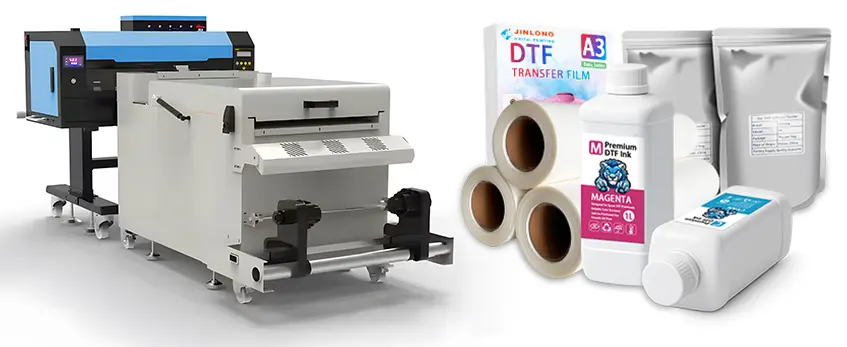
To get started with a DTF printer for shirts, having the right gear is key. Here’s what you need to focus on:
Choosing the Right DTF Printer
Look for these features when picking your printer:
| Feature | Why It Matters |
|---|---|
| Print Width | Controls maximum design size |
| Print Speed | Affects production time |
| Ink System | Quality inks mean vibrant, durable prints |
For reliable performance, jinlong DTF printers stand out as a top choice. They offer consistent output and support long print runs with ease, making them great for small businesses or beginners in custom apparel printing. You can check details about the DTF printing process and technology here.
Must-Have Accessories
Besides the printer, don’t forget these essentials:
- DTF Inks: Special inks designed for direct to film printing
- PET Films: The transfer films needed for printing designs (see high-quality DTF transfer films)
- Adhesive Powder: Helps the ink stick to the fabric during transfer
- Powder Shaker: Evenly coats the adhesive powder onto printed film
- Curing Oven: Cures the adhesive powder for effective bonding
- Heat Press: Applies your design to the shirt with precise temperature and pressure
Budget Breakdown
| Setup Level | Typical Cost Range | Best For |
|---|---|---|
| Entry-Level | $1,000 – $3,000 | Hobbyists & small batch runs |
| Professional Setups | $5,000 and up | High-volume, detailed work |
Starting small with a basic setup means you can test the market while keeping costs low. As your orders grow, investing in a professional setup like trusted jinlong DTF printers and full accessory kits can boost quality and speed.
With the right tools in place, your DTF t-shirt printing journey will be smoother and more efficient!
Step-by-Step Guide to DTF Printing on T-Shirts
Getting started with DTF printer for shirts is straightforward once you understand the process. Here\’s a simple step-by-step guide to help you print vibrant DTF transfers for t-shirts like a pro.
Preparing Your Design
- Use graphic software like Adobe Photoshop or Illustrator.
- Design in CMYK color mode for accurate color output.
- Make sure the file has a transparent background.
- Save your design as a high-resolution PNG with at least 300 dpi to capture fine details.
- Remember to include a white ink underbase layer for the best color pop on dark or colored shirts.
Printing the Transfer
- Load the PET film properly into the DTF printer. (Using quality DTF transfer film ensures smooth printing.)
- Set your printer’s software to print with white ink underbase first, then the color layers on top.
- Adjust printer settings for your film type and ink—slow print speeds often yield better detail and fewer clogs.
Applying Adhesive Powder and Curing the Film
- Immediately after printing, evenly sprinkle adhesive powder for DTF over the wet ink.
- Use a powder shaker to prevent clumps and get a consistent coat.
- Cure the film in a drying oven or with a heat gun to melt the powder onto the ink. This step ensures the transfer sticks well during heat pressing.
Heat Pressing onto T-Shirts
| Setting | Recommended Value | Notes |
|---|---|---|
| Temperature | 305°F – 320°F (150°C – 160°C) | Adjust based on fabric type |
| Time | 15 – 20 seconds | Don’t over-press to avoid ink bleeding |
| Pressure | Medium to high pressure | Even pressure over entire design |
| Peeling | Hot peel (immediate) | Peel film off right after pressing for best results |
Post-Press Finishing
- Place a non-stick or parchment sheet over the print and press again for 5-10 seconds to cure the ink fully.
- Let shirts cool before folding or packaging to avoid print distortion.
- This step seals the design for durability and a professional finish.
Following these precise steps, you\’ll get vibrant DTF prints that are durable and ready for the wash. For best results, pairing your workflow with the right supplies like DTF inks and films is key to long-lasting custom apparel printing.
Best Practices and Pro Tips for Flawless DTF Prints
Getting vibrant colors and sharp details with your DTF printer for shirts means paying attention to a few key tips and avoiding common mistakes. Here’s a quick guide to help you get top results every time:
Achieving Vibrant Colors and Sharp Details
- Use high-quality DTF ink and film for true color pop.
- Maintain correct print settings: optimal white ink underbase and resolution.
- Keep prints consistent by using fresh adhesive powder evenly.
- Calibrate your printer regularly to avoid color shifts.
Common Mistakes to Avoid
| Issue | Cause | Fix or Prevention |
|---|---|---|
| Ink Clogging | Dried ink or poor maintenance | Clean print heads regularly; use recommended inks |
| Uneven Powder | Too much or uneven shaking | Use a good DTF powder shaker; even application |
| Over-Pressing | Excessive heat or time | Follow correct heat press DTF transfers settings; see best DTF heat presses |
| Film Peeling | Insufficient curing or powder | Cure adhesive properly; avoid moisture exposure |
Testing Different Fabrics and Shirt Colors
- Test your transfers on cotton, polyester, and blends to see how colors hold up.
- Dark and light shirts may need adjustments on white ink layers.
- Keep notes on fabric types and settings for repeatable results.
Maintenance Tips for jinlong DTF Printers
- Clean print heads weekly to prevent clogging.
- Use genuine jinlong inks to avoid damage.
- Store PET film transfers in a dry place.
- Regularly check and replace worn parts.
- Follow jinlong’s quality control tips for performance and longevity. You can find detailed advice in their deep dive into jinlong DTF quality control.
By following these best practices, you’ll consistently produce durable, vibrant DTF transfers for t-shirts that customers love.
Troubleshooting Common DTF Issues
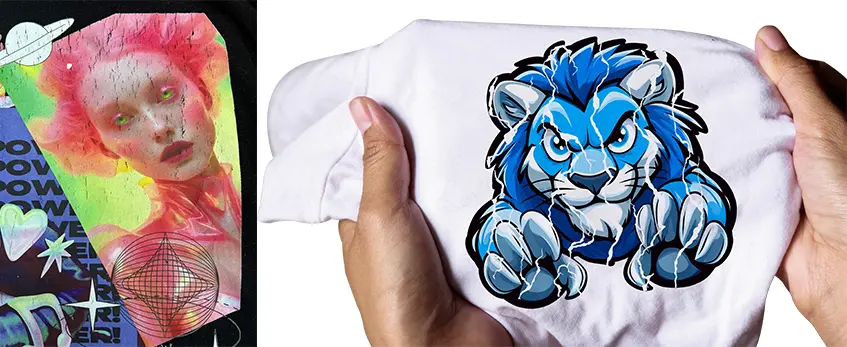
Even with the best DTF printer for shirts, you might run into a few common hiccups. Here’s how to handle faded colors, poor adhesion, film peeling, and ink clogs to keep your custom apparel printing on track.
Faded Colors or Poor Adhesion
- Cause: Ink not printed with the correct white ink underbase or insufficient adhesive powder.
- Fix: Double-check your printer settings to ensure the white ink layer prints properly beneath your colors. Also, apply the right amount of adhesive powder evenly and cure it well before pressing.
- Tip: Use quality DTF ink and film designed for vibrant DTF prints to avoid dull results.
Film Peeling or Cracking After Washing
- Cause: Under-curing powder, improper heat press settings, or using low-quality PET film transfers.
- Fix: Increase curing time for the adhesive powder, and ensure your heat press temperature and pressure match the recommended settings (usually around 320°F for 15-20 seconds).
- Tip: Check out detailed advice on managing adhesive powder and curing at a comprehensive guide to DTF transfer paper and powder.
Ink Clogs and Print Head Problems
- Cause: Ink drying inside the print head during idle periods or using incompatible ink systems.
- Fix: Perform regular print head cleaning cycles and keep your jinlong DTF printer setup running smoothly with routine maintenance.
- Tip: Using your printer frequently or investing in a powder shaker and curing oven helps prevent build-up. For more on this, see DTF printer with shaker and oven vs manual powdering.
Quick Fixes and Preventive Measures
- Run test prints before big batches to catch issues early.
- Calibrate your heat press and printer settings for each fabric type.
- Store inks and films properly to maintain quality.
- Regularly clean the print head and keep the workspace dust-free.
- Monitor powder application closely to avoid uneven coverage.
Keeping these troubleshooting tips in mind will ensure your DTF transfers for t-shirts stay vibrant, durable, and professional wash after wash.
Starting a Custom T-Shirt Business with DTF
Launching a custom t-shirt business with a DTF printer for shirts is a smart move, especially for small business owners and entrepreneurs working from home. Here’s a quick breakdown to get you started:
Startup Costs and Space Requirements
| Item | Estimated Cost (USD) | Notes |
|---|---|---|
| DTF Printer | $1,000 – $5,000 | Models like jinlong DTF printers offer reliability and solid performance |
| Heat Press Machine | $300 – $1,000 | Essential for transferring designs to shirts |
| Consumables (Inks, Films, Adhesive Powder) | $200 – $500 monthly | Includes PET film transfers and adhesive powder like TPU variants here |
| Workspace | Small dedicated area, 50-100 sq ft | Enough for equipment and storage |
Starting small at home is doable with minimal space, but as your business grows, consider moving to a larger workspace.
Pricing Your Prints and Profit Margins
To succeed, set prices that cover material costs, labor, and overhead while staying competitive. A simple pricing formula:
Cost per print + Labor + Overhead + Profit Margin = Selling Price
- Average print cost: $3–$7 depending on design size and materials.
- Aim for a 40-60% profit margin to stay profitable and competitive.
- Offer discounts on bulk orders or custom packages.
Marketing Strategies
- Online Sales: Build a user-friendly website and list your products on platforms like Etsy or Shopify. Use SEO keywords such as “DTF transfers for t-shirts” and “custom apparel printing.”
- Local Events: Set up booths at fairs, markets, or local festivals to showcase your vibrant DTF prints.
- Social Media: Use Instagram, Facebook, and TikTok to post eye-catching designs and customer testimonials. Engage with communities interested in custom t-shirts.
Legal Considerations and Brand Building
- Register your business and get any required licenses.
- Protect your brand with trademarks if you develop unique logos or slogans.
- Use clear terms for custom orders, returns, and copyright regarding customer designs.
Starting your journey with a reliable DTF printer setup can streamline production and elevate your custom apparel printing business. For more on DTF materials, see the detailed guide on DTF ink and film essentials.
Care and Longevity of DTF-Printed T-Shirts
Taking good care of your DTF-printed t-shirts is key to keeping the vibrant colors and sharp details looking fresh. With proper handling, DTF transfers for t-shirts can last through 50+ washes, making them a durable choice for custom apparel printing.
Washing Tips for Customers
- Turn shirts inside out before washing to protect the print.
- Use cold or warm water on a gentle cycle—hot water can weaken the adhesive powder bond.
- Avoid bleach or harsh detergents that may fade colors or damage the PET film transfers.
- Use mild detergents that are free from fabric softeners or additives.
Drying Instructions
- Air drying is best to preserve the print quality.
- If you use a dryer, go with low heat settings to prevent cracking or peeling.
- Avoid ironing directly on the print. If ironing is necessary, place a cloth over the design and use a low heat setting.
With these simple steps, your custom DTF t-shirt prints will stay durable and vibrant, handling everyday wear without losing appeal. For more on caring for your custom shirts or bulk printing options, check out this guide on ordering shirt transfers in bulk.


 English
 Español
 Deutsch
 Français