

No products in the cart.

Jinlong
How Proper Heat Press Temperature Cuts Waste and Boosts DTF Profits
If you’ve ever dealt with peeling, cracking, or scorched prints, you know how costly incorrect heat press temperature can be in DTF printing. Every failed transfer swallows up expensive films, powders, and blanks, not to mention your time and potential orders. Getting the DTF heat press temperature settings right isn’t just a technical detail—it’s the key to slashing waste and boosting your bottom line. In this guide, we’ll show you how mastering the optimal temperature for DTF transfers can transform your workflow, increase profit margins, and turn your print shop into a lean, efficient operation. Ready to cut costs and see consistent, vibrant results? Let’s dive in.
Why Temperature Is the Make-or-Break Factor in DTF Printing
Getting the heat press temperature right is crucial in DTF printing. The temperature controls how well the adhesive powder melts and bonds the design to your fabric. If it’s too low, the powder won’t fully melt, causing peeling, cracking, and poor adhesion. On the flip side, too high a temperature can lead to over-curing, which scorches the print, distorts colors, or even damages the fabric itself.
These common heat press mistakes result in wasted materials, such as ruined films, excess powder fallout, and scrapped garments. Each failed transfer means lost time and money—not just in the product but also in labor and shipping delays. Temperature directly impacts your DTF heat press temperature settings and ultimately dictates whether you produce quality, consistent prints or pile up costly waste.
By fine-tuning the temperature, you avoid these pitfalls, reducing DTF printing waste significantly and ensuring your transfers adhere perfectly the first time. In today’s competitive custom printing market, maintaining the right temperature isn’t just a technical detail—it’s a key factor in controlling your costs and protecting your bottom line.
The Direct Cost of Incorrect Heat Press Temperature
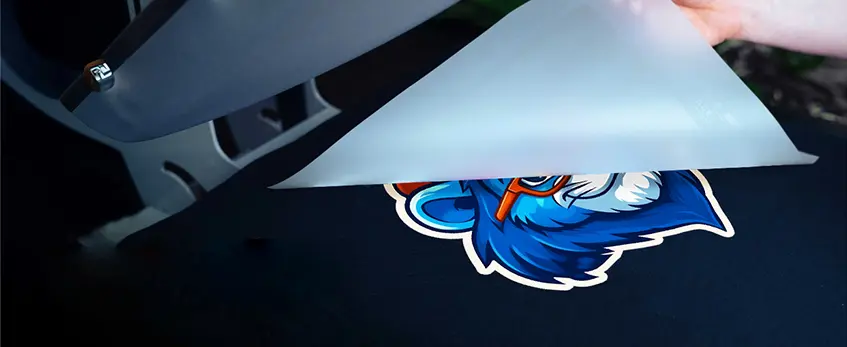
Getting the heat press temperature wrong in DTF printing hits your bottom line hard. When the temperature is off, you see several types of waste piling up: ruined films that can’t transfer properly, excess adhesive powder that doesn’t melt right, scrapped apparel because of scorching or peeling, and frequent reprints to fix mistakes. All these not only burn through your materials but also increase your costs quickly.
Time losses add up too. Incorrect temperature means more rework, handling customer complaints, issuing refunds, and sometimes even losing orders because you can’t meet deadlines. These delays slow down your workflow and reduce your daily output significantly.
This combination of wasted materials and lost time directly eats into your profits. Imagine a busy day where just 10% of your transfers fail due to wrong temperature settings – this means fewer sellable products and more resources spent on fixes, drastically cutting your profit margins.
To avoid this, dialing in the right DTF heat press temperature settings is crucial to reduce waste and boost efficiency. For more on minimizing transfer failures and improving production, check out the detailed hot peel DTF film roll print settings that guide how temperature and pressure work hand in hand.
Recommended Heat Press Temperature Settings for Jinlong DTF Transfers
Getting the heat press temperature just right is key to perfect prints and low waste when using jinlong DTF transfers. Generally, the optimal temperature range falls between 320°F and 350°F, but it varies based on fabric type:
- Cotton: 325°F to 335°F
- Polyester: 335°F to 345°F
- Nylon: 320°F to 330°F
These settings help melt the DTF powder perfectly without scorching the garment or causing adhesion problems like peeling or cracking.
Hot Peel vs. Cold Peel
Jinlong DTF transfers generally recommend cold peel after pressing. This means letting the transfer cool completely before removing the film, reducing risks of smudging or adhesive failure. However, some thicker or synthetic fabrics might benefit from a hot peel to improve adhesion. Testing your specific material will guide which technique suits your run best.
Tips to Dial in Exact Temperature
- Start in the middle of the range: Begin around 335°F for cotton and adjust up or down based on results.
- Calibrate your heat press regularly: Sensor accuracy directly affects transfer quality.
- Use test swatches: Press small fabric samples before full production runs.
- Control pressure and time: Temperature works hand-in-hand with these factors—balance all three for best results.
Fine-tuning heat press temperature for jinlong DTF transfers minimizes defects and helps keep your workflow efficient. For more detailed fabric-specific advice, check out solutions on DTF printer for shirts on cotton, polyester, and blends.
Step-by-Step Process to Optimize Temperature and Minimize Waste
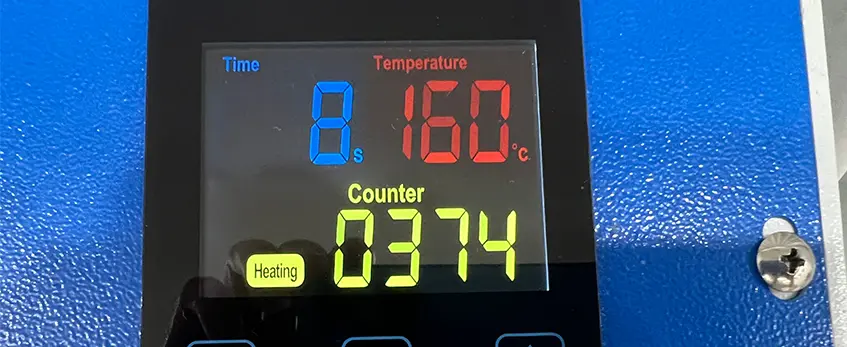
Getting the heat press temperature just right is key to cutting waste and boosting quality in DTF printing. Here’s a straightforward process to keep things consistent and efficient:
Calibrating Heat Press Tools
Start by regularly calibrating your heat press to ensure the temperature sensor reads accurately. Uneven heat or faulty sensors often cause transfer failures like peeling or color distortion. Use a reliable temperature strip or digital thermometer to spot-check the platen’s heat before every big run.
Pre-Pressing Garments
Before applying transfers, pre-press your garments for 3-5 seconds. This removes moisture and wrinkles, which can interfere with proper adhesion and cause defects. Pre-pressing also helps stabilize the fabric so that the powder melts evenly.
Applying Transfers with Consistent Pressure and Time
Apply your jinlong DTF transfers using the recommended pressure and time settings for the fabric type. Inconsistent pressure or timing can lead to under-melted powders or scorching. Using the exact heat press temperature for DTF transfers optimized by jinlong ensures the adhesive powder melts fully without over-curing. This step is crucial to reduce waste like ruined films and scrapped apparel.
Post-Press Cooling Techniques
Allow transfers to cool properly after pressing. This helps the adhesive set firmly, especially with hot peel or cold peel methods. For best results, follow jinlong’s guidance on peel timing relative to your fabric choice — this reduces peeling or cracking issues commonly seen with incorrect cooling.
Troubleshooting Temperature Issues
If you spot uneven heat distribution or suspect your sensor is off, troubleshoot promptly:
- Rotate your transfers to different platen areas for consistent results.
- Cross-check heat press temperature readings with external tools.
- Adjust settings gradually rather than making big jumps.
Advantages of jinlong DTF Products
One major benefit of jinlong DTF transfers and their TPU hot melt adhesive powder is their forgiving nature toward minor temperature variations. This means even if your heat press setup isn’t perfect every time, you still get reliable adhesion and vivid prints — cutting down on costly mistakes and waste.
For an in-depth look at how the adhesive powder works to create strong bonds at optimal temperatures, check out jinlong’s detailed guide on TPU DTF hot melt adhesive powder.
By following these simple steps to optimize heat press temperature and handling, your DTF printing workflow becomes more consistent, waste shrinks, and profits grow.
How Precise Temperature Control Increases Profit in DTF Operations

Keeping your heat press temperature spot-on in DTF printing slashes defects and cuts down waste significantly. When your temperature settings are dialed in just right, you reduce peeling, cracking, and color distortions that often lead to scrapped garments. That means less material thrown away and lower costs on reprints.
Efficiency also jumps with precise temperature control. You speed up your production line because you don’t waste time fixing mistakes or waiting for transfers to cure properly. Less rework means faster throughput and more orders completed daily, directly boosting your bottom line.
Quality improves too—consistent prints that last encourage repeat customers. Solid print adherence and vibrant colors keep clients coming back, which is crucial in the competitive custom printing market.
Scaling your operation becomes smoother with fewer hiccups. Larger orders require the same reliable results, or profit margins can erode fast. Accurate temperature control helps maintain high standards regardless of order size.
For example, a shop using optimized heat press temperature for DTF transfers saw a 20% reduction in waste and a 15% boost in overall profits just by calibrating their process. That kind of return on investment proves how vital correct temperature settings are.
For practical tips on keeping your heat press calibrated and efficient, check out this digital DTF workflow guide for printing, powdering, curing, and pressing. It’s a valuable resource to help you maximize profit by minimizing waste through precise temperature management.
Additional Tips from jinlong DTF for Maximum Profitability
To get the best from your DTF heat press temperature settings and boost profits, balancing temperature with pressure and time is key. Too much pressure or time, even at the right temperature, can cause issues like fabric damage or color distortion. Conversely, too little pressure or shorter pressing time can lead to poor adhesion or peeling.
Environmental factors also play a role. Humidity and ambient temperature affect how transfers cure, so adjust your heat press settings if your workspace conditions vary. Keeping your heat press well-maintained is essential for consistent results—regular calibration ensures the temperature stays accurate, avoiding common DTF heat press mistakes like uneven heating or sensor errors.
Using high-quality jinlong DTF supplies, including films and powder adhesives, complements your precise heat press temperature control. Better materials reduce defects, minimize wasted inventory, and improve adhesion reliability.
Finally, establish solid testing protocols by running small sample prints when you tweak settings. Lock in your optimal temperature, pressure, and time before full production. This practice saves wasted garments and powder, securing cost savings for your business.
For step-by-step heat press tips and settings with jinlong DTF transfers, check out our detailed desktop DTF printer setup guide.



 English
 Español
 Deutsch
 Français