



Master Using a DTF Printer and Shaker for Perfect T-Shirt Printing
If you\’re diving into the world of DTF printing for t-shirts and apparel, mastering both the Impresora DTF y agitador de polvo is a game-changer. These two tools work hand-in-hand to deliver vibrant, durable prints that stand out in today’s competitive apparel market. Whether you’re new to Direct to Film or looking to boost your shop’s efficiency, understanding how to leverage the full potential of your equipment is essential. In this guide, we’ll break down everything you need to know about using a DTF printer and shaker effectively—so you can create high-quality garments that last. Let’s get started!
¿Qué es la impresión DTF?
DTF printing, or Direct to Film printing, is a modern method for creating vibrant, durable designs on t-shirts and apparel. The process involves printing your design onto a special film using a DTF printer, then applying a layer of adhesive powder to the wet ink. This powder is cured, and the design is transferred onto fabric using a heat press.
How DTF Printing Works on Apparel
- Design Printing: The design is printed in reverse on a clear film with special inks.
- Aplicación en polvo: Adhesive powder is evenly shaken onto the wet ink to act as a bonding agent.
- Curado: The powder is heated to fuse with the ink, preparing it for transfer.
- Transferencia por prensa térmica: The film with the design is pressed onto fabric, transferring the print.
DTF vs Other Printing Methods
| Método | Proceso | Compatibilidad de tejidos | Durabilidad | Eficiencia de costes |
|---|---|---|---|---|
| Impresión DTF | Print on film + adhesive powder | Funciona en la mayoría de los tejidos | Highly durable + washable | Moderate initial cost |
| Impresión DTG | Impresión directa sobre tela | Mejor en algodón | Menos duradero en poliéster | Higher ink cost |
| Transferencia de calor | Pre-printed vinyl or transfers | Limited by transfer type | Can crack over time | Low to moderate cost |
| Serigrafía | Ink pushed through mesh screen | Great for bulk cotton | Muy resistente | High setup, low per-unit |
Key Benefits of DTF Printing in Apparel Production
- Versatile: Works on cotton, polyester, blends, and more.
- Durable & Washable: Prints resist cracking and fading through repeated washes.
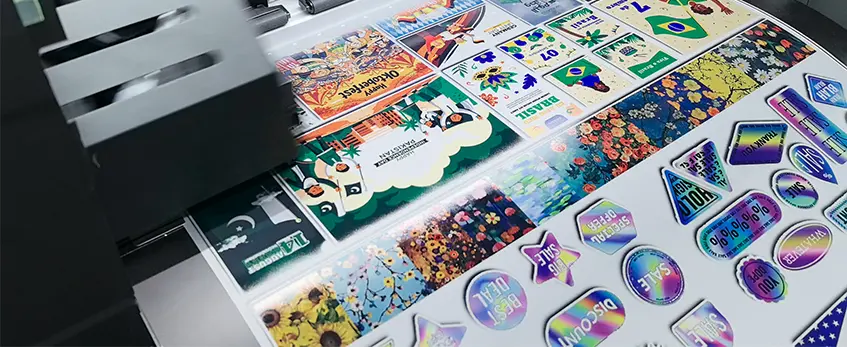
- Colores vibrantes: Produces sharp, colorful, and detailed images.
- Cost-Effective for Small Runs: No need for screens or plates, ideal for short runs or custom orders.
- Entrega rápida: The entire printing and transferring process is quick and efficient.
DTF printing stands out as a flexible, reliable solution for printing high-quality t-shirts and apparel, making it a great choice for businesses looking to expand or improve their printing services.
Components of a DTF Printing Setup
A solid DTF printing setup includes several key components working together to produce high-quality apparel prints. At the heart of the system is the DTF printer itself. For example, the Impresora Jinlong DTF is a popular choice with core features like high-resolution printing, precise ink control, and compatibility with various Láminas de transferencia DTF. This printer supports vibrant colors and sharp details, making it ideal for custom t-shirts and apparel printing.
Equally important is the powder shaker for DTF printing. This device applies adhesive powder evenly onto the freshly printed film, which is crucial for ensuring that the ink bonds properly to the fabric. A well-calibrated shaker prevents clumping and uneven powder distribution, directly impacting the print\’s durability and washability.
Other essential equipment includes a prensa de calor or curing station, used to bond the printed design onto the garment through heat and pressure. Software for preparing and managing design files also plays a key role in the workflow, helping optimize prints for color accuracy and efficient production.
By combining a reliable DTF printer like Jinlong’s with an efficient powder shaker and quality finishing tools, you set up for successful, scalable apparel printing operations. For more on choosing the right materials, check out this guide on películas de transferencia DTF de alta calidad.
How to Use a DTF Printer for T-Shirt and Apparel Printing
Getting started with a DTF printer for t-shirts and apparel printing is straightforward once you know the basic steps. First, prepare your design files. Use high-resolution images and convert them to the right color profile (usually CMYK) to ensure vibrant prints. Make sure your design is mirrored because the print will transfer onto the fabric in reverse.
Siguiente, set up your DTF printer. Load your sublimation or PET transfer films—like the reliable Película de transferencia DTF 60 cm doble serie básica. Fill the printer with quality DTF inks, such as white and color inks to get the full spectrum of your artwork. Proper printer calibration is crucial: check nozzle health, align the print heads, and run test prints to avoid color shifts or streaks.
When printing, follow this workflow:
- Print your design directly onto the transfer film using the Jinlong printer or a similar model.
- Once printed, pass the film through the powder shaker to evenly apply adhesive powder.
- Pre-cure the powder with a low-temperature heating station to prepare for pressing.
For best print quality, set your printer’s resolution between 720 and 1440 dpi, depending on detail needs. Pay attention to ink density and powder amount, balancing sharp colors with good adhesion.
If you face issues like ink smudging or color inconsistency, try cleaning print heads and adjusting ink flow settings. Regularly check the heat press temperature because it impacts the final transfer quality—a helpful guide on Ajustes de la prensa térmica DTF can assist here.
By following these simple steps, your DTF printing process on apparel will be smooth and efficient, producing vibrant, durable prints every time.
The Function and Importance of a Powder Shaker
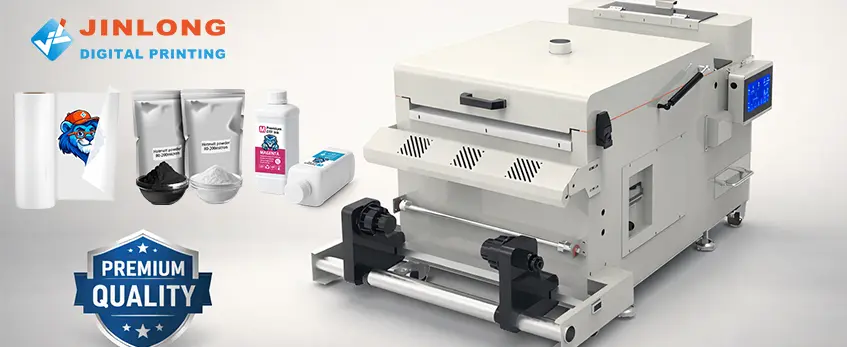
A powder shaker is a key piece of equipment in the DTF printing process, specifically designed to apply adhesive powder evenly onto the printed film. This adhesive powder is what helps the printed design bond securely to the fabric during curing.
The shaker works by distributing a fine layer of adhesive powder right after the design is printed onto the transfer film. Even application is crucial—too much powder can cause clumping, while too little reduces adhesion. A reliable powder shaker ensures consistent coverage, which directly affects the durability of the print and how well it holds up after multiple washes.
Precision in powder application means the print won’t peel or fade, giving your t-shirts and apparel a high-quality, long-lasting finish. Using a powder shaker properly improves the overall washability of your prints, making it essential for any serious DTF printing setup. For best results, pairing the shaker with high-quality powders and transfer films is recommended, such as those found in trusted kits like the Jinlong DTF printer and shaker systems.
Integrating the Powder Shaker in Your Printing Workflow
Using a powder shaker correctly is crucial for getting the best results from your DTF printer and shaker setup. Here’s a simple step-by-step guide to help you integrate the powder shaker smoothly into your apparel printing workflow:
- Print Your Design on Film: Start by printing your design using your DTF printer onto the transfer film.
- Prepare the Powder Shaker: Fill the shaker with the right amount of adhesive powder, usually a fine, hot-melt type designed for DTF printing.
- Shake the Powder Evenly: Place the printed film into the powder shaker and activate it. The shaker applies an even layer of powder that sticks to the wet ink.
- Check Powder Coverage: After shaking, inspect the film to ensure the powder is distributed uniformly without clumps or bare spots.
- Elimine el exceso de polvo: Gently tap or shake off extra powder to avoid thick spots that can affect curing.
- Cura el polvo: Finalize the process by curing the film in a heat press or curing station to melt the powder and bond it to the ink.
Best Practices for Powder Application
- Use the Right Quantity: Too much powder causes clumping; too little affects adhesion. Start with the powder amounts recommended by your supplier.
- Consistent Shaking Time: Typically, 10-20 seconds works well, but adjust according to your printer model and powder type.
- Uniform Shaking Technique: Keep the film flat and secure during shaking to prevent powder settling unevenly.
- Avoid Moisture: Ensure the powder stays dry to prevent clumping and poor adhesion.
Tips to Avoid Common Mistakes
- Don’t overload the shaker with powder; it should be enough to coat but not flood the design.
- Always clean your powder shaker regularly to prevent buildup that causes uneven application.
- Use quality adhesive powders designed specifically for DTF printing to guarantee proper bonding and washability.
For best results, pair your powder shaker with high-quality Láminas de transferencia DTF that work well with your powder and printing setup. This integration ensures durability and vibrant prints on your t-shirts and apparel.
Curing and Pressing: Finalizing the Print on Apparel
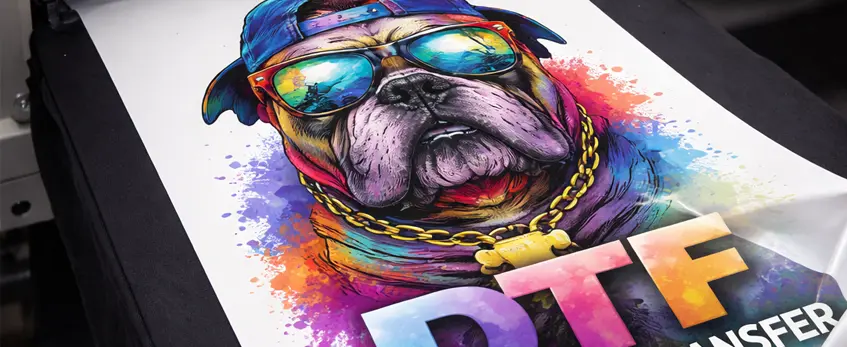
The curing process is key to making sure your DTF printing on t-shirts and other apparel sticks well and lasts through multiple washes. After applying the adhesive powder with your shaker, the printed design needs heat to properly melt the powder and bond it to the fabric. This step transforms the loose powder into a durable, flexible layer that locks the print in place.
Heating Process Explained
When you heat press the printed film onto the garment, the powder cures and fuses with the ink and fabric fibers. This creates strong adhesion and prevents peeling or cracking. Proper curing also maintains the softness of the print, so it doesn’t feel stiff or rough.
Recommended Heat Press Settings
Different fabrics need slightly different heat press settings to get the best results:
100% Algodón:
Temperature: 320°F (160°C)
Pressure: Medium (about 40-50 psi)
Tiempo: 15-20 segundosPolyester or Blends:
Temperature: 300°F (150°C)
Presión: Media a firme
Tiempo: 15-20 segundosDelicate Fabrics:
Use a protective sheet and slightly lower temperature (around 290°F/145°C) to avoid damage
Tips for Lasting Prints
- Use a quality heat press designed for DTF printing; you can explore options like the la mejor prensa térmica para empresas de impresión DTF for stable temperature control and pressure.
- Apply consistent, firm pressure during pressing to ensure uniform curing.
- Avoid over-pressing to prevent color fading or fabric damage.
- Always test your press settings with sample fabrics before full runs, especially if changing fabric type.
Effective curing plays a huge role in achieving high-quality, durable DTF prints that stand up to wear and washing, boosting customer satisfaction and repeat business.
Troubleshooting Common Issues in DTF Printing
When using a DTF printer and shaker, you might face some common issues like powder clumping, print adhesion problems, or ink smudging. Here’s a quick guide to fixing these challenges and keeping your DTF printing on track.
Powder Clumping or Uneven Distribution
Causas:
- Using too much or too little adhesive powder
- Powder moisture due to storage in humid conditions
- Inconsistent shaking or uneven powder application
Arreglos:
- Calibrate your powder shaker regularly to ensure even powder spread.
- Use the right amount of powder based on film size and design density.
- Store adhesive powder in a dry, sealed container to prevent moisture buildup.
- Shake the powder gently and steadily to avoid clumps.
Print Adhesion Problems
Causas:
- Insufficient heat press temperature, time, or pressure during curing
- Poor film-to-fabric contact or improper curing settings
- Using incompatible fabrics or low-quality transfer films
Arreglos:
- Follow recommended DTF heat press settings for different fabrics—typically around 320°F to 350°F for 15-20 seconds at medium pressure works well.
- Ensure complete curing of the adhesive powder by using a heat press or curing station as specified.
- Choose high-quality DTF transfer films designed for your specific apparel type to boost adhesion reliability.
Ink Smudging or Color Inconsistency
Causas:
- Wet ink when powder is applied too soon
- Using incorrect print settings or poor-quality inks
- Environmental factors like temperature and humidity affecting ink drying
Arreglos:
- Allow the print to dry fully before applying adhesive powder to prevent smudges.
- Use the recommended DTF inks and optimize printer calibration for color accuracy.
- Control workspace conditions, keeping humidity and temperature stable.
By regularly monitoring these points and maintaining your DTF printer and shaker, you can avoid common pitfalls in DTF printing on t-shirts and apparel. For more tips on optimizing your setup, see our Guía de compra de impresoras de transferencia DTF con las principales características.
Advantages of Using Jinlong DTF Printers and Shakers
Jinlong DTF printers and powder shakers stand out with advanced technology designed specifically for high-quality apparel printing. Their innovative features ensure sharp, vibrant prints with consistent ink flow and precise powder application, which is crucial for durable DTF printing on t-shirts and other apparel.
These printers come with user-friendly interfaces that simplify the setup and maintenance process, making them ideal for both beginners and seasoned professionals. The shaker’s even adhesive powder distribution reduces waste and improves print adhesion, ensuring your designs last through multiple washes.
Jinlong’s robust build quality and reliable performance support scalability, helping small and large businesses boost productivity without compromising on print quality. Plus, their comprehensive support and quality assurance give you peace of mind, whether you’re running a custom apparel shop or expanding your printing operations.
For more detailed insights, explore the benefits of Jinlong’s DTF technology in this article on Tendencias de impresión DTF en 2026, which discusses how this tech is shaping the future of apparel printing.
Maintenance and Care Tips for Your DTF Printer and Shaker
Keeping your DTF printer and shaker in top shape means better prints and fewer headaches. Here are some straightforward routine cleaning and upkeep tips to extend the lifespan of your equipment:
- Limpie regularmente los cabezales de impresión to prevent clogging and maintain sharp print quality.
- Remove excess adhesive powder from the shaker after each use to avoid buildup that can cause uneven application.
- Inspect and clean rollers and film paths to ensure smooth film feeding without jams or wrinkles.
- Check and refill ink cartridges before they get too low to avoid air bubbles and faded prints.
For consumables and components, replace the following on a regular schedule:
- Láminas de transferencia DTF after their recommended shelf life to ensure optimal adhesion.
- Polvo adhesivo frequently, since expired or contaminated powder affects curing and durability.
- Printer nozzles or print heads according to manufacturer guidelines, especially if you notice color inconsistency or print defects.
To ensure consistent print quality over time, also consider these tips:
- Calibrate your printer and shaker settings regularly for accurate powder application and color matching.
- Use high-quality inks and transfer films compatible with your Jinlong DTF printer for reliable results.
- Siga las recomendaciones Ajustes de la prensa térmica DTF for curing to avoid print failures that might seem like printer issues.
With regular maintenance and care, your DTF printer and shaker will keep delivering vibrant, durable prints that stand up to washing and wear. For detailed guidance on setup and maintenance, check out the complete DTF kit for beginners.





 English
  Español
  Deutsch
  Français