



Reduce DTF Printing Costs 50 Percent Without Losing Quality in 2026
If you’re already in the world of Impresión DTF or planning to jump in, you probably know how fast costs can spiral—especially on inks, films, and powders. The truth? Most shops are unknowingly overpaying 30-70% more per print than they need to. But here’s the good news: with smart tweaks, you can reduce your DTF printing cost by up to 50% without sacrificing vibrant colors, wash durability, or that professional hand-feel your customers expect.
In this guide, I’ll walk you through proven, tested strategies focused on optimizing every key cost driver—from choosing the right high-density inks y prima high-transfer-rate films to dialing in adhesive powder usage and streamlining your workflow. No fluff, just clear steps that cut your cost-per-print from around $2 down to $1 or less—while keeping your prints sharp and long-lasting.
Stick with me to uncover the insider secrets top shops use in 2025 to stay competitive and profitable—because every penny saved means real growth for your business.
Choose the Right DTF Inks to Cut Costs
Picking the right DTF inks is your first big step in slashing printing costs without skimping on quality. Here’s what to know:
Premium vs Mid-Range vs Budget Inks: What Matters Most?
| Tipo de tinta | Pigment Load % | Opacity & Wash Resistance | Average Cost per Liter | Notas |
|---|---|---|---|---|
| Premium | 8-12% | Highest opacity, lasts long | $90-$120 | Best for vibrant, durable prints |
| Gama media | 5-8% | Good opacity, decent wash | $50-$75 | Balanced quality and savings |
| Presupuesto | 3-5% | Fades faster, weak opacity | $20-$40 | Cuts costs but compromises look |
Pigment load directly controls how opaque your prints look and how well they survive washing. Low pigment means weak underbase and faded prints sooner.
Why Jinlong DTF High-Density Inks Are a Game-Changer
We personally rely on Tintas Jinlong DTF because their high-density white ink contains up to 40% more pigment than most budget inks. Result: you use 30-40% less white ink per print while keeping opacity strong.
Real numbers from our shop:
- White ink use drops from 18 g/A4 print to around 10-12 g
- Saves roughly 35% on white ink costs monthly
- Prints maintain top-tier wash and opacity ratings
Bulk Ink Systems: Bottles vs Cartridges
Switching from cartridges to bulk systems (1L, 5L, 20L bottles) cuts material cost per ml significantly.
| System Type | Cost per Liter | Waste Factor | Notas |
|---|---|---|---|
| Cartridges | $75-$130 | Alta | Frequent replacement, more waste |
| Bulk Ink Bottles | $40-$70 | Bajo | Lower per ml cost, less downtime |
| Bulk 20L Drums | $30-$60 | Más bajo | Best for high volume, max saving |
Expected Savings From Smart Ink Choices
By upgrading to high-density inks like Jinlong and moving to bulk bottles, you can expect to cut your ink costs by 25-45%, easily saving you hundreds to thousands every month.
En resumen:
- Don’t chase lowest price ink—check pigment load and real white ink use
- Choose Jinlong high-density inks for proven ink savings and quality
- Go bulk wherever possible to slash cost per print
You’re probably wasting several hundred dollars monthly right now on overpriced, low-pigment inks. Fix this first and watch your DTF printing cost drop fast.
Switch to High-Transfer-Rate DTF Films

One of the easiest ways to lower your DTF printing cost without sacrificing quality is by switching to high-transfer-rate films. When comparing cold-peel, hot-peel, and premium instant-peel films, premium instant-peel options stand out with transfer rates above 90%, while cheaper films often linger around 70-75%. This means you’re wasting less film and powder with higher-grade films.
Film thickness also plays a crucial role. Thinner films like 75μm generally consume less adhesive powder compared to thicker 100μm films, reducing powder usage and cutting costs. For 2025, the recommended film specs prioritize durability alongside high transfer rates—aim for films that balance optimal thickness with excellent peeling performance.
Using better films can save you 15-30% combined on both film and powder. For the best results, consider verified bundles that include premium films paired with adhesive powders, ensuring compatibility and consistent prints. You can explore products like the Polvo adhesivo termofusible TPU DTF to get started with high-quality supplies.
Optimize Adhesive Powder Usage
Adhesive powder can be a hidden cost in your DTF printing process, but dialing in the right usage can save you big. For most A4-sized prints, the sweet spot is between 12-18 grams of powder. Using too little risks poor adhesion, while too much just wastes material and cash.
Consider upgrading from manual powder application to auto powder shakers with recycle functions. These systems catch and reuse excess powder, slashing waste by up to 40-60% compared to manual methods.
When choosing powder, think about particle size:
- Fine powder offers smoother coverage but may clog or over-apply.
- Medium powder balances flow and adhesion for consistent prints.
- Polvo grueso can lead to uneven transfers and more waste.
Switching to a closed-loop powder system that recycles unused powder not only cuts costs but also helps maintain a cleaner workspace. These setups ensure you use only what’s necessary, improving your Coste por impresión DTF while keeping quality on point.
For a closer look at powder management and other workflow tips, check out our detailed guide on Optimización del flujo de trabajo de impresión DTF.
Reduce White Ink Consumption (30-50% Possible)
White ink is often the biggest chunk of your DTF printing cost, but you can cut its usage by 30-50% without losing quality. The key is smart underbase optimization:
- Knockout and Choke: Use knockout to remove unnecessary white areas beneath your color layers. Choke helps tighten the white edges to avoid excess ink bleeding.
- Opacity Sliders: Lower the white opacity slightly in your RIP software to use just enough ink for opacity without wasting it.
Another smart move is white-only-on-demand printing. Instead of printing a full white underbase every time, print white only where it’s needed based on the design. This saves ink and shortens drying time.
The latest 2025 RIP software options like PrintFactory, Cadlink, and EKPrint come with powerful white ink management tools. They let you preview and tweak underbase layouts digitally and adjust white ink density precisely, resulting in real savings.
Here’s a real-world example: customers who implemented these tricks reported cutting white ink use nearly in half with no drop in opacity or wash durability.
For more tips on how to maximize your white ink and other aspects of DTF printing, check out this detailed guide on Cómo curar el polvo DTF con una prensa térmica, which complements underbase efficiency perfectly.
Energy & Curing Cost Hacks
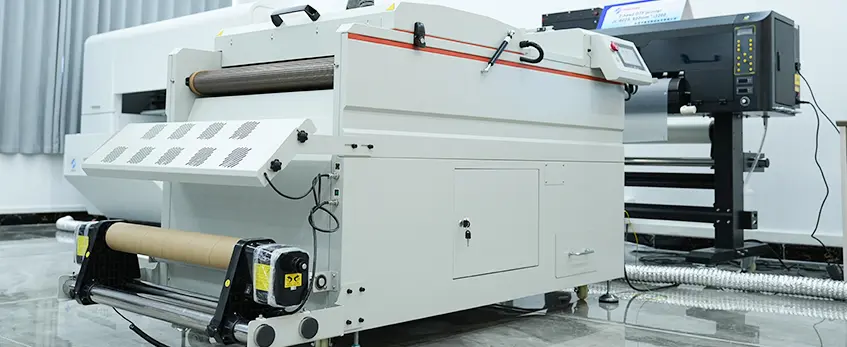
Cutting energy costs in DTF printing doesn’t mean slowing down production. Switching to LED-UV curing instead of traditional heat-press methods can save you significant time and electricity. LED-UV lamps heat up faster, use less power, and cool down quickly, letting you speed up curing without extra energy waste.
If you rely on conveyor dryers, optimizing their settings is key. Adjust conveyor speed and temperature to find the sweet spot where prints fully cure with minimal electricity use. Running dryers too hot or too fast wastes energy, while too slow reduces throughput. A well-tuned conveyor dryer improves efficiency and slashes power bills.
Don’t overlook simple insulation upgrades around your curing equipment. Adding heat-reflective barriers or insulating walls can cut electricity use by up to 20-25% by preventing heat loss. This means your machines won’t have to work as hard to maintain ideal curing temperatures.
By combining LED-UV technology, smart conveyor settings, and better insulation, you’ll reduce your DTF printing electric costs noticeably — all without sacrificing print quality or speed.
Bulk Buying & Supplier Strategies
Buying your DTF supplies in bulk can slash your printing costs, but timing and sources matter. Opt for 1000-meter film rolls when you have steady demand—it lowers your price per foot compared to 100-meter rolls, which make more sense for testing or small runs. For the best value without risking quality, consider verified Jinlong DTF consumables bundles that include ink, film, and powder designed to work together. These bundles not only guarantee compatibility but often come with better pricing.
Be mindful of minimum order quantity (MOQ) versus spot buying costs. Large MOQs usually come with discounts, but only if you’re sure you’ll use everything before the shelf-life ends. Spot buying gives flexibility but at a higher per-unit cost. Also, watch out for fake or distressed stock on platforms like Alibaba—these can harm your print quality and increase costs in the long run. Stick with trusted suppliers and verified bundles like those from Jinlong to ensure consistent professional DTF results on budget.
For tips on trusted materials and reliable suppliers, check out this detailed guide on DTF printing solutions and high-quality consumables.
Workflow & Labor Efficiency

Streamlining your workflow is one of the easiest ways to reduce your DTF printing cost without sacrificing quality. Here’s how you can boost efficiency and lower labor overhead:
- Gang-sheet and nesting best practices: Group multiple print jobs on one sheet to hit 95%+ film utilization. This means you use nearly every inch of your transfer film, cutting waste dramatically.
- Automated printing queues and barcode job management: Use software that queues jobs and tracks prints with barcodes. This reduces manual errors and speeds up the process, so you print more with fewer mistakes.
- Focused operator training: Proper training can cut misprints by up to 80%. Teaching your team correct file setup, printer operation, and maintenance ensures fewer wasted prints and lowers your DTF printing cost per print.
These workflow tweaks don’t require big investments but can make a big difference in your production speed and profit margin. For more tips on optimizing your DTF printing, check out the DTF printer forum with expert troubleshooting and advice.
Equipment Maintenance That Saves Thousands
Keeping your DTF equipment in top shape can drastically cut your printing costs. A well-maintained printhead avoids frequent replacements, saving you thousands by extending its life from the usual 6 months to 18 months or more.
Printhead Cleaning Cycles That Actually Work
- Use regular cleaning cycles according to your printer’s recommended schedule.
- For stubborn clogs, run a deep clean rather than multiple light cleans.
- Avoid excessive cleaning—it wastes ink and shortens printhead life.
When to Use Cleaning Solution vs Pure Ink Flush
- Use dedicated cleaning solutions for dried ink buildup and long downtime.
- Pure ink flushes are better for routine maintenance to keep nozzles clear without risking damage.
- Do not overuse cleaning fluids—they can cause printhead corrosion if misapplied.
Extend Printhead Life With These Tips
- Keep the printer environment dust-free and humidity-controlled.
- Always use high-quality DTF inks like tintas jinlong DTF designed for your printhead type to reduce clogging.
- Switch off the machine properly using the designated shut-down process to avoid ink drying inside the nozzles.
By following these maintenance steps, you’ll lower your DTF printing cost per print and boost overall production efficiency without sacrificing quality.
Bonus: Real Cost-Per-Print Calculator (Free Download)
To really see how much you can save, it helps to crunch the numbers with a solid Coste por impresión DTF calculator. That’s why I’m offering a free, easy-to-use Google Sheet and Excel template that lets you plug in your current prices—inks, films, powders, energy, and labor—and instantly shows your new costs after applying these optimization tips.
What it does:
- Calculates real cost per print based on your exact consumables and settings
- Adjusts for savings in white ink usage, high-transfer-rate films, and bulk buying
- Helps you compare between brands like jinlong DTF ink and others to find the best deals
- Provides a clear view of your profit margins so you can price smarter
This calculator takes the guesswork out of lowering your DTF production cost without risking quality. You’ll see where your biggest savings come from and where to focus next, making every print more profitable.
Grab your free DTF cost calculator today and start optimizing your business for success!





 English
  Español
  Deutsch
  Français