



How to Use DTF Transfer Paper and Powder for Perfect Vibrant Prints
What Is DTF Printing and Why Proper Technique Matters
Direct to Film (DTF) printing is a cutting-edge method that transfers vivid designs onto garments using a specialized DTF transfer paper and powder. Unlike traditional screen printing or heat transfer vinyl, DTF involves printing your artwork directly onto a clear film, then applying a hot melt adhesive powder before curing. This process creates flexible, durable prints suitable for various fabrics, including cotton and polyester.
The advantages of DTF printing are clear: it offers vibrant color reproduction, excellent detail, and strong adhesion on multiple fabric types. Achieving optimal DTF results hinges not just on the printer or ink quality but critically on using high-quality DTF film and adhesive powder. The combination of these materials ensures consistent ink transfer and durability during wear and washing.
Precision throughout the process—whether in ink application, powder curing, or heat pressing—is essential. Even small deviations can lead to peeling, cracking, or dull colors. Proper technique ensures that the cured powder forms that signature glossy orange-peel texture, locking in the design with a professional finish. Mastering these steps, especially with trusted products like Jinlong DTF transfer paper and powder, empowers you to create flawless, long-lasting prints every time.
Essential Materials and Equipment for DTF Transfers
Getting the right materials is key for top-quality DTF prints. Start with Película de transferencia DTF—available in various types like matte or glossy, each suited to different fabric and printing needs. Matte films tend to handle colors well with less glare, while glossy films often give vibrant, sharp images. Picking a high-quality film prevents common issues like blurry prints, as explained in this guide on pet film printing results.
Next, choose the right Polvo adhesivo DTF. The powder’s melt point and particle size matter because they affect how well the design bonds during heat pressing. Powder that’s too coarse or low-quality can cause uneven adhesion or peeling later on. Make sure to use powder specifically made for DTF, often labeled as hot melt powder, to get consistent and durable results.
You’ll also need a compatible Configuración de la impresora DTF—most setups include an inkjet or Epson-style printer loaded with special DTF inks, including a white ink underbase that ensures colors pop on dark fabrics. Keep your printer properly maintained to avoid common printing issues. Besides the printer and ink, your workspace should have tools like an automatic or manual powder shaker, heat press, and curing oven or tunnel for powder curing.
Don’t forget safety gear—wear gloves and a mask when handling Polvo DTF and inks to avoid inhalation or skin irritation. Your workspace should be dust-free with good ventilation to ensure powder applies evenly and stays dustless for a clean finish.
A controlled environment—ideally around 65-75°F with low humidity—will help keep your transfers consistent. This setup minimizes problems during powder application and curing, giving you optimal DTF results on cotton, polyester, or blends.
Step-by-Step Guide Printing on DTF Transfer Paper
Getting great results with DTF transfer paper starts with how you prepare your design and set up the printer. First, make sure your design files are in the right format—usually PNG or TIFF with a transparent background—and set your image resolution to at least 300 DPI for sharp prints. Pay attention to color profiles to ensure accurate ink reproduction, especially if you’re using white ink underbase in your design.
Next, configure your printer correctly. Use a reliable DTF printer like the JL DTF301B A3 model or similar, and load compatible DTF inks, such as the CMYK Basic Series ink. Set your printer to print on the rough side of the transfer film—the side meant for ink absorption—and double-check the layout so the design is flipped horizontally (mirror image) for correct transfer orientation.
While printing, timing is key for the DTF adhesive powder application. The ink must still be wet when you apply the powder; this ensures the powder sticks properly to the printed areas. If you apply powder too late, it won’t adhere well, leading to poor transfer quality. Whether you apply the powder manually or use an automated powder shaker, aim for an even coverage immediately after printing.
Following these steps with care will set a solid foundation for strong, vibrant DTF transfers on your apparel. For a smooth start, consider the advantages of the right DTF transfer film and powder combination to optimize every print.
How to Apply DTF Powder Correctly
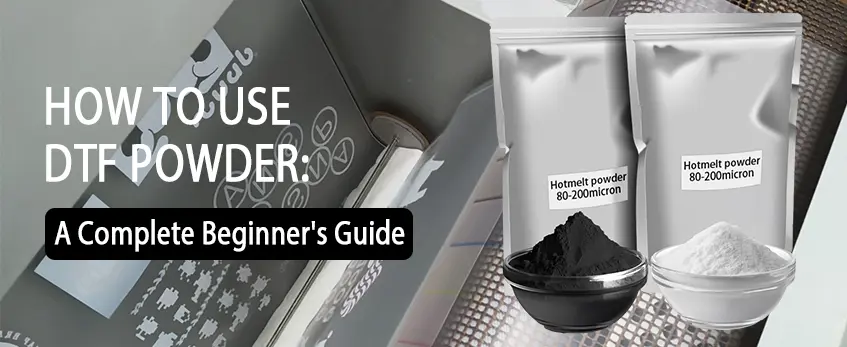
Applying DTF adhesive powder is a crucial step that directly impacts the durability and quality of your transfer. The powder must contact wet ink to properly stick—if it’s applied too early or on dry ink, the bond won’t form correctly.
Manual Powder Application Techniques
- Sprinkle the powder evenly and generously over the entire printed area while the ink is still wet.
- Use a soft brush or shake the powder gently by hand for better control and coverage.
- Tap off any excess powder carefully to avoid clumps and ensure an even coating.
Automated Powder Shaker Usage and Tips
- Automated powder shakers offer consistent coverage and speed, ideal for larger production runs.
- Adjust shaker settings based on powder type and ink volume—too much powder can cause buildup; too little leads to weak adhesion.
- Make sure your workspace minimizes static electricity, which can cause uneven powder distribution or clumping.
Common Powder Application Mistakes and Visual Cues
- Cobertura desigual: Shows as gaps or white spots in the powder layer; results in weak transfer areas.
- Aplicación excesiva: Leads to excess powder piles, causing rough surface texture and poor curing.
- Under-application: Makes the transfer peel or crack easily after pressing.
For consistent results, look for a thin, even layer of powder covering the entire design with no bare patches or heavy clumps. Proper powdering is key to achieving optimal DTF results on cotton, polyester, or blends.
For more details on common issues and fixes with DTF powder, check out this guide on problemas habituales de las películas DTF y cómo solucionarlos.
Curing the DTF Powder for Strong Bonding
Curing the DTF powder is a critical step to ensure a strong, lasting bond between the ink, adhesive powder, and fabric. After applying the powder to the wet ink, you need to cure it properly so the adhesive melts and adheres evenly, providing durability and wash resistance.
Recommended curing temperature and time:
- Set your curing oven or heat source to around 160°C a 170°C (320°F a 338°F).
- Cure the powder for about De 3 a 5 minutos, depending on powder thickness and machine settings.
During curing, the adhesive powder should melt and form the well-known “orange peel” texture—a slightly bumpy surface that indicates the powder is fully melted but not overcured. This texture is key for good ink adhesion and a soft hand feel.
Cooling tips:
- Allow the transferred film to cool fully before handling or pressing; this prevents sticking or distortion.
- Cooling also helps stabilize the adhesive and avoids defects like bubbling or warping.
Incorrect curing—either too hot or too long—can cause powder burn, cracking, or poor adhesion. On the flip side, undercuring leaves the powder powdery and weak. Following these temperature and timing guidelines is essential to achieving optimal DTF powder curing.
For high-quality results, pairing the right DTF transfer film and adhesive powder with consistent curing methods will make a big difference in your final prints.
Heat Pressing DTF Transfers onto Garments

Proper garment preparation is key for optimal DTF transfer results. Start by preheating the fabric for 5 to 10 seconds to remove moisture and wrinkles. This helps the DTF adhesive powder bond better to the fabric surface.
Set your heat press to around 320°F to 330°F (160°C to 165°C). Use medium to firm pressure and press for 15 to 20 seconds, depending on the fabric. Always follow your specific DTF powder curing guidelines for the best results. Place the printed DTF transfer with the adhesive side down onto the garment, then cover it with a non-stick release sheet to protect both your press and the design.
If layering multiple DTF transfers, press each layer individually to ensure strong adhesion without bleeding. After the initial heat press, peel the film while it’s warm for a smooth release. Then, press the garment again for 5 to 10 seconds to finalize the bond and improve durability.
Fabric type impacts your settings—cotton and polyester blends usually require standard pressure and temperature, while delicate fabrics need lower heat and shorter press time to avoid damage. Dark and light garments might also require adjustments, especially when using a white ink underbase to enhance color vibrancy.
For detailed guidance on compatible films and powders, check out this Polvo adhesivo termofusible TPU DTF y el DTF film roll guide. These resources can help you fine-tune your heat press settings for the best transfer durability.
Troubleshooting Common Issues for Optimal Results
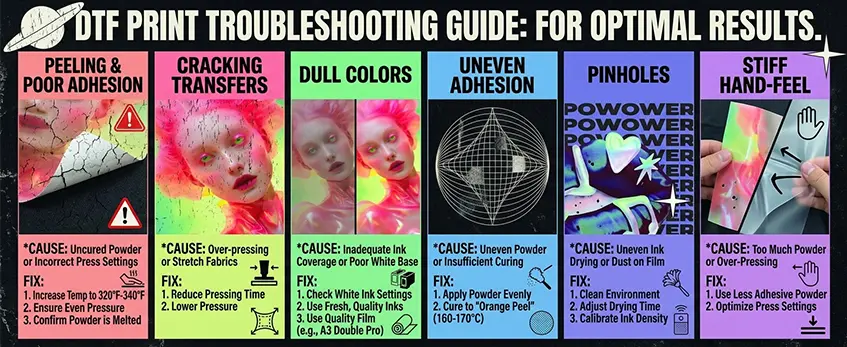
When using DTF transfer paper and powder, common issues like peeling, cracking, and dull colors can pop up. Here’s a quick guide to fix them and keep your transfers looking sharp:
Peeling or Poor Adhesion: This usually means the powder didn’t fully cure or the pressure/temperature settings on your heat press are off. Increase your heat press temperature slightly (around 320°F to 340°F), ensure even pressure, and confirm the powder is properly melted during curing. Also, make sure you’re using a high-quality Polvo adhesivo DTF that fits your fabric type.
Cracking Transfers: Cracks can result from pressing too long or with too much pressure, especially on stretch fabrics like polyester blends. Reduce the pressing time or lower the pressure to keep your print flexible and avoid brittleness.
Dull or Washed-Out Colors: Inadequate ink coverage or poor white ink underbase can cause faded results. Double-check your printer’s white ink settings, and use fresh, high-quality inks. Proper calibration of your printer and good film quality, like the Película de transferencia DTF Serie A3 Double Pro, can also improve vibrancy.
Uneven Adhesion and Residues: If parts of the design don’t stick well or leave powder residue, it’s often from uneven powder application or insufficient curing. Apply powder evenly using manual or automated methods, and always cure at the recommended temperature (usually around 160-170°C) until you see the characteristic “orange peel” texture.
Pinholes and Ink Drying Issues: Pinholes in the print usually come from ink drying unevenly or dust on the film. Work in a clean environment and adjust your printer’s drying time and ink density to avoid under- or over-inking.
Stiff Hand-Feel: A rigid, plastic-like feel means too much powder or over-pressing. Use less adhesive powder and optimize your press settings to get softer prints that last.
Preventive Measures Snapshot:
- Always test print and press on sample fabrics before going full scale.
- Store your DTF powder and film properly to avoid moisture or dust contamination.
- Maintain your printer and heat press regularly to ensure consistent results.
- Follow fabric-specific adjustments for pressing time and temperature, especially for cotton versus polyester blends.
By troubleshooting these common issues and fine-tuning your process, you’ll achieve professional, durable DTF transfers with vibrant colors and lasting adhesion every time.
Pro Tips and Best Practices for Professional DTF Results
To get the best from your DTF transfer paper and powder, focus on these key areas:
Quality Control and Test Prints: Always run test prints before full production. This helps catch color accuracy issues and powder adhesion problems early, saving time and materials.
Proper Storage of Film and Powder: Store your DTF film in a cool, dry place away from direct sunlight to prevent warping or damage. Keep adhesive powder sealed and dry to maintain its bonding strength.
Scaling Production and Workflow Efficiency:
- Organize your workspace for smooth transitions between printing, powdering, curing, and pressing.
- Use batch processing when possible to speed up production without sacrificing quality.
Safety Practices and Equipment Maintenance:
- Wear masks and gloves during powder application to avoid inhaling particles.
- Clean your printer heads and heat press regularly to avoid buildup that can affect transfer clarity and durability.
Enhancing Transfer Durability and Wash Instructions:
- Use recommended curing temperatures and times to achieve the ideal orange peel effect, ensuring strong bonding.
- Advise customers to wash garments inside out on a gentle cycle with cold water and avoid harsh chemicals to prolong transfer life.
Advanced Techniques and Special Effects:
- Experiment with layering for multi-dimensional prints.
- Test different adhesive powders and curing settings to create unique textures and finishes.
Applying these best practices helps you master the DTF film printing process and achieve consistent, professional results every time. For those looking to further optimize their setup, exploring specialized DTF printers and starter kits can provide added control and quality — check out options like the JL DTF604P DTF Digital Printer Pro Series for more advanced capabilities.





 English
  Español
  Deutsch
  Français