



How to Print DTF on Black Shirts with Perfect White Ink Coverage
Understanding DTF Printing on Dark Fabrics
Printing on black shirts brings unique challenges mainly due to the fabric’s light absorption. Unlike white or light-colored garments, black fabric soaks up ink colors, making prints appear dull or transparent if not handled properly. This is where base de tinta blanca plays a critical role.
Why Black Shirts Are Different
- Light Absorption: Black fabric absorbs most wavelengths of light, reducing ink vibrancy.
- Base de tinta blanca: Acts as a solid, opaque base layer to reflect colors clearly and vividly on dark surfaces.
- CMYK+W Workflow: White ink (W) is layered beneath the CMYK colors. This prevents color loss that happens when printing directly on black shirts.
How White Ink Works in DTF Printing
- White ink is printed first as an underbase layer.
- CMYK colors are printed on top, resulting in bright, vibrant designs.
- Using quality Tinta blanca DTF ensures high opacity and consistent coverage.
Benefits of Quality DTF on Black Shirts
| Beneficio | Explicación |
|---|---|
| Suavidad | Thin DTF films combined with proper ink keep prints soft and comfortable. |
| Full Color | Opaque white underbase preserves true, vibrant colors on black fabric. |
| Durabilidad | Premium inks and adhesive powders ensure wash-resistant and long-lasting prints. |
Using premium Películas Jinlong DTF and inks designed for dark fabrics guarantees professional results with softness, vivid colors, and robust durability—key for high-quality DTF transfer on dark fabrics such as black shirts.
Essential Equipment and Materials for Success
Printing DTF on black shirts with perfect white ink coverage starts with having the right gear. A recommended DTF printer with white ink circulation is crucial to prevent clogging and ensure consistent opacity of the white underbase. Using high-opacity white and pigment color inks guarantees vibrant colors on black garments and improves durability.
For materials, Jinlong DTF film types are optimized for dark fabrics, delivering excellent ink adhesion and color vibrancy. Pair this with premium adhesive powder, like Jinlong’s TPU hot-melt adhesive powder, to ensure strong bonding during heat transfer without compromising softness. You\’ll also need a reliable heat press and a curing station to apply consistent temperature and pressure — critical for curing DTF transfers on black cotton effectively.
Lastly, design software with RIP capabilities is essential for precise control over the white layer. It lets you separate and adjust white ink density, set choke values, and manage white ink layering for professional DTF results on black apparel. For more details on materials, check out Jinlong’s guide on Polvo adhesivo termofusible TPU DTF.
Preparing Your Design for Black Shirts
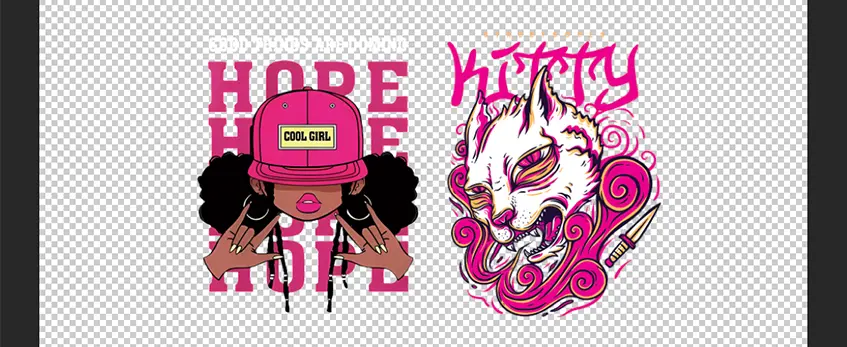
When preparing your design for DTF printing on black shirts, start with the right file setup. Use a high resolution—300 DPI is ideal—to keep details sharp. Your color mode should be set to CMYK+W, especially since the white underbase layer is crucial for vibrant colors on dark fabrics. Don’t forget to mirror your design before printing, as the image will be flipped during the transfer process.
Next, create a separate capa base blanca—this acts as the base coat that makes colors pop on black shirts. The white layer should exactly match the shape of your color design but with optimized edges to avoid white halos or misregistration. Adjust the white underbase density depending on your design—use 100% white density for solid, bold prints or dial it down for parts where softer coverage works better.
Optimizing contrast and detail is key when printing DTF transfers on dark fabrics. Boost the contrast in your design to help colors stand out, and fine-tune any fine lines or intricate elements so they don’t get lost against the black shirt. Proper preparation here ensures the DTF white underbase on black shirts provides full coverage and sharp details, setting you up for a vibrant and durable final print.
For best results, pair your design setup with quality Jinlong DTF transfer films and adhesive powders that enhance the cohesion between ink and fabric. You can explore suitable options like the Jinlong DTF Transfer Film A4 Double Pro Series and premium powders designed specifically for dark fabrics.
Mastering White Ink Coverage: The Heart of Perfect Prints

Getting the white ink coverage just right is crucial when printing DTF on black shirts. The white underbase acts like a bright canvas, making your colors pop and ensuring durability. To nail this, you need to focus on the density and layering of the white ink.
Start by adjusting your printer settings carefully. Set the white ink percentage and pass count to control how much ink deposits on the film—too little and your print looks dull; too much and it can cause clogging or uneven texture. Use a higher resolution setting for sharper edges and better detail, especially on dark fabrics.
White ink calibration is key. Always shake your white ink cartridges well before printing to keep pigments evenly mixed. Run regular nozzle checks to catch any blockages early. Perform max white tests by printing solid white blocks to see if the coverage meets your standards.
When applying multiple white layers, avoid flooding the film with excess ink. Instead, print thin, consistent layers that build up opacity without causing the ink to settle unevenly. This prevents clogging and reduces wasted ink. Proper layering also helps you get uniform white underbase coverage, essential for vibrant colors and durability.
By mastering white ink opacity and layering techniques, you’ll see your DTF transfer on dark fabrics come alive with vibrant colors and sharp details. For advanced tips on white ink calibration and improving white underbase quality, you can explore resources like how-quality DTF pro ink enhances color accuracy and adhesion.
Advanced Techniques: Choke, Underbase, and Edge Control
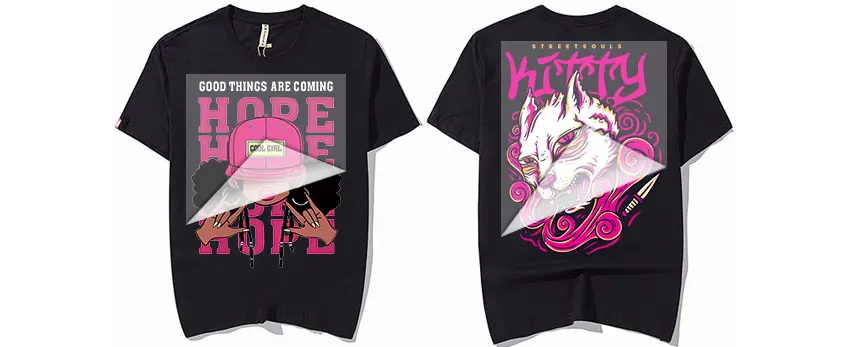
When printing DTF white underbase on black shirts, mastering choke is crucial to prevent white halos around your design. White underbase choke means slightly shrinking the white layer inside the color edges to avoid a visible white outline once transferred. This keeps the print looking sharp and professional on dark fabrics.
Why Choke Matters
Without choke, the white ink underbase can extend beyond the color layer, creating unwanted white fringing on black garments. This is especially noticeable with detailed or multi-colored designs. Choking your white layer ensures smooth, clean edges and enhances the vibrancy of your colors by providing a perfect mask beneath.
Recommended Choke Settings and RIP Use
Most RIP software used for DTF printing lets you set choke values; typically, a 0.2mm to 0.5mm choke is ideal for black shirts. The exact setting depends on your design’s complexity and printer precision. Use your RIP to apply and preview choke to dial in the perfect fit. Running test prints helps verify the setting before full production.
Testing and Tuning for Best Coverage
Test multiple choke values on your Jinlong DTF film to see which gives the best white ink coverage without losing edge detail. Adjust until you balance enough white underbase opacity and clean edges. Tuning ensures you avoid both white halos and any gaps in white ink deposition that can dull print vibrancy.
Registration Alignment Tips
Accurate registration is key for multi-layer prints involving white underbase plus CMYK colors. Misalignment causes color edges to shift, breaking the visual appeal. Always:
- Align your files carefully in RIP,
- Check printer calibration regularly,
- Use test prints to confirm perfect layer overlap,
- Keep your Jinlong DTF film flat and properly loaded.
Controlling choke and registration together guarantees crisp white underbases with no unwanted edges, resulting in vibrant, durable DTF prints on black fabrics. For more on film preparation and powder application, check out this detailed guide on Polvo adhesivo termofusible TPU DTF.
Step-by-Step DTF Printing Process on Black Shirts
To get perfect white ink coverage and vibrant colors on black garments using DTF, follow these precise steps:
Preparing Jinlong DTF Film
Start by selecting high-quality Jinlong DTF film suited for dark fabrics. Make sure the film is clean and free of dust for even ink adhesion. The right film type is critical to avoid peeling and ensure sharp print results. You can find premium options for this at Jinlong’s official shop.
Printing Color, Then White Underbase
Unlike standard CMYK prints, start by printing your color layers first, then apply the white ink underbase on top. This layering ensures the white stays dense and bright under the colors, which is key for black shirts. Proper printer settings for white ink opacity and layering directly affect the print quality.
Even Adhesive Powder Application (Rocking Technique)
Immediately after printing, while the ink is still wet, sprinkle Jinlong’s premium adhesive powder evenly over the entire print. Use the rocking technique—gently shake and tilt the powder tray so adhesive powder coats surfaces uniformly without clumping.
Transfer Curing Parameters
Cure the adhesive powder by passing the film through a curing station or conveyor dryer. Aim for an optimal temperature of around 160-170°C (320-338°F) for 1-2 minutes. Proper curing ensures the adhesive melts evenly to bond the print firmly to the fabric.
Pre-Pressing Shirt to Remove Moisture
Before heat pressing, pre-press the black shirt for a few seconds at 160°C (320°F) to remove moisture and wrinkles. This step helps prevent steam pockets and improves adhesion of the DTF transfer.
Heat Pressing: Temp, Pressure, Time
Place the DTF transfer on the shirt, printed side down. Use a heat press at 160-165°C (320-329°F) with medium to firm pressure. Press for 15-20 seconds, ensuring even contact over the entire print area. This step fixes the transfer to the garment securely.
Peeling Technique Best Practices
Peel the transfer film carefully after heat press. For black shirts, a warm peel of the film often works best—wait 10-15 seconds for better adhesion and to avoid damaging the white ink layer or color vibrancy.
Post-Press Curing for Durability
For extra durability and wash resistance, press the shirt again with a Teflon sheet or parchment paper on top at 150°C (300°F) for 5-10 seconds. This final step sets the print, locking in vibrant colors and solid white underbase for long-lasting use.
By following this detailed DTF printing process with Jinlong DTF film and premium materials, you ensure strong white ink coverage, vivid colors, and durable transfers on black cotton shirts.
For the best results, consider using a Jinlong DTF printer with white ink circulation to maintain consistent white ink performance throughout your production.
Troubleshooting White Ink Coverage Problems
Dull or transparent colors on black shirts often mean the white ink underbase isn’t strong enough. To fix this, increase the white ink density or add an extra white layer to boost opacity without flooding the print. Sometimes, adjusting the white ink choke settings DTF helps eliminate unwanted white halos around your design, sharpening white edges for a clean look.
Poor adhesion or peeling usually signals problems with the adhesive powder application or heat press settings. Use an even powder layer—rocking the powder helps—and maintain the recommended temperature, pressure, and time on your heat press. Avoid peeling issues by curing the transfer fully on quality fabrics designed for DTF.
Nozzle clogs or weak white ink output come from improper printer maintenance. Regularly shake your white ink bottles and run nozzle check tests to catch clogs early. Keep your printer’s white ink circulation system in top shape to prevent uneven white ink coverage, which is key for vibrant colors on black garments DTF printing.
To ensure wash durability, focus on proper curing and fabric choice. Use long-lasting, high-opacity white ink combined with the right curing temperature to lock in the print. Choosing black cotton shirts with a tight weave will also improve longevity and prevent fading after multiple washes.
For detailed advice on handling white ink and achieving professional results, consider the top tips for achieving high-quality DTF on canvas prints, which apply well to black shirts too.
Tips for Professional, Long-Lasting Results
Getting perfect DTF white underbase on black shirts isn’t just about printing—it starts with the right fabric and prep. Choose high-quality cotton or cotton blends designed for dark fabrics to ensure ink adhesion and color vibrancy. Always pre-press your shirt to remove moisture and wrinkles; it helps the DTF powder stick better and reduces transfer issues.
When it comes to washing and care, advise customers to turn shirts inside out, wash in cold water, and avoid harsh detergents or bleach. This preserves the high opacity white ink DTF printing and keeps colors vibrant longer. Line drying or tumble drying on low heat protects your design too.
If you’re scaling production, using Jinlong supplies like their premium DTF transfer films and adhesive powders can save time and maintain consistent quality across runs. Their Opciones de película de transferencia DTF are designed for optimal ink hold, especially on dark garments.
For cost savings without losing quality:
- Use white ink circulation systems to reduce ink waste
- Optimize heat press settings to prevent over-burning adhesive powder
- Regularly maintain your DTF printer to avoid costly repairs
Finally, prioritize a safe, clean workspace. Proper ventilation is essential when curing DTF transfers, and always follow manufacturer safety guidelines for handling inks and powders. Keeping your equipment and area tidy ensures consistently professional DTF transfer on dark fabrics every time.





 English
  Español
  Deutsch
  Français