



Free vs Paid DTF RIP Software Detailed Comparison and Buying Guide
Understanding the Free Landscape: What Are You Actually Getting?
When you dive into the world of DTF RIP software, the idea of “free” looks tempting, but it often comes with hidden catches. Many newcomers assume that standard printer drivers or free DTF rip software will handle their prints just fine. The truth? Standard drivers fail for DTF workflows because they lack crucial functions like white ink circulation management, underbase generation, and accurate ICC color profiles for DTF. These missing features result in poor print quality, wasted ink, and headaches down the line.
Free options often come as trial versions with limitations—watermarks on prints, restricted output sizes, or disabled advanced features like choke and spread settings for white ink. This makes them little more than demos rather than full solutions.
Then there\’s the tempting shortcut: cracked DTF RIP software. While it sounds like a bargain, cracked versions are risky. They often lack updates, can be unstable, and worse—pose serious security risks that can jeopardize your entire printing setup. Plus, no official support means you’re on your own if something goes wrong.
In short, “free” DTF RIP software often means compromised workflows, subpar print quality, and unexpected costs. Understanding these pitfalls can save you from costly mistakes as your DTF printing journey progresses.
The Power of Paid RIP Software: Why Professionals Pay Up
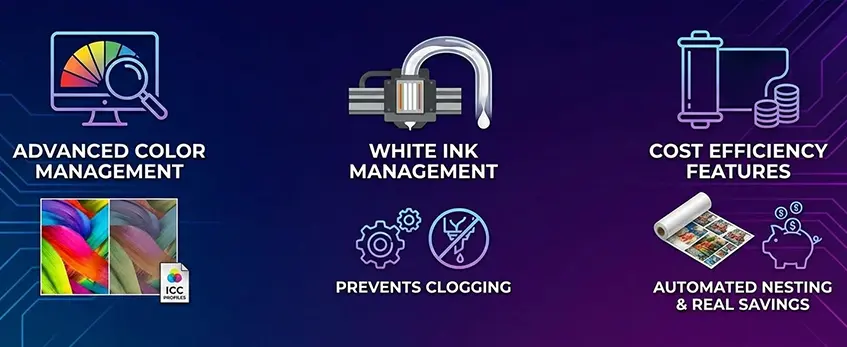
Paid DTF RIP software brings serious advantages that free options just can’t match, especially for professional workflows. Here’s why many printers choose to invest:
| Característica | Beneficio | Por qué es importante |
|---|---|---|
| Advanced Color Management with ICC Profiles | Precise control over CMYK vs RGB color gamut ensures true-to-design prints | Consistent, vibrant colors every time |
| Gestión de la tinta blanca | Tools for choke, spread, and white underbase generation | Prevent ink bleeding, improve opacity and print clarity |
| Cost Efficiency Features | Ink consumption calculator and intelligent nesting software | Reduce waste and lower overall printing costs |
Paid software also streamlines complex operations like white ink circulation management, which helps prevent printhead clogging—a common issue with lower-end or free RIPs. Plus, features like automated nesting optimize DTF film use, saving material and time.
For professionals who want reliable output and cost control, these well-rounded RIP functions turn into real savings and better prints. If you’re serious about DTF printing, investing in licensed RIP software is often worth it.
To see how these advantages fit into the bigger workflow, check out how AI and automation are transforming DTF printing efficiency for 2026 and beyond.
Head-to-Head Comparison: Free (Basic/Cracked) vs. Paid (Licensed)
When choosing between free or cracked DTF RIP software and licensed paid versions, the differences show up fast—especially in workflow speed, print quality, and support.
| Característica | Free (Basic/Cracked) | Paid (Licensed) |
|---|---|---|
| Velocidad del flujo de trabajo | Slower processing, basic RIP functions only | Faster batch handling with advanced RIP software features |
| Calidad de impresión | Limited color control, no variable dot technology | Supports variable dot tech for smoother gradients and sharper prints |
| Gestión de la tinta blanca | Basic or no underbase/white ink tools | Precise choke, spread, and white underbase generation |
| Knockout Black Background | Usually absent, requiring manual fixes | Built-in knockout black background for clean edges |
| Software Stability | Prone to crashes, especially with large files | Stable, optimized for heavy workloads |
| Support & Updates | None or risky cracked tools without updates | Regular updates, dedicated tech support |
| Ink Cost Calculation | Not available | Helps reduce waste with ink consumption calculators |
| DTF Film Nesting Software | Limited or unavailable | Advanced nesting to maximize film use and save costs |
Free or cracked software might look tempting at first, but the bottlenecks in workflow and print quality can hurt your business efficiency. Paid licensed RIPs shine with better tools like variable dot technology, which delivers smoother prints by varying dot sizes, and knockout black background features that make your prints pop without manual corrections.
For anyone serious about DTF printing—particularly business owners—going paid means faster turnaround times, top-notch print quality, and reliable support, all crucial to keep your gear running smoothly and clients happy.
If you want to dive deeper into the direct-to-film printing workflow and get the best out of your printer, check out our detailed DTF printer guide for custom apparel printing.
The Hidden Cost Analysis: When Free Becomes Expensive
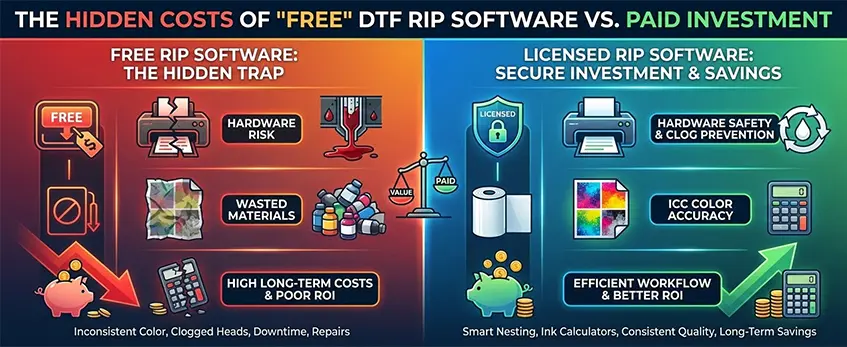
Free DTF RIP software might seem like a great deal at first, but often the hidden costs catch up fast. Poor color management in basic or cracked RIP software leads to inconsistent prints, wasting expensive consumables like DTF ink and films. Without proper ICC color profiles tailored for DTF, you’ll see color mismatches that require repeated prints — eating into your budget and time.
Hardware safety is another concern. Free software usually lacks advanced white ink circulation management and printhead clog prevention features. This puts your DTF printer’s vital parts at risk, increasing maintenance or repair costs. Clogged nozzles from improper white underbase generation or choke and spread settings can mean downtime and pricey fixes.
When you factor in the cost of wasted ink, film, and potential hardware damage, the ROI of “free” software quickly declines. Investing in licensed RIP software with built-in ink consumption calculators and efficient nesting tools often saves money in the long run. It improves your overall Direct to Film printing workflow, balancing output quality and cost-effectiveness.
For a real breakdown of performance versus cost in popular DTF setups, check out Jinlong’s insights on whether investing in quality hardware and software pays off: their analysis on 4-head DTF printers’ cost to performance is a good start.
Jinlong DTF Verdict: Who Needs What?
If you’re a hobbyist just starting out with Direct to Film printing, a basic free DTF RIP software might be enough to get your feet wet. It covers the essentials like simple color management and basic white ink circulation management without overwhelming you with complex features. However, expect some limitations in workflow speed and image precision, which might be fine for small, casual runs.
For serious business owners and professionals, a mandatory licensed RIP is non-negotiable. Paid software offers advanced functions like ICC color profiles for DTF, fine-tuned choke and spread settings, and a full toolkit for white underbase generation. This means better print quality, efficient ink consumption, and less waste, which directly impacts your ROI. Plus, paid options come with ongoing support and updates to keep your workflow smooth and your hardware safe from printhead clog issues.
Jinlong recommends pairing their printers with licensed RIP software to unlock the full potential of their machines, ensuring consistent quality and maximum efficiency. If you’re curious about the best DTF setup for beginners or want to learn about materials and tips, check out Jinlong’s DTF vinyl printer guide for beginners. This resource perfectly complements the right choice of RIP software for your needs.
In short: start with free if you’re experimenting, but invest in licensed RIP software when going pro or running a business. It’s an upfront cost that pays back with better prints, fewer headaches, and optimized DTF printing workflow.





 English
  Español
  Deutsch
  Français