



DTF Printer Head Problems Guide Cleaning Repair or Replacement
Understanding DTF Printhead Basics and Common Problems
A Cabezal DTF is the heart of your direct-to-film printer, responsible for firing thousands of precise ink droplets onto the film to create sharp, vibrant designs. It uses a fine array of nozzles—each nozzle ejecting specific colors, including challenging white ink, which is thicker and prone to clogging. This fine precision is what makes DTF transfers stand out for quality and detail.
Sin embargo, Problemas con el cabezal de impresión DTF are common and can derail print quality quickly. The most frequent issues include:
- La boquilla se atasca that block ink flow
- Missing lines in nozzle checks indicating blocked or damaged nozzles
- Streaking or banding across prints due to inconsistent ink deposition
- Color inconsistencies where colors don’t match expected tones
- Ink leaking around the printhead or inside the printer
- Weak or intermittent ink ejection causing faded or incomplete prints
When these problems strike, they appear clearly in your final prints as faded white ink areas, gaps or blank spots in your designs, or prints that won’t adhere properly after heat pressing. These signs mean your printhead needs immediate attention to avoid compromising your product quality and business reputation.
Understanding these basics helps you spot issues early and decide whether to clean, repair, or replace your DTF printhead before the problem worsens.
Root Causes of DTF Printer Head Problems
DTF printer head issues usually trace back to a few main causes. Ink-related problems top the list, such as drying on nozzles, contamination, or using poor-quality or incompatible inks. White ink sedimentation is especially common, causing stubborn clogs. Environmental factors also play a big role—dust buildup, humidity swings, and long idle periods can all trigger nozzle problems. Plus, running your printer with incorrect settings like improper printhead height or print speed can lead to trouble.
Maintenance neglect is another major culprit. A dirty capping station or worn wipers and dampers can quickly cause printhead failures. Air trapped in ink lines and skipping cleaning schedules only make things worse. Finally, mechanical wear happens naturally; printheads can suffer physical damage or degrade after thousands of prints, reducing their lifespan significantly.
To prevent these root causes from escalating, regular upkeep and using recommended inks like those from jinlong DTF are crucial. Proper maintenance also ties into avoiding common issues like white ink clogging fixes or needing a DTF damper replacement. For more on ink and printer care, check out our guide on perfect white ink coverage.
Diagnosing the Issue: Nozzle Checks and Symptom Analysis
Running a proper Comprobación de la boquilla DTF is the first step to diagnosing printer head problems. This test prints a pattern that shows if any nozzles are clogged or missing. Here’s what to look for:
| Nozzle Check Result | Qué significa |
|---|---|
| Minor breaks (small gaps) | Temporary clogs, dirt, or ink drying |
| Severe dropouts (multiple missing lines) | Deep clogging, air bubbles, or damaged nozzles |
| Streaks or banding | Ink flow issues or partial nozzle blockage |
Step-by-step troubleshooting flowchart:
- Visual inspection: Check for physical ink leakage or debris on the printhead.
- Realice una comprobación de la boquilla: Identify missing nozzles or streaks in the test print.
- Basic software diagnostics: Use your printer’s maintenance tools to run cleaning cycles or line purging.
- Check ink and dampers: Inspect for air bubbles or sediment in ink lines and replace dampers if needed.
Differentiate temporary clogs vs. deeper issues:
- Temporary clogs often clear up after a light or medium clean cycle or manual flushing.
- Deeper problems like damaged nozzles or air locks require more intensive steps such as damper replacement or professional repair.
For regular upkeep and clear test prints, ensure you follow a solid DTF printer maintenance schedule and use quality inks designed to prevent clogging, like those recommended by Impresoras Jinlong DTF.
When and How to Clean Your DTF Printhead
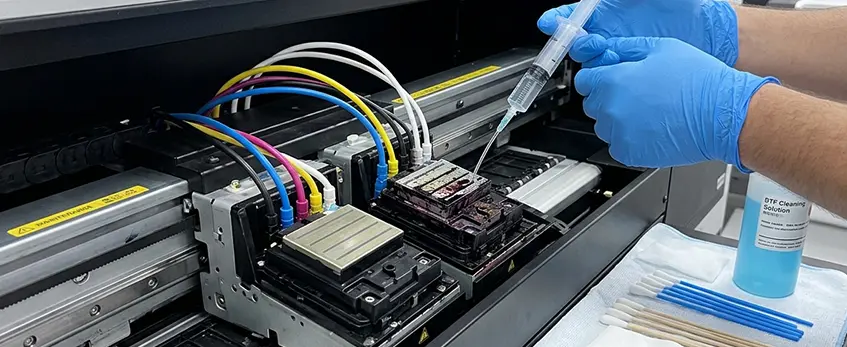
Keeping your DTF printhead clean is key to avoiding costly downtime and poor print quality. You should perform routine cleaning based on daily or weekly nozzle checks, especially after idle periods. Emergency cleaning is needed if you spot clogged nozzles, streaking, or color inconsistencies in your prints.
Automatic Cleaning Cycles
Most DTF printers offer automatic cleaning options: light, medium, and power clean. Use a light clean for minor clogs and regular maintenance, but avoid overusing stronger cycles since they consume ink and can wear the printhead prematurely. Reserve power cleaning for tough clogs when other methods fail.
Manual Cleaning Techniques
When automatic cleaning isn’t enough, manual cleaning helps clear stubborn blockages. Common methods include:
- Limpieza de superficies with foam swabs dampened in safe cleaning fluids
- Soaking the printhead in gentle cleaning solution to dissolve dried ink
- Syringe flushing, either forward or reverse, to push ink or cleaner through nozzles
Use only jinlong DTF-recommended cleaning fluid and distilled water with lint-free materials to avoid damaging the delicate printhead nozzles. Avoid rubbing too hard, which can cause physical damage.
Safety and Testing
Always follow safety precautions: power down the printer before cleaning, avoid using harsh solvents, and never mix cleaning solutions. After cleaning, run a nozzle check and test print to confirm improvement. If issues persist, repeat cleaning or consider professional service to prevent voiding warranties.
For detailed cleaning supplies, quality fluids, and maintenance scheduling, check out jinlong DTF’s recommended products and schedules to keep your printhead in top shape and prolong its lifespan.
When Repair Makes Sense (and How to Do It)
Not every DTF printer head problem calls for a complete replacement. Repair makes sense when issues like air bubbles in ink lines, damper or filter clogs, and minor mechanical problems pop up. These can often be fixed without buying a new printhead, saving time and cost.
DIY Repair Steps
- Purge Ink Lines: Use your printer’s utility or manually flush ink lines to clear air bubbles or blockage.
- Replace Dampers and Capping Station Parts: These small components wear out and cause poor ink flow or drying problems. Swapping them out can restore print quality.
- Recalibrate the Printhead: Adjust height, alignment, or pressure settings as needed to fix print defects related to mechanical positioning.
When to Call a Professional
If the issue involves complex electrical faults, damaged wiring, or specialized tools for disassembly, it’s better to seek professional repair. Attempting advanced fixes without experience risks voiding warranties or worsening the damage.
Repair vs. Replacement Cost
Repairing small issues usually costs less than a new DTF printhead but can add up with repeated fixes. Replacement tends to be more expensive upfront but can be more economical if printhead problems persist after multiple repairs. Consider your print volume, downtime costs, and the availability of genuine parts to decide the best route.
Fixing minor issues through proper maintenance and repair keeps your printer running smoothly and extends the lifespan before you need to consider when to replace your Epson DTF printhead.
When to Replace Your DTF Printhead
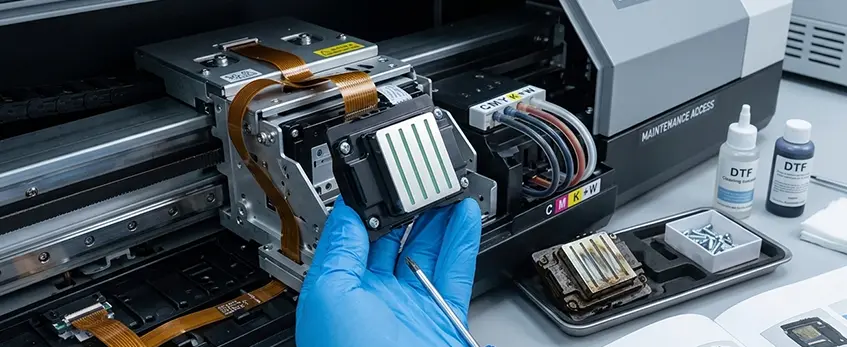
Knowing when to replace your DTF printhead is crucial to keep your prints sharp and avoid costly downtime. Here are clear signs it’s time for a replacement:
- Persistent nozzle failures even after multiple deep cleanings and manual flushing
- Visible physical damage like cracks, worn nozzles, or corrosion
- Consistent quality drops such as streaking, banding, or faded whites that don’t improve with maintenance
Expected Lifespan of a DTF Printhead
Typically, a DTF printhead lasts between 6 to 18 months depending on factors like:
- Print volume (higher usage wears heads faster)
- Ink type and quality (poor ink clogs heads quicker)
- Maintenance habits (regular cleaning extends life)
Step-by-Step Replacement Guide for jinlong DTF-Compatible Heads
- Preparación: Power off the printer and clean the area. Have necessary tools and a new jinlong DTF printhead ready.
- Removal: Carefully detach cartridges and disconnect the printhead assembly. Follow your printer’s manual to avoid damage.
- Installation: Insert the new printhead firmly, reconnect ink lines, and secure all components.
- Initial priming: Run the printer’s priming cycle to remove air bubbles and ensure proper ink flow before printing.
Choosing the Right Replacement Head and Avoiding Pitfalls
- Always select jinlong DTF-compatible printheads designed for your specific model for best performance.
- Avoid forcing parts during installation to prevent damage.
- Double-check connections to prevent air locks or ink leaks.
Proper replacement ensures your DTF printer continues delivering top-quality prints, minimizing downtime and repair costs.
For more detailed insights on print quality and maintenance, check out our guide on DTF RIP software control of color and white ink.
Prevention Strategies: Keep Your Printhead Healthy Long-Term
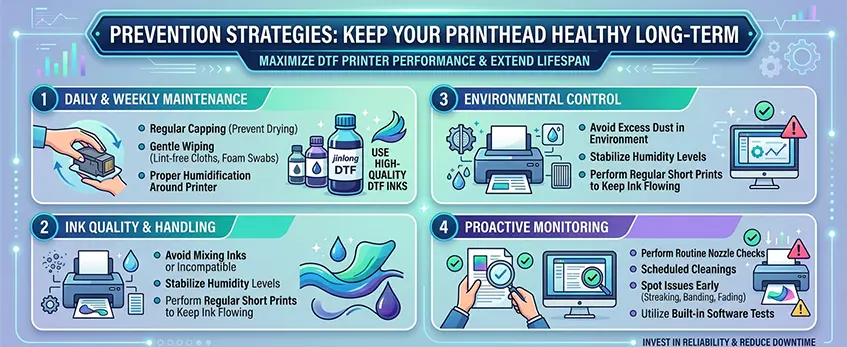
Keeping your DTF printer head in top shape starts with a solid daily and weekly maintenance routine. Key tasks include regularly capping the printhead when not in use to prevent drying, gently wiping nozzles with lint-free cloths or foam swabs, and maintaining proper humidification around your printer. These simple habits greatly reduce the risk of common issues like DTF printhead clog causes and extend your printhead lifespan.
Ink handling plays a big role too. Always use high-quality DTF inks and consumables from trusted brands like jinlong DTF, which help prevent white ink sedimentation and clogging. Avoid mixing inks or using incompatible formulas, since poor ink quality often leads to maintenance headaches. Also, keep your printer environment controlled—avoid excess dust, stabilize humidity levels, and perform regular short prints to keep the ink flowing smoothly through the nozzles.
Monitoring your printer’s performance with routine nozzle checks and scheduled cleanings can catch problems early before they cause serious damage. Employ simple diagnostic tools or built-in software tests to spot issues like streaking, banding, or fading early on. If you’re looking to upgrade your setup or need supplies, exploring jinlong DTF’s range of quality films and inks ensures you’re investing in reliability and reducing downtime.
By staying consistent with these best practices, you protect your investment, reduce repair costs, and enjoy sharp, vibrant prints over the long haul. For more on printer costs and maintenance essentials, check out this detailed DTF printer A3 cost breakdown with machine price, supplies, and cost per print.
Cost Analysis: Cleaning, Repair, or Replacement – Making the Smart Choice
When it comes to DTF printer head problems, knowing whether to clean, repair, or replace is key to saving money. Here’s a clear cost breakdown:
- Cleaning supplies: Usually the most affordable option, involving specialized DTF printhead cleaning solutions, lint-free swabs, and distilled water. Regular cleaning is inexpensive and helps avoid bigger issues.
- Repair labor: Costs can vary widely depending on the problem—simple fixes like damper replacements or line purging are cheaper, but professional repairs for electrical or mechanical damage can get pricey.
- New printhead cost: This is the most expensive, often ranging from hundreds to over a thousand dollars depending on your Jinlong DTF-compatible model.
ROI calculations show that investing in preventive maintenance and timely cleaning cycles reduces the chance of costly repairs or replacements. For instance, skipping routine cleaning may seem like a time-saver but often leads to persistent nozzle clogs or white ink sedimentation problems, driving up repair bills or forcing a full printhead swap.
Also, investing in quality parts and genuine Jinlong DTF cleaning fluids not only ensures better printhead longevity but also avoids the hidden costs of dealing with cheap, incompatible inks or parts that cause faster clogging and damage. It’s smart to choose trusted supplies over cut-rate alternatives, especially in high-precision DTF printing where print quality and uptime matter.
Balancing these factors helps you decide the most cost-effective path: clean regularly, repair when minor problems pop up, and replace only when the printhead shows clear signs of irreversible damage. Maintaining this routine will keep your print costs manageable and help your DTF printer perform reliably in the long run.
For more tips on maintaining your DTF setup, you might find useful guidance in the Jinlong Prints help resources.





 English
  Español
  Deutsch
  Français