



DTF Printer Head Problems and Fixes for Perfect Print Quality
Troubleshooting DTF Printer Head Issues: A Guide to Restoring Print Quality
If you’re facing print quality problems with your DTF printer, the print head is often the culprit. Common issues like horizontal banding, falta de tintay sedimentación de tinta blanca usually trace back to print head troubles. This guide walks you through identifying and fixing these problems to bring your prints back to top quality.
DTF printer heads—especially those using piezoelectric technology—are sensitive and require proper care. Problems can arise from clogged nozzles, dried ink, or damper and capping station faults. Knowing how to spot symptoms, perform cleaning cycles, and maintain your Jinlong or Epson i3200 print head can save time and costly replacements.
We’ll cover typical print head issues, how to diagnose them, and the best ways to apply effective cleaning and maintenance. Whether you’re dealing with atasco del cabezal de impresión o sistema de circulación de tinta blanca failures, this guide will help you restore vibrant, crisp prints fast. Keep reading for practical, no-nonsense fixes designed for your DTF printer’s longevity and consistent output quality.
Diagnosing the Symptoms: Is it Actually the Print Head?
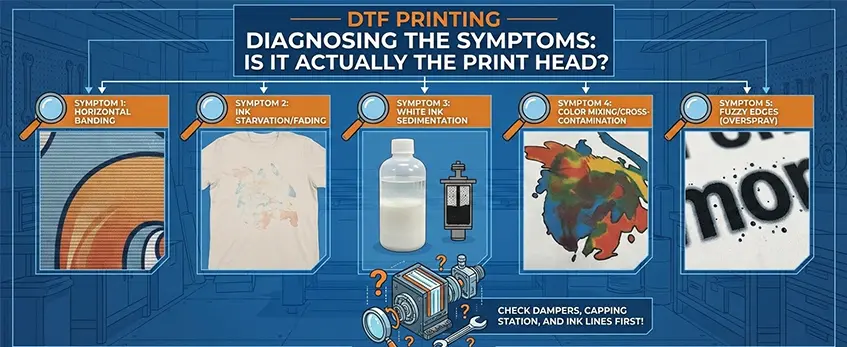
When your DTF printer starts showing issues, it’s easy to blame the print head, but accurate diagnosis is crucial. Here are common symptoms that typically point to DTF printer head problems affecting print quality:
Symptom 1: Horizontal Banding
Horizontal banding appears as repetitive light or dark stripes across the print. This usually signals partial nozzle clogs or inconsistent ink flow in the DTF nozzle check pattern. It can be caused by dried ink or head strikes. Fixing this often requires cleaning the print head and checking the capping station alignment.
Symptom 2: Ink Starvation/Fading
If your prints look faded or uneven, especially in certain colors, it might be ink starvation. This occurs when ink delivery is obstructed, often in the white or CMYK channels, causing inconsistent saturation. Problems with the white ink circulation system or damper blockages often cause this.
Symptom 3: White Ink Sedimentation
White ink is notorious for settling and clogging nozzles due to its heavy pigment concentration. Sediment buildup inside the print head or damper reduces print quality and can cause patchy prints. Regular circulation of white ink and proper maintenance of the white ink system is essential to avoid this.
Symptom 4: Color Mixing/Cross-Contamination
When colors bleed into each other or unwanted hues appear, it’s likely a sign of cross-contamination. This can happen due to faulty dampers, poor capping station seals, or excessive ink viscosity changes, leading to print head clogging issues.
Symptom 5: Fuzzy Edges (Overspray)
Fuzzy or feathered edges usually come from overspray caused by inconsistent ink ejection or pressure problems inside the print head. This typically relates to piezoelectric print head malfunction or improper ink viscosity that needs adjustment.
If you notice any of these symptoms, it’s a good idea to perform a detailed print head check and cleaning. For guidance on maintaining your white ink and avoiding sedimentation, refer to our detailed resource on the DTF white ink circulation system. Identifying the exact issue early helps restore print quality faster.
Common Causes of Print Head Failure in DTF Printing
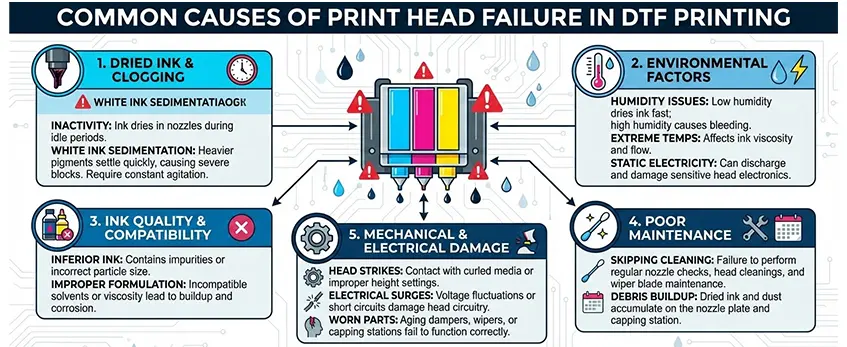
Print head issues are a big headache when running DTF printers, especially if you’re aiming for sharp, vibrant prints. Here are the most common culprits behind print head failure:
El factor de la tinta blanca
White ink is thicker and more prone to settling, which makes the white ink circulation system critical. If the white ink isn’t circulating properly, it can clog the nozzles or cause uneven flow, leading to print head problems. Frequent clogging from white ink sedimentation means you’ll need to pay special attention to maintenance routines involving white ink to keep your print head in top shape. For more insight on this, check out our detailed guide on tinta blanca de inyección y cómo funciona.
Head Strikes
Accidental head strikes happen when the print head hits the media or debris on the platen. This physical damage can destroy the delicate piezoelectric print head elements and cause permanent failure. Preventing head strikes involves proper alignment of the capping station and setting the right print gap to avoid contact.
Dried Ink
When ink dries inside the nozzles, it leads to clogging. Dried ink is the number one enemy of print heads, especially if the printer sits idle for too long or if the ink viscosity isn’t properly managed. Regular use of quality print head cleaning solution and maintaining correct ink viscosity can prevent this buildup.
Damper & Capping Station Issues
The damper controls ink flow and helps avoid air bubbles, while the capping station seals the print head between uses to prevent drying. If these parts are malfunctioning—or if the capping station alignment is off—it can cause ink starvation, dried ink, and eventual print head failure. Routine inspection and timely replacement of dampers and capping components are a must to keep your Jinlong DTF equipment running smoothly.
Being aware of these common causes can help you troubleshoot and avoid costly repairs. If you want to dive deeper into maintaining your Epson i3200 or similar DTF equipment, make sure to follow manufacturer guidelines and regular maintenance practices.
Step-by-Step Fixes for Critical Print Head Problems
When your DTF printer head starts causing quality issues, tackling the problem early can save you time and money. Here are five practical fixes to restore your print head’s performance:
Fix 1: The Standard Cleaning Cycle
Start with the built-in cleaning cycle on your DTF printer. This routine uses the machine’s software to flush out clogged nozzles gently. It’s your first line of defense against common clogging and ink starvation issues. Running a nozzle check pattern before and after helps confirm improvements.
Fix 2: Manual Wiper Blade & Capping Station Cleaning
If standard cleaning doesn’t do the trick, manually clean the wiper blade and capping station. Remove dried ink and debris that might cause head strikes or misalignment. Use a lint-free cloth with a dedicated print head cleaning solution to wipe these parts carefully, preserving the sensitive piezoelectric print head surface.
Fix 3: The “Soak” Method (Moisturizing)
For more stubborn clogs, gently soak the print head area with a cleaning solution. This method softens hardened ink inside the nozzles and membrane without aggressive scrubbing, which can cause permanent damage. Remember to follow your manufacturer\’s recommendations for soak times to avoid overexposure.
Fix 4: Syringe Flushing (Advanced)
If soaking isn’t enough, syringe flushing helps clear deep clogs. Using a syringe filled with cleaning fluid, flush ink channels directly through the damper or ink inlet. This advanced step requires care and proper equipment to avoid damaging the print head or ink circulation system, especially with white ink, which is prone to sedimentation.
Fix 5: Addressing Air Bubbles
Air bubbles trapped in the ink lines cause inconsistent ink flow and fading. To remove them, perform a careful purge or use a vacuum system if available. Regularly checking dampers and performing preventive maintenance reduces the risk of air entering the system, helping avoid print head blockage.
By following these fixes, you’ll tackle most DTF printer head problems effectively, improving print quality on your Jinlong DTF printer and extending its lifespan. For best print results, pair proper maintenance with quality consumables like premium DTF transfer film and powder from trusted suppliers. You can explore the DTF transfer film options here and select powders suited to your printing needs.
Prevention: Extending the Lifespan of Your Jinlong DTF Equipment
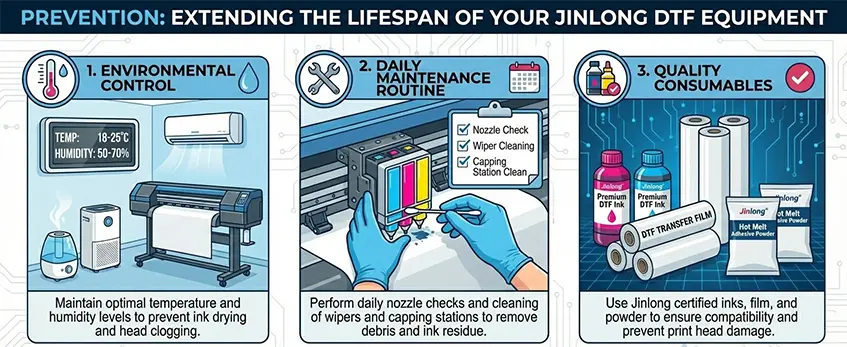
Keeping your Jinlong DTF printer head in top shape starts with solid prevention habits. Here are the key areas to focus on:
Environmental Control
DTF printer heads are sensitive to dust, temperature, and humidity. Make sure your print area is clean and well-ventilated. Avoid extreme temperatures and keep relative humidity between 40-60%. This helps prevent dried ink buildup and ensures proper ink flow, reducing the risk of print head clogging and membrane failure.
Daily Maintenance Routine
A simple daily routine can save you headaches and prolong your print head’s life:
- Run a DTF nozzle check pattern before printing to spot clogs early.
- Perform the printer’s standard cleaning cycle regularly.
- Clean the escobilla limpiaparabrisas y estación de tapado to avoid dried ink debris.
- Compruebe el sistema de circulación de tinta blanca to prevent sedimentation, which affects print quality and can cause head strikes.
Quality Consumables
Using high-quality inks and consumables is crucial. Opt for inks specifically formulated for DTF technology, like those compatible with your Jinlong printer. Cheap or incompatible inks tend to clog nozzles quicker and worsen problems such as falta de tinta and inconsistent color output. Also, use reliable DTF films and powders to guarantee proper adhesion and reduce prints with fuzzy edges or banding.
Keeping these prevention tips in mind will minimize downtime and costly print head repairs. For more on maintaining your equipment and improving print results, check out our detailed guide on DTF printing vs. other transfer methods.
When to Replace the Print Head: Signs of Permanent Damage and Cost-Benefit Analysis
Knowing when to replace your DTF printer head is crucial to avoid wasting time and money on repeated maintenance. Some problems go beyond fixes like cleaning or flushing and signal permanent damage.
Signs of Permanent Damage
- Persistent Nozzle Blockages: If your DTF nozzle check pattern consistently shows missing nozzles after multiple thorough cleaning cycles, the print head may be failing.
- Head Strike Damage: Visible scratches or dents caused by head strikes can harm the piezoelectric elements, leading to uneven ink spraying or total nozzle failure.
- Print Head Membrane Failure: When the membrane cracks or tears, ink leaks and print quality degrade beyond repair.
- White Ink Circulation Issues: Ongoing problems with white ink sedimentation despite proper damper and capping station maintenance indicate internal head damage.
- Color Mixing or Blurring: Frequent color cross-contamination not fixed by damper replacement or cleaning points toward print head wear.
Cost-Benefit Analysis
Replacing a print head is a significant investment, but it often restores print quality and prevents more costly downtime. Consider these factors:
- Repair vs. Replace: Minor clogging or dirt can be fixed with cleaning solutions or syringe flushing. If these don’t work, replacement is the next step.
- Print Quality Impact: Poor print quality means lost sales and wasted materials. When faded prints, banding, or fuzzy edges persist, replacement pays off.
- Equipment Age and Usage: Older Jinlong DTF equipment with heavy use may justify replacing the print head for reliability.
- Consumable Costs: Using high-quality consumables like recommended inks and dampers can extend print head life—factor that in before replacing.
To make the best decision for your setup, evaluate your printer head condition against maintenance efforts and printing needs. For more about maintaining your DTF printer and avoiding head problems, check out our detailed DTF white ink guide for inkjet printing on dark fabrics y el ultimate beginner’s guide to DTF printing equipment.





 English
  Español
  Deutsch
  Français