



DTF Kit Explained Complete Guide to Components and Workflow
Si está explorando Impresión directa en película but feel overwhelmed by the technical setup, understanding what’s actually in a Kit DTF is crucial before you buy. From Película de transferencia PET y sistemas de circulación de tinta blanca a adhesivo termofusible en polvo y Software RIP, each component plays a vital role in producing sharp, durable prints on fabrics like cotton and polyester blends. This guide breaks down every essential part of a DTF starter bundle and walks you through the precise Proceso de impresión DTF—so you can assess whether this turnkey solution fits your business needs and skill level without guesswork.
Deconstructing a DTF Kit: The Engine – The DTF Printer
When you buy a Kit DTF, the first critical component is the Impresora DTF—the engine that drives your direct to film printing process. Understanding your printer options is key to consistent, quality results.
Converted Printers vs. Purpose-Built Commercial Engines
| Característica | Converted Printers | Purpose-Built Commercial DTF Printers |
|---|---|---|
| Originally designed for | Inkjet photo or sign printing | Direct to film textile printing |
Deconstructing a DTF Kit: The Canvas – DTF Transfer Film (PET Film)
DTF transfer film, often called PET film, is the canvas for your designs in the direct to film printing process. The quality of this film is crucial because its special coating controls how well the ink soaks in and sticks. A high-quality coating ensures vibrant colors and sharp details while preventing smudging or ink run during printing.
When choosing DTF film, you’ll find two main types: exfoliación en caliente y pelado en frío. Hot peel film requires you to remove the film immediately after heat pressing while it\’s still warm, making it faster but sometimes trickier to master. Cold peel film, on the other hand, needs to cool fully before peeling, offering more control and cleaner edges but adding a bit more time to the workflow. Both types come in sheets or rolls, with rolls offering more flexibility for larger print volumes.
For reliable results on polyester and cotton blends, look for premium DTF transfer film like the Double Pro series, which balances ink absorption and easy peeling. You can check out jinlongprints’ DTF transfer films that feature excellent coating and durability for various applications.
Deconstructing a DTF Kit: The Chemistry – Special DTF Inks
At the heart of every DTF kit is the specialized DTF ink, which makes all the difference when printing vibrant, durable designs. Most DTF inks include the full CMYK color gamut plus white ink, a crucial element for ensuring opacity, especially on dark garments. Without white ink, colors will appear dull or see-through on black or richly colored fabrics.
High-quality DTF inks aren’t just about bright colors—they also deliver impressive elasticity and wash-fastness. This means your prints won\’t crack or fade after stretching or multiple washes. These properties ensure the transfer remains soft and durable, maintaining its look and feel longer than standard inks. So when choosing a DTF kit, pay attention to ink quality to secure long-lasting, high-impact results.
The Adhesive: DTF Hot Melt Powder
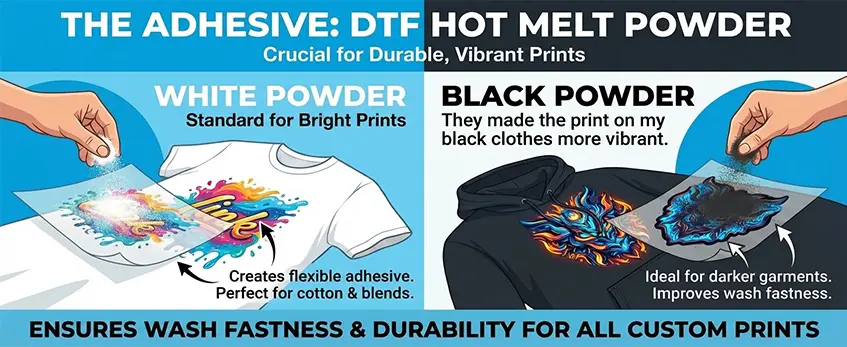
The DTF hot melt powder is a crucial part of any DTF kit, acting as the glue that bonds the printed ink to your fabric. After printing the design on the PET transfer film, this powder is applied to the wet ink. When heated during curing, the powder melts and creates a strong, flexible adhesive layer that holds the colors firmly on textiles like cotton, polyester, or blends.
There are different types of hot melt powders available, with polvo blanco being the most common for standard bright prints. Alternatively, some use black powder, which offers better resistance against color bleeding—perfect for working with darker garments or designs that need extra sharpness. Choosing the right powder helps improve the overall wash fastness and durability of your custom prints.
Using a quality hot melt adhesive powder ensures your prints stay vibrant and intact through multiple washes, making it a vital component for reliable direct to film printing results.
The Brains: RIP Software
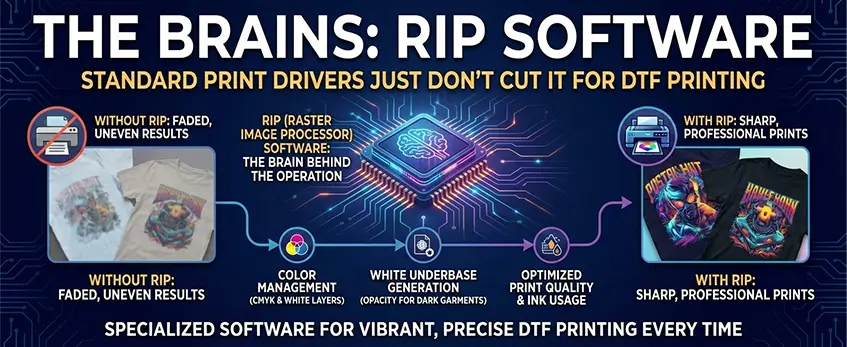
Standard print drivers just don’t cut it for DTF printing. That’s where specialized RIP software comes in—it’s the brain behind the operation. RIP (Raster Image Processor) software handles critical tasks like color management, ensuring your CMYK and white ink layers print exactly as needed. It’s especially important for generating the white underbase, which provides the opacity required for vibrant prints on dark garments. Without RIP, you can’t properly control how the white ink lays down beneath your colors, leading to faded or uneven results. This software also optimizes print quality and ink usage, making your DTF prints look sharp and professional every time. If you want to explore top hardware paired with effective RIP software, check out the JL DTF604S DTF Digital Printer for a complete solution.
How It Works: The 5-Step DTF Workflow
Step 1: Design and RIP Processing
The first step in the direct to film printing process is preparing your design using RIP software for DTF. This software is essential because it controls how your image prints, especially when handling white ink. One key action here is mirroring the image so it appears correctly once transferred onto your garment.
RIP software lets you set up the white ink channel either as a solid underbase or a gradient, depending on your design. A solid underbase provides a strong, opaque white layer needed for printing on dark garments, while a gradient white underbase can create smoother transitions and more detailed effects. This step ensures the final print has vibrant colors and proper opacity.
Using RIP software for DTF also manages color profiles and ink usage efficiently, making sure your CMYK + white ink layers align perfectly for the best results. Getting this right upfront prevents common issues like poor color accuracy or white ink clogging during printing.
How It Works: The 5-Step DTF Workflow
Step 2: Printing – Color First, White Ink Second
In the DTF printing process, sequencing matters. You start by printing the full-color image onto the PET transfer film. This includes the CMYK colors that create the design’s vibrant look. Once the color layer is down, the printer adds the white ink layer beneath or on top (depending on the RIP software settings), which works as a base to make designs pop, especially on dark garments.
Printing color first then white ink is crucial because the white layer acts as a backing, giving opacity and helping the colors stay true after transfer. Without a solid white base, prints on dark fabrics would look dull or faded. High-quality DTF printers with a white ink circulation system ensure smooth, consistent ink flow, preventing clogging and maintaining sharp print details.
This printing step highlights why a purpose-built DTF printer or a well-converted machine stands out—reliable white ink delivery and printhead resolution are key to quality results. Proper RIP software control also manages how this layering happens seamlessly during printing, making sure the white underbase matches the color coverage perfectly.
For a closer look at different DTF setups and transfer films that work best with this printing sequence, check out our guide on best A3 DTF transfer film in 2026.
How It Works: Step 3 — Powder Application
Once the color and white ink layers are printed, the next crucial step in the direct to film printing process is applying the DTF hot melt powder. This special powder sticks to the wet ink, acting as an adhesive that later bonds the print to your garment.
Here’s how powder application works:
- Sprinkle the powder evenly over the freshly printed transfer film while the ink is still wet.
- Ensure full coverage so every part of the design will adhere properly.
- After application, shake off any excess powder to avoid clumps or uneven spots.
Most setups use either a manual shake-off method or an automated shaker system:
- Manual shaking: Simple and budget-friendly but requires careful handling to avoid powder waste.
- Automated shaker: Offers consistent powder distribution and reduces mess, making it ideal for higher volumes or professional use.
Doing this right is key for a smooth finish and solid adhesion during the curing and heat press steps.
For details on managing ink behavior and powder interplay, check out guides like the mejores prácticas para imprimir y probar una carta de colores DTF para obtener resultados óptimos.
How It Works: The 5-Step DTF Workflow
Step 4: Curing (Melting)
After applying the hot melt powder, curing is a critical step that fuses the adhesive to the ink and film, ensuring a durable transfer. You can cure your print using two common methods: the heat press hover technique or a curing oven.
- Heat press hover method: Hold the heat press just above the powder-coated film without pressing down. This melts the powder evenly without flattening the ink, which helps preserve print vibrancy and texture.
- Horno de curado: Place the film in a curing oven set to the recommended temperature to melt the powder consistently over a larger batch, ideal for higher volume operation.
To know when curing is done correctly, watch for visual cues: the powder should turn glossy and develop a subtle orange-peel finish. This signals the powder has melted and bonded properly, preventing issues like peeling or poor adhesion later on.
Consistent curing is key to achieving strong, wash-fast prints that last on various fabrics. Proper temperature control during this step also avoids over-melting, which can damage print details or cause colors to dull.
Mastering this step ensures your DTF transfers stick well right from the start while maintaining vibrant colors and a smooth finish.
How It Works: The 5-Step DTF Workflow
Step 5: Heat Pressing and Peeling
After curing the DTF transfer powder, the next crucial step is heat pressing. Set your heat press to around 160°C (320°F) y aplique una presión firme durante 15 segundos. This temperature and timing are ideal for activating the hot melt adhesive powder, ensuring it bonds securely to your fabric—whether it\’s cotton, polyester, or blends.
When peeling off the PET film, make sure to do it carefully to avoid pulling up any ink or adhesive. Usually, peeling is done while the transfer is still warm to get a clean release, but check your specific film’s recommendations.
Consejo profesional: For longer-lasting prints with improved wash fastness and durability, perform a second heat press. Simply place a sheet of parchment paper over the design and press again for 5 to 10 seconds. This extra step helps lock in the ink and powder for reliable wear over time.
This final press and peel stage is what transforms your DTF print from a transfer film into a professional-looking, vibrant image that stands up to everyday wear and washing.
For more tips on heat press settings and maximizing durability, explore the detailed DTF printing on shirts durability and washability guide.
Why Compatibility Matters: The jinlong DTF Advantage
When mixing different brands of DTF kit components—like ink, powder, and film—you risk issues like ink pooling, poor adhesion, or uneven transfers. These problems often come from mismatched ink viscosity, incompatible powder melting points, or film coatings that don’t gel well together.
The jinlong DTF kit eliminates these headaches by ensuring perfect compatibility across all parts. Their specially formulated Viscosidad de la tinta DTF is designed to sync seamlessly with their PET transfer film’s coating and the melting point of their hot melt powder. This tight integration means cleaner prints, stronger adhesion, and consistent results every time.
Beyond quality materials, jinlong also offers solid support and maintenance help, making it easier to keep your DTF printer running smoothly. This all-in-one approach brings peace of mind, especially for businesses looking for reliable proceso de impresión directa sobre película solutions without the guesswork.
For those wanting to learn more about jinlong’s cohesive system, check out their DTF Transfer Film Single Pro Series for a closer look at the base materials that make a difference.
Maintenance and ROI Expectations
Keeping your DTF kit in top shape means daily checks are a must. Regularly inspect the printhead nozzles and keep the white ink well-agitated to avoid clogs and ensure smooth printing. This simple habit extends the life of your machine and keeps your prints consistently vibrant.
When it comes to cost, DTF printing is surprisingly affordable. The coste por impresión is lower than many other textile printing options, making it a solid choice for small businesses or custom shops aiming for great margins without sacrificing quality.
Versatility is another big win with a DTF kit. You can print on a wide variety of substrates — from hats, bags, and shoes to dark garments made of polyester and cotton blends. This flexibility lets you expand your product lineup and reach more clients with custom apparel printing solutions that truly stand out.
For ongoing support and the right materials, check out reliable options like the DTF ink CMYK basic series y top-rated DTF powder to keep your prints perfect from start to finish.





 English
  Español
  Deutsch
  Français