



Fix Common DTF Film Problems Ghosting Static and Powder Issues Expert Tips
Understanding Ghosting in DTF Transfers
Ghosting in DTF transfers shows up as faint duplicate or shadow images, blurred edges, or double impressions on your garment. It’s frustrating because it ruins the clean, sharp look you’re aiming for.
Primary causes of ghosting include:
- Misalignment during heat pressing: Even slight shifts between the film and garment cause blurred or doubled images.
- Rapid peeling while hot: Pulling the film too quickly before it cools can drag the ink, creating ghost shadows.
- Under-cured powder: When the DTF hot melt powder isn’t fully melted, it can loosen during transfer, causing ghosting.
- Static interference: Static electricity can shift the film or powder particles, leading to misprints.
- Mala manipulación de la película: Bending, stretching, or inconsistent loading disturbs the print’s alignment.
- Incorrect press settings: Temperature, time, and pressure that don’t match your materials lead to incomplete bonding and image distortion.
Utilizando Película Jinlong DTF with its consistent, high-quality coating helps reduce these baseline risks. Its uniform surface improves powder adhesion and heat transfer stability—making ghosting less likely from the start.
Step-by-Step Fixes for Ghosting
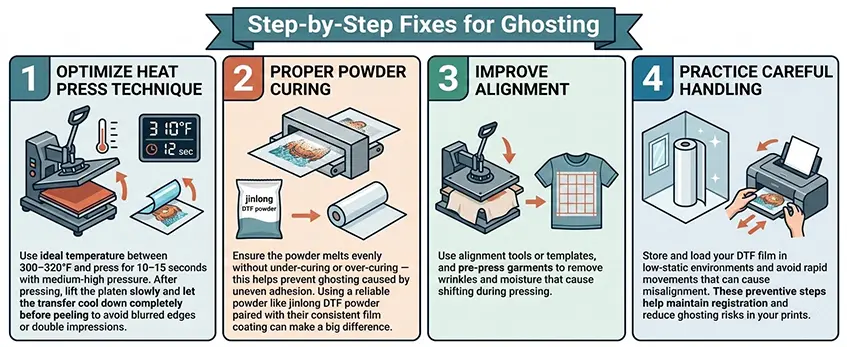
To fix ghosting in DTF transfers, start by optimizing your heat press technique. Use an ideal temperature between 300–320°F and press for 10-15 segundos with medium-high pressure. After pressing, lift the platen slowly and let the transfer cool down completely before peeling to avoid blurred edges or double impressions.
Next, focus on proper powder curing. Ensure the powder melts evenly without under-curing or over-curing — this helps prevent ghosting caused by uneven adhesion. Using a reliable powder like jinlong DTF powder paired with their consistent film coating can make a big difference.
Improving alignment also reduces ghosting: use alignment tools or templates, and pre-press garments to remove wrinkles and moisture that cause shifting during pressing.
Finally, practice careful handling. Store and load your DTF film in low-static environments and avoid rapid movements that can cause misalignment. These preventive steps help maintain registration and reduce ghosting risks in your prints.
For more on choosing quality materials, check out jinlong’s Película de transferencia DTF y high-concentration DTF ink to keep your workflow smooth and efficient.
Static Electricity Problems in DTF Printing
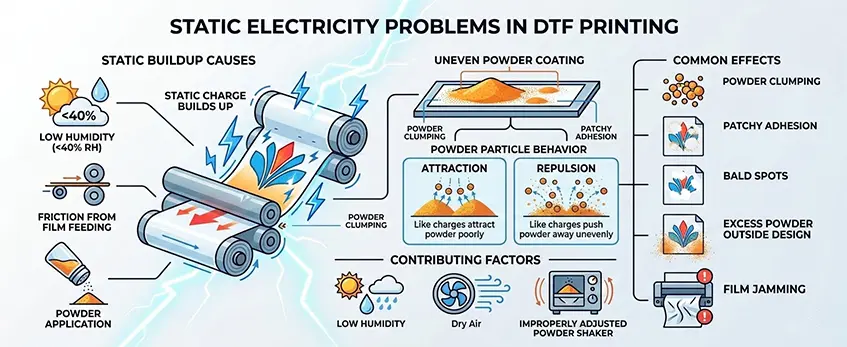
Static electricity often pops up during DTF printing, especially in dry environments with low humidity. When the air lacks moisture, the friction from feeding the DTF film and applying powder can build up static charge. This causes dry powder particles to repel or attract each other unevenly, leading to common problems like powder clumping and patchy adhesion.
The effects of static electricity in your DTF process include bald spots where the powder fails to stick, excess powder spilling outside your design edges, and even jamming of the film inside the printer. Environmental factors like low humidity combined with equipment setup—such as overly strong printer suction or an improperly adjusted powder shaker—can make static issues worse.
Keeping these elements in check is crucial for reliable powder application and smooth printing, helping to avoid the headaches of uneven DTF powder application and inconsistent transfers. For more insights on keeping your DTF setup efficient, check out our guide on selecting the right DTF rolls for high-volume printing.
Effective Solutions to Eliminate Static in DTF Printing
Static electricity can cause serious headaches in DTF printing, but there are simple, effective ways to tackle it:
Maintain Proper Humidity
Keep your workspace humidity between 45% and 60% using humidifiers or dehumidifiers. This balance reduces static buildup on film and powder.
Use Anti-Static Tools
Equip your workspace with these essentials to neutralize static:
| Tool | Purpose |
|——————–|———————————-|
| Ionizer bars | Discharge static from film surface |
| Anti-static brushes | Remove static from powder and film |
| Grounding straps | Prevent static buildup on equipment |
| Aluminum foil hacks | Simple static dissipators on film rollers |
Adjust Printer Settings
- Reduce suction force if the printer pulls film too hard, which causes static.
- Slow down print speeds for white ink layers to minimize static charge buildup.
Choose Right Materials
Select Polvo DTF Jinlong specially formulated to generate less static and pair it with jinlong DTF film’s anti-static coating. This combo significantly lowers powder clumping and film jamming, improving your print quality. For more on powder and film, check out jinlong DTF powder options y sus DTF film’s anti-static features.
By controlling static with these practical steps, your DTF prints will be smoother, cleaner, and more consistent every time.
Powder Issues – Adhesion, Excess, Clumping, and Uneven Application
Powder problems are a common headache in DTF printing that impact transfer quality and durability. You might notice poor powder adhesion, which causes weak wash durability, or see excess powder leading to messy transfers. Clumping is another issue, where powder forms lumps instead of spreading evenly, and uneven melting can leave a rough texture on the final print.
These issues often stem from a few key causes:
- Wrong humidity levels in your workspace can make powder stick poorly or clump together.
- Incompatible powder and film types—using mismatched materials affects powder adhesion and melt quality.
- Over or under-application of powder—too much powder causes excess residue; too little weakens adhesion.
- Inadequate shaking during powder application can lead to uneven coating and clumps.
- Curing temperature mismatches—incorrect heat settings prevent powder from melting fully or cause burning.
Managing these factors carefully helps prevent common DTF powder adhesion problems and ensures a smoother, cleaner transfer every time. For best results, rely on high-quality jinlong DTF powder paired with their consistently coated film to reduce sticking issues and improve the overall durability and look of your prints.
Proven Fixes for Powder Problems
To fix common DTF powder issues like poor adhesion, clumping, or uneven application, start by applying powder evenly. Using automated shakers helps spread the powder consistently, and be sure to shake off excess powder gently but thoroughly to avoid messy transfers.
Next, optimize the curing process. Use dedicated DTF ovens set at the right temperature to fully melt the powder without scorching it, ensuring a smooth finish and strong bonding.
Matching your materials is key. Jinlong DTF powder is specially formulated with a fine consistency and excellent adhesion properties that work hand-in-hand with jinlong DTF film, reducing powder sticking and adhesion problems.
If you still face adhesion issues, try pre-drying the printed film slightly before applying powder. Also, pre-press garments to remove moisture or wrinkles, and double-check your heat press settings—temperature, pressure, and time must be just right for full bonding and wash durability.
For more on selecting premium materials that reduce powder issues from the start, check out jinlong’s Opciones de película de transferencia DTF.
Preventive Best Practices for Flawless DTF Results
Keeping your direct to film workflow smooth starts with regular maintenance and smart material choices. Here’s what I recommend:
Daily/weekly maintenance: Clean your printheads frequently to avoid clogging, especially with white ink. Circulating white ink regularly prevents sediment buildup that can cause print issues. Also, store your jinlong DTF film, powder, and ink in a cool, dry place to keep them fresh and free from static or moisture problems.
Material selection tips: Using premium quality materials like jinlong DTF film and Polvo adhesivo termofusible TPU is crucial. These are formulated to work seamlessly together, reducing common issues like powder clumping and poor adhesion from the start.
Testing workflow: Always run small test prints before full production. This helps you fine-tune press settings, powder application, and alignment. It’s a simple step to catch any issues like ghosting or uneven powder early—saving time and wasted materials down the line.
Following these best practices can seriously minimize common DTF problems and make your transfers look sharp and durable every time.





 English
  Español
  Deutsch
  Français