

No hay productos en la cesta.


Jinlong
Problemas comunes con la película de transferencia A3 DTF y cómo solucionarlos
Fase 1: Alimentación de la película y mecánica de la impresora (especificaciones A3)
Problema: La impresora no alimenta la película
Si su Película de transferencia A3 DTF no se alimenta correctamente, el problema suele estar en la mecánica de la impresora. Estas son las causas habituales y cómo solucionarlas:
Causa raíz:
- La acumulación de polvo en los rodillos de recogida reduce el agarre.
- El reverso resbaladizo de la película dificulta el agarre de los rodillos.
Arréglalo:
- Limpiar los rodillos de recogida a fondo con alcohol isopropílico para eliminar el polvo y los residuos.
- Aplique una tira de cinta de pintor azul a lo largo del borde delantero de la película Jinlong DTF. Esto añade tracción y ayuda a la impresora a agarrar y alimentar la película suavemente.
Siguiendo estos sencillos pasos se resuelven la mayoría de los problemas de alimentación de hojas A3, garantizando un movimiento fiable y uniforme de la película a través de su impresora DTF.
Fase 1: Alimentación de la película y mecánica de la impresora (los detalles de ”A3”)
Problema: golpes en la cabeza (arañazos en la impresión)
Un problema habitual de la película de transferencia A3 DTF son los golpes en el cabezal, que aparecen como arañazos o líneas en las impresiones. Esto suele ocurrir porque la película se curva debido a los cambios de humedad o si la calidad del revestimiento de la película no es constante. Cuando la película se curva, el cabezal de impresión puede golpearla accidentalmente, causando esas marcas no deseadas.
Cómo solucionarlo:
- Utilice una platina de vacío: Esto ayuda a mantener la película plana y estable durante la impresión.
- Pega los bordes de la película con cinta adhesiva: Asegurar los bordes evita que la película se ondule al pasar por la impresora.
- Almacenar la película con poca humedad: Mantenga su película Jinlong DTF en un entorno con una humedad de 40-60% para conservar la planitud y la integridad del revestimiento.
Controlar la estática y la curvatura es esencial para una alimentación suave de las hojas A3 y evitar golpes en el cabezal. Para obtener los mejores resultados con la tinta DTF y las películas de transferencia, el almacenamiento y la manipulación adecuados prolongan la vida útil del cabezal de impresión y garantizan una calidad constante. También puede consultar las guías sobre cómo la cobertura de tinta blanca mejora la calidad de impresión cuando se utiliza la película de transferencia DTF para obtener resultados vibrantes.
La tinta blanca se acumula o se funde con los colores
Uno de los problemas habituales de la calidad de impresión con la película de transferencia DTF A3 es la acumulación o sangrado de tinta blanca en las zonas de color. Esto suele ocurrir cuando el volumen de tinta es demasiado alto para la capacidad de absorción de la película, lo que hace que la tinta blanca se extienda y se mezcle con otros colores.
Cómo solucionarlo:
- Ajuste los límites de tinta del software RIP para la tinta blanca a unos 40-60%. Esto reduce el volumen de tinta depositada, evitando la sobresaturación.
- Compruebe la calidad del revestimiento de la película de transferencia. Un revestimiento de baja calidad o inconsistente puede empeorar los problemas de absorción de tinta, por lo que optar por productos fiables como el Película de transferencia Jinlong DTF puede ayudar a mantener la claridad de la impresión.
Si gestiona el volumen de tinta y utiliza una película con el recubrimiento adecuado, obtendrá impresiones más nítidas sin pérdida de color ni acumulación de tinta blanca, lo que garantiza que sus diseños se mantengan nítidos y vibrantes.
Bandas o rayas de tinta blanca en impresiones con película de transferencia DTF A3
Un problema común en la impresión de películas de transferencia DTF A3 son las bandas o rayas de tinta blanca. Esto suele ocurrir porque los inyectores del cabezal de impresión se obstruyen o porque el sistema de circulación de la tinta blanca no funciona correctamente. Cuando la tinta blanca no fluye con suavidad, se producen esas molestas rayas que degradan la calidad de impresión.
Cómo solucionar las bandas de tinta blanca:
- Ejecutar ciclos de limpieza pesados en su impresora DTF con regularidad para limpiar los inyectores obstruidos.
- Agite diariamente los depósitos de tinta blanca para mantener el pigmento uniformemente suspendido.
- Mantener la humedad adecuada de la impresora alrededor de 40-60% para reducir el secado de la tinta en el interior de los inyectores.
Un mantenimiento adecuado no sólo reduce el banding, sino que también prolonga la vida útil del cabezal de impresión. Para obtener más información sobre cómo solucionar los problemas de los cabezales de impresión y mantener su impresora DTF A3, consulte esta guía en Problemas del cabezal de impresión DTF que afectan a la calidad de impresión y soluciones. Mantener el cabezal de impresión limpio y la tinta circulando bien es clave para obtener impresiones suaves y vibrantes en su película DTF.
Fase 3: Adherencia irregular del polvo (reverso blanco irregular)
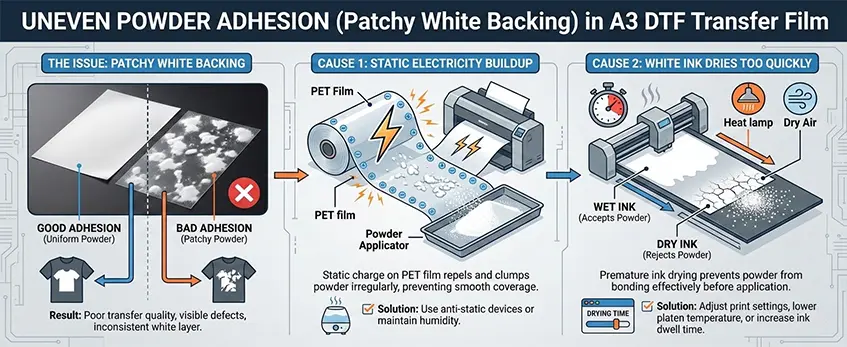
Un problema habitual de la película de transferencia DTF A3 es la adherencia irregular del polvo, que se manifiesta en forma de manchas blancas en el reverso de las impresiones. Esto suele ocurrir porque se acumula electricidad estática en la superficie de la película PET o porque la tinta DTF blanca se seca demasiado rápido antes de aplicar el polvo.
Cómo solucionarlo:
- Instale cables antiestáticos alrededor de su estación de trabajo para reducir la acumulación de electricidad estática en la película. Esto ayuda a que el polvo DTF se adhiera de forma más uniforme.
- Aplicar el polvo inmediatamente después de la impresión, mientras la tinta blanca está todavía húmeda. Si espera demasiado, la tinta se secará rápidamente, lo que provocará una mala adherencia del polvo y un aspecto irregular.
Si tiene en cuenta estos pasos, evitará que el polvo se funda de forma irregular y mejorará la durabilidad y el aspecto de sus transfers. Para obtener los mejores resultados, asegúrese también de que el polvo DTF se funde correctamente con los ajustes de temperatura de su horno de curado.
Si acaba de empezar, consulte esta guía detallada en cómo imprimir DTF con tinta blanca y mejores prácticas para optimizar todo su flujo de trabajo.
Aplicación y curado del polvo: El efecto ”piel de naranja frente a la superficie aceitosa
Cuando se trabaja con película de transferencia DTF A3, es fundamental aplicar el polvo y curarlo correctamente para obtener impresiones de calidad. Un problema común es el efecto de “piel de naranja” o una superficie aceitosa en la imagen transferida. Esto suele deberse a temperaturas de curado inadecuadas durante el proceso de fusión del polvo.
- Impresiones poco curadas suelen tener un aspecto aceitoso y pegajoso porque el polvo DTF no se ha fundido y adherido correctamente a la tinta. Para solucionarlo, aumente el calor o prolongue el tiempo de curado en su horno de curado DTF hasta obtener un acabado seco y mate.
- Impresiones sobrecuradas volverse demasiado áspero o quebradizo, provocando una textura de piel de naranja exagerada que puede agrietarse o desprenderse. En este caso, reduzca la temperatura de curado o acorte el tiempo de curado.
- Su objetivo es lograr un textura uniforme de piel de naranja de tacto suave y duradero. Esta textura garantiza que el polvo DTF se funda perfectamente, lo que proporciona la mejor durabilidad de lavado y calidad de impresión.
Mantenimiento correcto Temperatura del horno DTF y siguiendo las directrices de presión de la prensa térmica evitará estos problemas y mejorará la longevidad de su impresión. Para obtener más información sobre el curado óptimo y la elección de polvos, consulte la página opciones de tinta DTF serie pro que funcionan bien con su configuración DTF A3.
La película no se despega limpiamente (la tinta se queda en la película)
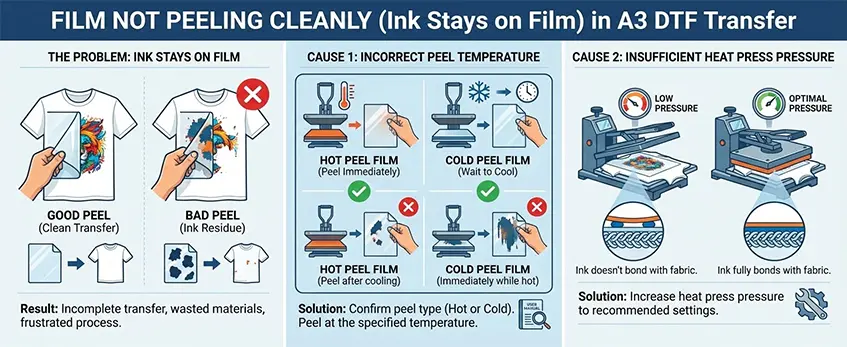
Uno de los problemas más frustrantes con la película de transferencia A3 DTF es cuando la película no se despega limpiamente, dejando la tinta pegada en la película en lugar de transferirse a la prenda. Esto suele ocurrir porque la temperatura de pelado es incorrecta o la presión de la prensa térmica no es suficiente.
Para solucionarlo:
- Confirme el tipo de pelado de su película-La película de transferencia DTF A3 puede pelarse en caliente o en frío. Asegúrese de que está pelando la película a la temperatura correcta; pelar demasiado pronto o demasiado tarde puede causar retención de tinta.
- Ajuste la presión de la prensa térmica-Si la presión es demasiado ligera, la tinta no se adherirá completamente al tejido y se quedará en la película. Aumente la presión de la prensa térmica según las directrices de su máquina para garantizar una adhesión adecuada.
Una presión y una temperatura de transferencia adecuadas son fundamentales para obtener siempre un pelado limpio. Si no está seguro de los ajustes, le recomendamos que compruebe la presión recomendada para la prensa térmica de su impresora y los ajustes del perfil DTF ICC correspondientes a su película y tinta.
Para quienes utilicen impresoras Jinlong, pueden encontrar más consejos sobre las prácticas correctas de prensado térmico y curado en su sitio web guía de la mejor prensa térmica DTF para principiantes, que le ayudarán a conseguir una transferencia impecable.
Transferencia y pelado: Levantamiento o agrietamiento de la imagen tras el lavado
Un dolor de cabeza común con la película de transferencia A3 DTF es cuando sus impresiones comienzan a levantarse o agrietarse después del primer lavado. Esto suele ocurrir porque el polvo no se ha curado correctamente o porque se ha omitido el crucial segundo paso de termofijación. Sin este sellado final, la tinta no se adhiere completamente al tejido, dejándolo vulnerable al desgaste.
Para solucionarlo, aplique siempre una plancha térmica inicial después de 15 segundos de presión final utilizando Papel de teflón o de pergamino. Este paso adicional fija la impresión y mejora la durabilidad, garantizando que sus diseños permanezcan vibrantes e intactos después de varios lavados. Un curado y sellado adecuados son la clave para superar con seguridad cualquier prueba de durabilidad de lavado DTF.
Para obtener más información sobre las técnicas de termofijación perfectas y consejos de curado, consulte este detallado Guía de configuración de la impresora de transferencia DTF, desde la impresión hasta la termofijación. Abarca todo lo que necesita para maximizar la vida útil de su impresión utilizando la presión, la temperatura y el método de pelado adecuados.
Factores medioambientales: El enemigo invisible
Control de la humedad
Mantener el nivel de humedad adecuado -entre 40% y 60%- es crucial cuando se trabaja con tinta y película de transferencia DTF A3. Una humedad demasiado baja provoca la acumulación de electricidad estática en la película, lo que hace que el polvo se adhiera de forma desigual y causa problemas de alimentación en la impresora. La estática también puede atraer el polvo, que obstruye los inyectores del cabezal de impresión y arruina la calidad de impresión.
Por otro lado, una humedad demasiado alta hace que la película se ondule y que la tinta se seque de forma irregular, provocando golpes en el cabezal o manchas. Mantener el clima de su espacio de trabajo dentro del rango ideal ayuda a evitar estos problemas, garantizando una alimentación suave de la película y un rendimiento constante de la tinta.
Para obtener los mejores resultados, combine un control adecuado de la humedad con el mantenimiento rutinario de la impresora, como comprobaciones de las boquillas de los cabezales de impresión y el seguimiento de los límites de tinta del software RIP. Este equilibrio es clave para reducir los problemas habituales de alimentación de hojas A3 y proteger el sistema de circulación de tinta blanca del cabezal de impresión.
Más información sobre nuestra Película de transferencia DTF serie A3 doble profesional funciona mejor en entornos controlados.
Factores medioambientales: El enemigo invisible - Almacenamiento
El almacenamiento adecuado de la película y el polvo DTF Jinlong es crucial para evitar la absorción de humedad, que puede afectar seriamente a la calidad de impresión y a la adherencia del polvo. A continuación le indicamos cómo almacenar sus materiales para mantenerlos en perfecto estado:
- Conservar en un lugar fresco y seco: Procure mantener un entorno constante con niveles de humedad entre 40-60%. El exceso de humedad puede hacer que la capa de absorción de la película de transferencia se debilite y el polvo se apelmace, reduciendo la durabilidad del lavado.
- Sellar herméticamente las películas: Guarde siempre la película de transferencia A3 DTF no utilizada en su embalaje original sellado o en recipientes herméticos para evitar la exposición al aire y la humedad.
- Utilizar compresas de gel de sílice: La colocación de paquetes desecantes dentro de cajas de almacenamiento o contenedores de película ayuda a controlar la humedad y evita la acumulación de electricidad estática en la película de PET.
- Evitar la luz solar directa o el calor: Las altas temperaturas pueden deformar la película y degradar la calidad del recubrimiento de tinta, por lo que se recomienda mantener los materiales alejados de fuentes de calor.
- Almacenar el polvo adecuadamente: El polvo DTF debe conservarse seco y libre. Guárdelo en recipientes herméticos y a prueba de humedad. Para solucionar problemas comunes con el polvo, consulte la guía detallada en DTF powder shaker solución de problemas y cómo solucionarlos.
Siguiendo estos consejos, evitará muchos problemas comunes de alimentación de hojas A3 y preservará la integridad de sus consumibles de tinta, polvo y película DTF para obtener transferencias uniformes y profesionales.





 English
 Español
 Deutsch
 Français