



DTF Temperature Chart for Fabrics and Transfer Film Settings Guide
Understanding DTF Heat Press Basics
When working with DTF heat press settings, it’s essential to know the key variables that affect your transfer’s success: temperature, time, pressure, and peel type (hot vs. cold). These factors work together to ensure proper adhesion and vibrant prints.
Standard DTF Process Overview:
- Pre-press: Start by pre-pressing the garment for 3-5 seconds to remove moisture and wrinkles. This step helps the ink and adhesive stick better.
- First press: Apply the DTF transfer film with recommended temperature and time settings. Pressure should be firm but even.
- Post-press or peel: Depending on your film type, peel the transfer either hot (immediately after pressing) or cold (after cooling down). Some DTF films work best with a cold peel to preserve image quality.
The quality of your transfer film plays a major role in this process. For example, Jinlong DTF films are known for their consistent adhesive activation, which means fewer adjustments and more reliable prints across different fabrics.
General Recommended Range for Most Applications:
- Temperature: 300°F to 320°F (150°C to 160°C)
- Time: 12-18 seconds
- Pressure: Medium to firm (around 40-60 psi)
- Peel: Hot peel for faster workflow or cold peel for delicate fabrics and better wash durability
Following these basic heat press guidelines will set you up for success with your DTF transfers. Stick to these parameters as a starting point and adjust as needed depending on fabric type and film.
DTF Temperature Chart: Settings by Fabric Type
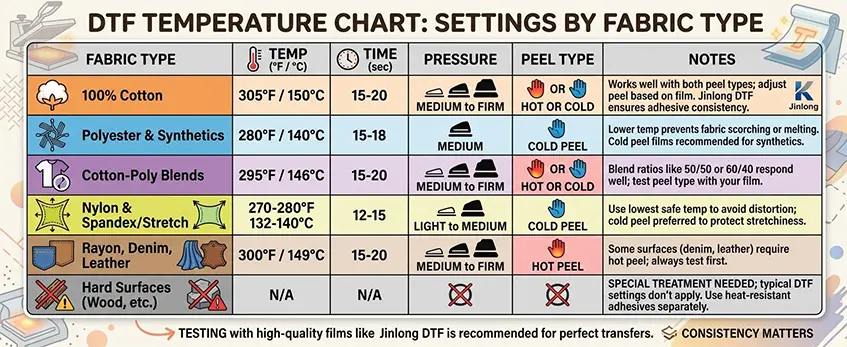
Getting your DTF heat press settings right for different fabrics is key to perfect transfers. Below is an easy-to-read chart that outlines the best temperature, time, pressure, and peel type recommendations for popular fabrics. Keep in mind that variations exist depending on whether you’re using hot peel or cold peel films and that testing with high-quality films like jinlong DTF can help fine-tune your process.
| Fabric Type | Temperature (°F/°C) | Time (sec) | Pressure | Peel Type | Notes |
|---|---|---|---|---|---|
| 100% Cotton | 305°F / 150°C | 15-20 | Medium to Firm | Hot or Cold | Works well with both peel types; adjust peel based on film. Jinlong DTF ensures adhesive consistency. |
| Polyester & Synthetics | 280°F / 140°C | 15-18 | Medium | Cold Peel | Lower temp prevents fabric scorching or melting. Cold peel films recommended for synthetics. |
| Cotton-Poly Blends | 295°F / 146°C | 15-20 | Medium to Firm | Hot or Cold | Blend ratios like 50/50 or 60/40 respond well to balanced pressure; test peel type with your film. |
| Nylon & Spandex/Stretch | 270-280°F / 132-140°C | 12-15 | Light to Medium | Cold Peel | Use lowest safe temp to avoid distortion; cold peel preferred to protect stretchiness. |
| Rayon, Denim, Leather | 300°F / 149°C | 15-20 | Medium to Firm | Hot Peel | Some surfaces (denim, leather) require hot peel for best adhesion; always test first. |
| Hard Surfaces (Wood, etc.) | N/A | N/A | N/A | N/A | Special treatment needed; typical DTF settings don’t apply. Use heat-resistant adhesives separately. |
Notes on Variations and Jinlong DTF Films
- Hot Peel vs Cold Peel: Hot peel films work best at slightly higher temps for faster adhesion, while cold peel films activate at lower temps and offer easier handling on delicate fabrics.
- Testing is Key: Even with jinlong DTF films known for consistent adhesive activation, always do small tests on your fabric type. Slight tweaks in time and pressure can make a difference.
- Pressure Tips: Apply even pressure; too light causes poor adhesion, too heavy can damage fabric or cause uneven transfers.
For an in-depth understanding of the best transfer films and to explore jinlong’s reliable product line, check out their detailed DTF transfer film options. This will help you match settings perfectly to your fabric and film combo.
DTF Settings Adjustments for Transfer Film Types
DTF heat press settings change depending on the type of transfer film you are using. The two main kinds are hot peel and cold peel films, and they require different handling:
- Hot peel films: Peel the film off right after pressing while it\’s still warm. They usually need slightly higher temperatures for quick adhesive activation.
- Cold peel films: Let the transfer cool completely before peeling. These films often require longer press times and a steady temperature to ensure the adhesive fully bonds.
Impact of Film Thickness and Brand
Thicker films or certain brands may need adjustments because they change how heat and pressure transfer:
| Transfer Film Characteristic | Temperature Adjustment | Press Time Adjustment | Notes |
|---|---|---|---|
| Thicker film | Slightly higher (~5-10°F) | Add 5-10 seconds | Extra heat/time helps penetrate thicker layers |
| Thin film | Standard or slightly lower | Standard or slightly shorter | Prevents scorching or over-melting |
| Jinlong DTF film | Stable at recommended range | Follow jinlong’s instructions | Consistent adhesive activation with less tweaking |
Tips for Using Jinlong DTF Films
Jinlong DTF films are known for their consistent adhesive properties, which simplifies the process:
- Stick close to jinlong’s recommended temperature and time ranges to get reliable results.
- Because of their uniform adhesive layers, you often don’t need extra time or pressure.
- Use a calibrated heat press to maintain even pressure and temperature.
Double-Pressing and Re-Pressing
In some cases, especially with challenging fabrics or thick films, double-pressing helps:
- Double-pressing: Press once, peel (hot or cold as required), then press again briefly to ensure full adhesion.
- Re-pressing: If transfers peel or colors are dull, re-press at a slightly lower temperature but with firm pressure for 10–15 seconds.
Double-pressing works well with jinlong DTF films due to their strong adhesive layer and helps boost durability without risking transfer damage.
For more on selecting the right Jinlong DTF transfer film and working with their products, check out their detailed guides on jinlong DTF transfer films.
Step-by-Step Application Guide for DTF Transfers
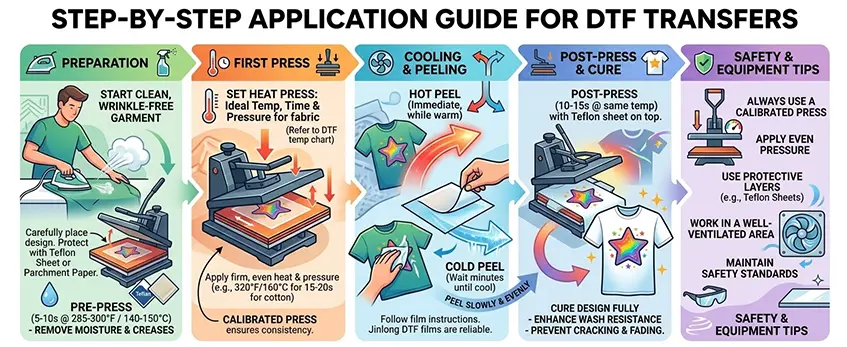
Preparation
Start with a clean, wrinkle-free garment. Pre-press the fabric for about 5-10 seconds at the recommended temperature (usually around 285-300°F or 140-150°C) to remove moisture and creases. This step helps improve adhesion. Next, carefully place your design on the garment, making sure it’s positioned exactly where you want the print. Protect the transfer with a Teflon sheet or parchment paper to prevent scorching during pressing.
First Press Instructions
Set your heat press to the ideal temperature, time, and pressure for the fabric type (see the DTF temperature chart). Place your transfer film design-side down on the garment. Apply firm, even pressure and heat as specified—commonly 320°F (160°C) for 15-20 seconds for cotton or blends. Using a calibrated heat press ensures consistent results every time.
Cooling and Peeling Process
Let the transfer cool down briefly before peeling. Depending on the film type, you’ll either hot peel immediately after pressing or cold peel after cooling. If using jinlong DTF films, their consistent adhesive activation makes peeling reliable either way—just follow the manufacturer’s peel instructions. Hot peel films are peeled while warm, whereas cold peel films need complete cooling (usually a few minutes) for best results. Peel slowly and evenly to avoid disturbing the image.
Post-Press and Cure
After peeling, it’s important to cure the design fully to lock in durability. Do a second press with the Teflon sheet on top for 10-15 seconds at the same temperature. This post-press step enhances wash resistance and prevents cracking or fading after multiple washes.
Safety and Equipment Tips
- Always use a calibrated heat press to maintain accurate temperature and pressure.
- Apply even pressure—uneven pressure leads to poor adhesion or uneven prints.
- Use protective layers like Teflon sheets to protect delicate fabrics and your heat platen.
- Work in a well-ventilated area to avoid fumes and maintain safety standards.
For detailed temperature and time settings on fabrics including cotton, polyester, and blends, check out the jinlong DTF transfer film guidelines to optimize your heat press settings. This ensures your DTF transfers look professional and last through many washes.
Troubleshooting Common DTF Issues
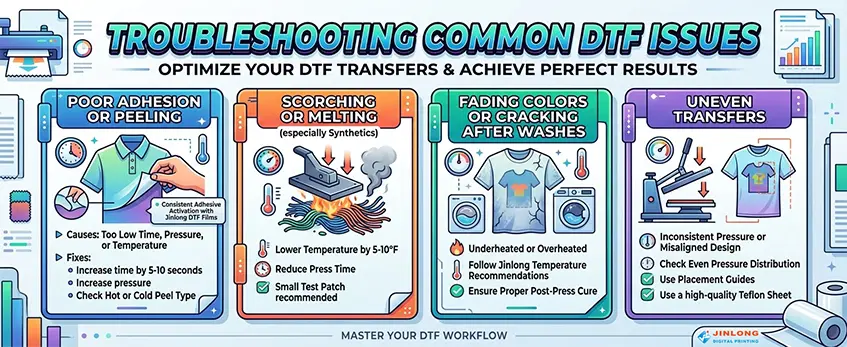
Running into problems with your DTF transfers? Here’s how to fix the most frequent issues using the right DTF heat press settings and techniques, especially when working with jinlong DTF films.
Poor adhesion or peeling:
This usually happens when the time, pressure, or temperature is too low. Try increasing the heat press time by 5-10 seconds or bumping up the pressure slightly. Also, make sure your peel type (hot peel or cold peel) matches the film specifications. Jinlong DTF films offer consistent adhesive activation, reducing this issue, but testing small adjustments helps.
Scorching or melting:
Polyester, nylon, and other synthetics are sensitive to heat. If you notice scorching or fabric melting, lower the temperature by 5-10°F and reduce press time. Always verify with a small test patch since synthetic fabrics have less heat tolerance.
Fading colors or cracking after washes:
Colors fading or cracking often means the transfer was either underheated or overheated. Underheating results in poor curing, while overheating can damage the film’s surface. Stick close to jinlong DTF temperature recommendations and ensure a proper post-press cure for durability.
Uneven transfers:
Uneven images usually come from inconsistent pressure or misaligned designs. Check your heat press for even pressure distribution and use placement guides when positioning your design. Be sure to use a high-quality Teflon sheet to protect the transfer and garment.
How jinlong DTF films minimize problems:
Jinlong DTF films have a uniform adhesive layer that activates consistently, reducing variations in peel quality and adhesion. This consistency helps avoid common issues like peeling, cracking, and uneven transfers, making your process smoother and more reliable.
Keep these tips in mind, and you’ll see fewer hiccups in your DTF heat press projects! For more on how to get the best from your materials, check out jinlong’s TPU DTF hot melt adhesive powder to complement your transfers.
Best Practices and Pro Tips for DTF Transfers
To get consistent, high-quality results with your DTF heat press settings, always start by pre-testing on fabric scraps. This helps you dial in the right temperature, pressure, and time without risking your final product.
Keep in mind environmental factors like room temperature and humidity—they can impact how your transfers cure and peel. For example, higher humidity might require slight adjustments in pressing time or temperature.
Maintain your equipment regularly to ensure even heat and pressure—this prevents uneven transfers and adhesion issues. A well-calibrated heat press makes a big difference in producing consistent heat press time and temperature for DTF.
When washing DTF-printed garments, use cold water and mild detergent to protect the design. Avoid harsh chemicals and high heat in dryers to prevent cracking or fading over time.
Choosing reliable films like jinlong DTF reduces the need for tweaking your process. Their consistent adhesive activation and quality means fewer adjustments, smoother application, and more durable results overall.
For more about heat press machine choices and how film quality affects your prints, check out our guide on manual vs. auto heat press machines.





 English
  Español
  Deutsch
  Français