



DTF Printer Head Problems Repair Costs and Downtime Reduction Guide
Diagnosing the Issue: Is Your Print Head Actually Broken?
When your DTF printer shows signs of trouble, the first step is accurate diagnosis. Is your print head actually broken, or is it a related issue? Jumping to costly repairs without a checklist can waste time and money.
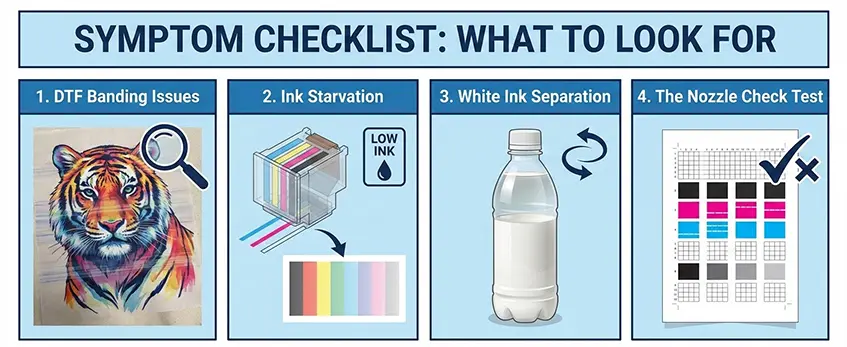
Symptom Checklist: What to Look For
- DTF Banding Issues: Uneven lines or streaks across prints often indicate nozzle problems or ink starvation.
- Ink Starvation: If the print head isn’t getting enough ink, expect light or missing areas in prints.
- White Ink Separation: White ink sedimentation can separate inside the print head, leading to clogging or inconsistent output.
- The Nozzle Check Test: Always run this test first. A clean nozzle pattern confirms hardware health; missing or faint lines point to clogs or malfunction.
Hardware vs. Software: Where’s the Failure?
Understanding if the problem is physical or mechanical saves downtime.
- Physical Print Head Clog: Piezoelectric print head repair may be needed if nozzles are clogged despite cleaning. Clogs usually stem from sediment buildup, especially with white ink.
- Damper or Capping Station Failure: Hardware like dampers and capping stations can cause ink starvation or drying. This often mimics print head issues but requires replacement of specific components, not the entire head.
Diagnosing correctly means targeting the real problem. Jinlong’s experience shows that many “head failures” are linked to the damper or capping station maintenance—issues that are significantly cheaper and quicker to fix than full print head replacement. Use this checklist and tests as your first defense to reduce downtime.
The Financial Breakdown: Cost of Repair vs. Replacement
When dealing with DTF printer head problems, understanding the full financial impact is key before deciding on repairs or replacement. It’s not just about the price tag of parts or labor—you also have to factor in lost production time, which can hit your bottom line hard.
The Hidden Costs: Parts, Labor, and Lost Production
- Parts: Replacement print heads like the Epson i3200 printhead price can range widely, but they’re never cheap.
- Labor: Skilled repairs, especially for piezoelectric print head repair, require professional service, adding to costs.
- Lost Production: Every hour your printer sits idle equals orders delayed and potential revenue lost.
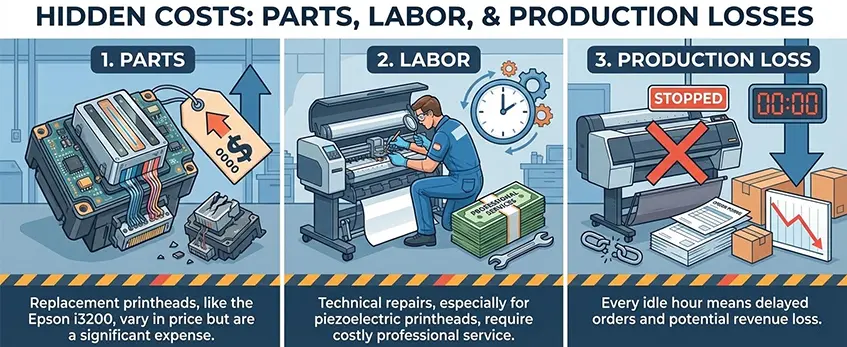
Downtime can quickly outweigh even expensive parts bills, so time really is money.
Tier 1: Minor Repairs (DIY)
Many small print head clogs and DTF ink starvation causes can be tackled at home. You\’ll need:
- Quality print head cleaning solution
- Spare time for careful manual cleaning
- Patience for repeated nozzle checks like XP600 nozzle check troubleshooting
Quick tips:
- Regularly flush the head to prevent blockage buildup.
- Agitate white ink to avoid sedimentation and clogging.
- Use proper wiping blade cleaning to maintain smooth ink flow.
Tier 2: Component Replacement (Dampers & Cap Tops)
Sometimes, the failure isn’t the head itself, but parts like the damper or capping station. Costs here are lower than a full head swap but still significant.
- **Dampers
Advanced Troubleshooting: Saving a \’Dead\’ Head
When your DTF printer head seems dead, don’t rush to replace it just yet. There are advanced troubleshooting steps that can often bring it back to life and save you costly downtime.
The Reverse Flush Method: Step-by-Step Safe Cleaning
This technique uses printer software or manual tools to push cleaning solution backward through the print head nozzles, dislodging stubborn clogs safely. Follow these steps:
- Power off your printer before starting to avoid electrical damage.
- Remove the damper and gently flush cleaning solution through the head in reverse.
- Use a lint-free cloth to catch dripping ink and repeat until no blockages remain.
This method is great for removing deep-set ink clogs without risking printhead delamination symptoms.
Soaking the Head: Capping Station Soaking Techniques
A clogged capping station lets dry ink build up, causing printhead clogging and ink starvation. To reduce this:
- Detach the print head assembly and soak the capping station in a gentle cleaning solution overnight.
- Avoid harsh chemicals that can damage piezoelectric print heads.
- After soaking, rinse and dry completely before reassembly to prevent moisture-related damage.
Checking Ribbon Cables: Electrical Issues Mimicking Failure
Sometimes what looks like a “dead” print head is actually a faulty ribbon cable connection:
- Inspect all cables for loose connections or visible wear.
- Re-seat or replace any suspect cables to restore electrical signals.
- This quick check can save unnecessary print head replacement costs.
The White Ink Factor: Dealing with Titanium Dioxide Sedimentation
White DTF inks contain titanium dioxide, which easily settles and causes banding and clogging:
- Use a thorough ink circulation system to keep white ink well-mixed during printing.
- Clean the white ink lines and dampers regularly with recommended printhead cleaning solutions.
- Consider premium inks like those formulated with anti-clogging features to reduce sediment buildup.
For example, Jinlong’s DTF premium ink helps maintain nozzle health and print quality over time. For a full rundown on quality inks, check out Jinlong’s TPU DTF hot melt adhesive powder and their best ecofriendly DTF films.
These advanced steps are essential to get the most out of your DTF printer heads while avoiding costly full replacements. Regular maintenance combined with troubleshooting techniques like reverse flushing and soaking can drastically reduce downtime and extend the life of your investment.
The Jinlong Protocol: How to Reduce Downtime to Zero
Keeping your DTF printer running smoothly starts with the right environment. Aim to maintain humidity between 40-60% and temperature around 70-75°F (21-24°C). Too dry, and your print head clogs faster; too humid, and condensation can cause electrical issues. This simple step cuts down on printhead clogging and helps the overall lifespan of piezoelectric print head components.
A solid daily maintenance routine is your best defense against downtime. Here’s what to focus on:
- Agitate white ink regularly to prevent titanium dioxide sedimentation, a common cause of white ink circulation system failure.
- Clean the wiper blade daily to avoid ink buildup and streaking issues like banding.
- Run nozzle checks every morning using nozzle check troubleshooting to catch early signs of DTF ink starvation or print head clogging.
Using high-quality ink also plays a huge role. Jinlong DTF premium ink is specially formulated with anti-clogging features that reduce sediment and keep dampers and capping stations cleaner longer. Paired with a good maintenance schedule, the right ink cuts down costly repairs and protects your print heads.
When you need to leave your printer idle, using the right vacation mode is key:
- Wet capping keeps the print head moist and ready for use.
- Flushing fluid circulates through the system, preventing sediment buildup during long pauses.
Following these steps, the Jinlong protocol can essentially reduce your downtime to zero, saving both money and stress while maximizing your printer’s uptime. For more on quality inks and maintenance tips, check out the Jinlong DTF premium ink options.





 English
  Español
  Deutsch
  Français