

No products in the cart.

Jinlong
DTF Printer Head vs Ink System Issues How to Diagnose and Fix
Downtime from DTF printer head problems or ink system issues can bring your production to a grinding halt—and misdiagnosing the culprit wastes time and money. Many operators jump to replacing the expensive printhead, only to find the real cause is a simple ink starvation issue in the supply system. In this guide, we cut through the confusion with a clear, step-by-step diagnostic approach. You’ll learn how to pinpoint whether the root cause is a clogged or damaged printhead or a failing component like dampers, tubing, or the capping station. Knowing the difference ensures you fix the right problem—saving costly parts and keeping your operation running smoothly.
Anatomy of the Failure: Understanding the Two Systems
When troubleshooting DTF printer head problems, it’s crucial to understand the two core systems involved: the Printhead (The Engine) and the Ink System (The Fuel Line). Each plays a distinct role and exhibits unique failure modes that impact print quality and machine reliability.
The Printhead (The Engine)
The printhead is the heart of the DTF printer, responsible for delivering precise ink droplets onto film via its nozzle plate. The printhead contains piezoelectric elements that control ink ejection at a microscopic level. Failure modes include:
- Clogging: Ink particles or dried residue block nozzles, causing missing lines during the DTF nozzle check.
- Short Circuits: Electrical faults within the printhead can disrupt signal transmission, leading to erratic nozzle firing or total print failure.
- Delamination: Physical separation of the printhead’s internal layers, often from overheating or impact, manifests as irregular ink flow or permanent damage.
Recognizing these symptoms is essential to distinguish printhead failure from ink system issues.
The Ink System (The Fuel Line)
The ink system feeds and regulates ink supply to the printhead. Its critical components include:
- Ink Tanks and Circulation System: Maintain consistent ink levels and prevent sedimentation.
- Tubing and Dampers: Deliver ink under controlled pressure and filter out air bubbles to ensure steady flow.
- Capping Station: Provides a sealed environment to protect the printhead and maintains negative pressure during cleaning cycles.
Pressure stability and airtight seals in this system are vital. Leaks, air ingress, or damper failures lead to ink starvation, causing fading or color inconsistencies. Understanding the ink system’s role helps isolate issues like white ink starvation or capping station suction failures from printhead faults.
By clearly differentiating between these two systems—the engine driving ink ejection and the fuel line supplying it—technicians can apply precise diagnostics and reduce downtime on Jinlong DTF printers.
Scenario A: Signs It Is an Ink System Issue (Starvation)
When your DTF printer shows signs of ink system problems, it often boils down to starvation — where the printhead doesn\’t get enough ink. Here’s how to spot it:
The \’Fade Out\’ Effect: If your prints start strong but colors fade after just a few inches, especially white ink, it’s usually damper drainage sucking ink away. This causes an inconsistent flow, leading to faint or missing colors.
Air in the Lines: Check the tubing for any air bubbles or gaps. Visible bubbles interrupt ink flow and mess up nozzle firing. Air in lines is a classic sign of ink starvation.
Damper Check: Make a visual inspection of the ink dampers. If they look empty or the protective film is concave, that’s a red flag showing ink isn’t reaching the printhead properly.
Capping Station Failure: During cleaning cycles, if you don’t see
Scenario B: Signs It Is a Printhead Problem (Blockage or Damage)
When missing nozzle lines don’t clear up even after several cleanings and your dampers are full, it’s a clear sign of a stubborn printhead blockage or damage. This is different from ink flow issues—here, the printhead itself is the root cause of your DTF printer head problems.
Electrical cross-talk during a nozzle check—where colors bleed into each other or print patterns look mixed—points to internal printhead damage. This often means the piezoelectric elements or circuits inside the head are malfunctioning.
You might also spot physical damage, such as scratches or head strike marks on the printhead surface. These mechanical hits can permanently harm nozzle function and cause banding or missing lines.
Finally, cable or board issues can mimic printhead failures. If your printer won’t recognize the head or shows a zero temperature reading, check for loose or damaged cables and connections on the control board. These electronic faults prevent proper communication and heating, impacting print quality.
Recognizing these specific signs helps distinguish true printhead faults from simpler ink system problems, saving time and repair costs.
For deeper insights on troubleshooting printhead damage in popular models like Epson i3200 or XP600, exploring specialized guides can be helpful. If you face persistent DTF printer head problems, addressing printhead issues promptly ensures your prints stay sharp and vibrant.
The \’Jinlong DTF\’ Isolation Test: How to Tell the Difference
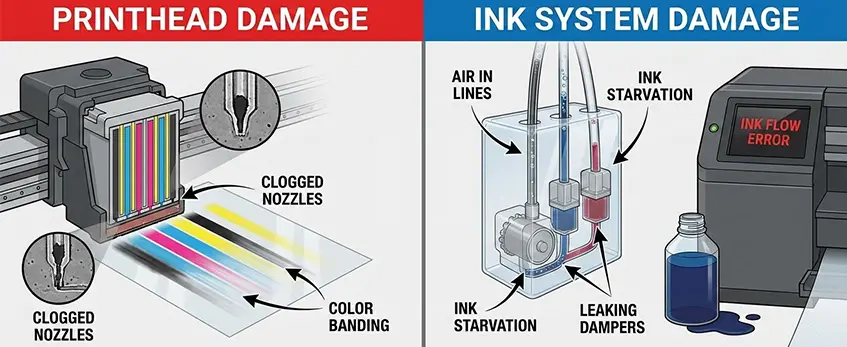
When you’re stuck between printhead problems and ink system issues, the Jinlong DTF isolation test is your go-to method to pinpoint the cause quickly.
| Step | What to Do | What It Shows |
|---|---|---|
| Step 1: Syringe Pull Test | Use a syringe to pull ink through dampers and tubing | Confirms if ink flows freely or if there\’s a blockage or air in lines (ink system issue) |
| Step 2: Swap Technique | Swap dampers between problem and healthy printheads | If issue moves with damper → ink system; stays with head → printhead problem |
| Step 3: Flush Test | Flush the printhead with a low-pressure cleaning solution | Shows stubborn clogging inside the printhead (printhead clogging symptoms) |
Why Use This Test?
- It differentiates DTF nozzle check missing lines caused by clogged or damaged printheads from DTF ink flow problems in the dampers, tubing, or capping station.
- Saves you unnecessary printhead replacements.
- Helps diagnose white ink starvation DTF or bands caused by air bubbles in ink dampers and pressure issues.
For more tips on fixing white ink and circulation problems, check out the comprehensive DTF printer white ink troubleshooting guide. This test fits perfectly into your regular maintenance routine to keep your Jinlong DTF printer running smooth.
Solutions and Fixes for DTF Printer Head Problems and Ink System Issues
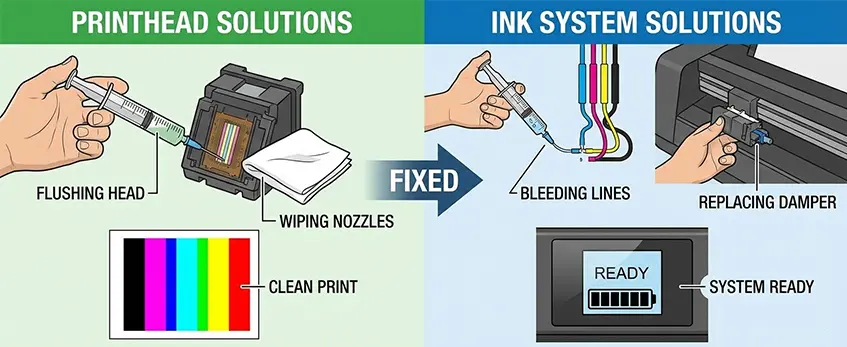
When dealing with DTF printer head problems versus ink system issues, knowing the right fixes can save time and money.
Fixing Ink System Issues:
- Replace Dampers: Old or clogged dampers can cause white ink starvation in DTF prints. Swapping these out often restores proper flow.
- Clean Wiper Blade and Capping Seals: Residue buildup here leads to capping station suction issues, affecting ink circulation and print quality. Regular cleaning keeps seals tight and wipers effective.
- Check Circulation Motor: A failing motor can cause ink flow problems and air bubbles in the lines. Ensuring it runs smoothly prevents these interruptions.
Addressing Printhead Issues:
- Soak the Head Carefully: For stubborn clogging, soaking the printhead in a gentle cleaning solution can help, but never soak too long to avoid damaging piezoelectric components.
- Ultrasonic Cleaning With Caution: This deep clean method can clear printhead delamination symptoms or stubborn clogs but should be done sparingly and by professionals to prevent physical damage.
- Know When to Replace the Head: Persistent nozzle check problems, printhead strike damage, or electrical faults mean it’s time for a new printhead.
Proper upkeep and timely fixes keep your DTF printer running smooth and avoid costly downtime. For help with ink system maintenance and color performance, check Jinlong DTF maintenance checklist to optimize your workflow.
Prevention: The Jinlong DTF Maintenance Routine
Keeping your DTF printer running smoothly starts with a solid maintenance routine. Jinlong DTF users should follow daily and weekly checklists to catch issues before they grow.
Daily Maintenance Checklist
- Run a nozzle check to spot any missing lines or clogging early.
- Clean the wiper blade and capping station seals to prevent buildup that causes printhead strike damage.
- Check ink dampers and tubes for air bubbles or leaks, avoiding white ink starvation and banding.
- Confirm the circulation motor is working to maintain proper ink flow and pressure.
Weekly Maintenance Checklist
- Do a deeper flush of the printhead with manual printhead flushing methods or ultrasonic cleaning, but only when necessary.
- Inspect and replace damper parts per the DTF damper replacement guide if you notice persistent nozzle issues or fadeouts.
- Examine the capping station for suction problems to prevent waste ink pump failure issues.
Humidity Control Is Key
Ink drying inside your printer is a common cause of both printhead clogging and ink flow problems. Keeping your workspace humidity stable is a simple but effective way to avoid these headaches.
Use High-Quality Jinlong DTF Inks and Parts
Sticking with certified Jinlong DTF inks and replacement parts is crucial. These are specifically designed to work together, reducing risks like printhead delamination symptoms or ink starvation that can lead to expensive repairs.
For more tips on optimizing your print results and maintaining system health, check out how to achieve soft-hand feel in DTF printing with Jinlong products, ensuring longer printhead life and consistent output quality.





 English
 Español
 Deutsch
 Français