



DTF Ink Printer Guide 2025 Starting a Profitable Apparel Business
How DTF Printing Actually Works: Step-by-Step Breakdown
Starting with DTF (Direct to Film) printing can feel like decoding a secret code—but it’s actually pretty straightforward once you know the parts and process. Here’s a simple step-by-step guide to how DTF printing works, along with the 5 essential components you’ll use every day.
Step 1: The Design and Printing on Film
- You begin by creating or selecting your design.
- Using a DTF printer loaded with specialized DTF inks (including white ink for opacity), the design is printed in reverse onto a clear PET film. Think of this like printing a decal you’ll transfer later.
- The printer lays down color ink first, then the white ink underbase, so the colors pop on any fabric.
Step 2: Powdering with Adhesive
- While the ink is still wet, the film passes through an adhesive powder station. This powder sticks to the printed ink, forming the key for your design to physically bond with fabric.
- After powdering, excess powder is shaken off, leaving just enough to secure the print.
Step 3: Curing with Heat Press or Oven
- The next step uses a heat press or curing oven to gently melt and set the adhesive powder into the ink layer. This ‘activates’ the powder, making it tacky and ready to stick during transfer.
- Proper curing is crucial to avoid wash and crack issues later.
Step 4: Transferring to the Garment
- The film is placed print-side down onto your chosen apparel — cotton, polyester, nylon, blends, dark or light colors.
- A heat press firmly presses and heats the film to transfer the design. The melted powder acts like glue, binding the ink to the fabric’s fibers.
Step 5: Peeling and Finishing
- Once cooled briefly, you peel off the film, leaving your vibrant design perfectly adhered to the fabric.
- A quick final press may follow for durability.
Why DTF Works on Everything: Cotton, Polyester, Nylon, Blends, Darks & Lights
DTF’s magic is versatility. Unlike some printing methods that struggle with dark or synthetic fabrics:
- The white ink underbase means your colors always stay bright.
- The adhesive powder physically sticks the design to the fabric surface, overcoming issues like polyester’s smooth, non-absorbent feel.
- That’s why you’ll see DTF printed shirts, hoodies, nylon bags, and blends looking sharp no matter the color.

The 5 Essential Components for DTF Printing
| Component | Purpose | Notes |
|---|---|---|
| DTF Printer | Prints designs directly on film | Look for reliable, clog-resistant models like Jinlong DTF printers |
| DTF Ink | Specialized pigment inks including white | OEM vs third-party affects quality & clogging |
| PET Film | Transparent transfer material | Hot peel vs cold peel differences impact workflow |
| Adhesive Powder | Binds ink to fabric post-heat | Grain size and color (white mostly) matters |
| Heat Press / Curing Oven | Sets the print onto garments | Precise temperature & timing critical |
DTF printing is a game-changer for custom apparel because it’s clean, flexible, and works on nearly any fabric type you throw at it. Once you have these components down, you’re well on your way to producing crisp, durable designs that customers love.
Best DTF Ink Printers in 2025
Looking for the best DTF ink printer in 2025? Here’s a quick rundown to help you find the right fit, whether you’re just starting out or scaling up.
Top Budget Printers Under $3,000
For beginners and side hustlers, affordable DTF printers under $3,000 offer great entry points without skimping on quality. These models handle up to 22-inch prints, perfect for small t-shirt runs or custom hoodies. Expect decent speed and reliable white ink printing but be ready for some maintenance to keep them running smoothly.
Best Mid-Range (22–24 inch) for Small Businesses
If you’re running a small shop, mid-range printers sized between 22 and 24 inches are the sweet spot. They provide better print speed, more stable ink flow, and increased durability. These models often include features like multiple print heads and enhanced RIP software compatibility, optimizing your workflow for consistent production.
Best Production-Grade 4-Head / i1600 / i3200 Models
For serious production needs, 4-head printers like the Epson i1600 or i3200 dominate the market. These machines offer fast print speeds, wider print areas, and superior white ink handling. Expect cleaner prints with richer colors and less downtime. They’re a step up for those ready to invest $15,000+ for semi-production or full-scale operation.
Spotlight: Jinlong DTF Printers (60cm & 30cm Flagship Models)
Jinlong’s DTF printers stand out for blending affordability with professional-grade features. Their 60cm (24-inch) and 30cm (12-inch) models boast:
- High-precision ink delivery for vibrant, durable prints
- Reliable dual-head designs that minimize clogging
- User-friendly setup and consistent color profiles
- Proven durability suited for long print runs
Jinlong also offers excellent support and warranty terms, making them a favorite among US-based startups and growing businesses. For more on Jinlong’s ink and film options optimized for these printers, check their detailed guides on DTF PET film and adhesive powders.
Comparison Table
| Printer Model | Print Size | Speed (A3/hr) | Print Heads | Price Range | Warranty |
|---|---|---|---|---|---|
| Budget Model A | Up to 22” | 8–10 | 1 | <$3,000 | 1 Year |
| Mid-Range Model B | 22–24” | 12–15 | 2 | $3,000–$7,000 | 1–2 Years |
| Jinlong 30cm Model | 12” | 10–12 | 2 | $4,000–$5,000 | 1 Year |
| Jinlong 60cm Model | 24” | 15–20 | 2 | $6,000–$8,000 | 1–2 Years |
| Epson i1600 / i3200 | 24” | 20+ | 4 | $15,000+ | 2 Years |
Choosing the right DTF ink printer depends on your budget, production volume, and fabric types. Whether you aim for a garage startup or semi-production, these options cover all bases.
For detailed specs on Jinlong’s lineup and consumable compatibility, explore their full range at the official Jinlong website.
-

JL-DTF301B A3 DTF Printer XP600 【Applicable to beginner sets】
View more View more -
JL-DTF302S DTF Digital Printer
View more View more -
JL-DTF602S DTF Digital Printer Best Product Print Quality Package
View more View more -
JL-DTF604S DTF Digital Printer Best Product Print Quality Package
View more View more -
JL-DTF604P DTF Digital Printer [Pro Series]
View more View more


![JL-DTF604P DTF Digital Printer [Pro Series]](http://jinlongprints.com/wp-content/uploads/2025/07/JL-DTF604P-300x300.webp)
DTF Consumables You Must Get Right
Getting your consumables right is key to smooth DTF printing and top-quality results. Here’s what you need to know:
DTF Inks:
- Pigment inks vary in color vibrancy and durability—choose inks designed specifically for DTF to avoid fading or cracking.
- OEM inks usually guarantee better consistency and fewer clogs, but quality third-party inks can be more budget-friendly.
- Regular maintenance and flushing help prevent clogging, especially with pigment-heavy inks.
PET Film:
- Hot peel film needs to be removed immediately after pressing, while cold peel requires cooling first; choose based on your workflow speed.
- Thickness matters: 75μm offers finer detail and easier peeling, while 100μm adds durability for heavier prints.
- Premium brands ensure less static and better ink adhesion—check out reputable options like the Jinlong DTF transfer film for consistent quality.
DTF Powder:
- Powder comes in fine and medium grain. Fine powder provides smoother textures, while medium grain works better for heavier fabrics.
- Adhesive powder colors—white vs black—depend on your shirt color and design needs; white powders are most common for bright and dark shirts alike.
For beginners and small shops, I recommend the reliable Jinlong DTF ink & film bundles that combine top-tier inks with premium films designed to prevent common issues like peeling and poor adhesion. Getting your consumables right upfront saves time, money, and lots of headaches down the road.
Exact Startup Costs in 2025
Starting a DTF ink printer business in 2025 can fit different budgets depending on how serious you are. Here’s a straightforward breakdown of startup costs by business size:
Tier 1: Garage/Side Hustle (< $4,000)
- Basic DTF printer (budget models under $3,000, like smaller jinlong printers)
- Starter set of DTF ink and PET film
- Adhesive powder and small heat press
- Minimal accessories and RIP software
Perfect if you want to test the waters or run a part-time hustle from home.
Tier 2: Serious Small Shop ($6,000–$12,000)
- Mid-range DTF printer with 22–24 inch print width
- Higher-quality consumables (OEM inks, premium films)
- Decent heat press or curing oven
- RIP software license
- Backup supplies and maintenance kits
Ideal for growing businesses aiming for consistent production and better quality control.
Tier 3: Semi-Production ($18,000+)
- Production-grade printers (4-head models like i1600 or i3200)
- Full inventory of consumables, plus automatic powder shaker
- Industrial curing oven
- Software plus training or technical support
- Space setup for workflow efficiency
Best for semi-production shops focused on wholesale or high volume custom apparel orders.
Hidden Costs Beginners Often Miss
- Replacement printer heads and spare parts
- Software updates and subscriptions
- Electricity and utility bills (DTF printers can use a lot of power)
- Packaging and shipping materials
- Marketing and design costs
Planning ahead is key for success — unexpected expenses can quickly add up and stall your growth.
For those starting small, check out the benefits of using an efficient A3 DTF printer for on-demand printing to keep initial costs low without sacrificing quality.
Step-by-Step: Setting Up Your DTF Workflow
Getting your DTF ink printer workflow right from day one sets you up for smooth printing and great results. Here’s a simple step-by-step guide focused on Jinlong DTF printers, so you avoid common startup headaches.
Unboxing & Assembly
Start by carefully unpacking your Jinlong DTF printer. Check for all parts, and follow the included manual for assembly. Jinlong models come mostly pre-assembled but double-check ink tubes and connections to avoid leaks or clogs later.
Software Installation
Install your RIP software—2025 favorites include Cadlink Digital Factory and Wasatch SoftRIP, known for efficient color management and print queue control. A good RIP helps with white underbase settings and precise ink saving.
Ink Filling & Initial Maintenance
Fill your printer with compatible Jinlong DTF inks, including pigment CMYK and white ink. Use the recommended procedure to prime the printheads gently, keeping clog risks low. If interested, check this Jinlong DTF ink CMYK 100ml Pro Series for reliable compatibility. Run head cleaning cycles as suggested before your first print.
Test Printing & Color Profile Creation
Print a test design to calibrate colors. Creating accurate color profiles is key—this keeps prints vibrant on cotton, polyester, and blends. Perform multiple test prints on your chosen DTF film types to ensure perfect ink adhesion and sharpness.
Powder Shaking & Curing
Apply DTF adhesive powder evenly on the wet print. Using a consistent shaker is best practice—invest in an automatic powder shaker as you scale up. You can learn more about durable powder options in this TPU powder guide. Cure prints using a heat press or curing oven immediately after powdering for best bond strength.
Heat Pressing Parameters
Optimal heat press settings depend on your fabric:
- Cotton: 320°F for 15 seconds
- Polyester: 315°F for 18 seconds
- Blends: 320°F for 15–20 seconds
Adjust pressure to medium-high. Avoid over-pressing to prevent print cracking.
Daily & Weekly Maintenance
Prevent head clogs with a simple routine:
- Daily: Run nozzle checks, clean printheads lightly if needed
- Weekly: Deep clean with approved cleaning solutions, check ink filters, inspect tubes
Proper maintenance extends your printer’s life and keeps colors consistent.
Following these steps will help you maintain your Jinlong DTF printer in top form, ensuring your custom apparel business in the U.S. delivers quality prints that last.
Designing for DTF – What Actually Sells in 2025
If you want your custom apparel business to thrive, focusing on what’s trending in 2025 is key. Here are the hottest niches selling well with DTF printing right now:
- Streetwear: Bold graphics, retro vibes, and urban themes always pull in a younger crowd.
- Local Sports: Custom team shirts and fan gear for schools and community leagues fly off shelves.
- Family Reunions: Personalized tees and hoodies with family names and event dates remain popular.
- Gaming: Designs featuring popular games, memes, and gamer culture attract a loyal audience.
- Pets: Cute and funny pet designs continue trending, especially for dog and cat lovers.
Design Tools That Work
You don’t need to break the bank to create killer designs. Here’s what works:
- Free tools: Canva, GIMP, and Inkscape are great for beginners experimenting with layouts.
- Paid software: Adobe Illustrator and CorelDRAW offer advanced options for precise vector artwork — ideal if you want to create complex designs that print cleanly on DTF.
Creating Mockups That Close Sales
Mockups are your sales secret weapon. They help buyers envision the final product, increasing conversion rates. Keep these tips in mind:
- Use high-quality, realistic apparel mockups.
- Show your design on different garment colors and styles to appeal to more customers.
- Include lifestyle shots to make the design relatable.
If you’re exploring film options for your prints, check out premium DTF transfer films that enhance color vibrancy and durability for every design niche.
Pricing, Profit Margins & Real Numbers for DTF Printing
Knowing your pricing and profit margins is key to running a successful DTF ink printer business. Here’s a realistic breakdown based on A3-size prints, perfect for tees and hoodies.
Typical Cost Per Print (A3 Size):
Ink & Film: Around $1.50 – $2.00
Adhesive Powder: About $0.15
Power & Maintenance: Roughly $0.20
Total Cost: Between $1.85 and $2.35 per print
Keep in mind, these costs can vary depending on your ink quality, film brand, and powder type. For example, premium PET films like the jinlong DTF transfer film series may cost slightly more but improve print longevity and feel.
Retail Pricing That Wins:
Most shops price custom DTF shirts between $22 to $35 depending on design complexity, shirt quality, and niche demand. Pricing in this range keeps you competitive while securing solid profit margins of 50% or more.
Realistic Monthly Revenue Timeline:
- 100 shirts/month: Expect roughly $2,000 – $3,500 in revenue. This side hustle level lets you cover startup costs fast.
- 500 shirts/month: Scaling brings in around $11,000 – $17,500/month. This level is ideal for serious small shops with a reliable customer base.
- 2,000 shirts/month: At full production, revenue can hit $45,000 – $70,000/month or more, especially when adding wholesale or gang sheets.
Remember, as you grow, negotiating bulk supplies like inks and films can lower costs, boosting margins further. Managing your pricing closely while maintaining quality will keep your custom apparel business profitable and sustainable.
Marketing & Selling Your DTF Products
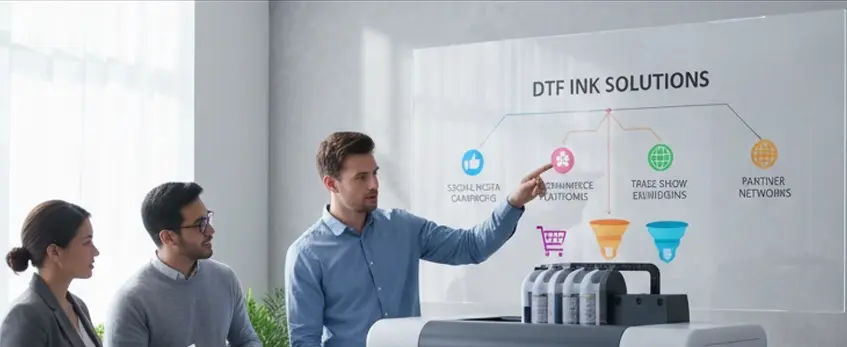
Getting your custom apparel noticed is crucial, especially in 2025’s crowded market. The best platforms for selling your DTF prints include Etsy, Shopify, TikTok Shop, and Facebook Marketplace. Each offers unique advantages depending on your audience:
- Etsy: Great for handmade, custom designs and reaching niche shoppers.
- Shopify: Ideal for building your own brand and scaling with a professional storefront.
- TikTok Shop: Perfect for quick viral sales with trending designs and younger buyers.
- Facebook Marketplace: Good for local reach and connecting with community buyers.
Local marketing still plays a key role too. Schools, gyms, and community events remain reliable spots to find customers. Sponsor local sports teams or set up booths at events to build strong, lasting relationships.
To boost your sales long-term, focus on turning one-time buyers into repeat wholesale clients. Offer volume discounts, exclusive deals, or loyalty programs. This creates steady revenue and helps your custom apparel business grow sustainably.
For smooth operations, consider integrating your marketing with trusted tools and platforms that support easy management of orders and customer communication. This approach will keep your business agile and responsive to customer needs.
Common Mistakes & How to Avoid Them
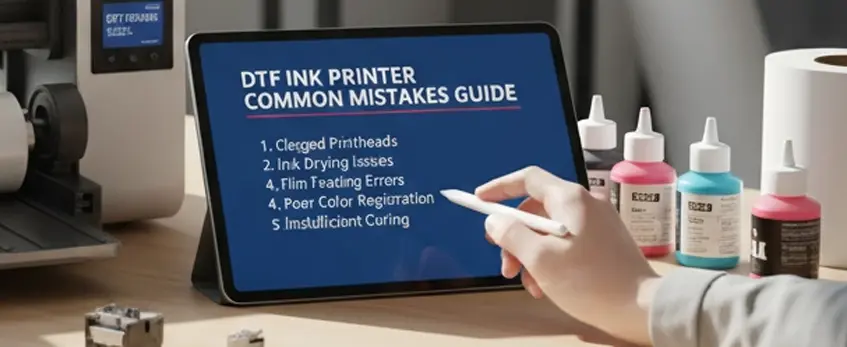
Starting with DTF ink printers can be exciting, but a few common mistakes can quickly turn your project into a costly headache. Here’s what to watch out for:
Wrong Film and Ink Combo: Using incompatible film and ink types often leads to print failures, poor adhesion, or fading after wash. Stick to recommended bundles, like the trusted jinlong DTF ink and film sets, to avoid this hassle. For a detailed guide on choosing the right DTF ink and film, check out this helpful resource on how to choose the right DTF printer for you.
Skipping White Underbase Settings: The white underbase is crucial for vibrant prints on dark fabrics. Skipping this step or setting it incorrectly causes dull colors and poor print opacity. Always calibrate your RIP software carefully before printing.
Poor Curing Leading to Wash Failures: Under-curing your prints or using the wrong heat press settings results in prints peeling or cracking after a few washes. Follow recommended heat press temperatures and timing for different fabrics—cotton, polyester, or blends—to lock in prints securely.
Buying the Cheapest Printer: It might be tempting to grab a low-cost DTF printer, but many beginners regret this choice. Cheap models often come with unreliable print heads, poor warranty support, and higher long-term maintenance costs. Investing in a reliable brand like jinlong will save you money and stress down the line. Learn more about newbie mistakes and proven solutions in this jinlong DTF printer beginner’s guide.
Avoid these pitfalls to keep your custom apparel business running smoothly and your prints looking top-notch from day one.
Scaling Your Custom Apparel Business
Once you’ve got your DTF printing workflow down and steady orders rolling in, it’s time to think bigger. Scaling smart is key to growing your custom apparel biz without burning out or breaking the bank.
When & How to Add a Second Printer
If you’re hitting a bottleneck with your current setup, adding a second DTF ink printer can double your output and reduce turnaround times. Start by:
- Evaluating your monthly order volume (typically when you exceed 500 shirts/month)
- Choosing a compatible model to streamline maintenance and ink supplies
- Setting up a dedicated workspace to keep things organized
A second printer lets you handle rush orders or run different designs simultaneously, giving you more flexibility.
Adding Automatic Powder Shaker + Oven
Manual powder application and curing waste time and can cause inconsistent prints. Automating with gear like a DTF powder shaker and a curing oven helps by:
- Ensuring even powder coverage
- Faster, more uniform curing for durable prints
- Reducing labor time, letting you focus on other tasks
By investing in this equipment, you improve print quality while paving the way toward higher production levels.
Hiring Your First Employee
Bringing someone on board is huge—it means your business can handle more orders without your constant involvement. When hiring:
- Look for experience in DTF printing or willingness to learn
- Start with part-time or freelance help for prepping transfers, powdering, or heat pressing
- Train them on your maintenance routine to avoid costly mistakes
Good team members improve productivity and help maintain print quality as you grow.
Moving Into DTF Gang Sheets & Wholesale
Once your volume supports it, printing gang sheets (multiple designs or repeated graphics on one sheet) cuts costs and speeds up production. This lets you:
- Maximize film use, lowering your material expenses
- Offer wholesale pricing to local boutiques, teams, or event organizers
- Expand your customer base beyond single-piece sales
Wholesale orders boost revenue but require tight workflow management and reliable supplies.
Planning your growth thoughtfully with these steps ensures your custom apparel business expands smoothly while maintaining the quality your customers expect.
For reliable consumables as you scale, check out jinlong\’s professional-grade DTF ink and film bundles to keep your production line running strong.





 English
  Español
  Deutsch
  Français