

No products in the cart.


Jinlong
Why Is My DTF Not Sticking Common Causes and Expert Fixes
Understanding DTF Adhesion – What Goes Wrong?
Direct-to-Film (DTF) printing is a popular method for transferring vibrant designs onto fabrics by printing on a special film, applying hot-melt adhesive powder, curing it, and heat pressing onto the garment. However, DTF transfer not sticking issues frequently arise when the adhesive doesn’t bond properly with the fabric. Common causes include incomplete adhesive melting during the heat press, which leads to weak or patchy adhesion. Poor fabric contact, such as uneven pressure or pressing over seams, interferes with the bonding process. Material incompatibilities—like using the wrong type of film, ink, powder, or fabric—can also prevent the transfer from sticking well and reduce wash durability. Understanding these typical adhesion problems is the first step in troubleshooting why your DTF print may not bond correctly to shirts or other garments.
Top Causes and Fixes for DTF Not Sticking
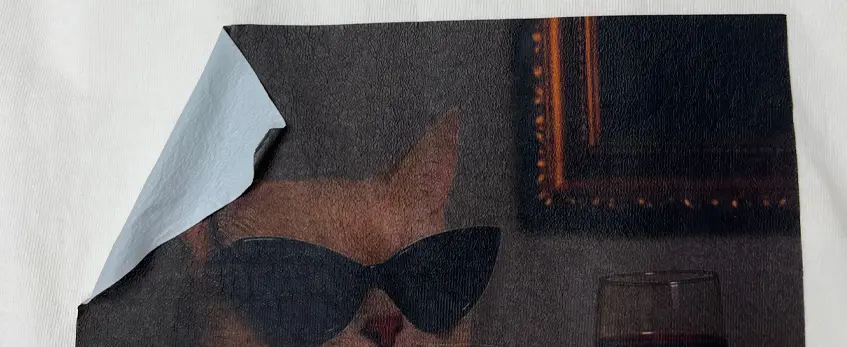
When your DTF transfer isn’t sticking right, it usually boils down to a few common causes. Let’s break down key issues and easy fixes to get your prints bonding strong.
| Cause | What Happens | How to Fix It |
|---|---|---|
| 1. Incorrect Heat Press Temperature | Too low: adhesive won’t melt properly; too high: colors may dull or scorch | Use recommended temp (typically 320°F–340°F). Calibrate your press with a thermometer for accuracy. |
| 2. Insufficient or Uneven Pressure | Poor contact leads to weak bonding | Apply firm, even pressure. Adjust pressure lever and avoid bumps from seams or buttons. Use a pressure test sheet if needed. |
| 3. Pressing Time Too Short or Too Long | Under-pressed: poor adhesion; over-pressed: prints crack or discolor | Follow jinlong’s guidelines – usually 15 seconds. Always wait for cold peel after pressing. |
| 4. Peeling the Film Too Early (Hot Peel vs. Cold Peel) | Hot peeling causes lifting and incomplete adhesive set | Always do a cold peel after pressing. Test your jinlong films to see peel timing. |
| 5. Skipping or Rushing the Pre-Press Step | Moisture creates steam barrier, stopping bonding | Pre-press shirts to remove moisture and wrinkles before transfer. Helps ensure smooth adhesion. |
| 6. Poor-Quality or Incompatible Materials | Low-grade film, ink, or powder causes weak adhesion and peeling | Always use genuine jinlong consumables and check product expiration dates. |
| 7. Uneven or Insufficient Hot-Melt Powder Application | Clumps or sparse powder coverage leads to patchy transfer | Shake powder well, apply evenly, and cure properly by following jinlong’s instructions. |
| 8. Fabric Type or Preparation Issues | Synthetics or untreated dirty fabrics cause poor bonding | Pre-wash fabrics, especially cotton. Avoid silicone-treated materials. Test prints on different fabric types first. |
| 9. Printer Settings Leading to Low Ink Saturation | Thin ink layers won’t hold powder well | Optimize jinlong printer profiles. Use proper ink density and a solid white underbase layer. |
| 10. Environmental Factors (Humidity/Temperature) | High humidity slows drying and affects storage | Keep workspace humidity low and control room temp. Store materials in dry, sealed containers. |
| 11. Pressing Over Uneven Surfaces or Garment Features | Seams, zippers, and pockets block contact | Position designs away from these areas. Use press pillows or silicone mats to even out surfaces. |
| 12. No or Improper Post-Press / Second Press | Skipping second press weakens adhesion and washability | After cold peel, do a second press with parchment paper for 5–10 seconds. This locks in the design and extends durability. |
Following this checklist can resolve most DTF adhesion problems and prevent your DTF transfer peeling causes from sneaking up. Proper heat press settings and careful process steps are key to avoid issues like DTF powder not adhering or DTF not bonding to fabric.
For a deeper dive on how to optimize your jinlong DTF workflow, check out useful tips in this guide for ordering shirt transfers that covers crucial process aspects for beginners. Also, comparing different methods in DTF vs. Heat Transfer Printing helps you stay updated with best practices for consistency and quality.
Keeping these fixes in your toolkit ensures your DTF prints stick right, wash well, and look great every time.
Quick Troubleshooting Checklist for DTF Users
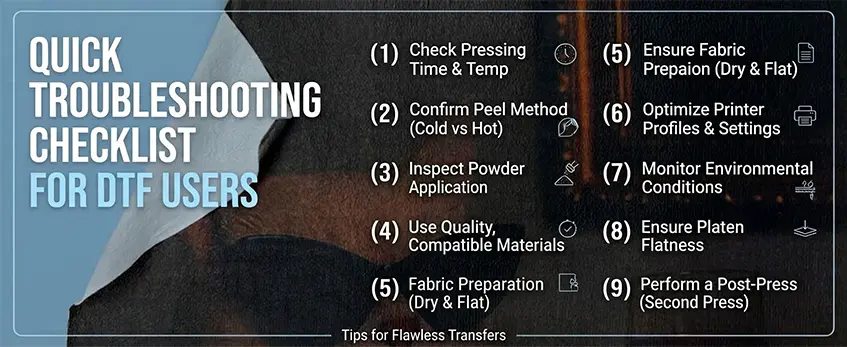
If your DTF transfer is not sticking, a clear troubleshooting checklist can save time and frustration. Follow this step-by-step diagnostic flow to pinpoint and fix common DTF adhesion problems:
Check Heat Press Settings
Confirm the temperature matches jinlong’s recommended range (usually around 160-170°C). Too low or high heat causes poor bonding. Calibrate your heat press regularly to maintain accurate temperature.
Verify Pressure Is Even and Firm
Uneven or weak pressure leads to patchy adhesion. Make sure the heat press platen is clean and adjust pressure to cover the entire design without crushing the garment.
Timing Matters: Pressing Duration
Stick with jinlong’s suggested pressing time (often 15-20 seconds). Pressing too short or too long can cause peeling or discoloration. Always test a cold peel after pressing for best results.
Evaluate Film Peeling Method
Avoid peeling the film hot unless the film specifically calls for it. Most jinlong DTF films require a cold peel to prevent lifting.
Inspect Powder Application
Uneven or clumped hot-melt powder reduces adhesion. Shake powder evenly before coating and cure it well with consistent heat.
Use Quality, Compatible Materials
Always opt for genuine jinlong transfer films, inks, and powders. Low-quality or expired materials often cause the DTF not bonding to fabric.
Confirm Fabric Preparation
Pre-wash garments to remove oils, dirt, or silicone treatments that block adhesion. Test on a cotton garment first before moving to blends or synthetics.
Optimize Printer Settings
Make sure ink saturation is sufficient on your jinlong printer profiles. Weak ink layers fail to hold powder well, increasing peeling risks.
Control Environmental Conditions
Keep humidity and temperature in check. High moisture slows drying and damages powder adhesion.
Avoid Uneven Surfaces
Do not press over seams, zippers, or pockets that create pressure gaps. Use presses pillows or inserts when necessary for a flat surface.
Perform a Post-Press/Second Press
A cold second press with parchment paper locks in adhesion and improves wash durability.
Following this checklist will help you identify why your DTF transfer isn’t sticking and guide you toward a solid, lasting print. For more tailored tips on jinlong DTF printing, explore resources like their detailed DTF transfer film options and troubleshooting guides.
Prevention Tips for Long-Term Success with jinlong DTF
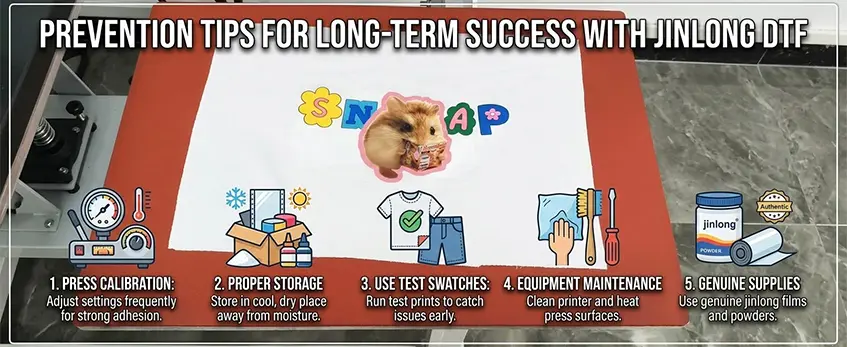
Keeping your jinlong DTF prints sticking strong over time starts with good habits. Here are key prevention tips to avoid common DTF adhesion problems and ensure your transfers last:
Regular Press Calibration: Check and adjust your heat press temperature and pressure frequently. Even small variations can cause your DTF transfer not sticking issues. Follow jinlong’s recommended DTF heat press settings to keep things consistent.
Proper Material Storage: Store your DTF films, powders, and inks in a cool, dry place. High humidity and temperature swings can ruin adhesive powders and films, causing poor bonding later on.
Use Test Swatches: Always run test prints on similar fabric before a full production run. This helps catch any printer settings or fabric prep issues early, so you won’t waste material or time with transfers that peel.
Equipment Maintenance: Keep your printer heads clean and your heat press platen free of residues. Dirty equipment can reduce adhesion by interfering with proper ink or powder application.
Use Genuine jinlong Supplies: Opt for authentic jinlong DTF transfer films and hot-melt adhesive powders for the best compatibility and adhesive performance. Using the right consumables is a solid defense against peeling or weak bonding.
Following these best practices helps you reduce common DTF transfer peeling causes and ensures your prints look great and stay put wash after wash. For premium supplies, check out the jinlong DTF transfer film series and the reliable TPU DTF hot-melt adhesive powder to keep your setup optimized.
Frequently Asked Questions
Why does my DTF peel after washing?
DTF peeling after washing often happens when the adhesive wasn\’t fully cured or the pressing time and temperature were off. Using the right jinlong DTF heat press settings and performing a proper second press after the initial transfer can lock the ink and powder in place, improving wash durability significantly.
Is polyester hard to bond with DTF?
Polyester can be tricky because its synthetic fibers sometimes repel adhesives, causing poor DTF adhesion. To fix this, pre-test the fabric and adjust your temperature and pressure settings. Pre-pressing the polyester garment to remove moisture and wrinkles also helps improve bonding. Using high-quality powders and inks designed for polyester, like genuine jinlong consumables, enhances the stickiness and wash resistance.
What’s the difference between hot peel and cold peel in DTF?
Peeling the film too early (hot peel) often leads to lifting and weak adhesion. A cold peel, where you wait for the transfer to cool completely before removing the film, prevents this issue. Testing your films with jinlong recommended processes can guide you on optimal peel timing.
How do I know if my powder application is right?
Uneven or sparse hot-melt powder results in poor bonding and patchy prints. The powder should evenly coat the ink layer without clumps or thin areas. Shake and cure the powder properly to ensure uniform coverage, which is key to solving most DTF powder not adhering problems.
Can environmental conditions affect DTF adhesion?
Absolutely. High humidity and improper storage of DTF materials can impact drying times and powder absorption. Keeping your workspace at an ideal temperature and humidity level helps maintain consistent DTF adhesion and print quality.
If you want to dive deeper into troubleshooting jinlong DTF printing, check out the detailed guides on jinlong DTF troubleshooting.





 English
 Español
 Deutsch
 Français