

No products in the cart.

Jinlong
What Is a DTF Printer with Shaker and Oven Complete Guide 2026
What Does “DTF” Actually Mean? (Direct-to-Film Explained in 60 Seconds)
DTF stands for Direct-to-Film, a printing method where designs are printed onto a special PET film before being transferred to fabric. Unlike direct-to-garment (DTG) printing, which prints directly on textiles, DTF prints the image first on film using inkjet technology, including white ink and CMYK colors.
Here’s the quick breakdown:
- Design is printed on clear PET film, not the fabric itself
- Special white ink is printed as a base layer to make colors pop on dark or light garments
- After printing, hot-melt adhesive powder is applied to the wet ink on the film
- The powder melts in a curing oven, bonding with the ink
- Finally, the print is heat-pressed onto the clothing, creating a durable, vibrant design
DTF is favored because it works on almost any fabric type, including cotton, polyester, blends, and more. Plus, it produces bright colors and feels soft to the touch. It’s one of the fastest-growing printing methods for beginners and pros alike, especially for small businesses looking for high-quality, versatile garment customization.
Bottom line: DTF means printing your design onto film, then transferring it to fabric. This method opens up more fabric options, vivid color results, and easier printing compared to traditional methods.
The 3 Core Components of a Full DTF System
A complete DTF printer setup includes three main parts that work together to create durable, vibrant transfers: the DTF printer, the powder shaker, and the curing oven.
The DTF Printer
This is the heart of the system. It prints your design onto a special PET film using CMYK plus white ink. Unlike direct-to-garment (DTG) printers, DTF printers are designed to lay down a precise layer of white ink first, which acts as an adhesive base for the colors. The printed film then moves on to the powder shaker. For a high-quality print, many use RIP software to control ink placement and white ink management.
The Powder Shaker
After printing, the wet ink on the film needs to be coated with a hot-melt adhesive powder. This powder sticks only to the wet ink areas. The shaker applies this powder evenly and removes any excess. Models range from manual to fully automatic. Modern powder shakers now include humidity control and powder recycling systems to reduce waste and ensure consistent application, which are becoming essential features by 2026.
The Curing Oven
The last step before transfer is curing the powder. The curing oven melts and activates the adhesive powder by heating the coated film at about 300–350 °F (150–175 °C). This process ensures that the powder will firmly bind to the fabric when heat-pressed. Ovens come in various designs—drawer style, vertical, or horizontal conveyor—with different heating methods like infrared or forced-air circulation to maintain even curing.
Together, these three parts form a complete DTF printing system capable of delivering high-quality transfers efficiently for apparel customization and more. For those looking for an industry leader, the jinlong DTF printer models offer reliable options that integrate well with quality powder shakers and ovens.
Detailed Breakdown – How Each Part Works

The DTF Printer
A DTF printer uses a unique printing process combining white ink with CMYK colors to produce vibrant designs. Unlike traditional textile printers, it prints onto PET film—not directly on fabric. This film acts as the carrier for the design, which you’ll later transfer to garments. The white ink is important because it acts as a base layer, making colors pop on dark or colored fabrics. Most modern DTF printers use RIP software to manage ink flow, color profiles, and white ink circulation. This software is essential for getting accurate colors and keeping the white ink from drying and clogging the printer. If you’re new to DTF, learning RIP basics will save you headaches.
The Powder Shaker / Applicator
After printing, the PET film is coated with a special hot-melt powder. This powder is what lets the ink bond with the fabric. When heated later, it melts and “glues” the design onto your garment. Powder applicators vary: manual, semi-automatic, and fully automatic shaker machines exist. Automatic systems are preferred in 2026 for consistent application, less powder waste, and easier handling. They also come with humidity control and recycling features—key must-haves to prevent powder clumping in humid environments and to reuse leftover powder efficiently. These features help keep running costs down and maintain print quality.
The Curing Oven
The final piece is the curing oven; it melts the hot-melt powder at temperatures between 300°F and 350°F to prepare the design for heat transfer. There are several oven types: drawer ovens, vertical ovens, and horizontal conveyor ovens. Each offers different advantages depending on your production volume and space. Drawer ovens are compact, ideal for small shops, while conveyors handle larger batches faster. Ovens also differ by heating method—infrared heats quickly and evenly, while forced-air ovens provide consistent airflow to cure powder thoroughly. Choosing the right curing oven impacts transfer durability and overall print quality.
For beginners, understanding these components and how they link together is crucial to getting started with a complete DTF printing system. If you want to dive deeper into printing on PET film and ink types, check out some detailed guides on DTF transfer films available here.
Step-by-Step DTF Printing Workflow

Here’s a simple breakdown of how a full DTF printer with shaker and oven system works, step by step:
Design → RIP Software → Print on Film
Start with creating your design in any graphic software. Then, send the design to your RIP software, which prepares it by handling color profiles and white ink layers. The printer lays down CMYK plus white ink onto a special PET film instead of direct fabric printing.
Automatic Powder Application & Excess Removal
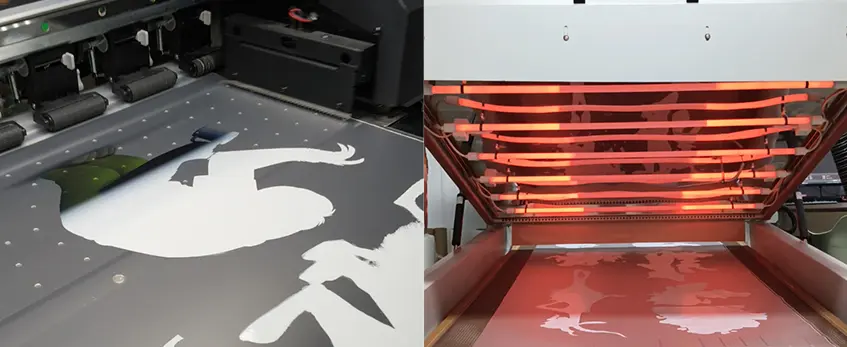
Next, the PET film moves into the powder shaker where hot-melt adhesive powder is evenly applied to the wet ink. The shaker vibrates to remove any excess powder, ensuring a smooth, even coating that sticks only where the ink is.
Curing / Melting the Powder
The powder-covered film passes through the curing oven, where heat melts the powder at about 300–350 °F. This creates a tacky, durable layer that will bond the print to the garment during pressing.
Heat-Press Transfer onto Garment
Place the cured film on the garment, then use a heat press to transfer the design. Heat and pressure activate the adhesive layer and embed the ink into the fabric.
Peel & Final Press
After pressing, peel the film from the garment while it’s hot or cold depending on the powder type. Then, a final press locks the design in place for durability and wash resistance.
This workflow is the backbone of DTF printing, ensuring vibrant, flexible prints ready for various fabrics. For beginners, mastering each step is key to producing quality, long-lasting transfers.
For more tips on using the right powder for vibrant and long-lasting prints, check out this guide on choosing the right TPU powder DTF.
Pros & Cons of a Full DTF Printer + Shaker + Oven System

When considering a full DTF printer with shaker and oven system, it’s important to weigh the benefits and limitations compared to other popular printing methods like DTG, screen printing, and sublimation. Here’s a straightforward comparison table to help you understand where DTF stands in 2026:
| Feature | DTF Printer + Shaker + Oven | DTG Printing | Screen Printing | Sublimation Printing |
|---|---|---|---|---|
| Print Quality | Vibrant colors, sharp details | Excellent, smooth color blends | Great for solid colors, less detail | Bright but limited to polyester |
| Fabric Compatibility | Works on cotton, polyester, blends | Best on cotton only | Works on many types but limited color ranges | Only polyester or polymer-coated |
| Setup Cost | Moderate to high ($4k-$12k+) | High initial cost | High upfront tooling cost | Moderate |
| Running Costs | Moderate (ink + powder + film) | High ink cost | Low ink cost but high labor | Low ink cost |
| Speed | Fast batch runs with automation | Slower per print | Fast for large runs | Fast for polyester items |
| Durability | Very durable and flexible prints | Durable but may crack on stretch | Extremely durable | Very durable on suitable fabrics |
| Ease of Use | Medium (requires learning powder & curing) | Easy to start but needs maintenance | Moderate — skilled labor required | Simple but fabric limited |
| Color Range | Full CMYK + white ink | Full CMYK + white ink | Limited to screen colors | Full CMYK but limited substrate |
| Maintenance | Requires shaker, oven upkeep | Requires regular printhead care | Screen prep & cleaning needed | Minimal ink system maintenance |
| Best For | Small to medium businesses wanting versatility | Small runs of cotton items | High volume, simple designs | Sportswear and polyester items |
Key Takeaways
- DTF systems with a dedicated shaker and oven excel in versatility and durability, making them ideal for varied garment types and small to medium shops.
- Unlike DTG, DTF handles polyester and blends well, while offering vibrant and lasting prints.
- Compared to screen printing, DTF has quicker setup and is better for complex, colorful designs but less cost-effective at very high volumes.
- Sublimation is great for polyester but lacks fabric versatility that DTF provides.
This balanced look at pros and cons helps clarify why investing in a complete DTF printing setup is a strong choice for many U.S.-based apparel businesses in 2026.
For a deeper dive on how DTF ink technology is shaping the textile printing industry, check out this detailed overview of how DTF ink is revolutionizing the textile printing industry.
How Much Does a Complete DTF System Cost in 2026?
If you\’re diving into DTF printing, knowing the costs upfront helps a lot. In 2026, complete DTF printer setups with a shaker and oven fall into three main price brackets:
Budget All-in-One (< $4,000): These compact systems are great for beginners or small hobbyist shops. They usually handle narrower print widths (up to 13”) and come with basic shaker and oven functions. You’ll get decent print quality but expect slower speeds and more manual work.
Mid-Range Systems ($5,000–$10,000): This is where the popular jinlong DTF lineup sits. These machines offer wider print widths (often 24”), better white ink circulation, automatic powder application, and more reliable ovens with temperature controls. They strike a solid balance for small to medium businesses wanting professional results without overspending.
Professional Setups ($12,000+): If volume and speed are your focus, the bigger 24”–32” printers paired with advanced auto-shakers and large curing ovens come into play. These are built for heavy-duty production, offering faster throughput, superior color management, and more consistent print quality.
Running Cost Per Print
Aside from the upfront cost, consider consumables and maintenance. Typical running costs include:
DTF powder: Around $0.20–$0.40 per print, depending on powder type and application efficiency. Using quality powders like TPU hot-melt adhesive powder helps improve durability and reduces waste.
Ink and film: Ink costs average $0.50–$1.00 per print; good quality PET films run about $0.20–$0.30 each.
Electricity & maintenance: Oven and printer electricity plus occasional parts replacement can add roughly $0.10–$0.15 per print.
Overall, you’re looking at roughly $1.00–$2.00 per transfer on average, depending on your print size and workflow efficiency.
Choosing the right system depends on your printing volume and budget. For most startups, a reliable mid-range setup like a jinlong DTF printer with shaker and oven offers the best blend of price, features, and support. You can see more about their 2026 features and options here.
What to Look for When Buying a DTF Printer with Shaker and Oven
When you\’re shopping for a complete DTF system, keep these key features in mind to get the best value and performance:
Print Width (13\” vs 24\”)
Choose your print width based on the size of the garments you plan to produce. A 13-inch printer is great for small to medium shirts, hats, and smaller items, while a 24-inch or wider model suits larger prints or higher volume jobs.
Auto-Cleaning & White Ink Circulation
White ink can be tricky since it tends to clog easily. Look for printers with built-in auto-cleaning cycles and continuous white ink circulation to keep your prints smooth, reduce downtime, and prolong nozzle life.
Shaker Features (Recycling, Humidity Sensor)
An advanced powder shaker with powder recycling cuts waste and cost. Also, make sure it has a humidity sensor or control system to keep the hot-melt powder in perfect condition – this is becoming a 2026 must-have for consistent print quality.
Oven Size & Temperature Consistency
The curing oven should be large enough to handle your typical transfer sizes without crowding. Consistent temperature control (300–350 °F) is crucial for properly melting the powder, so look for ovens with reliable sensors and stable heat distribution, like infrared or forced-air models.
Warranty & Local Support
Buy from a manufacturer or distributor that offers solid warranty coverage and responsive local support in the U.S. It saves time and money when you can get help quickly without long waits.
Consumables Availability
Check that inks, films, powders, and parts for your chosen system are easy to source locally or ship quickly within the U.S. Some brands are better stocked and make running your DTF printer smoother.
For a detailed look at recommended film types, check out this complete beginner’s guide to DTF film, which is essential for pairing with your purchase.
Choosing wisely upfront ensures your DTF printer with shaker and oven system fits your workflow and keeps production running hassle-free.
Top Recommended DTF Systems in 2026 (Including jinlong DTF)
If you\’re diving into DTF printing this year, picking the right system can really make or break your experience. Here’s a clear, no-nonsense comparison of the top DTF printer + shaker + oven combos available in 2026:
| System | Print Width | Powder Shaker Type | Oven Type | Price Range | Best For |
|---|---|---|---|---|---|
| jinlong DTF Series | 13\” – 24\” | Automatic w/ recycling | Forced-air conveyor | $5,000 – $10,000 | Small to medium shops, reliable support |
| Brand X Compact DTF | 13\” | Semi-auto | Drawer oven | <$4,000 | Budget setups, beginners |
| ProPrint 32\” Full Setup | 32\” | Automatic | Infrared conveyor | $12,000+ | Large volume, professional use |
What sets jinlong DTF apart for many small-to-medium apparel shops is its balance of price, reliability, and features tuned to real-world printing needs. The automatic powder shaker comes with humidity control and powder recycling – crucial for cutting waste and keeping prints consistent. Their forced-air curing oven heats evenly, speeding up drying time without risking fabric damage. Plus, jinlong’s local customer support in the US means less downtime and easy maintenance, a big deal for busy shops.
For those starting small but planning to grow, the jinlong DTF lineup offers scalable options, including compact A3 models ideal for tight spaces, and wider 24\” printers when your order volumes pick up. You can explore these options with confidence, knowing they’re designed specifically to fit the typical workflow and budget constraints of US-based businesses. Check out the jinlong A3 DTF printer detailed review and specs for more on their beginner-friendly machines.
In short, jinlong remains one of the most practical and well-rounded systems in 2026, especially for small-to-medium shops looking to enter or scale DTF printing without overspending or compromising quality.
Common Beginner Mistakes & How to Avoid Them (10 Quick Bullet Tips)
Starting with a DTF printer with shaker and oven can be tricky if you don’t watch out for common pitfalls. Here are 10 quick tips to keep your prints crisp and your workflow smooth:
Skipping Proper Ink Circulation: Always run the white ink circulation system or it will clog and cause print defects.
Using Wrong or Cheap Film: Stick to PET film designed for DTF to avoid poor adhesion and color fading.
Overloading Powder: Too much powder can cause rough prints and longer curing times. Follow powder guidelines carefully.
Ignoring Humidity Control: High humidity impacts powder sticking and causes clumping. Use a shaker with humidity sensors or keep the area dry.
Under-curing Prints: Not melting powder completely in the oven leads to cracking or powder fallout after transfer.
Poor RIP Software Setup: Misconfigured RIP settings can cause color shifts or banding on your prints.
Neglecting Regular Maintenance: Clean printer heads, shaker components, and the oven regularly to avoid breakdowns.
Skipping Test Prints: Always run test prints to adjust colors, powder amounts, and curing times before full runs.
Not Peeling Correctly: Peeling hot vs cold matters depending on your powder; follow the powder’s instructions carefully.
Ignoring Consumable Quality: Use quality inks, powders, and films—saving pennies here can cost you in the long run.
By avoiding these beginner mistakes, you’ll get the most out of your DTF system and deliver high-quality prints consistently. For more on maintaining your equipment and optimizing prints, check out these helpful DTF printer maintenance tips.
Maintenance & Daily Care Checklist
Keeping your DTF printer with shaker and oven in top shape means less downtime and better prints. Here’s a simple daily checklist to keep your system running smoothly:
- Check Ink Levels: Always monitor CMYK and white ink reservoirs. Running low on white ink can clog nozzles.
- Run White Ink Circulation: Most DTF printers need daily or every-other-day white ink circulation to prevent settling.
- Clean Printheads: Use automated or manual cleaning cycles to avoid clogged nozzles, especially white ink.
- Inspect Powder Shaker: Make sure the shaker is free of blockages and the powder flow is consistent. Check humidity controls if available.
- Remove Powder Residue: Clean excess powder from the shaker tray and surrounding areas after each batch.
- Oven Temperature Check: Verify the curing oven temperature settings before each use for consistent melting.
- Clean Oven Interior: Wipe down the oven interior regularly to remove any powder buildup or lint.
- Check Film Feed and Alignment: Ensure PET film rolls feed smoothly without wrinkles or jams.
- Run Test Prints Weekly: This helps identify any color or print quality issues early.
- Keep Work Area Dust-Free: Dust can affect powder adhesion and print quality, so a clean environment helps.
- Update Software and Firmware: Regularly check for updates to your RIP software or printer firmware.
- Log Maintenance: Keep a simple log of maintenance tasks to track issues or part replacements.
Following this maintenance routine extends the life of your complete DTF printing system and keeps prints consistent. For more detailed care tips, check out resources like the jinlong DTF printer support pages.
Frequently Asked Questions About DTF Printer with Shaker and Oven
Can I use a regular inkjet printer as a DTF printer?
No. Regular inkjet printers aren’t designed to handle the special white ink and PET film used in DTF printing. You need a dedicated DTF printer that supports white ink circulation and uses RIP software to control ink layering properly.
How long do DTF prints really last?
DTF prints typically last 30–50+ washes without major fading or cracking when properly cured and heat-pressed. The durability can sometimes match or even exceed DTG and screen printing, especially on various fabric types.
Is a separate shaker + oven better than an all-in-one DTF machine?
Separate components often offer better control and consistency. For example, standalone ovens usually provide superior temperature stability and larger capacity. A dedicated powder shaker with humidity control ensures even powder application and less waste, key for higher-quality prints.
What’s the difference between a drawer oven and a conveyor oven?
Drawer ovens are compact and affordable but limited in batch size. Conveyor ovens (horizontal or vertical) handle continuous production better and provide more even curing, ideal for busy shops.
Does humidity affect the powder application?
Yes. High humidity can cause the hot-melt powder to clump or stick unevenly. That’s why modern powder shakers include humidity sensors and recycling systems to maintain consistent quality.
Can I recycle unused powder?
Some powder shaker systems allow recycling unused powder, but it depends on the equipment. Recycling reduces waste but requires careful handling to avoid contamination.
What kind of maintenance does a DTF printer need?
Daily cleaning of white ink heads, regular nozzle checks, and using auto-cleaning functions are crucial to avoid clogging. Proper maintenance extends the printer’s life and print quality.
How much space do I need for a full DTF system with shaker and oven?
A compact setup usually fits in a 6×8 ft area, but a full professional system with larger ovens and automatic shakers may require a dedicated 10×15 ft workspace.
Are DTF prints suitable for all fabric types?
DTF works well on cotton, polyester blends, nylon, and even leather. It’s more versatile than sublimation, which is limited to polyester fabrics.
What’s the average print speed?
Basic A3-size DTF printers can print a garment in 3–5 minutes. Larger setups with faster ovens and shakers can boost output, reaching dozens of prints per hour.
Can I mix DTF printing with other methods like DTG or screen printing?
Yes. Many shops combine DTF for vibrant, durable prints on hard-to-print materials with DTG or screen printing for special effects or large volumes.
Where can I get reliable DTF consumables?
Suppliers like Jinlong offer professional-grade white ink, hot-melt adhesive powder, and PET films designed specifically for DTF printing. Check out their selection to keep your setup running smoothly.
For more in-depth answers, check out our DTF printing core process analysis and details on TPU hot-melt adhesive powder which are essential components of any quality DTF system.





 English
 Español
 Deutsch
 Français