



How to Print DTF on Black Shirts Using Hot Peel or Cold Peel Film
Printing vibrant, durable designs on black shirts can be tricky—but that’s where DTF printing shines. Whether you’re using hot peel or cold peel film, mastering the right technique with jinlong DTF materials can make all the difference in achieving sharp, crack-resistant results that stand out on dark fabric. In this guide, you’ll get a clear, step-by-step walkthrough on how to print DTF on black shirts—covering peel methods, optimal heat press settings, and troubleshooting tips so your transfers look professional and last wash after wash. Let’s get started and unlock the full potential of your DTF workflow!
Why DTF Printing Excels on Black Shirts
Direct-to-Film (DTF) printing is a standout choice for black shirts thanks to its opaque white ink base. This white layer ensures vibrant colors pop on dark fabrics, avoiding the dull or washed-out look common with other methods.
Fabric Compatibility
DTF works well on a variety of fabrics, including:
| Fabric Type | Compatibility |
|---|---|
| 100% Cotton | Excellent color vibrancy |
| Cotton Blends | Great balance of softness and durability |
| Polyester | Strong adhesion and bright prints |
Durability and Wash Performance
DTF transfers, especially those printed with jinlong DTF film and hot melt powder, are tested to withstand dozens of washes without cracking, peeling, or fading. Their flexibility keeps prints vibrant and soft over time.
DTF vs. Screen Printing and Vinyl
| Feature | DTF Printing | Screen Printing | Heat Transfer Vinyl (HTV) |
|---|---|---|---|
| White Ink Base | Yes, opaque and reliable | Requires separate white ink screens | Limited; often thick and stiff |
| Detail and Color | High-quality, full-color | High quality, but color layering complex | Usually limited to simple designs |
| Fabric Range | Wide (cotton, blends, polyester) | Best on cotton & blends | Works on many but less flexible |
| Durability | Excellent, flexible prints | Good, but can crack if fabric stretches | Prone to cracking and peeling |
Benefits for Custom Apparel Businesses Using jinlong DTF
- Consistent Quality: jinlong’s DTF film delivers reliable, vibrant prints with an opaque white base perfect for black shirts.
- Versatile Designs: Supports complex multi-color and gradient designs without extra setup.
- Efficient Production: Fast print-to-press turnaround and stable film/ink compatibility.
- Customer Satisfaction: Prints remain bright and durable, elevating your brand\’s reputation in custom apparel.
DTF printing with jinlong products provides an industry-leading solution for dark garment decoration that blends quality, versatility, and efficiency—ideal for propelling your custom apparel business forward.
Understanding Hot Peel vs. Cold Peel DTF Film
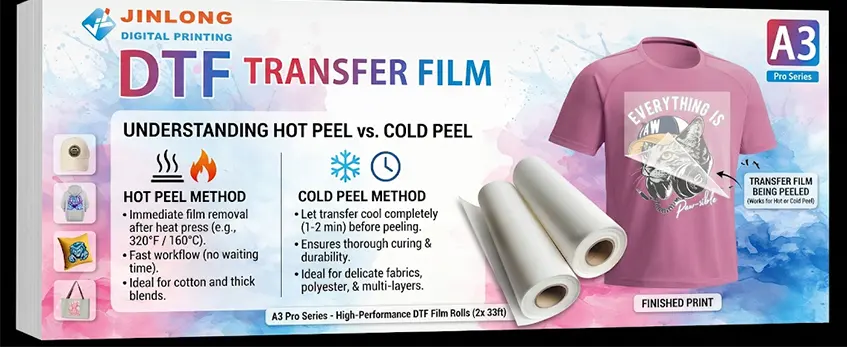
When printing DTF transfer on dark shirts, especially black, knowing whether to use hot peel or cold peel film makes a big difference.
Hot Peel DTF Film means you remove the film immediately after heat pressing while it’s still hot. Typical press settings are around 320°F (160°C) for 15-20 seconds with medium pressure. The main upside is a faster workflow—no waiting time to peel. But it can be a bit tricky on some fabrics, risking stretch marks or slight distortion if the peel is rushed. Hot peel works well with jinlong DTF film designed for quick release under heat, offering a smooth transfer on cotton and blends.
Cold Peel DTF Film means you let the transfer cool completely after heat pressing—usually around 1 to 2 minutes—before peeling the carrier film off gently. This method helps the ink and hot melt powder cure more thoroughly, which can improve durability and reduce cracking on soft or stretchy fabrics. Cold peel’s downside is it slows production, but it’s often preferred for polyester or delicate blends where gentle handling matters.
When to Choose Hot or Cold Peel for Black Shirts:
- Use hot peel for quick, crisp prints on cotton or thick blends where you need speed but good lasting quality.
- Use cold peel for delicate fabrics, polyester blends, or multi-layer designs demanding extra durability and softness.
Jinlong DTF film offers variants optimized for each peel type, making sure the film peels cleanly without residue or damage—key for professional results on black apparel. For specific details on jinlong film types and peel characteristics, check out their DTF transfer film options. This helps you match the right film to your fabric and project needs perfectly.
Materials and Equipment Needed for Printing DTF on Black Shirts
To get crisp, vibrant DTF transfer on dark shirts, you’ll need the right materials and gear. Start with jinlong DTF film variants, specially designed for clear, bright prints on black fabric. Pair this with a reliable DTF printer loaded with quality inks—especially white ink—to build that essential opaque base layer. Don’t forget jinlong’s hot melt powder, which is crucial for strong adhesion and durability of the transfer. You can check out detailed specs and uses of this powder on the official jinlong TPU DTF hot melt adhesive powder page.
For heat pressing, choose a heat press that can hold stable temperatures between 300°F to 320°F and apply even pressure. Accessories like a Teflon sheet or protective cover help prevent scorching and give you smooth finishes. Before printing, make sure your black shirts are clean, pre-washed, and free of fabric softeners or wrinkles to ensure the best ink adhesion.
Lastly, set up a workspace with good ventilation and wear gloves when handling inks and powders. Keep tools like a lint roller, heat-resistant tape, and a clean surface handy to streamline the process and maintain safety throughout your DTF printing workflow.
Step-by-Step Guide: Printing and Preparing the DTF Transfer
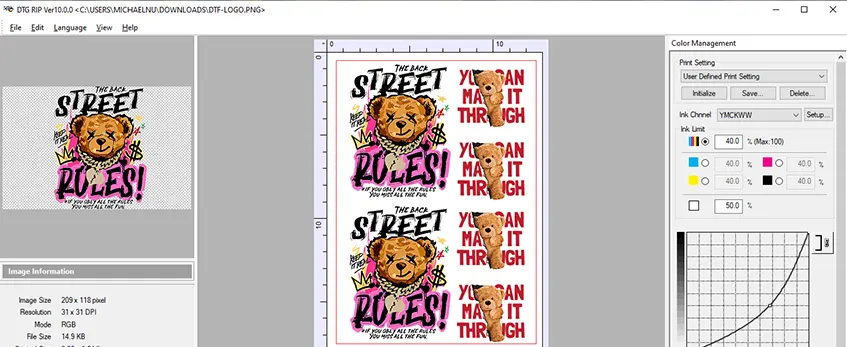
Design Prep and Color Management for Dark Shirts
Start by adjusting your design specifically for black shirts. Since dark backgrounds can dull colors, use a strong white ink base layer in your design to maintain vibrancy. Make sure your colors are vivid and saturated to stand out well against black fabric. Proper color management ensures your printed design looks bright and sharp once transferred.
Printing on jinlong DTF Film
Use jinlong DTF film designed for dark garments to achieve the best results. Load your design into the DTF printer, making sure to print the white ink layer first, followed by the color layers. Always print on the film with the correct side up to avoid transfer issues. This film works perfectly with jinlong DTF hot melt powder, creating a strong bond.
Applying and Curing Hot Melt Powder
Immediately after printing, evenly apply jinlong DTF hot melt powder onto the wet ink side of the film. Shake off excess powder carefully to ensure a consistent layer. The hot melt powder is crucial as it helps the design adhere securely to the fabric during heat pressing. After application, cure the powder by drying the film using a heat press or conveyor dryer set around 140–160°C (284–320°F). Proper curing is essential for durability.
Drying and Curing Techniques
Dry the prepared film completely to avoid smudging or spreading during transfer. Use a heat press or a drying oven for about 1 to 3 minutes depending on your equipment and powder layer thickness. Avoid over-drying as it can cause the powder to lose its stickiness. The right drying step leads to a flawless transfer on black shirts, enhancing the longevity and softness of the print.
For more detailed tips on using jinlong DTF hot melt powder and curing steps, check out the professional guidance on TPU DTF hot melt adhesive powder.
Applying DTF Transfer to Black Shirt: Heat Press Settings and Technique
Before pressing, always pre-press the black shirt for about 5-7 seconds. This step removes moisture and wrinkles, ensuring a smooth surface for the DTF transfer. Moisture in the fabric can cause dull colors or weak adhesion, so don\’t skip this part.
When placing your design, align it carefully on the shirt to avoid uneven prints. Use heat-resistant tape if needed to keep the transfer film in place during pressing.
Heat press settings vary depending on whether you use hot peel or cold peel DTF film:
- Hot peel: Set temperature to 320°F (160°C), press for 15-20 seconds with medium pressure.
- Cold peel: Press at 320°F (160°C) for 30 seconds, also with medium pressure.
After pressing, immediately peel off the film for hot peel transfers to prevent ghosting. For cold peel, let the shirt cool completely before gently removing the film.
Always use a protective sheet, like a Teflon or parchment paper, between the heat press platen and your transfer. This prevents damage to both your design and the heat press.
Following these heat press settings and techniques will help you achieve vibrant DTF transfer on dark shirts, especially when working with jinlong DTF film and powders. For a deeper dive into the DTF printing process step by step, you might find this resource helpful: how a modern t-shirt graphic printer can boost profit and efficiency.
Peeling the Film: Hot Peel or Cold Peel Process
When printing DTF on black shirts, knowing the correct peeling technique is key to getting crisp, durable prints.
Hot Peel Immediate Removal Technique:
With hot peel film, you remove the transfer film right away while it\’s still warm—usually just seconds after lifting the heat press. This quick peel prevents the adhesive from over-curing and keeps the ink sharp. Be sure to peel smoothly and steadily to avoid any stretching or lifting.
Cold Peel Cooling and Gentle Peeling:
For cold peel film, let the transfer cool completely before peeling. This usually takes a few minutes. Cooling allows the design and adhesive to set fully, reducing the risk of smudging or distortion. Peel gently at a slow pace to preserve the print quality.
Troubleshooting Peeling Errors:
If the design sticks to the film or parts lift off the shirt, you likely peeled too soon or the temperature/time was off.
Faded or patchy areas can result from uneven peeling pressure or incorrect curing of the hot melt powder.
For stubborn peeling, check if your heat press settings match jinlong DTF film requirements and adjust accordingly.
Post-Peel Secondary Pressing for Durability:
Once peeled, perform a quick secondary press with a protective sheet to boost adhesion and print durability. This step helps the ink bond deeper into the fabric and reduces cracking or peeling in the long run.
Mastering the right peel technique—whether hot peel or cold peel—is crucial for professional DTF transfer results on dark shirts. For detailed heat press settings and film info, make sure to review specific guidelines for the jinlong DTF film line.
Troubleshooting Common Issues on Black Shirts
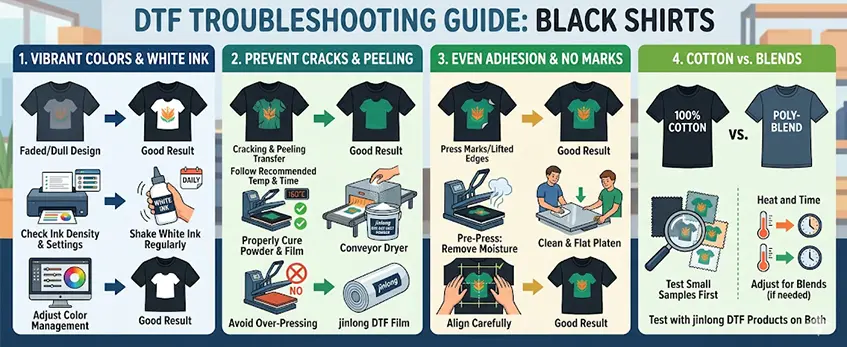
Printing DTF transfer on dark shirts like black ones comes with some unique challenges. Here’s how to handle the most common problems you might face:
Faded or Dull Colors and White Ink Problems
- Make sure you\’re using the right ink density and that your printer settings support vibrant DTF on black cotton or blends.
- White ink is key for opacity on dark fabrics but can sometimes look gray or blotchy if not printed correctly. Regularly shake and maintain your white ink to avoid settling issues.
- Adjust your color management settings to boost brightness without oversaturating.
Cracking, Peeling, and Stiffness
- These often happen when heat press settings aren’t right or when the adhesive powder hasn\’t cured properly. Follow the recommended temperature and time strictly for your jinlong DTF hot melt powder and film.
- Avoid over-pressing, which can make the print stiff and prone to cracks later on.
Press Marks and Uneven Adhesion
- Uneven pressure or moisture on the shirt can leave unwanted press marks or cause parts of the transfer to lift. Use a pre-press step to remove moisture and align your design carefully.
- Make sure your heat press platen is flat and clean for consistent pressure.
Fabric Differences: Cotton vs. Blends
- Cotton absorbs heat and ink differently than polyester blends, which impacts adhesion and color vibrancy. Jinlong DTF film works well on both, but blends might need slight adjustments in press time or pressure for optimal results.
- Test small samples on each fabric type before full runs.
jinlong Film-Specific Fixes
- Jinlong’s DTF film is designed for excellent peel characteristics, but if peeling issues arise, check if you’re using hot peel or cold peel properly.
- Visit this detailed guide on common heat press mistakes to troubleshoot adhesion problems specific to jinlong DTF film.
By paying close attention to these points, your prints on black shirts will stay vibrant, smooth, and durable.
Washing and Care Instructions for Long-Lasting Results
Keeping your DTF transfer on dark shirts vibrant and durable starts with the right care after printing. Here are some simple tips to ensure your prints last:
- First wash tips: Wait at least 24 hours after pressing before washing your black shirt with DTF transfer. This wait helps the ink fully set and prevents premature peeling.
- Detergent choice: Use mild, color-safe detergents without bleach or harsh chemicals. Avoid fabric softeners as they can break down the DTF film and reduce adhesion.
- Washing method: Turn the shirt inside out and wash it on a gentle, cold water cycle to protect the print and fabric.
- Drying methods: Air dry whenever possible, or use the tumble dryer on low heat. High temperatures can damage the DTF film and fade colors faster.
Expected Durability and Maintaining Vibrancy
Proper care can help your DTF prints maintain their vibrancy through 30+ washes, depending on fabric type—cotton shirts tend to hold color longer than polyester blends. Following washing and drying guidelines reduces issues like cracking, peeling, or stiffness.
Maintaining softness and brightness also depends on the quality of jinlong DTF powder and film used, so pairing good materials with these care steps gives you professional DTF results on black apparel every time.
For a deeper comparison of DTF with other transfer methods on dark garments, check out our detailed overview of DTF vs vinyl printing.
Advanced Tips and Best Practices for Printing DTF on Black Shirts
Scaling Production: Hot Peel vs Cold Peel
When growing your custom apparel business, choosing between hot peel and cold peel DTF film can impact speed and efficiency. Hot peel transfers dry instantly when pressed, perfect for fast turnaround and batch processing. Cold peel takes longer due to cooling time but often delivers better flexibility for detailed designs. For higher volume runs on black shirts, hot peel is usually your go-to for productivity without sacrificing quality.
Multi-Layer and Specialty Designs
Adding layers or specialty effects on black shirts requires careful planning:
- Use opaque white base layers with jinlong DTF hot melt powder for vibrant colors.
- Cure each layer fully before applying the next to avoid smudging.
- Consider cold peel film when working with multi-layered designs to reduce risks of peeling or cracking.
- For specialty finishes like metallic or glitter, test with small batches to find the right settings.
Testing on Various Black Fabrics
Black garments vary — cotton, blends, and polyester all behave differently with DTF printing:
- Cotton tends to absorb ink well, offering brighter colors.
- Blends can improve stretch but may require pressure adjustments during pressing.
- Polyester needs precise temperature control to avoid damage while ensuring adhesion.
Always run tests on your intended fabric type to adjust heat press settings and find ideal peel times for long-lasting, vibrant transfers.
Improving Softness and Stretch with Jinlong Powder/Film
One common challenge with DTF transfers on black shirts is maintaining fabric feel and flexibility. Using jinlong DTF hot melt powder optimized for stretch and softness helps:
- Reduces stiffness compared to conventional powders.
- Maintains breathability of the shirt.
- Enhances print elasticity, crucial for t-shirts used in activewear.
Pairing the right jinlong film variant with this powder improves overall comfort without compromising durability.
Environmental and Cost Considerations
When scaling DTF printing, keep an eye on both environmental impact and production costs:
- Jinlong DTF film and powders are designed for efficient curing, reducing wasted energy.
- Hot peel methods save time and reduce rejects, lowering material waste.
- Recycle leftover film scraps when possible to cut costs.
- Test different ink and powder combinations to find a balance between bulk price and performance.
For more advanced insights on maintaining color vibrancy and adhesion, exploring professional-grade solutions like the DTF Pro Ink can be a smart move to optimize results on black apparel in your production line.





 English
  Español
  Deutsch
  Français