



How to DTF Printing in 2026 Advanced Techniques Trends and Product Guide
Essential Equipment and Materials for DTF Printing in 2026
Getting started with Direct to Film (DTF) printing in 2026 means having the right gear and supplies—especially if you want reliable results and future-proof your shop. Here’s what you need to know about the latest DTF technology, consumables, and software.
Next-Gen DTF Printers: Print Head Tech and Features
The heart of any DTF setup is your printer. In 2026, next-gen DTF printers are all about speed, precision, and durability. Here’s what sets them apart:
- Advanced print heads: Look for models with multi-channel piezo printheads, white ink circulation systems, and anti-clog features for smooth, consistent prints.
- CMYK + White support: Essential for vibrant colors and sharp white underbases on PET transfer film.
- Auto-cleaning and maintenance: Reduces downtime and keeps printhead maintenance simple.
- High-res output: Up to 1440 DPI for crisp, detailed graphics—even on complex textile pigment ink designs.
If you want consistent quality, Jinlong DTF printers stand out for their robust print head engineering and reliable white ink management.
Consumables Checklist: Films, Inks, and Powder Types
DTF printing success hinges on using the right consumables. Here’s your 2026 essentials checklist:
- PET transfer film: Choose between cold peel and hot peel options depending on your workflow. Cold peel films offer sharper details; hot peel speeds up production.
- Oeko-Tex DTF ink: Go for certified, eco-friendly inks for safe, vibrant, and wash-durable prints. Jinlong DTF’s high-purity inks deliver consistent color and reduce printhead clogs.
- Hot melt powder: TPU powder is flexible and breathable—great for soft garments. PES powder brings extra durability for heavy-use items.
- Specialty films: Glitter, glow, and reflective films are trending for custom jobs.
AI-Assisted RIP Software and Color Management
Don’t overlook your software—it\’s just as important as your hardware. In 2026, AI-powered RIP (Rasterization software) makes file prep and color management smarter:
- DTF ICC profiling: Automated ICC profile generation ensures accurate color matching and consistency across batches.
- Rasterization tools: Handle high-resolution files with ease, optimize ink usage, and support CMYK + white workflows.
- Color management: Real-time color correction and ink volume control help avoid waste and keep your prints vibrant.
- Compatibility: Make sure your RIP software works seamlessly with your printer and supports the latest DTF techniques.
Pro tip: Jinlong DTF supports leading AI-assisted RIP solutions and offers technical support to keep your workflow smooth.
Bottom line: Invest in next-gen DTF printers, certified consumables, and smart software to stay ahead in 2026. Reliable brands like Jinlong DTF help you deliver top-quality Direct to Film transfers, every time.
Step-by-Step Guide: Modern DTF Printing Workflow
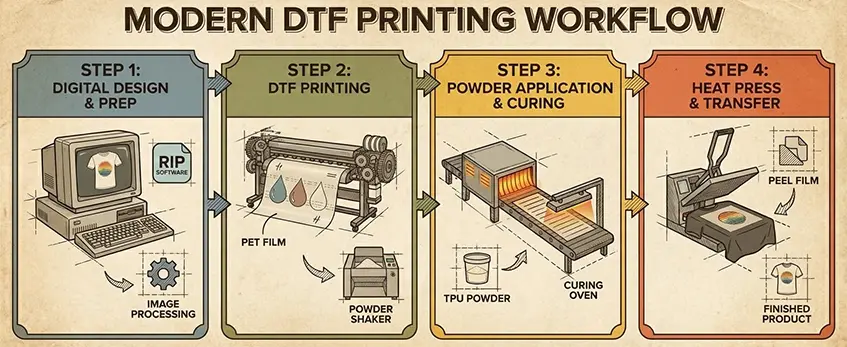
Ready to get pro results with DTF printing in 2026? Here’s a quick, easy-to-follow workflow that covers all the latest techniques and trends.
1. Advanced File Preparation
- Start with high-res files (300 dpi or better). This keeps your Direct to Film transfers sharp and vibrant.
- Rasterization matters—use AI-powered RIP software for smooth edges and detailed gradients.
- ICC profiles are key for color accuracy. Dial in your DTF ICC profiling to match your textile pigment ink and PET transfer film.
2. Printing Process: CMYK + White Underbase
- Set up your printer for CMYK plus a white underbase. This white layer makes colors pop, especially on dark garments.
- Control ink volume—too much ink can cause bleeding, too little means faded prints. Most next-gen DTF printers let you fine-tune this from the RIP.
- Keep your white ink circulation system running to avoid clogs and separation.
3. Powder Application: Manual vs. Automatic
- Manual powdering works for small runs, but for speed and consistency, automatic powder shakers are the way to go. Check out this DTF printer with powder shaker guide to see why automation improves print quality.
- Use anti-static tips—like grounding mats or anti-static brushes—to keep Hot melt powder TPU or PES from clumping.
4. Curing Techniques
- Set your DTF curing oven temperature between 320-350°F (160-175°C). Watch for visual cues: powder should melt clear and glossy, not burned.
- Dwell times matter—usually 2-3 minutes for even curing. Test and tweak based on your powder and film type.
5. Heat Pressing & Finishing
- Prep your garment: lint roll, pre-press for moisture removal.
- Use the right pressure settings for DTF—medium to firm, usually 40-60 psi.
- Try a second press after peeling (cold peel vs hot peel) to boost wash durability and smooth out the finish.
- Specialty films like glitter or reflective may need lower temps—always check the manufacturer’s guide.
With these steps, you’ll get consistent, pro-quality DTF prints every time. If you’re looking to upgrade your setup or troubleshoot powder application, see the best DTF powder options for small businesses for more tips.
2026 DTF Printing Trends and Innovations
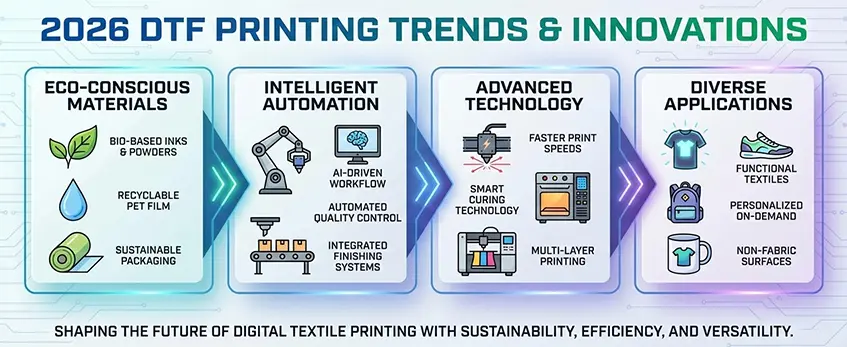
DTF printing in 2026 is all about smarter, more comfortable, and eco-friendly transfers. Here’s what’s changing:
Breathable DTF Techniques for Comfort
- New breathable DTF prints are a game-changer for everyday wear. Advanced textile pigment ink formulas and micro-perforated PET transfer film help keep garments feeling soft and airy—even after multiple washes.
- These techniques boost comfort without losing wash durability, which is huge for sportswear and casual tees.
Specialty Films: Glitter, Glow, Reflective
- Direct to Film transfers now go way beyond standard looks. Glitter, glow-in-the-dark, and reflective films are trending for custom apparel, safety gear, and event merch.
- Cold peel vs hot peel film options make it easy to get the finish you want, whether it’s a subtle shimmer or bold visibility.
Eco-Conscious Printing: Biodegradable Films & Waste Reduction
- Sustainability is front and center. Brands are switching to biodegradable PET transfer film and Oeko-Tex DTF ink to cut down on harmful chemicals.
- Waste reduction is easier with automatic powder shakers and smart curing ovens that optimize powder use. If you’re looking for eco upgrades, check out TPU DTF hot melt adhesive powder—it’s designed for clean, efficient transfers.
For more on how AI and automation are making DTF printing greener and smarter, see this guide to DTF automation and innovation in 2026.
The bottom line: 2026 DTF printing is all about comfort, creativity, and responsibility. If you want to stand out, keep an eye on these trends.
Troubleshooting Advanced DTF Issues
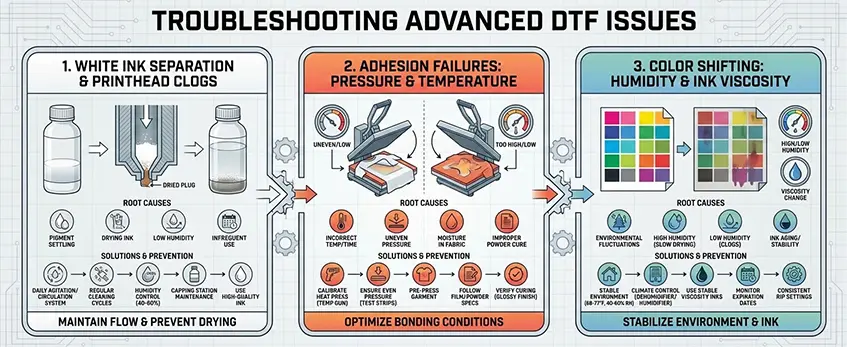
Even with the best DTF printers and consumables, sometimes things go sideways. Here’s how to tackle the most common advanced DTF printing problems in 2026:
White Ink Separation & Printhead Clogs
- Symptom: White ink looks streaky or fades, or your printhead keeps clogging.
- Fixes:
- Make sure your printer’s white ink circulation system is running 24/7.
- Use Oeko-Tex DTF ink and keep up with regular printhead maintenance.
- Flush lines and do nozzle checks daily, especially if you’re running jobs back-to-back.
- Store ink at room temperature to prevent separation.
Adhesion Failures: Pressure/Temperature Problems
- Symptom: Transfers peel or crack after pressing, or don’t stick well.
- Fixes:
- Double-check your heat press settings for DTF—pressure, temp, and dwell time matter.
- Use the right hot melt powder (TPU or PES) for your garment type. For example, TPU DTF hot melt adhesive powder works best for most cotton and poly blends.
- Make sure film is fully cured before pressing. If in doubt, do a wash durability test.
Color Shifting: Humidity & Ink Viscosity
- Symptom: Colors look off, especially on gradients or skin tones.
- Fixes:
- Keep your workspace at consistent humidity—aim for 40-60% to avoid ink viscosity issues.
- Use AI-assisted RIP software for better DTF ICC profiling and color management.
- If you see color shifting after curing, check your oven temperature and dwell time.
Staying on top of these DTF troubleshooting tips keeps your prints sharp and your customers happy. For more on DTF printing basics and how to avoid common mistakes, check out this DTF shirt printing beginner’s guide.
Why Choose Jinlong DTF for Future-Proof Printing
If you’re serious about Direct to Film transfers and want your business ready for what’s next, Jinlong DTF is a solid choice. Here’s why US print shops trust Jinlong for future-proof DTF printing:
Consistent Film Coating & High-Purity Inks
- Uniform PET transfer film: Jinlong’s Pro Series DTF transfer film offers reliable cold peel and hot peel options with consistent coating. This means better adhesion and less waste.
- Oeko-Tex certified DTF ink: Their high-purity textile pigment ink keeps colors sharp and prints safe for skin contact.
- White ink circulation system: Reduces clogs and keeps your printhead running longer.
Reliable Support & Supply Chain
- Fast US shipping: No waiting months for supplies. Jinlong keeps a steady inventory of TPU DTF hot melt adhesive powder and other essentials.
- Expert troubleshooting: Their team knows DTF ICC profiling, printhead maintenance, and heat press settings for DTF—so you get real help when you need it.
- Scalable solutions: Whether you’re just starting or scaling up, Jinlong’s support grows with you.
Jinlong DTF: Quick Comparison Table
| Feature | Jinlong DTF | Typical DTF Supplier |
|---|---|---|
| Film Coating Consistency | High | Varies |
| Ink Purity (Oeko-Tex) | Certified | Not always certified |
| White Ink Circulation | Yes | Sometimes |
| US-based Support | Fast & reliable | Often overseas |
| Supply Chain Reliability | Strong | May have delays |
Jinlong keeps the process smooth, from ordering consumables to troubleshooting advanced DTF issues. For US print shops looking to stay ahead of 2026 DTF printing trends, Jinlong is a future-proof partner.





 English
  Español
  Deutsch
  Français