



What Are DTF Machines A Beginner’s Guide to Direct-to-Film Printing
What Does “DTF” Actually Stand For?
DTF means Direct-to-Film printing. In simple terms, it\’s a method where your design is printed onto a special clear film first, then transferred onto fabric using heat. Think of it like printing stickers that stick perfectly on shirts, hoodies, or other textiles—but way cooler and more flexible.
Direct-to-Film Explained Simply
Unlike printing directly onto the fabric, DTF prints your design on a PET (polyethylene terephthalate) film using special inks. Then, a powder adhesive sticks to the wet ink. After curing the powder with heat, you press the design onto your garment. The result? A vibrant, durable print that works on almost any fabric: cotton, polyester, blends—you name it.
How DTF Stands Out: Quick Comparison with Other Methods
| Fonctionnalité | DTF | DTG (impression directe sur vêtement) | Sérigraphie | Impression sur vinyle | Sublimation |
|---|---|---|---|---|---|
| Type d'impression | Film transfer | Direct on fabric | Stencil process | Cut heat transfers | Dye infusion |
| Compatibilité des tissus | Coton, polyester, mélanges | Meilleur sur le coton | Many fabrics | Mostly cotton/poly | Polyester and light colors only |
| Vibration des couleurs | Haut | Haut | Haut | Haut | Haut |
| Sensation d'impression | Soft to slightly raised | Très doux | Variable | Thick and vinyl feel | Soft and embedded |
| Suitable for Dark Fabrics? | Oui | Oui | Oui | Oui | Non |
| Coût de la mise en place | Modéré | Haut | Haut | Faible à modéré | Haut |
| Vitesse de production | Modéré | Slow | Fast (bulk) | Modéré | Modéré |
| Meilleur pour | Small to mid runs, complex designs | Small runs | Grandes séries | Custom numbers, logos | Vêtements de sport en polyester |
So, if you want a versatile, vibrant, and cost-effective way to print on different fabrics, especially dark ones, DTF is a great choice.
In short: DTF combines the best of direct printing and heat transfer, letting you print crisp, colorful designs without the hassle DTG or screen printing often brings. And that’s why it’s exploding in popularity in 2026!
How Direct-to-Film (DTF) Printing Actually Works (Step-by-Step)
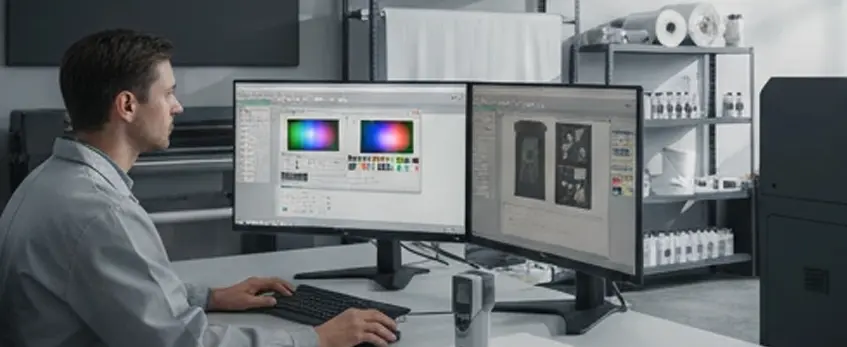
DTF printing sounds complex, but it’s pretty straightforward once you break it down. Here’s how the process works from start to finish:
Step 1: Design → RIP Software
You begin with your artwork or design file. This goes into RIP software, which prepares the image for printing by adjusting colors and layers to work with CMYK plus white ink. The RIP software ensures the printout will look vibrant and accurate when transferred.
Step 2: Printing on PET Film with CMYK + White Ink
Next, your design is printed directly onto a special PET film using a DTF printer. The printer lays down the color layers (Cyan, Magenta, Yellow, Black) plus a white ink base. The white layer is essential for printing on dark fabrics and making colors pop.
Step 3: Automatic Powder Shaker Applies Hot-Melt Adhesive
Right after printing, an automatic powder shaker coats the wet ink with a fine layer of hot-melt adhesive powder. This powder will help the print stick to the fabric during heat pressing. Using a quality Agitateur de poudre DTF ensures even application and less mess.
Step 4: Curing the Powder
Once coated, the film passes through a curing oven or drying unit to melt and set the adhesive powder. This step makes the powder ready to bond firmly to your garment when heat is applied.
Step 5: Heat-Press Transfer onto Fabric
Finally, you place the film on your fabric and use a heat press to transfer the design from the film to the garment. The heat activates the adhesive, locking the print firmly onto the fabric while maintaining a soft hand feel.
Understanding these steps helps you get the most out of your printer and produce vibrant, durable prints on cotton, polyester, and blended fabrics alike. For seamless printing results, using a reliable printer like the JL DTF602S model can make a big difference in quality and efficiency.
Core Components of a DTF Printing System

Starting with a solid Direct-to-Film (DTF) setup means knowing the key gear involved. First off, the Imprimante DTF is the heart of the operation. They come in common sizes like A3, A2, and A1 to fit different production scales. Popular choices include modified Epson models, such as those from the trusted Série jinlong DTF, known for reliability and consistent quality.
Next, an essential part is the powder shaker and curing oven. After printing onto a PET film, a hot-melt adhesive powder needs to be evenly applied and then cured. You can choose between manual or automatic powder shakers, depending on your budget and volume needs. Automatic systems speed things up, but manual units work fine for smaller runs.
A presse à chaud is the last big investment for transferring the design onto fabric. Size matters here — a press matching your print size (like 15×15 inches for A3 prints) works best to ensure even heat and pressure.
Finally, don’t forget the consumables and software: you’ll rely on quality DTF inks (CMYK + white), films, and powder for vibrant, durable prints. Proper Logiciel RIP is also crucial for preparing your designs and controlling print output. For example, jinlong offers professional-grade Encres DTF et de haute qualité films de transfert that ensure your prints come out sharp and long-lasting.
Getting your components right sets a strong foundation to build your DTF printing business efficiently in 2026.
Pros & Cons of DTF Printing (Honest 2026 Breakdown)
Direct-to-Film (DTF) printing is gaining momentum in 2026 for good reasons—but it’s not without its quirks. Here’s a clear look at the real advantages and disadvantages:
Avantages
- Works on a variety of fabrics: Whether it’s cotton, polyester, or blends, DTF handles them all well. This includes dark garments, where colors really pop.
- No pre-order minimums: Perfect for businesses that want to print on demand without large upfront commitments.
- Couleurs vives et durables : DTF prints offer bright hues with great wash fastness—lasting over 50 washes when done right.
- Douceur au toucher : Unlike some heavy transfers, DTF prints feel smooth and comfortable on the fabric.
- Flexibilité : You can print full-color, detailed designs including gradients and fine lines without extra screens or vinyl cuts.
Inconvénients
- Higher initial investment: Setting up a quality DTF machine and system can cost more upfront compared to simpler methods.
- White ink maintenance: White ink is essential in DTF but requires regular cleaning and care to avoid clogging and color issues.
- Powder mess: The hot-melt adhesive powder needs careful handling—expect some mess and the need for good ventilation.
- Courbe d'apprentissage : Getting the perfect print means mastering the steps—curing, powder application, and temperature settings take some practice.
All in all, DTF printing offers a strong option for those looking to diversify their printing capabilities in 2026, especially for small to mid-sized orders with vibrant, lasting results. Just be ready to invest time and resources upfront to get it right.
For a complete DTF setup, check out specialized supplies like Poudre adhésive thermofusible TPU that help ensure a clean, durable transfer.
How Much Does It Really Cost to Start DTF Printing in 2026?
Getting into DTF printing in 2026 can fit various budgets depending on your goals. Here’s a straightforward breakdown:
Budget Setup (< $2,000)
- Basic A4 or A3 DTF printer (often modified Epson models)
- Starter pack of DTF transfer film and hot-melt adhesive powder (check out options like DTF transfer film 33cm Single Pro Series)
- Manual powder shaker or a small shaker combined with a basic heat press
- RIP software (some free or low-cost versions available)
This setup works well for testing the waters or very small runs but may require more hands-on effort and maintenance.
Mid-Range Setup ($2,000 – $6,000)
- Larger A3/A2 DTF printers with improved stability and dual-head options
- Automatic powder shaker and curing oven to speed up production
- Mid-sized heat press (15”x15” or larger) for versatility
- Higher-quality DTF inks and films for consistent results (40cm Single Pro Series DTF films are popular here)
- Professional RIP software with color management
This tier fits small businesses aiming for moderate production volume without breaking the bank.
Professional Setup ($8,000+)
- Industrial-grade A1 or larger DTF printers (e.g., Jinlong DTF modified Epson models) with auto-cleaning and continuous ink supply
- Fully automated powder shaker and curing systems
- Large-format heat presses specialized for quicker transfers and bigger designs
- Premium inks, films, powders, and software licenses for top-tier color accuracy and durability
Geared towards businesses that want to scale up with fast turnaround and consistent output.
Cost Per Print Breakdown (Real Numbers)
- DTF Film : Around $0.30 to $0.50 per print, depending on size and quality
- Encre : Approximately $0.20 to $0.40 per print, factoring in CMYK + white ink usage
- Poudre adhésive : Roughly $0.05 to $0.10 per print
- Electricity & Misc: About $0.05 per print
All told, the average cost per printed shirt lands roughly between $0.60 to $1.00, making DTF printing competitive for small to mid-sized runs.
Starting smart means investing in reliable consumables like quality films and powders. For example, pairing your setup with trusted products like Jinlong’s Poudre adhésive thermofusible TPU DTF can save money and reduce issues down the line.
Best DTF Printers for Beginners in 2026
If you’re just starting with DTF printing, choosing the right machine is key to smooth sailing. The Jinlong DTF series stands out as a top pick for beginners in 2026. These printers offer a solid balance of stability, user-friendly support, and great value — perfect for small businesses or home setups.
What Specs Should You Focus On?
- Largeur d'impression : A3 or A2 size printers are great for most beginner projects. They offer enough space for standard t-shirt sizes without overwhelming your workspace.
- Print Heads: Dual-head models print faster but cost more. Single-head printers are slower but affordable and easier to maintain, making them ideal for learning.
- Auto-Cleaning Features: White ink clogs are a major headache in DTF printing. Printers with auto-cleaning systems reduce maintenance downtime and keep your prints consistent.
- Compatibilité : Make sure your printer works with reliable RIP software for smooth color management and design handling.
For a reliable entry into the DTF printing world, consider exploring the Jinlong DTF series—they’re designed with beginners in mind, combining ease of use with professional results.
Common Beginner Mistakes & How to Avoid Them
Starting with DTF machines can feel overwhelming, but knowing the common mistakes upfront can save you time and money. Here’s what beginners often trip over and how to avoid these pitfalls:
Using the Wrong Film Type
Not all PET films are created equal. Using low-quality or incompatible film can cause poor ink adhesion or fading. Stick with trusted films designed for DTF to get sharp, lasting prints.
Over or Under Curing the Powder
Curing the hot-melt adhesive powder too little results in weak transfers, while over-curing can make prints stiff or crack. Follow curing time and temperature guidelines closely, and run test prints to dial in the sweet spot.
Skipping Test Prints
Testing saves headaches. Always do small-scale test prints before running a full batch. This helps catch issues with design, color, ink flow, and curing before you waste materials.
Poor Ventilation in Your Workspace
DTF printing involves powders, inks, and heat presses which can release fumes or dust. Good airflow and ventilation protect your health and keep your workspace clean.
Using Cheap or Incompatible Ink
Low-quality ink may clog your printer heads or cause color problems. Invest in reliable DTF ink (like the high-quality options available for Imprimantes DTF) to ensure smooth operation and vivid results.
Familiarize yourself with these common mistakes to get the most out of your DTF printing setup from day one!
Is DTF Printing Right for Your Business?

DTF printing is a solid choice if you’re targeting small to medium runs with full-color designs, especially on dark garments or blends. It’s perfect for startups or growing businesses because you don’t need to pre-order large quantities. The vibrant colors and soft hand feel make it a favorite for custom tees, hoodies, and more without breaking the bank.
However, DTF isn’t ideal if you’re planning to mass-produce 10,000+ identical shirts—that’s where screen printing still shines for cost-efficiency. Also, if your market demands an ultra-soft retail feel (think premium retail t-shirts), DTF might not be the best fit since the print layer has a slight texture.
Overall, if flexibility, color vibrancy, and easy setup for varied designs matter most, DTF printing could be the right move for your business model.
Getting Started Checklist for DTF Printing (Free Downloadable PDF)
If you’re ready to dive into DTF printing, having a clear checklist can make all the difference. Here’s a simple rundown to get you started smoothly:
Must-Have Equipment:
- A reliable DTF printer (A3 size is great for beginners)
- PET transfer films (like the DTF transfer film 50cm standard series)
- Encres CMYK + DTF blanc
- Powder shaker (manual or automatic, depending on your setup)
- Curing oven or heat press (for powder curing)
- Heat press for transferring prints onto garments
- RIP software for printing management
Trusted Suppliers:
- Partner with suppliers specializing in DTF-specific consumables to ensure quality and consistency. For example, the Jinlong DTF film series offers excellent options for beginners and pros alike.
First Design Tips:
- Start with simple, colorful artwork to understand how colors translate on film.
- Test small prints before committing to a full run to avoid wasted materials.
- Avoid overly fine detail until you’re comfortable with the printer’s capabilities.
- Use RIP software features like color profiles and white ink layering for best results.
For easier access, you can download a free PDF checklist compiling these essentials and tips to take with you during your setup phase. This guide is a handy reference whether you’re starting at home or scaling up your small business.
Getting your DTF printing system right from the start means fewer headaches, happier customers, and better prints every time.
Frequently Asked Questions about DTF Printing
Puis-je utiliser une imprimante à jet d'encre ordinaire pour DTF ?
No, a regular inkjet printer won’t work for Direct-to-Film printing. DTF printers use special Epson-based printers modified to handle pigment or water-based DTF inks including white ink, which regular inkjets can\’t support. For a reliable start, check out recommended Imprimantes DTF pour débutants.
Quelle est la durée de vie des impressions DTF ?
DTF prints are extremely durable, typically lasting 50+ washes without fading, cracking, or peeling when properly cured and heat-pressed. This makes DTF ideal for everyday wear on cotton and polyester blends.
DTF est-il meilleur que DTG en 2026 ?
It depends on your needs. DTF is more versatile for dark garments, blends, and offers vibrant colors with a nice soft feel. DTG usually excels on 100% cotton light garments but can be more sensitive to fabric types and requires pretreatment. For an in-depth comparison, explore this detailed DTF vs DTG guide.
Do I need a special room or ventilation for DTF?
While DTF printing isn’t as harsh as screen printing, good ventilation is recommended, especially during powder application and curing, to reduce any airborne powder dust. A small, well-ventilated space is usually sufficient for most home or small business setups.
Can I print on hoodies, hats, and nylon?
Yes! One of DTF’s biggest strengths is its adaptability. It works well on hoodies, nylon, hats, and a wide variety of fabrics including cotton, polyester, and blends. Just ensure you use the right powder adhesive and curing process for each material.
For more tips on how DTF printing machines work and what you need to start, check out this straightforward DTF printing workflow overview.





 English
  Español
  Deutsch
  Français