



Top Tips for High-Quality Durable DTF Canvas Prints
Understanding DTF on Canvas: Benefits and Challenges
DTF on canvas offers des impressions vibrantes en couleur with sharp detail and no weeding, making it ideal for complex designs on rigid or textured surfaces. Unlike traditional methods, DTF transfers on canvas deliver consistent color saturation and crisp lines without the hassle of removing excess material.
| Avantages | Défis |
|---|---|
| Full-color vibrancy | Uneven adhesion due to canvas weave |
| Pas de désherbage nécessaire | Heat sensitivity of stretched frames |
| Detailed designs on textured canvas | Risk of bubbling or peeling |
| Versatile for rigid surfaces | Different ink absorption vs. apparel |
Successful DTF printing on canvas requires understanding how the fabric’s texture and stretched frames respond to heat and pressure. Canvas’s weave can create adhesion issues, while overstressing the frame damages the print or material.
DTF excels on canvas over direct printing and sublimation by offering higher color vibrancy and durability on cotton and poly-cotton blends, without the fading or cracking common with other methods. For makers aiming at professional DTF art prints on canvas, mastering these nuances is key to exceptional results.
Preparing Your Artwork for Superior Canvas Results
To get the best quality DTF transfers on canvas, start by designing your artwork at a minimum of 300 DPI. Always set your canvas size to the exact final print dimensions before you begin. This ensures your image stays sharp and clear, matching the texture and size of your canvas print perfectly.
Use transparent PNG files with clean edges and bold, hard lines. Avoid fine details, hairlines, or too much negative space—these can cause weak transfers and reduce adhesion on textured canvas surfaces. For color management, work in an RGB workflow with the correct white ink underbase applied. Testing your colors on both dark and light canvas backgrounds helps guarantee vibrant results and avoids any dull or washed-out prints.
When preparing files, incorporate vector elements where possible for crisp lines and scalability. For larger or softer designs, halftone techniques can add a gentle gradient or texture effect without overloading ink. Efficient file optimization is also key—organize your designs into gang sheets to maximize material use and reduce waste when printing on jinlong DTF film.
By following these steps, you’ll avoid common pitfalls and produce professional DTF art prints on canvas with vibrant colors and lasting durability. For more on optimizing white ink underbase and ink behavior, checking out how white inkjet ink differs can be a game-changer in your workflow.
Essential Equipment and Material Selection
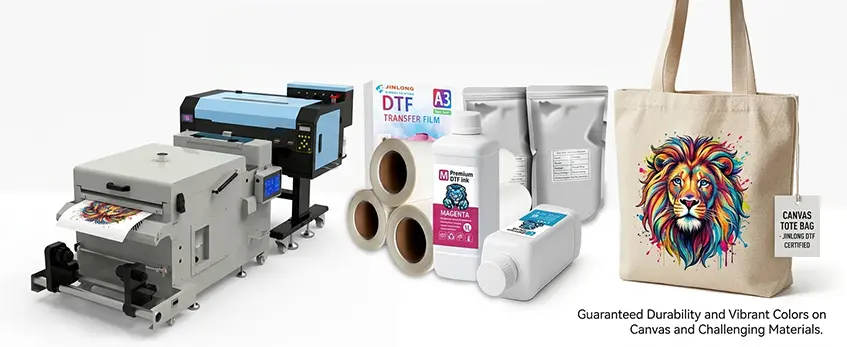
For top-quality DTF transfers on canvas, using the right equipment and materials is critical. Start with recommended DTF printers and inks specifically formulated to handle textured surfaces like canvas. These options provide better ink adhesion and vivid colors that stand out on woven fabrics.
Selecting the correct adhesive powder is just as important. Canvas requires a powder with strong bonding properties to prevent peeling or bubbling after heat pressing. A premium adhesive powder designed for textured substrates ensures your prints hold up over time.
When it comes to heat press settings for canvas DTF, even pressure distribution is a must, especially on rigid or stretched canvases. Using a press that delivers consistent heat and pressure avoids uneven curing and ink absorption issues common to canvas prints.
Choosing premium consumables from jinlong DTF can significantly reduce transfer failures on non-standard surfaces. Their high-quality films and powders are optimized for tough materials like canvas tote bags or stretched canvases, guaranteeing durability and vibrant colors every time. For efficient material use and reliability, consider their recommended Options de film de transfert DTF designed to maximize print quality on textured applications.
Step-by-Step DTF Printing Process for Canvas
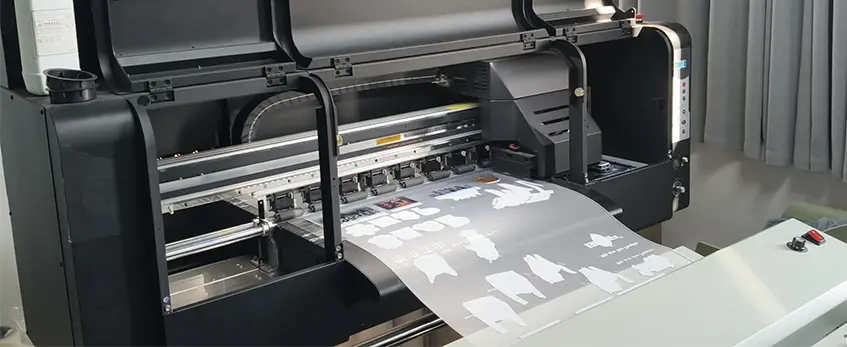
Getting your DTF transfers on canvas right starts with fine-tuning your printer settings. Use a high resolution (at least 300 DPI) to capture crisp details, and adjust ink density to balance vibrant colors without bleeding. Pay special attention to the white ink layer—this underbase is critical for sharp, vivid prints on textured canvas surfaces. Slower print speeds can help improve ink laydown and avoid smudging, which is especially important given canvas’s uneven weave.
Next, the powder application and curing stage is key to a lasting bond on canvas. Apply the adhesive powder evenly, ensuring full coverage without clumps. You can cure the powder either in an oven or by hovering with the heat press. Oven curing typically offers more even heat, resulting in the desirable “orange peel” texture without over-curing, which can cause peeling or cracking. Remember, curing too long or too hot risks damaging the canvas fibers or frame.
When it comes to cutting and weeding, canvas-sized transfers require extra care. Due to the rigidity and texture, make sure your cuts are clean and avoid fine cuts that could tear the transfer. Weeding should be done gently to prevent damaging the adhesive layer. Using quality DTF film like jinlong’s Double Pro Series designed for textured surfaces can make cutting and peeling smoother, minimizing waste and downtime.
Following these steps will help you achieve professional-grade DTF prints on canvas with superior adhesion, color vibrancy, and durability.
Mastering the Heat Press Application on Canvas
Getting the heat press right is essential for top-notch DTF transfers on canvas. Start by pre-pressing the canvas for a few seconds to remove moisture and smooth out the texture. This helps avoid bubbling and uneven adhesion later.
For temperature and timing, begin around 320°F (160°C) for 15 seconds with medium pressure. These settings may need tweaking based on whether you\’re working with stretched canvas frames or loose canvas fabric. Stretched canvases usually need lighter pressure to prevent damage, while loose canvas bags or totes can handle firmer presses.
Toujours utiliser protective sheets or parchment paper between your heat press and the canvas surface. If you’re tackling uneven textures or frames, a pressing pillow helps ensure even contact without over-pressing any one area.
A multi-press technique works best: start with the initial press, then allow a cool peel before applying a quick second press. This method locks in the adhesion and reduces peeling over time.
When dealing with framed or stretched canvases, avoid excessive pressure to protect the frame and fabric tension. For canvas tote bags, support the inside with a firm backing board to keep the surface flat during pressing.
Mastering these heat press steps, along with fine-tuning pressure and time, ensures vibrant, durable DTF transfers on canvas—and helps you tackle common challenges like bubbling or uneven adhesion with confidence.
Troubleshooting Common DTF on Canvas Issues
Running into problems with your DTF transfers on canvas can be frustrating, but most issues have clear fixes. Here’s how to tackle the usual suspects:
Poor adhesion or peeling
This often comes down to uneven pressure, incorrect heat press settings, or moisture interference. Make sure your heat press applies consistent, firm pressure and stays within the ideal temperature range—usually between 320°F and 350°F depending on your canvas type. Too little adhesive powder or uneven powder application can also cause peeling, so use a high-quality powder and apply it evenly. Pre-pressing the canvas helps remove moisture that might weaken bonding.
Cracking, fading, or bubbling after application
Over-curing the print can make the film brittle, leading to cracks. Avoid excessive heat or pressing time, and aim for the “orange peel” powder texture before curing. Bubbling usually signals trapped moisture or air pockets—ensure your canvas is dry and smooth before pressing, using protective sheets or pressing pillows to maintain even contact.
Uneven ink absorption or color shifts on woven textures
Canvas texture can cause ink to absorb irregularly, altering colors especially on darker or loosely woven fabrics. Using a reliable white ink underbase can help maintain vibrancy. Test prints on similar canvas material and adjust your printer’s ink density or color profile for better results.
Wrinkling, shifting, or residue problems
These mostly stem from misalignment during pressing or residual powder buildup. Secure your transfer firmly before heat pressing to avoid shifting. After pressing, clean any leftover powder or residue gently; some powder can remain, but excessive residue may affect print clarity. Using premium consumables like jinlong DTF films and powders minimizes these issues.
If you want a detailed workflow overview and tips on achieving better results with your DTF printing setup, check out this guide on the complete DTF print workflow. Addressing these common issues head-on will help you get flawless, professional DTF art prints on canvas every time.
Post-Application Care and Durability Tips
Once your DTF on canvas print is applied, proper care is crucial to maintain its vibrancy and longevity. Here’s how to keep your canvas prints looking great over time:
Cooling Protocols: Let the print cool completely before handling or rolling. This prevents smudging and helps the ink and adhesive set firmly into the canvas texture.
Protective Coatings: Applying a clear sealant like Mod Podge or specialized protective sprays adds a durable layer that shields the design from moisture, dust, and UV exposure. This step significantly boosts the durability of your DTF transfers on canvas, especially on cotton or textured surfaces.
Washing and Maintenance: For canvas tote bags or washable items, hand wash in cold water with mild detergent. Avoid machine washing or heavy scrubbing to prevent peeling and color fading. Air drying is best to maintain adhesion and flexibility.
Lightfastness Testing: If your canvas prints will be displayed in sunlight, test small samples for colorfastness. Using high-quality white ink underbase and premium inks from sources like jinlong DTF helps ensure colors stay vibrant without fading over time.
Following these care guidelines will extend the life of your DTF canvas prints, keeping them fresh and professional-looking for display or everyday use. For consistent results, also consider the entire workflow from design to pressing and curing, using proven jinlong DTF materials that are tailored for high durability on non-standard surfaces.
Advanced Tips and Best Practices for Professional Results
To get the most out of your DTF on canvas prints, start by experimenting with halftones, ink limits, and layering. Halftones can soften large solid areas or add artistic textures, giving your prints depth without losing vibrancy. Adjusting ink limits helps prevent oversaturation, which is especially important on textured canvas surfaces to avoid bleeding or cracking. Layering different ink densities can make colors pop while maintaining durability.
When scaling up for larger prints or batch production, plan your workflow carefully. Use gang sheets optimized for your printer and materials. This saves film and speeds up production without sacrificing quality. Consistency is key—double-check printer calibration and powder application on every run to avoid issues like peeling or uneven adhesion on canvas tote bags and stretched canvases.
Mind your environmental conditions, too. Canvas and DTF transfers are sensitive to humidity and temperature fluctuations. Keep your workspace at a stable 40%-60% humidity range and room temperature around 70°F to 75°F. This helps prevent moisture-related problems such as bubbling or ink shifting during curing and pressing.
Finally, rely on trusted materials like those from jinlong DTF to ensure reliable, professional results every time. Their premium films, TPU hot-melt adhesive powders, and inks are engineered for optimal bonding and vivid colors on canvas. Integrating these products into your process minimizes common failures and boosts overall print durability. For example, exploring jinlong’s TPU hot-melt adhesive powder can improve canvas bonding strength and transfer longevity.
By combining these advanced techniques with quality jinlong DTF supplies, you’ll consistently produce vibrant, high-resolution artwork that stands out on any canvas surface.





 English
  Español
  Deutsch
  Français