



How to Identify DTF Printer Ink Issues | Out of Ink vs Clogs Explained
If your Imprimante DTF is suddenly spitting out faint prints, streaks, or worse—nothing at all—you’re probably wondering whether it’s completely out of ink, just running low, or suffering from clogged nozzles. Knowing how to tell if your DTF printer is out of ink vs. clogged or low ink issues is key to saving time, materials, and avoiding costly printhead damage. In this post, you’ll get straightforward, practical tips to quickly diagnose what’s holding your prints back—and what to do next. Whether it’s stubborn white ink sedimentation or air bubbles messing with your flow, we’ve got you covered. Let’s get your printer running spotless again.
Key Diagnostic Tool: Running a Nozzle Check
One of the simplest and most effective ways to diagnose ink flow issues in your DTF printer is by running a nozzle check. This test prints a pattern that helps you quickly see how well each ink nozzle is working. Here’s how to do it step-by-step:
- Access your printer’s control panel or software.
- Find the option labeled “Nozzle Check” or “Print Test Pattern.”
- Start the test and wait for the printer to print the pattern.
When the nozzle check pattern prints, look closely at the lines:
- Solid, continuous lines mean your nozzles are firing correctly.
- Gaps, missing sections, or broken lines suggest clogged nozzles or ink flow problems.
A perfect nozzle check shows clear, unbroken lines for every color channel, including the tricky white ink if your printer supports it. If you see missing stripes or faded areas, that’s a sign your printer needs some attention—either due to low ink, clogging, or both.
L'utilisation de la DTF printer nozzle check regularly helps catch problems early, saving you time and frustration before they affect your print quality.
Signs Your DTF Printer Is Completely Out of Ink
One of the clearest signs your DTF printer is completely out of ink is when you see printer error messages or blinking ink lights that indicate empty ink tanks. Most modern DTF printers come with built-in sensors that alert you when an ink tank is empty or critically low.
If your printer shows no ink output at all—even during cleaning cycles—this is another strong hint that the ink is finished. During a cleaning cycle, ink should still flow to clear nozzles, so zero output means the tanks might be dry.
Check the Continuous Ink Supply System (CISS) tanks visually. If you notice empty or near-empty tanks, especially on one or more colors, that confirms the issue.
In some cases, specific colors might be completely missing during prints. For example, one channel won’t print at all and won’t respond to ink charging or priming attempts. This is a major red flag that your printer is out of ink in that color channel.
For more on how to properly diagnose ink issues and improve print quality, check out this detailed Guide des machines d'impression DTF pour les débutants.
Signs of Low Ink Levels (Not Fully Empty)
Low ink levels in your DTF printer often show up as faint or inconsistent color density in your prints. You might notice that colors look washed out or uneven, especially on larger images. Many printers also have warning lights or software alerts to let you know when ink is running low, so keep an eye out for those—ignoring them can lead to bigger problems.
Another sign is air bubbles in ink lines, which cause ink flow to be intermittent. These bubbles disrupt the steady movement of ink, leading to patchy print results. This is especially common in white ink channels, where low volume often causes white ink to look thin or patchy. White ink sedimentation or separation worsens this effect, making it clear you need to check your ink levels and possibly agitate or prime the lines.
If you want to maintain vibrant prints and avoid these issues, regularly monitor your ink supply and keep your DTF white ink fresh by shaking it well before use. For detailed printing and testing tips that help catch these problems early, you can check out the best practices for printing and testing a DTF color chart at Jinlong Prints.
Signs of Clogged Nozzles or Printhead Issues
One of the most common DTF printer nozzle check alerts for clogged nozzles is missing lines or gaps in the pattern, indicating partial or full blockages. You might also see streaks, banding, or colors that look off in your prints—these are classic clogged printhead symptoms.
A key hint is when ink flows during cleaning cycles but fails to print properly. This often happens because cleaning pushes ink through, but the printhead can’t maintain flow during actual printing.
White ink is especially prone to issues. Its pigment particles can settle and cause sedimentation, leading to temporary clogs that might clear up somewhat after shaking or agitating the white ink. This kind of DTF white ink problem requires regular attention to keep your prints sharp and consistent.
Maintaining a regular cleaning routine and using quality inks like those from Jinlong Prints help prevent these clogs and keep your printhead working smoothly. For more tips on avoiding common print issues, check out our detailed DTF printer troubleshooting guide.
Out of Ink vs. Clogged: Quick Comparison Table

| Enjeu | Symptômes | Nozzle Check Appearance | Initial Fixes |
|---|---|---|---|
| Out of Ink | – Printer error or blinking ink lights – No ink output during cleaning – Empty tanks visible – One color channel missing completely | – Entire nozzle lines missing on one or more colors | – Refill empty ink tanks – Check CISS system for leaks – Perform an ink charge or priming cycle |
| Low Ink Levels | – Faint or inconsistent colors – White ink looks thin or patchy – Ink warnings from software | – Nozzle check shows weak or faded lines | – Refill ink before fully empty – Shake or agitate white ink – Run soft cleaning cycles |
| Buses bouchées | – Missing lines or gaps in prints – Streaks or banding – Ink flows in cleaning but not printing – White ink sedimentation | – Partial or full blocked nozzle lines (gaps within lines) | – Run multiple cleaning cycles carefully – Agitate white ink – Use manual syringe purge if needed |
This table helps you quickly spot if your DTF printer issues are due to being out of ink or clogged nozzles. If you’re seeing no ink at all plus error messages, focus on refilling first. But if the print fades or shows streaks with some ink still flowing during cleanings, clogged nozzles are likely the culprit.
For ongoing support, make sure to use high-quality inks like Jinlong DTF to reduce sedimentation and improve ink flow. You can also check resources on DTF printer troubleshooting for more detailed steps.
Step-by-Step Troubleshooting Guide
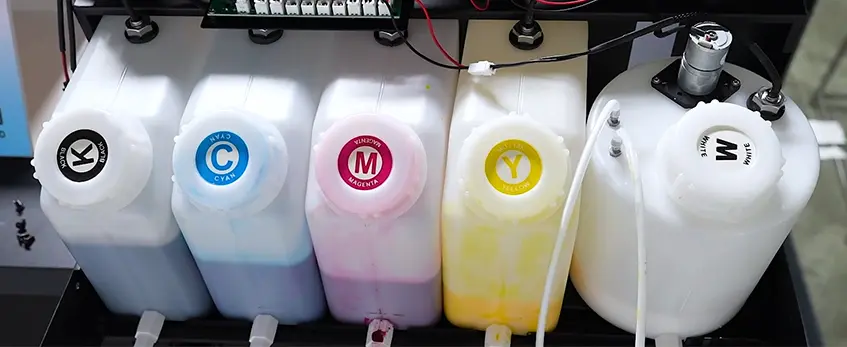
When your DTF printer shows signs of low ink or clogs, here’s a clear way to troubleshoot and get back to smooth printing:
Check ink levels first. Open your tanks to see if any colors are empty or near-empty. Always refill with high-quality inks like jinlong DTF ink for consistent flow and fewer clog issues.
Agitate the white ink well. White ink tends to settle and cause sedimentation. Give the bottle or tank a good shake, then prime the ink lines to ensure smooth white ink flow.
Run cleaning cycles carefully. Use your printer’s cleaning utility to clear minor clogs. But don’t overdo it—excessive cleaning wastes ink and can shorten printhead life.
Try manual fixes. Use a syringe to pull out air bubbles from the dampers or ink lines, and check for any visible leaks or loose connections that might disrupt ink flow.
Know when to escalate. If you’ve run multiple cleaning cycles without improvement, or the nozzle check still shows missing lines, it’s time to consult a professional or consider replacing parts like the printhead or dampers.
For more on maintaining smooth ink flow and avoiding clog problems, using premium inks like the ones described in DTF ink compatibility: everything you need to know can help keep your printer running longer and cleaner.
Preventing Low Ink and Clogging Problems
Keeping your DTF printer running smoothly starts with regular care. Establish a daily or weekly maintenance routine that includes running a DTF printer nozzle check and shaking the white ink bottles well to prevent sedimentation. Also, control your workspace environment—maintain humidity between 40-60% to avoid ink drying inside the nozzles or lines.
Utilisation premium DTF inks, like those from Jinlong, lowers the chance of clogs and sediment buildup, especially in white ink channels. Always keep your ink tanks at least one-third full to ensure consistent ink flow and reduce air bubbles in ink lines, which can cause intermittent printing issues.
If you don’t use your printer often, consider setting up a circulation system to keep the ink moving or follow a proper shutdown procedure to protect the printhead and dampers from drying out or clogging, saving you time on future troubleshooting. For reliable ink performance and fewer maintenance headaches, using high-quality supplies and sticking to these habits is key. You can find premium ink options suited for your printer on the Jinlong DTF ink Pro Series product page.
When to Seek Professional Help or Replace Parts
If your DTF printer shows no improvement after multiple deep cleaning cycles and priming attempts, it’s a clear sign of permanent damage. Persistent clogged printhead symptoms, missing colors in DTF prints, or constant ink flow issues despite proper maintenance usually mean some parts need replacing.
Common replacements include:
- Dampers: These control ink flow and can clog or leak over time.
- Tête d'impression : The core component that may suffer permanent nozzle damage or clogging beyond cleaning.
- Waste ink pad: If saturated, it can cause error lights and affect print quality.
At this stage, it’s best to contact a professional technician familiar with DTF printer troubleshooting. They can accurately diagnose and fix deep-seated problems, ensuring your printer returns to optimal performance. For ongoing care, consider using premium Encres DTF and following recommended printer maintenance tips to prevent future damage.





 English
  Español
  Deutsch
  Français