



How to Tell If Your DTF Printer Is Out of Ink Despite Full Levels
Common Reasons DTF Printers Show False Ink Levels
It’s frustrating when your DTF printer indicates there’s plenty of ink, but your prints suggest otherwise. False ink level readings happen for several reasons, and understanding these can save you time and wasted materials.
Air bubbles or leaks in ink lines: Air trapped in the DTF ink lines can disrupt ink flow, causing the printer to misread actual ink levels. These bubbles lead to inconsistent printing and false low ink warnings even when tanks aren’t empty.
Pigment settling, especially in white ink channels: White ink in DTF printers tends to settle or separate over time. This pigment settling can block ink flow, resulting in false ink level readings and print issues like weak white underbase or fading.
Clogged dampers, filters, or printhead nozzles: Dirt, dried ink, or residue can clog the dampers and printhead nozzles. Such blockages interfere with ink delivery and cause the printer’s sensors or RIP software to report incorrect ink amounts.
Software/RIP glitches or uncalibrated sensors in modified setups: Sometimes, inaccuracies come from the software side — your RIP might have glitches or your sensors may need recalibration. This is common with customized or older jinlong DTF setups where monitoring isn’t perfectly aligned with physical ink levels.
Low ink pressure from improper tank height or partial blockages: If your ink tanks aren’t positioned correctly, or if there’s a partial blockage in the tubing, ink pressure drops. This low pressure mimics an empty tank to your printer, triggering false low ink alerts despite having usable ink.
Recognizing these common causes of false ink levels helps you troubleshoot faster and keeps your DTF printer running smoothly with accurate ink monitoring.
Visual and Print Quality Signs Your Ink Is Actually Low
Sometimes your DTF printer may say it has enough ink, but the print quality tells a different story. Watch out for faded or missing colors, especially the white ink underbase. A weak white layer often leads to cracking or peeling transfers on garments. You might also see streaks, bands, or uneven coverage in prints—even if your nozzle checks look all clear.
Another big red flag is thin or patchy white ink layers on dark fabrics, which usually means your white ink supply is running low or the ink flow is inconsistent. If the printer starts skipping sections or produces incomplete test patterns, it’s a clear sign of low ink or possible clogging in your printhead. These are classic DTF printer streaky prints et DTF white ink not printing problems you don’t want to ignore.
For more details on preventing print issues related to ink flow, you can check out tips on DTF powder shaker troubleshooting and common issues. Keeping an eye on your print quality saves time and keeps your prints sharp.
Step-by-Step Ways to Check Actual Ink Levels
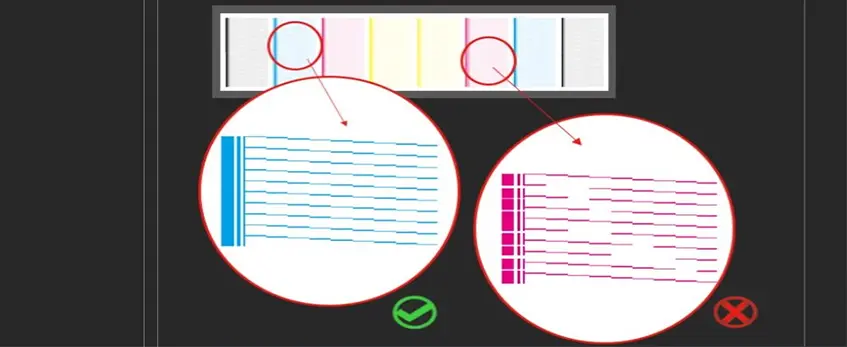
When your DTF printer shows ink levels but you suspect it’s actually low, a hands-on check is the best way to confirm. Follow these simple steps to verify your real ink supply:
Visually inspect ink tanks or bottles: Start by checking the fill lines carefully. Give the tanks a gentle shake to see if pigment has settled, especially in white ink, which tends to separate over time. Settling can make the ink level look higher than it really is.
Examine ink lines and dampers: Look closely for any air bubbles, gaps, or signs of backflow in the ink lines and dampers. Air in DTF ink lines can disrupt flow and create false ink readings.
Run multiple nozzle checks: Print several nozzle checks in a row. Missing segments or fading patterns that worsen over repeated tests often signal low ink or partial clogging in your printhead.
Perform head cleanings and watch waste ink output: Execute cleaning cycles and observe how much waste ink is expelled. If the waste ink volume is unusually low, it might mean the ink is not flowing properly from the tank.
Manual syringe ink pull: Using a clean syringe, gently draw ink from the dampers or tubing to confirm if ink is physically present and moving. This hands-on test can catch blockages or dried ink that sensors miss.
These steps help you diagnose your true ink status beyond the printer’s monitoring system. Regular checks like these prevent wasted prints and keep your colors vibrant—especially critical for maintaining a strong white underbase on dark garments.
For more on maintaining your print quality and ink flow, consider following trusted maintenance tips and product recommendations designed specifically for jinlong DTF systems.
Quick Diagnostic Tests to Confirm Low Ink
When you\’re unsure if your DTF printer is really low on ink despite what the monitor shows, running these quick diagnostic tests can help confirm the issue:
Print solid color blocks (CMYK + white): Printing dense, solid patches lets you see if any colors, especially the white ink, are fading or losing density. A drop-off in color intensity signals low ink or poor ink flow.
Test ink circulation: Give the white ink a good shake or agitation in the tank, then re-run nozzle checks. Freshly mixed white ink often clears up clogged lines or settles pigment causing weak white underbase prints.
Check for error lights or software alerts: Sometimes your printer or RIP software will warn about ink flow issues beyond normal low ink levels. Scan for unusual alerts that may point to air bubbles, clogged dampers, or sensor glitches.
Compare against jinlong DTF recommendations: Always refer to jinlong DTF\’s guidelines on maintaining proper tank fill levels and circulation for optimal ink flow. Ensuring you meet these standards helps avoid false ink level readings and print quality problems.
These steps are essential for finding real ink level issues versus false ink level DTF alerts caused by hardware or software hiccups. For more tips on proper setup and maintenance, jinlong’s detailed XP600 DTF printer setup and maintenance tips for beginners peut être une ressource utile.
How to Fix False Readings and Restore Ink Flow
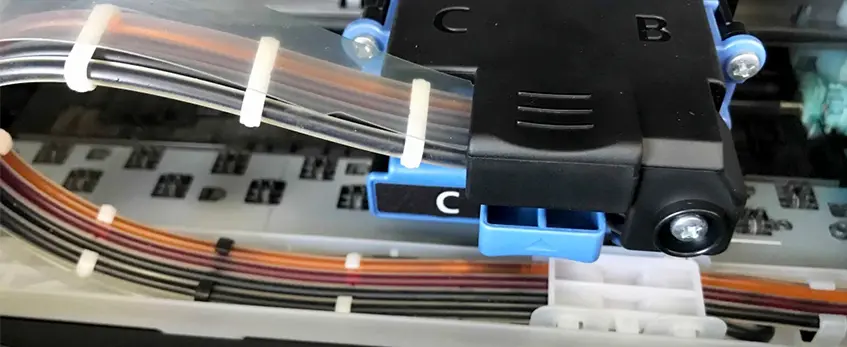
If your DTF printer is showing false ink levels or experiencing low ink flow despite full tanks, here’s how to get things back on track:
Prime the ink lines and remove air: Use a syringe or the printer’s power cleaning function to push ink through the system. This helps clear out air bubbles in the dampers or ink lines that often cause inaccurate DTF ink monitor readings and weak white underbase issues.
Flush and refill with fresh ink: Old or settled pigment, especially in white ink, can clog nozzles and dampers. Flush the system and fill with high-quality DTF ink compatible with your printer (like those recommended for jinlong DTF models) to ensure smooth flow and consistent print quality.
Clean dampers, wipers, and the capping station: These parts tend to build up dried ink residue that disrupts ink flow and triggers false low ink signals. Regular cleaning restores proper ink circulation and prevents printhead clogging.
Adjust your RIP software settings: Sometimes, software glitches or uncalibrated sensors cause inaccurate DTF ink level warnings. Double-check your settings to ensure your RIP software is correctly tracking real ink levels and circulating ink properly.
Know when to replace parts: If you still see air bubbles in dampers, persistent streaky prints, or ongoing ink flow problems, it might be time to swap out dampers, ink tubes, or filters. Worn components reduce ink pressure and lead to false low ink alerts and weak white ink coverage.
Following these steps helps maintain proper ink flow and reliable ink level monitoring so your DTF printer delivers clean, vibrant transfers every time. For best results, pair this with a routine maintenance schedule tailored to your specific printer model.
Preventing Inaccurate Ink Readings in Your DTF Printer

Keeping your DTF printer’s ink levels accurate starts with a solid daily maintenance routine. Shake or agitate the white ink well each morning to avoid pigment settling, which is a common cause of false ink level readings and weak white underbase prints. Always run nozzle checks to spot any fading or clogging early before it impacts your print quality.
Use only premium inks that are fully compatible with your jinlong DTF system. Cheap or off-brand inks can cause clogging and inaccurate DTF ink monitor readings, leading to printhead clog and low ink flow issues.
Maintain your printing environment within the ideal temperature and humidity range. High or low temps cause inks—especially white ink—to settle or dry inside the lines, increasing air bubbles and false low ink alerts.
Stay proactive about monitoring your ink consumption. Don’t wait for warnings—refill your DTF ink tanks before the levels get too low to avoid unexpected downtime and streaky prints.
For jinlong DTF owners, take advantage of the built-in circulation features designed to keep white ink moving smoothly through the system, reducing sediment buildup and preventing false ink level notifications. Using these features alongside regular maintenance will help avoid inaccuracies in your printer’s ink status and keep your prints vibrant and consistent.
For detailed care tips and recommended inks, check out the guide on comment choisir la meilleure imprimante à encre DTF pour des impressions éclatantes et durables.
When to Seek Professional Help or Replace Ink Components
If you’ve tried all the basic fixes and your DTF printer still shows false ink levels or weak white underbase print issues, it’s time to get professional help. Persistent ink flow problems, clogged printhead nozzles, or repeated streaky prints that don’t go away after cleaning often signal deeper hardware problems.
Watch out for signs of printhead damage caused by dry running — this can cause permanent failure and costly repairs. If your printer frequently drops ink, shows faded nozzle checks, or gives inaccurate DTF ink monitor warnings despite proper maintenance, replacing parts like dampers, filters, or ink lines might be necessary.
For reliable ink management and fewer false ink level alerts, consider upgrading to a jinlong DTF system. Jinlong printers come with built-in circulation features and better sensor calibration, helping to avoid many common DTF ink flow problems and maintenance headaches. You can explore detailed troubleshooting tips and maintenance advice on the jinlong troubleshooting guide to keep your printer running smoothly.





 English
  Español
  Deutsch
  Français