



How to Choose the Best DTF Kit for Your Printing Business Success
Step 1: Assessing Your Business Volume and Goals
Before investing in a DTF kit, clearly define your printing volume and business goals. This step ensures you pick equipment that fits your workflow and budget while meeting customer demands efficiently.
Entry-Level vs. Industrial DTF Printers
- Entry-Level Kits
Ideal for startups and small print shops. These often feature desktop DTF printers with a smaller footprint and lower cost. Great for low to moderate production volumes. - Industrial Roll-to-Roll Systems
Designed for high-volume businesses. Wide-format roll-to-roll DTF printers handle large orders with faster production speeds, perfect for scaling your printing business.
| Fonctionnalité | Entry-Level Desktop | Industrial Roll-to-Roll |
|---|---|---|
| Taille d'impression | Up to A3 or 60cm wide | Wide format, up to 100cm+ |
| Volume Capacity | Faible à modéré | High volume production |
| Investissement initial | Plus bas | Plus élevé |
| Empreinte | Compact desktop setup | Larger floor space required |
Production Speed & Printhead Count
Match your technologie de la tête d'impression to your output needs:
- More printheads = faster prints and higher shirts per hour.
- Example: Dual printheads working together print both CMYK and White inks to speed up workflow.
- Consider Epson i3200 printheads for durability if volume demands are high.
Space Constraints: Footprint Matters
Don’t forget to allocate space not just for the printer but also for:
- Agitateur de poudre: Ensures even powder application after printing.
- DTF Curing Oven: Necessary for drying prints; temperature control affects quality.
Measure your workspace accurately and factor in these components to keep your production line smooth and efficient.
Choosing the right DTF kit starts by aligning volume, speed, and space. This foundation leads to smarter purchases, smoother workflow, and stronger ROI for your custom apparel printing business.
Step 2: Evaluating the Hardware (The Printer & Shaker)
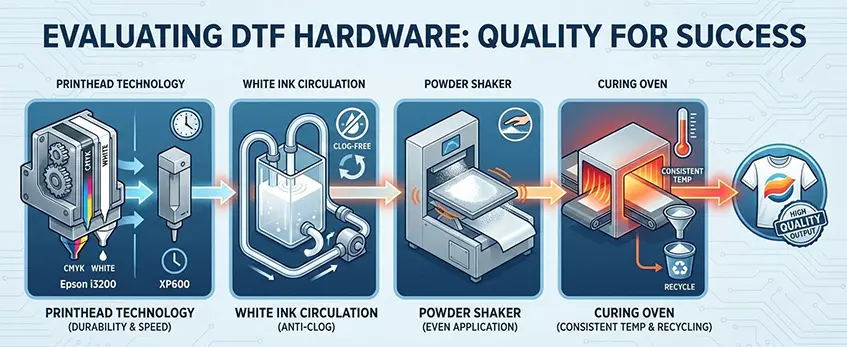
When choosing the right DTF kit, the quality of the printer and shaker hardware plays a critical role in your printing business’s success. Start by looking at the technologie de la tête d'impression. For example, Epson i3200 printheads are known for their durability and longer lifespan compared to XP600 models. Investing in dual printheads designed to handle both CMYK colors and white ink separately can improve print speed and quality by preventing color mixing and ensuring vivid whites.
Another key feature is the système de circulation de l'encre blanche. A good system continuously circulates white ink to prevent it from settling and clogging the printheads. This anti-clogging technology reduces downtime and costly maintenance, keeping your print shop workflow smooth.
Don’t overlook the secoueur de poudre et four de durcissement, essential for perfect prints. The shaker ensures even application of hot melt powder, critical for strong adhesion and stretchability. Meanwhile, a curing oven with consistent temperature control guarantees proper melting and curing of the powder, which boosts wash fastness and durability of your prints. Some ovens even offer automated powder recycling to minimize waste and improve efficiency.
For a balanced setup, consider how these hardware components work together — this will dramatically affect print quality, uptime, and overall efficiency. For an all-in-one solution that matches inks, film, powder, and hardware seamlessly, check out the features of the JL DTF602S digital printer designed for quality and reliability.
Step 3: The Consumables Ecosystem (Ink, Film, Powder)
Choosing the right consumables—DTF ink, film, and powder—makes a huge difference in print quality and machine longevity. Start with Qualité de l'encre DTF: look for proper viscosity and high pigment density to ensure vivid colors without clogging your printheads. Cheap ink formulas often cause head clogs, leading to downtime and higher maintenance costs.
Lorsqu'il s'agit de DTF film (PET film), the choice between hot peel and cold peel films affects your workflow and final print feel. Hot peel films release ink cleanly when warm, good for fast processing, while cold peel films offer extra softness but need longer cure times. Always pick films with high-quality coatings to avoid ink smudging and improve wash fastness.
Pour DTF powder (hot melt powder), consider white versus black powder options depending on your garment colors. Quality powders boast excellent stretchability and adhesion, preventing cracking and peeling during wear. Proper powder adherence is critical for durable, vibrant prints.
One big advantage is sourcing your ink, film, and powder from the same trusted supplier. The Avantage de Jinlong DTF means all consumables are chemically matched for compatibility, reducing issues like poor ink release or inconsistent adhesion. For example, Jinlong’s coordinated systems optimize your print quality and minimize maintenance headaches. You can explore their full line, including high-concentration DTF ink and PET film, for a seamless setup that enhances your printing business’s efficiency and reliability.
Step 4: Software and Color Management (RIP)
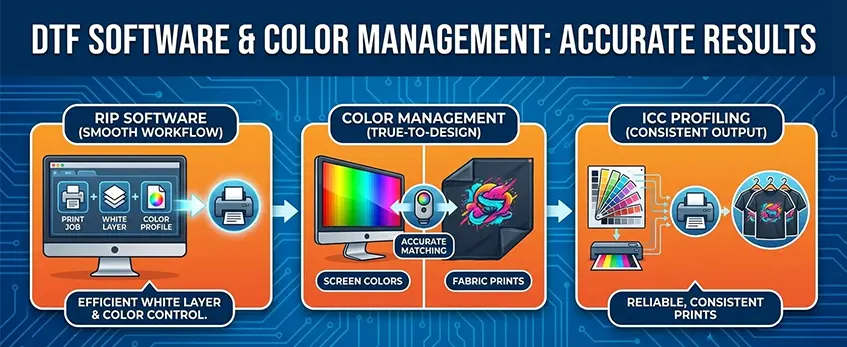
Choosing the right RIP software is key for smooth workflow and top-notch print quality in your DTF kit setup. A good RIP handles white layer generation perfectly, ensuring vibrant white ink coverage that pops on dark fabrics. It also manages color profiling to keep your prints true-to-design, preventing any surprise color shifts from screen to fabric.
ICC profiling plays a huge role here — it matches on-screen colors with final fabric prints, so you get consistent, reliable results every time. This eliminates guesswork, saving time and reducing wasted materials.
If you want to see how white ink technology impacts print vibrancy and coverage, check out this detailed guide on comment l'encre blanche pour jet d'encre améliore la couverture de l'impression et l'éclat des couleurs.
Pairing your RIP software properly with your printer and consumables is a must to optimize print shop workflow automation and maintain accurate color profiles for your direct to film printer maintenance routine.
Step 5: Support, Warranty, and Maintenance
When choosing the right DTF kit for your printing business, don’t overlook the importance of solid after-sales support. Technical support and training are crucial—problems with your direct to film printer maintenance can slow down your workflow and hurt your bottom line. Reliable customer service helps you get back on track fast, especially if you’re new to DTF printing or invested in a high-volume setup.
Spare parts availability is another key factor. Make sure you can easily source essential components like printhead dampers, capping stations, and cables. Having these on hand or available quickly means less downtime and smoother operation.
Lastly, understand the warranty terms thoroughly. Often, warranties cover main components like printheads and printers differently from consumables such as dtf ink, dtf powder, and dtf film. Knowing exactly what’s covered—and for how long—helps you avoid unexpected costs and keeps your print shop running efficiently.
A dependable support system combined with clear warranty coverage is just as important as your hardware and consumables, ensuring your investment in a DTF kit pays off in reliability and quality.





 English
  Español
  Deutsch
  Français