



Guide de l'imprimante à transfert DTF pour l'impression de vêtements personnalisés aux couleurs vives
Introduction to DTF Printing
If you’re diving into custom apparel printing, understanding Direct to Film (DTF) transfer printing is a great place to start. Simply put, DTF printing is a method where designs are printed directly onto a special PET film using a DTF transfer printer. This film, coated with adhesive powder and cured, is then heat pressed onto garments like t-shirts, hoodies, and more.
How DTF Works: A Quick Overview
Here’s the basic process in a nutshell:
- Design printing: The image is printed in full color onto a transparent PET film using specialized DTF inks.
- Poudre adhésive : While the ink is still fresh, powdered adhesive is applied to the print.
- Le séchage : The powder is cured with heat so it sticks to the ink.
- Transfert de chaleur : Using a heat press, the design is transferred from the film onto the fabric.
- Final steps: After pressing, the film is peeled away, leaving a vibrant, durable print on your custom apparel.
Rise in Popularity for Custom Apparel
DTF printing has quickly gained traction in the custom t-shirt transfers market because it delivers bright colors, works on virtually any fabric, and requires no pretreatment. Since its emergence, this technique has become a reliable and cost-effective alternative to traditional methods, making it popular with both small businesses and hobbyists looking to produce personalized, high-quality garments with ease.
If you’re aiming for vibrant apparel transfers that last, understanding and utilizing a high-performing DTF transfer printer est un choix judicieux.
Benefits of DTF Printing for Custom Apparel
DTF transfer printing offers several advantages that make it a top choice for custom apparel in the U.S. market. Here’s why many small businesses and hobbyists prefer it:
Vibrant Colors & Durability
DTF prints deliver bright, eye-catching colors with excellent opacity. The prints are tough and can handle regular washing without fading or cracking, making them perfect for custom t-shirt transfers or hoodies. These washable DTF prints keep designs looking fresh longer.
Fonctionne sur tous les tissus
One of the biggest perks is versatility. Whether you’re working with cotton, polyester, blends, or printing on dark or light garments, DTF has you covered. You don’t need special pretreatment, so you save time and effort compared to other methods.
Low Minimum Orders & On-Demand Printing
DTF is ideal for small businesses or startups because it supports low minimums. You can easily print one-offs or small batches without breaking the bank, which is great for custom hoodie printing or limited-edition apparel runs.
Cost-Effective Setup
Compared to other printing methods, DTF requires less upfront investment, especially when paired with reliable DTF ink and powder. This makes it perfect for anyone starting a small biz or testing new designs.
| Bénéfice | Pourquoi c'est important |
|---|---|
| Vibrant, durable prints | Long-lasting, bright custom apparel |
| Fabric versatility | Print on cotton, polyester, blends, dark/light garments |
| No pretreatment | Faster workflow, less prep time |
| Low minimums | Ideal for small orders and on-demand printing |
| Cost-effective setup | Budget-friendly for startups and small businesses |
This combination of features makes DTF printing a practical, flexible, and affordable choice for anyone looking to create quality custom apparel right here in the U.S. If you want to optimize your output, consider quality ink and powder options to maintain vibrancy and durability throughout every print.
DTF vs. autres méthodes d'impression
Lorsque l'on compare les DTF transfer printer technology to other printing methods, it’s clear that each has its strengths, but DTF shines in versatility and ease.
DTF vs. DTG (Direct to Garment)
DTG offers great detail on 100% cotton but struggles with dark fabrics and polyester blends. DTF transfers vibrant, durable prints on almost any fabric type, including dark and light garments, without needing pretreatment. Plus, DTF is generally less costly upfront and better for small runs or on-demand custom t-shirt transfers.
DTF vs. Screen Printing
Screen printing is excellent for large runs with simple designs but requires setup time, screens, and isn’t cost-effective for small batches. DTF is perfect for short runs, detailed artwork, and saves time since there is no screen setup—ideal for startup businesses and custom hoodie printing.
DTF vs. Sublimation and Vinyl Heat Transfers
Sublimation only works well on polyester and light-colored items and can’t print whites. Vinyl transfers are durable but limited in color gradients and design complexity. In contrast, DTF provides vibrant apparel transfers with durable, washable prints on a wide range of fabric types, including cotton, polyester, and blends.
When to Choose DTF for Your Projects
- Small to medium runs requiring full-color designs
- Printing on mixed fabric types, including dark garments
- Seeking cost-effective, durable, and vibrant custom apparel
- Need fast turnaround without extensive setup
- On-demand or custom t-shirt transfers requiring sharp detail and wash resistance
Overall, DTF printing offers a flexible, affordable way to produce high-quality, durable garment decoration that stands out compared to other methods. For reliable results, pairing a quality DTF printer with premium materials like the trusted Film de transfert DTF et poudres adhésives makes all the difference.
Essential Equipment for DTF Printing
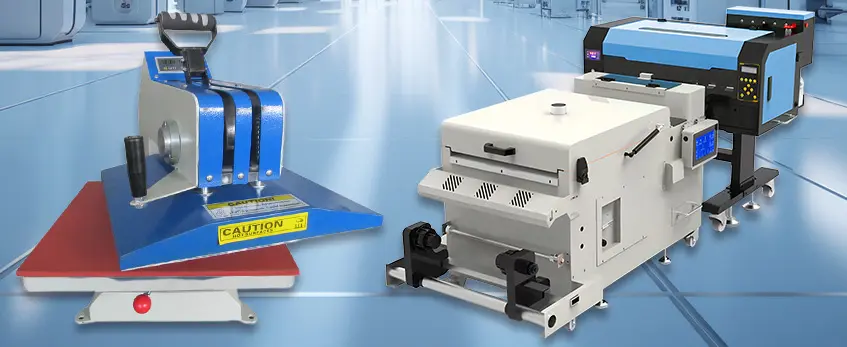
When setting up your DTF transfer printer workspace, choosing the right equipment is crucial for quality and efficiency. Here’s what you need to consider:
DTF Printers: Key Features to Look For
- Print Width: Depending on your project size, choose a printer that offers the suitable print width, typically ranging from 13 to 24 inches for apparel printing.
- Système d'encre : Look for printers designed specifically for DTF ink, which requires reliable and consistent ink delivery to avoid clogs and maintain vivid colors.
- Résolution : A high print resolution (600×600 dpi or higher) ensures sharp, vibrant designs that stand out on garments.
For dependable performance, many custom apparel printers trust Imprimantes DTF jinlong, known for their ease of use and consistent output. These printers balance affordability with professional features, making them a favorite among startups and growing businesses alike.
DTF Inks, Powders, and Films
- Encres DTF : Opt for high-quality pigment inks designed for DTF to guarantee bright, durable prints that hold up through washing.
- Poudre adhésive : This is key for bonding the print to the fabric. The powder must be evenly applied and properly cured during the transfer process.
- Films PET : Using premium PET films ensures better ink absorption and transfer quality. Different films might work better depending on the printer and ink combination—explore options like those explained in detail on our page about types et utilisations du papier transfert.
Supporting Equipment
- Presse à chaud : A quality heat press with adjustable temperature, pressure, and time controls is essential for the curing process and to ensure the print adheres perfectly to the garment.
- Secoueur de poudre : Automating adhesive powder application with a shaker helps achieve consistent coverage and saves time during production.
- Four de séchage : For larger volume operations, curing ovens enable faster powder melting and bonding, improving workflow efficiency.
- RIP Software: Reliable RIP software is vital for managing color profiles, print quality, and optimizing designs specifically for DTF printing. Many high-volume shops rely on specialized RIP solutions to improve accuracy and reduce waste, as detailed in the guide on why print shops need a DTF printer with shaker and oven.
Investing in the right combination of equipment tailored to your business scale and product line will set you up for producing vibrant, durable custom transfers with top-notch quality.
Processus d'impression du DTF étape par étape
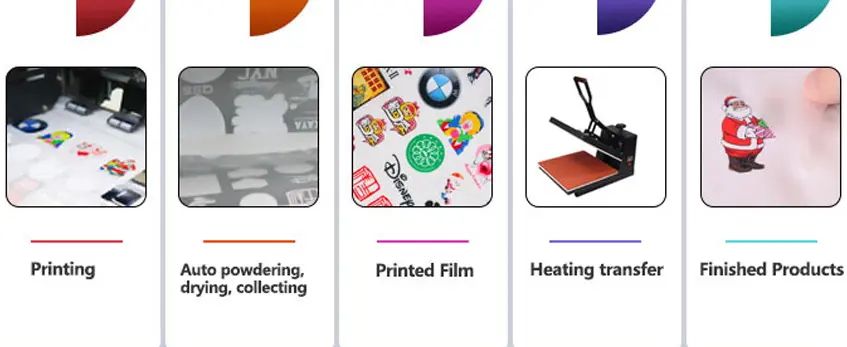
Getting great results with your DTF transfer printer means following a clear process from design to finished garment. Here’s a simple breakdown:
Préparation de la conception
- Use vector or high-resolution PNG files with transparent backgrounds for sharp prints.
- Set your design size based on the garment\’s printable area.
- Use RIP software for DTF to optimize ink usage and colors. This software helps with color management and print layout, ensuring vibrant apparel transfers every time.
Printing onto PET Film
- Load your design into the DTF printer, which prints the image reversed onto PET film using DTF ink and powder.
- Make sure your printer settings match the film size and ink type for consistent output.
Applying Adhesive Powder and Curing
- Immediately after printing, apply adhesive powder evenly over the printed film. This powder sticks to the wet ink.
- Cure the film using a heat source like a curing oven or heat press at low temperature to solidify the powder, preparing it for transfer. For more on equipment options, check out the Imprimante DTF avec agitateur et four vs poudrage manuel.
Heat Pressing onto Apparel
- Place the cured film onto the garment, face down.
- Use a heat press with recommended settings (temperature, time, and pressure) to transfer the design onto the fabric. Heat press settings vary by fabric, but a typical range is 320°F for 15-20 seconds.
Peeling and Post-Pressing
- Peel the film off while still warm or cold depending on the powder type (hot peel or cold peel).
- For durable garment decoration, post-press the design with a protective sheet for a few seconds to enhance adhesion and softness.
This step-by-step process is what makes DTF printing a versatile and reliable method for custom t-shirt transfers, hoodies, and other apparel. Following it ensures your prints stay vibrant, durable, and washable.
Best Practices for Professional Results with DTF Transfer Printer
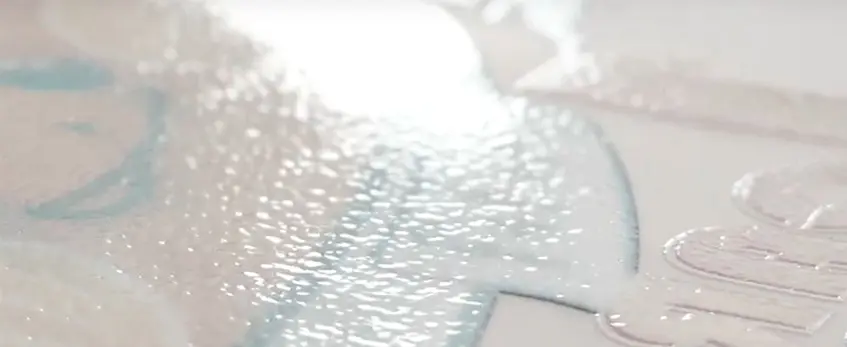
Getting professional results from your DTF transfer printer means paying close attention to a few key details—from heat press settings to garment care. Here’s how to ensure your custom apparel printing looks sharp, vibrant, and durable every time.
Heat Press Settings by Fabric Type
- Coton et mélanges de coton : Réglez votre presse à chaud sur environ 320°F (160°C) for 15 secondes avec une pression moyenne.
- Polyester and Synthetics: Use a slightly lower temperature, about 300°F (150°C), for 12-15 seconds to avoid fabric damage.
- Vêtements sombres : Increase pressure slightly to ensure good adhesion without overheating.
- Light Garments: Medium pressure and standard time work best.
Remember, sensitive fabrics may require shorter pressing time or lower heat to avoid scorching.
Design Tips for Sharp, Vibrant Prints
- Utilisation high-resolution artwork (at least 300 DPI) for crisp details.
- Stick to vibrant colors that pop on both light and dark fabrics.
- Avoid overly complex gradients or very fine lines that may lose clarity during transfer.
- Utilize RIP software for DTF to optimize color management and improve ink deposition.
Maintaining Ink Flow and Preventing Clogs
- Keep your DTF inks fresh and shake adhesive powders well before application to prevent clumping.
- Regularly clean your print heads according to your printer’s instructions, especially when switching between colors.
- Maintain consistent humidity and temperature in your workspace to reduce ink drying issues.
- Monitor ink levels and replace cartridges proactively.
Washing and Care Instructions for Finished Garments
- Advise customers to wash garments inside out using cold water to preserve the print’s vibrancy.
- Use mild detergents and avoid bleach or fabric softeners.
- Tumble dry low or hang dry for best results.
- Avoid ironing directly over the printed areas.
For a smooth production process, having the right gear in place is critical. Check out our guide on essential equipment for efficient DTF production for more tips on maintaining your setup and achieving the best results.
Common Issues and Troubleshooting in DTF Printing
Even with the best DTF transfer printer and materials, you might face some common problems like poor adhesion, cracking, or fading. Here’s a quick guide to fix these issues and keep your custom apparel looking sharp.
Fixing Poor Adhesion, Cracking, or Fading
- Mauvaise adhérence : This often happens if the powder isn’t applied evenly or not cured properly. Make sure you spread the adhesive powder uniformly and use the right curing temperature and time. Also, double-check your heat press settings—too low heat or pressure can cause the transfer to peel off early.
- Cracking Prints: Cracking usually points to overexposure to heat or the wrong type of powder. Using high-quality DTF powder designed for your fabric helps, and avoid pressing at too high a temperature for too long.
- Décoloration : Fading may happen if low-quality inks or powders are used. Use vibrant DTF inks and powder to ensure durable garment decoration that lasts through multiple washes.
Color Inaccuracies and Powder Excess
- If your colors look off, review your design files and confirm your RIP software settings are correct. Adjusting the color profiles can help fix inaccuracies. Proper maintenance of your DTF printer also ensures colors stay consistent.
- Excess powder on the film can cause a rough finish or poor adhesion. Use a powder shaker for even application, and shake off any loose powder before curing.
Printer Maintenance and Error Handling
- Regular cleaning of print heads and checking ink levels prevent clogging and maintain smooth ink flow. For specific issues like ink not printing or smudged prints, it’s helpful to recognize if your printer is out of ink or clogged. You can find detailed tips on identifying and fixing these issues in the guide on how to tell if your DTF printer is out of ink or clogged.
- Routine maintenance also extends to your curing oven and heat press. Make sure everything operates at the recommended settings and schedules.
By addressing these common problems quickly, you’ll avoid downtime and keep your custom t-shirt transfers and hoodies looking professional and durable.
Getting Started with Your DTF Setup
Starting with DTF printing can feel overwhelming, but tackling it step-by-step makes the process smooth and affordable. First, consider your budget. If you’re just getting into custom apparel printing, starter kits that bundle a DTF printer, inks, adhesive powder, and PET film make the most sense. They simplify the setup and cut costs on buying parts separately.
Space-wise, a small dedicated area with enough room for your DTF printer, heat press, and curing station creates an efficient workflow. Keep your workspace organized to handle everything from film printing to powder application and heat pressing without hassle.
Scaling from a hobby to a small business is easier with the right equipment. Models like Imprimantes DTF jinlong offer reliable performance, user-friendly controls, and affordable pricing — perfect for newcomers and pros alike. They support various print widths and come with quality inks and films that hold up well in wash tests.
If you want a dependable setup, look into jinlong’s offerings that balance cost and quality. Their best DTF printer for small businesses and startups bundles provide everything you need to launch your custom t-shirt transfers or custom hoodie printing on demand. This makes them a smart first choice for anyone serious about entering the vibrant world of Direct to Film printing.





 English
  Español
  Deutsch
  Français