



Guide d'achat de l'imprimante de transfert DTF Caractéristiques principales pour une meilleure performance
Introduction to DTF Transfer Printing
Direct to Film (DTF) transfer printing is a fast-growing method for decorating textiles. Unlike traditional printing, DTF prints your design onto a special heat transfer film first. Then, with powder and heat pressing, the design transfers seamlessly to fabrics like cotton, polyester, blends, and more.
How DTF Printing Works
- Print Design on Film: The printer lays down ink (including white ink) onto a clear film.
- Appliquer la poudre adhésive: A hot-melt powder coats the wet ink.
- Cure de la poudre: The powder is melted to bond with ink and fabric later.
- Transfert par presse à chaud: Using a heat press, the design moves from the film to the fabric with vibrant color and durability.
Benefits Over Other Methods
| Méthode | Avantages de la DTF | Limites |
|---|---|---|
| DTG (Direct to Garment) | Works on various fabrics; cheaper maintenance | DTG needs pretreatment; less versatile fabrics |
| Sérigraphie | Faster for large runs; vibrant colors | Setup cost and time; limited colors |
| Sublimation | Vivid dye penetration on polyester | Only works well on polyester or coated surfaces |
DTF shines in its versatility, durability, and cost-effectiveness, especially for small runs and mixed fabric types.
Who Should Consider a DTF Printer?
- Petites entreprises: Perfect for custom t-shirts, hoodies, bags, and more with flexible fabric options.
- Startups: Low entry cost with minimal setup lets you test designs easily.
- Hobbyistes: Great for personal projects and gifts, offering professional quality at home.
DTF transfer printers are a smart choice if you want reliable, durable prints on many fabrics without complicated pretreatment or high startup costs.
À emporter : If you\’re looking for a flexible, cost-effective printing method that handles multiple fabrics and offers sharp, vibrant prints, a DTF transfer printer could be exactly what your business or hobby needs.
Understanding Your Needs Before Buying
Before you jump into buying a DTF transfer printer, it’s important to assess your production volume. Are you planning for low-volume runs like custom t-shirts and hoodies for a small local shop? Or do you need a high-volume machine that can handle bags, hats, and a variety of fabrics day in and day out? Knowing this upfront helps narrow down your choices.
Common applications for DTF printers include t-shirts, hoodies, tote bags, and other fabric items, so think about the types of products you want to make. The printer’s size and print width often depend on your typical design dimensions.
Budget is another major factor. Entry-level models are great for beginners and hobbyists who want to start small without breaking the bank. They generally offer good print quality and ease of use but might fall short when it comes to speed and durability under heavy use. On the other hand, professional DTF printers come with faster print speeds, robust build quality, and features like white ink circulation for consistent prints—all essential if you’re targeting a growing business or high-volume production.
Choosing the right model aligned to your needs ensures you don’t overspend on features you won’t use or get stuck with a printer that can’t keep up. If you want a deeper dive into ink options and costs to better gauge your budget, check out this detailed breakdown of DTF printer ink cost.
Key Features That Really Matter for Your DTF Transfer Printer
Choisir le bon DTF transfer printer comes down to several core features that will affect print quality, speed, and long-term reliability. Here’s what to focus on:
| Fonctionnalité | Ce qu'il faut rechercher | Pourquoi c'est important |
|---|---|---|
| Printhead Technology | Epson-based heads (I3200, XP600) | Known for reliability and sharp prints; multiple heads increase speed & quality |
| Qualité d'impression et résolution | Minimum 1440 DPI for crisp, vibrant prints | Higher DPI means better details and smooth color gradients |
| Gestion de l'encre blanche | Built-in white ink circulation system | Prevents clogging and ensures consistent, opaque white underbases |
| Print Speed & Width | Balance speed with quality; common widths: A3 (13”) for starters, 24” for larger jobs | Larger width = bigger design potential; speed matches your workload needs |
| Ink & Consumables | Pigment-based inks; easy refilling systems | Durable, washfast prints that look great over time; lower ongoing costs |
| Build Quality & Maintenance | Sturdy frame with auto-maintenance (auto-cleaning) | Supports everyday use and reduces downtime |
Printhead Technology and Durability
A solid printhead like Epson’s I3200 or XP600 sets the foundation for high-quality DTF printing. These heads are industry favorites for their durability and ability to deliver sharp lines and vibrant colors. Printers with multiple heads can crank out more prints faster without sacrificing quality, which is a huge plus for small businesses or startups.
Qualité d'impression et résolution
Look for machines that support at least 1440 DPI resolution. This ensures your designs have sharp edges and rich color depth—important for custom t-shirt printing where detail matters. A wide color gamut also helps with smooth gradients and fine details, making prints pop.
White Ink Management System
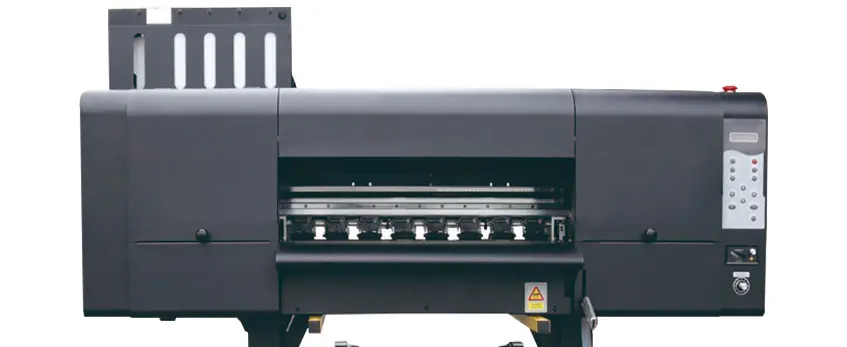
White ink is tricky because it tends to settle and clog nozzles. A good DTF printer includes a système de circulation de l'encre blanche that keeps the ink moving, preventing blockages and ensuring a solid, opaque underbase. This is crucial for vibrant prints on dark or colored fabrics. For more on how white ink systems improve print consistency, check out this detailed guide on how a DTF printer with shaker and oven improves print consistency and speed.
Print Speed and Width
Balancing speed and quality depends on your production needs. Entry-level DTF printers often offer A3 (13-inch) print widths, which are perfect for t-shirts and small projects. Larger 24-inch printers handle bigger designs and higher volumes but come at a higher price. Decide based on what you plan to print and how much.
Ink System and Consumables Compatibility
Pigment inks are preferred for washing durability and long-lasting vibrancy. Also, consider how easy it is to refill the ink system—too complicated or expensive can eat into your profits. Reliable ink and compatible powders play a huge role in print quality and cost management.
Build Quality and Reliability
Your DTF printer should have a sturdy frame and housing built to handle daily production without issues. Features like automatic maintenance and auto-cleaning reduce downtime and manual upkeep. This is especially important for busy shops focused on consistent output.
By paying attention to these core features, you’ll pick a DTF printer that matches your production style and delivers sharp, durable prints. For more on managing consumables and maintenance, see the helpful tips on DTF powder shaker maintenance.
Software and Ease of Use
When choosing a DTF transfer printer, software plays a crucial role in smooth operation. Most DTF printers require compatible RIP software like CADLink or AcroRIP to manage print files accurately, handle color profiles, and control ink usage. This software ensures your designs come out crisp, vibrant, and true to the original colors.
For beginners or small business owners, look for models with user-friendly interfaces that simplify the printing process. A straightforward setup means less time troubleshooting and more time creating.
Equally important is workflow integration—your printer’s software should sync well with all stages of production, including printing, applying the adhesive powder, and curing. This seamless connection helps reduce errors and speeds up your turnaround time, making your small business or hobby setup more efficient and reliable.
Maintenance, Support, and Long-Term Costs
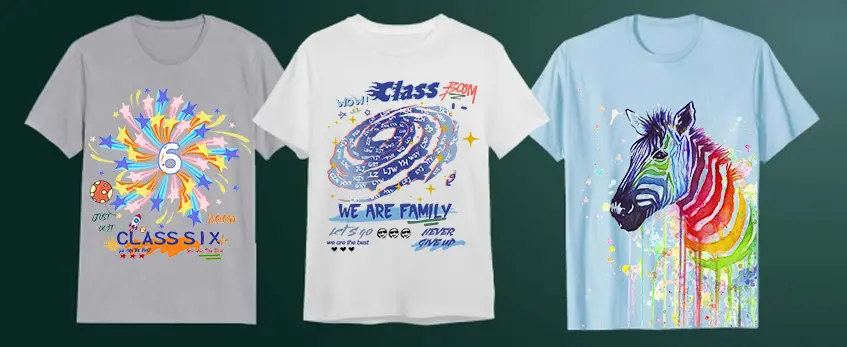
Keeping your DTF transfer printer running smoothly means staying on top of daily and weekly maintenance. Simple tasks like cleaning the printhead, checking the white ink circulation system, and inspecting ink nozzles help avoid clogging and ensure consistent print quality. Most Epson-based printheads, like the I3200 or XP600, require regular attention but are known for durability when maintained well.
Before buying, check the warranty terms and the availability of customer support and replacement parts. Reliable brands often provide quick service, which can save you downtime and money in the long run.
Don’t forget about hidden costs. Ink, especially pigment-based DTF ink, powder for powdering, and heat transfer film are ongoing expenses you’ll want to budget for. Energy consumption for running the printer and curing oven also adds up over time. If you want to compare consumable options, checking out resources like the detailed differences between white powder and black powder used in DTF printing can help you pick what best fits your business needs.
By planning for maintenance and long-term costs upfront, you’ll avoid surprises and keep your custom t-shirt printing machine working reliably for years.
Common Mistakes to Avoid When Buying a DTF Transfer Printer
When investing in a DTF transfer printer, there are a few key mistakes to avoid that can save you time and money in the long run.
Overlooking White Ink Circulation: One of the biggest issues with direct to film printers is white ink clogging and settling. Make sure the printer you choose has a reliable white ink circulation system to keep your prints vibrant and consistent, especially for opaque underbases.
Choosing Based on Price Alone: Avoid cheap conversions or repurposed printers that aren’t designed specifically for DTF printing. Dedicated models with Epson printheads or similarly reliable technology might cost more upfront but deliver better print quality, durability, and less hassle.
Ignoring Workspace and Ventilation Needs: DTF printing involves inks, powders, and curing processes that require proper ventilation. Not planning for adequate workspace or ignoring heat and powder ventilation can lead to health risks and equipment issues.
By steering clear of these common pitfalls, you’ll ensure your DTF printer setup is efficient, reliable, and safe for your specific production needs. For a deep dive into key consumables that affect print quality and durability, check out the detailed guide on choosing the right TPU powder DTF for vibrant longlasting prints.
Top Recommendations by User Type
Choosing the right DTF transfer printer depends largely on your needs and experience level. For beginners and small businesses just getting started, an Imprimante A3 DTF is often the best choice. These models offer a manageable print width, user-friendly interfaces, and affordable pricing without sacrificing print quality. They allow you to experiment with custom t-shirt printing machines and build your business without a huge upfront investment.
For those handling larger orders or running professional shops, high-volume DTF printers with multiple Epson-based printheads deliver faster print speeds and improved durability. These setups are designed for continuous use, offering consistent, durable washfast prints that meet demanding production schedules.
Among top brands, Imprimantes Jinlong DTF stand out for reliable performance, solid build quality, and effective white ink circulation systems, which are crucial for vibrant colors and sharp details. They also provide good support and maintenance options, making them a smart choice whether you’re a hobbyist or running a busy print shop. You can explore their full lineup and offerings on the Jinlong Prints website.
No matter your level, choosing a printer designed specifically for DTF printing—not just a converted printer—helps avoid common issues and ensures smoother operation from day one.





 English
  Español
  Deutsch
  Français