



Les meilleures imprimantes DTF pour débutants en 2026 : peu coûteuses et faciles à utiliser
Qu'est-ce que l'impression DTF et pourquoi la choisir en tant que débutant ?
DTF (Direct to Film) printing is a versatile method where designs are printed on a special film, then transferred onto fabric using heat. Here’s a quick look at the DTF process:
- Design creation – Prepare your artwork digitally.
- Printing on film – Use a DTF printer to print the design with white and color inks on PET film.
- Application de la poudre – Apply adhesive powder on the wet print.
- Curing powder – Heat the film to fix the powder.
- Heat transfer – Use a heat press to transfer the design onto fabric.
Why DTF is Great for Beginners
Compared to DTG, screen printing, or sublimation, DTF offers unique advantages for first-timers:
| Méthode | Beginner Benefits of DTF |
|---|---|
| DTG | DTF uses less expensive inks and works on more fabric types (cotton, polyester, blends). |
| Screen Print | No need for complex screen setups; faster for short runs. |
| Sublimation | Works on any fabric color/type, not limited to polyester. |
Common Beginner Challenges & 2026 Model Solutions
| Défi | 2026 DTF Printer Features that Help |
|---|---|
| White ink clogging | Automatic white ink circulation systems |
| Complex setup | Plug-and-play design, touchscreen controls |
| Software difficulty | Intuitive, beginner-friendly software |
| Maintenance | Maintenance-free or simplified cleaning routines |
DTF for starters has never been easier, thanks to these improved usability features and lower startup costs in 2026 models. You can jump into garment printing with confidence, without the steep learning curve of older methods.
Facteurs clés à prendre en compte lors de l'achat d'une imprimante DTF pour débutants

When searching for the best beginner DTF printer, focusing on usability and entry cost is crucial. Here’s a simple guide covering what matters most for newcomers:
Usability Features
- Automatic white ink circulation keeps the ink flowing smooth, preventing clogs without daily manual shaking.
- Intuitive software makes designing and printing easy, even if you’re new to DTF.
- Plug-and-play setup lets you get started quickly without complicated installations.
- Touchscreen controls offer simple navigation and job management.
Entry Cost Breakdown
| Cost Type | Gamme typique (USD) | Notes |
|---|---|---|
| Printer Price | $700 – $3000+ | Entry-level machines usually under $1500 |
| Bundles (ink, powder, film) | $150 – $500 | Starter kits lower overall costs |
| Total Startup Cost | $850 – $3500+ | Includes accessories and training |
Print Quality and Speed
- Resolution often ranges from 720×720 dpi to 1440×1440 dpi—higher means crisper prints.
- Print width varies from A4 to A3+, affecting job size flexibility.
- Meilleur pour small runs or samples, fitting new businesses and hobbyists perfectly.
Maintenance and Reliability
- Daily maintenance mainly involves clearing white ink lines and cleaning printheads.
- Models with clog prevention features save time and frustration.
- Check for good warranty coverage—some brands offer up to a year or more.
After-Sales Support
- Look for brands that provide training resources, responsive customer service, and active community forums.
- Helpful support reduces beginner stress and enhances your learning curve.
Space and Scalability
- Desktop models suit small spaces and light workloads.
- Roll-fed printers offer scalability for expanding businesses, handling longer prints efficiently.
- Consider upgrade paths to grow without switching systems.
Coûts permanents
| Consumable | Average Cost per Unit | Impact on Cost per Print |
|---|---|---|
| Ink (White & Color) | $30 – $80 per set | Major factor in print cost |
| Film | $0.10 – $0.30 per sheet | Depends on print size |
| Poudre | $20 – $50 per kg | Influences texture and adhesion |
For accurate powder use and curing guidance, check out detailed info on how to cure DTF powder with a heat press or curing oven.
Balancing these factors helps new users pick a user-friendly DTF printer that fits their budget while offering quality and reliability for their entry-level needs.
Top 8 Best DTF Printers for Beginners in 2026
When looking for the best beginner DTF printer in 2026, usability, entry cost, and print quality top the list. Below is a structured comparison of the top models designed for starters—each with pros, cons, pricing, and ideal user profiles.
1. Budget Converted Option: Epson L1800-Based Models
Pour : Affordable, widely available, good print quality for starters
Cons : Requires conversion kits and tinkering; more maintenance needed
Meilleur pour : Hobbyists or casual users wanting low-cost DTF entry
2. Compact All-in-One: xTool Apparel Printer
Pour : Small footprint, plug-and-play setup, great for limited space
Cons : Limited print width (usually under 13\”), slower print speeds
Meilleur pour : Beginners needing a user-friendly, compact desktop printer
3. Reliable Hybrid: Epson SureColor F1070
Pour : Uses original Epson print heads, solid white ink circulation, great reliability
Cons : Higher entry cost, requires some setup knowledge
Meilleur pour : Users wanting balance between ease-of-use and high print quality
4. User-Friendly A3 Size: Procolored 13\” Models
Pour : True A3 print width, intuitive touchscreen, automatic ink circulation
Cons : Slightly bulky for some setups
Meilleur pour : Small businesses or serious hobbyists needing larger prints
5. Featured Recommendation: jinlong DTF Series
Pour : Outstanding usability with automatic white ink circulation, affordable bundle options, excellent customer support
Cons : Slight learning curve on powder and curing steps
Meilleur pour : Beginners focused on low startup cost and strong after-sales support — check out their full lineup at Imprimantes DTF jinlong
6. Mid-Range Dedicated: OMTech or LINKO A3 Equivalents
Pour : Robust build, dedicated DTF features, decent warranty coverage
Cons : Requires moderate space and maintenance commitment
Meilleur pour : Users ready to invest more for professional-grade output
7. Roll-Fed Starter: Prestige or Similar Models
Pour : Ideal for batch production, continuous printing with roll media
Cons : Larger footprint, higher consumable usage
Meilleur pour : Beginners planning to scale quickly or produce on-demand
8. Premium Beginner: Higher-End Dual-Head Printers
Pour : Faster speeds, top-tier print quality, advanced features like auto cleaning
Cons : Higher price, more complex setup
Meilleur pour : Newcomers who want a future-proof printer from day one
| Modèle | Fourchette de prix | Largeur d'impression | Caractéristiques principales | Meilleur pour |
|---|---|---|---|---|
| Epson L1800-based | $600 – $900 | Up to 13\” | Budget-friendly, converted kit | Hobbyists, low cost setup |
| xTool Apparel Printer | $1200 – $1500 | Up to 13\” | Compact, prêt à l'emploi | Small spaces, beginners |
| Epson SureColor F1070 | $3500 – $4500 | Up to 24\” | Reliable, hybrid tech | Semi-pro users |
| Procolored 13\” Models | $2500 – $3500 | 13\” | User-friendly, auto ink rollers | Small business starters |
| jinlong DTF Series | $1800 – $2800 | 13\” – 24\” | Low cost, good support, easy use | Débutants soucieux de leur budget |
| OMTech / LINKO A3 | $3000 – $4000 | 13\” | Dedicated, reliable | Growing small biz |
| Prestige Roll-Fed | $4500 – $6000 | Up to 24\” | Roll-fed, scalable | Batch printers |
| Premium Dual-Head Models | $6000+ | 24\”+ | Fast, high quality | Serious beginners wanting premium |
Choosing the right beginner DTF printer in 2026 means balancing your budget with your print needs and available space. For a fully supported starter option, many recommend the Série jinlong DTF as a great blend of ease, affordability, and reliable customer service — perfect for getting started without overwhelm.
Setup Guide for Your First DTF Printer
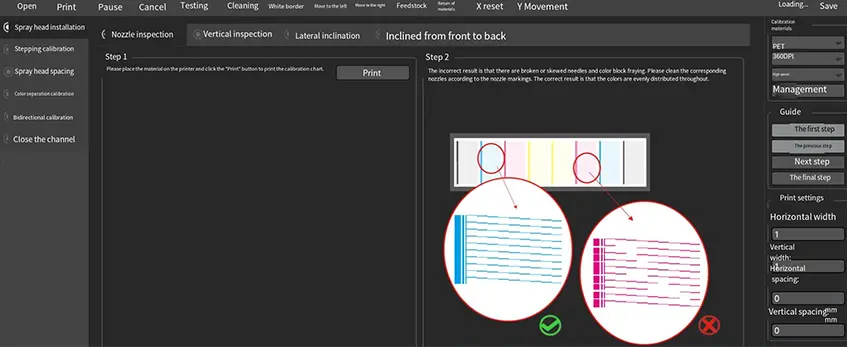
Getting started with your beginner DTF printer doesn’t have to be intimidating. Here’s a simple setup guide to help you unbox, install software, and complete your very first print smoothly.
Unboxing and Initial Setup Tips
- Carefully remove all packing materials and protective tapes from the printer.
- Place your DTF printer on a stable, flat surface with enough space for film rolls or sheets.
- Connect the power cable and USB or Wi-Fi according to the printer\’s instructions.
- Check the included starter kit—usually inks, powder, and cleaning supplies—to ensure nothing’s missing.
- For entry-level DTF machines, look for features like plug-and-play setup and preloaded software that minimize setup hassle.
Software Installation and First Print Walkthrough
- Install the printer driver and RIP (Raster Image Processor) software from the included CD or manufacturer website.
- Calibrate your printer if prompted—this sets the foundation for good print quality.
- Load sample designs or prepare a test image within the software; beginner-friendly programs usually have easy controls and presets.
- Prepare your first transfer film or roll and load it into the printer.
- Execute a test print to check colors, ink flow, and alignment.
- If you want to explore color tweaking and white ink management, resources like the detailed DTF color chart guide can be very useful.
Essential Accessories Overview
- Presse à chaud: Required for curing prints onto garments, essential for any DTF setup.
- Système de circulation de l'encre blanche: Helps prevent ink clogging, especially critical in daily use.
- Cleaning kits: Include syringe, cleaning solution, and wipes to maintain your printer’s nozzles.
- Additional powder shaker or shaker station: For even powder application during transfer.
- Consumables stock: Films, pigment inks, and curing powders to keep your workflow smooth.
Starting with a user-friendly DTF printer that supports automatic white ink circulation and intuitive controls will drastically reduce your learning curve. Following this setup guide ensures you avoid common beginner mistakes, setting you on the right path in your DTF printing journey.
Maintenance Tips to Avoid Common Beginner Mistakes
Keeping your beginner DTF printer in top shape means sticking to simple daily and weekly maintenance routines. This practice helps prevent common problems like white ink clogs, which are a frequent headache for new users. Here’s how to keep things running smoothly:
Daily Maintenance:
Run a quick nozzle check and print head cleaning cycle before starting your day to avoid ink buildup.
Shake white ink bottles well before each use and ensure the ink circulation system is working to prevent sedimentation.
Wipe down printer surfaces and inspect the film feeding path for any dust or debris.Weekly Maintenance:Perform a deeper head cleaning and check the ink lines for blockages.
Clean the capping station and wiper blade gently to keep the printer’s mechanisms fresh.
Check powder dispensers and heat press cleanliness if your setup includes them.Preventing White Ink Clogs:White ink tends to settle and clog easily. Use automatic white ink circulation features if your printer has them, or manually circulate the ink if not. Stay consistent with using your printer, as letting it sit for long periods will encourage clogs.Basic Troubleshooting:
- If you notice faded prints or streaks, start with running a nozzle check and cleaning cycles.
- Recalibrate the printer settings if colors seem off or prints don’t align.
- Keep backup consumables like extra print heads or ink cartridges ready to minimize downtime.
Following these maintenance tips will save you from costly repairs and improve the lifespan of your entry-level DTF machine. For more on white ink handling and how smart ink circulation improves print quality, check out the detailed guide on how automatic white inkjet ink enhances print coverage and color vibrancy.
Regular care is key to hassle-free, professional-quality results from your beginner DTF printer setup.
Cost Analysis: Real Entry Expenses and ROI for Beginners

Getting started with DTF printing as a beginner means understanding the real costs upfront. Your startup budget will mainly consist of the printer itself, consumables like DTF ink, transfer films, and powder, plus some essential accessories such as heat presses and cleaning kits.
Typical Entry Cost Breakdown:
- Imprimante DTF : $400 to $3,000 depending on model and features (budget models like Epson L1800-based printers start around $400, while more advanced, user-friendly DTF printers such as the jinlong DTF series cost closer to $1,200-$2,000).
- DTF Inks & Films: Expect to spend $50-$150 monthly once you\’re printing regularly. High-quality CMYK and white inks from suppliers like jinlong DTF ink options ensure vibrant, reliable prints.
- DTF Powder: Usually around $40-$70 per kilo, which lasts quite a while depending on your volume.
- Presse à chaud : About $300-$600 for a reliable, beginner-friendly model.
With these costs factored in, your total startup could range from $1,000 to $4,000 depending on the printer and accessories chosen.
Estimating Cost Per Transfer:
- Print film typically costs around 10-20 cents per print depending on size.
- Ink usage averages 15-25 cents per transfer.
- Powder adds roughly 3-5 cents.
- Plus minor costs for maintenance consumables.
Overall, a single DTF transfer often costs between 30 to 50 cents for a small to medium design.
Break-Even Analysis:
- Selling transfers at $5 to $10 each, common in hobby or small business setups, means you break even after roughly 200-500 prints.
- As print speed and volume increase with better equipment, your ROI improves quickly, especially when factoring in repeat customers.
Keeping these entry costs and ongoing expenses in mind helps set realistic expectations and ensures your DTF startup stays profitable from the beginning. For beginners wondering about sizes and costs, check out this detailed guide to choosing the right A3 DTF printer versus A4 and A2, which gives great insight on matching printer size with your budget and production goals.
Questions fréquemment posées
What is the cheapest reliable DTF printer for beginners?
For those starting out, budget-friendly converted printers like Epson L1800-based models offer a great balance of price and print quality. These entry-level DTF machines are affordable and user-friendly, making them ideal for beginners who want quality results without a big upfront cost.
How much daily maintenance do beginner DTF printers require?
Daily maintenance depends on the model, but beginner-friendly DTF printers often include features like automatic white ink circulation to reduce clogging. Basic routines involve shaking white ink bottles, cleaning print heads, and checking powder levels, usually taking 10-15 minutes daily to keep things running smoothly.
Should I choose a converted or dedicated DTF printer as a beginner?
Converted printers are generally cheaper and good for small runs, especially if you’re testing the waters. Dedicated DTF printers, like the Jinlong DTF series, offer more reliability, better support, and features designed specifically for DTF printing, making them a better long-term investment for small businesses. Learn more about this series on the Jinlong DTF A3 printer page.
What are the best inks and films for vibrant, lasting results?
Choosing good quality DTF inks and transfer films is key. Look for pigment-based inks with strong color vibrancy and wash resistance, paired with durable PET films and quality powder adhesive. For beginners, using trusted products like the DTF transfer film double pro series 40cm and compatible hot-melt adhesive powders will improve print quality and durability.
How can I scale from a hobby to a small DTF business?
Start with a reliable beginner DTF printer that fits your current workload and space, then gradually invest in larger printers or roll-fed models. Focus on mastering print quality and workflow first. Also, join online forums and communities for tips and support. Tracking your startup costs, including consumables and maintenance, helps you plan for scaling and boosting ROI effectively over time.
If you want to dive deeper into DTF startup costs or printer comparisons, check out the full guide above to make informed choices for your setup.





 English
  Español
  Deutsch
  Français