



Les meilleures imprimantes DTF d'entrée de gamme pour les débutants en 2026 avec une qualité professionnelle
If you’re new to printing custom apparel, finding the best DTF printers for beginners in 2026 can feel overwhelming. But here’s the good news: entry-level machines today are powerful enough to deliver professional results without breaking the bank or requiring expert skills. Whether you’re launching a side hustle or starting a small business, the right Imprimante DTF pour débutants offers vibrant colors, durable transfers, and easy setup—all designed to get you printing confidently from day one. In this guide, you’ll discover affordable, user-friendly options that punch well above their weight and tips to help you achieve pro-quality prints without the headaches. Let’s get you printing like a pro.
Understanding DTF Printing for Beginners
DTF (Direct to Film) printing is a fantastic entry point if you’re new to custom apparel printing. The process is straightforward:
- Print on film – Your design is printed digitally onto a special PET film.
- Apply powder – A hot-melt adhesive powder sticks to the printed ink, especially the white underbase.
- Cure powder – The powder-coated film passes through a curing oven to solidify the adhesive.
- Heat press transfer – Finally, you press the film onto your fabric with a heat press, transferring the design permanently.
Why Choose DTF Over DTG, Screen Printing, or Sublimation?
DTF printing offers beginners several benefits:
- Polyvalence : Works on a wide range of fabrics including cotton, polyester, blends, and even dark or light colors.
- Lower cost: No expensive pretreatment like DTG or large setup fees as in screen printing.
- Ease of use: Minimal setup compared to screen printing; less technical than sublimation.
- Quality: Produces vibrant colors with lasting durability, suitable for small business or hobby use.
Common Beginner Challenges & Modern Solutions
Newcomers often face these hurdles:
| Challenge | Ce qui se passe | How Modern Machines Help |
|---|---|---|
| Printer clogs | Ink dries in nozzles, halting prints | White ink circulation systems prevent clogging |
| Maintenance | Frequent cleaning required | Automated or easy maintenance features |
| Précision des couleurs | Colors may appear dull or off | Advanced RIP software and color profiles |
Modern entry-level DTF printers, like Jinlong DTF models, focus on user-friendly designs that reduce maintenance and improve print consistency, making your start smooth and hassle-free.
By understanding these basics, you’re ready to explore which DTF printer fits your goals and budget perfectly!
Key Factors to Consider When Choosing an Entry-Level DTF Printer
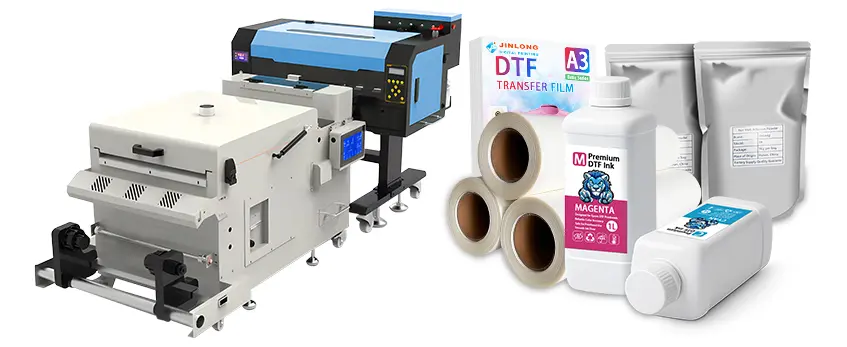
When picking the best entry-level DTF printer, budget is usually the first priority. Remember, the cost includes more than just the printer—you’ll need essentials like a powder shaker, inks, and films to get started. A reliable starter kit can help simplify this initial investment without breaking the bank.
Print size and format matter too. Desktop options usually come in A4 or A3 sizes, ideal for small projects and convenient setups. If you plan to handle bigger jobs or want more efficiency, roll-fed printers are worth considering, offering longer print runs and less frequent media loading.
Printhead technology is a big deal, especially how machines handle white ink. White ink circulation systems are crucial to prevent clogs and maintain consistent print quality. Look for models with built-in circulation or auto-flushing features that reduce downtime and maintenance hassles.
Ease of use should never be overlooked. User-friendly software, plug-and-play setups, and automatic maintenance cycles make DTF printing less intimidating for beginners. This means less time troubleshooting and more time producing professional prints.
Quality features are another key aspect. Check resolution specs for sharp, vibrant images and ensure the printer supports inks and films that deliver durable, wash-resistant results. This will ensure your prints look professional and last long, which is essential for small business or hobby use.
Speed and production capacity should fit your needs. Entry-level machines usually handle small runs well, but make sure the printer you choose meets your expected output without slowing your workflow.
After-sales support, training resources, and warranty coverage play a big role in smooth operations. Having access to helpful customer service and learning materials will save you headaches when you’re starting out.
Lastly, consider ongoing costs like inks, films, and powder compatibility. Some brands offer more affordable consumables or better availability, which can make a big difference over time. For tips on reducing printing costs without sacrificing quality, the guide on reducing your DTF printing cost is a great resource to check out.
Ultimately, a good entry-level DTF printer balances affordability, reliability, ease of use, and quality—giving beginners a strong foundation to grow their skills or business.
Top Entry-Level DTF Printers for Beginners in 2026
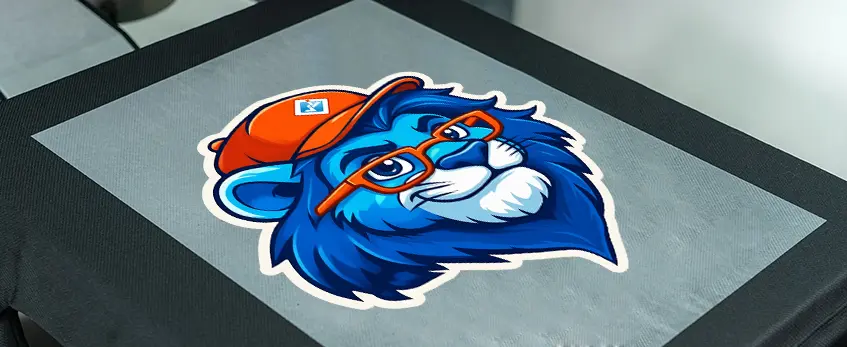
When choosing the best entry-level DTF printer for beginners in 2026, we focused on user-friendliness, affordability, reliability, and the ability to deliver professional DTF results. These machines offer easy setup, solid print quality, and manageable maintenance, which is key for beginners.
Here’s a detailed look at 6 top beginner-friendly DTF printers, including the popular Jinlong DTF models known for their seamless integration, reliable consumables, and designs tailored to newcomers.
| Printer Model | Fourchette de prix | Largeur d'impression | Caractéristiques principales | Support Rating | Meilleur pour |
|---|---|---|---|---|---|
| Jinlong Eco A3 | $3,200 – $3,800 | A3 (13\” wide) | White ink circulation, automated maintenance | ★★★★★ | Small business, beginners |
| Jinlong Basic Series | $2,800 – $3,200 | A4 (8.5\”x11\”) | Compact, easy setup, reliable inks & powders | ★★★★★ | Hobbyists, starters |
| Epson Conversion Kit | $1,500 – $2,200 | A4 desktop | Affordable converted option, basic features | ★★★★☆ | Budget-conscious beginners |
| Mophorn A3 DTF Printer | $3,000 – $3,500 | A3 desktop | User-friendly software, good color accuracy | ★★★★☆ | Entry-level with speed needs |
| Ricoh Dedicated DTF | $4,000 – $5,000 | Roll-fed (up to 16\”) | High print speed, white ink circulation system | ★★★★☆ | Small businesses scaling output |
| VEVOR Entry A3 | $1,800 – $2,400 | A3 desktop | Plug-and-play, decent color vibrancy | ★★★☆☆ | Absolute beginners, low volume |
Why Jinlong Stands Out for Beginners
Jinlong’s DTF printers are favored because of their plug-and-play setup, excellent after-sales support, and consistent print quality. Plus, they come with compatible consumables like inks and powders that help avoid common beginner issues like clogging or fading. You can explore Jinlong’s reliable consumables like their Poudre adhésive thermofusible TPU to enhance your print durability.
Converted vs. Dedicated DTF Machines
While converted printers offer a lower upfront cost, dedicated DTF printers like those from Jinlong provide better color vibrancy, white ink managementet wash durability, important for professional results on beginner budgets.
If you want a detailed tutorial on setup and maintenance for Jinlong models, their help center is a great resource designed for beginners moving into small business production.
With this lineup, beginners can match their budget and production goals with the right entry-level DTF printer that delivers professional quality without the steep learning curve.
Recommended Accessories and Setup for Beginners
Getting started with an entry-level DTF printer means more than just the printer itself. To deliver professional results on a beginner budget, you\’ll need a few essential accessories:
- Powder Shaker: This ensures an even layer of adhesive powder on your prints, which is key for durability and wash resistance.
- Curing Oven or Heat Tunnel: Proper curing of the powder is critical before pressing, so a reliable curing oven speeds up the process and guarantees consistent results.
- Presse à chaud : A quality heat press helps transfer your design smoothly onto various fabrics. Look for one with adjustable temperature and pressure settings to handle different materials.
- RIP Software: User-friendly RIP software simplifies color management and print layouts, especially for white ink and underbase settings common in DTF printing.
For beginners, starting with compatible, high-quality consumables is a must. Choose films and inks designed specifically for entry-level DTF setups, like the trusted A4 double PRO series transfer films ou 60cm roll films, to avoid clogs and ensure vibrant prints.
Quick Setup Guide from Unboxing to First Print
- Unbox Carefully: Inspect the printer and accessories for any damage. Remove all protective packaging.
- Install Printheads and Ink: Follow the manual exactly. Use recommended inks to protect your warranty and print quality.
- Load the Film: Choose the right size film (A4 or roll format depending on your printer).
- Calibrate and Test: Run nozzle checks and calibration prints to make sure everything’s aligned.
- Apply Powder and Cure: Once you’ve printed your film, evenly shake on the adhesive powder, then cure it using your oven or heat tunnel.
- Heat Press Transfer: Use your heat press to transfer the design onto your fabric at the recommended settings.
With these accessories and setup steps in place, your beginner DTF machine becomes an efficient tool capable of producing professional DTF results right from the start.
Tips for Achieving Professional Results on a Beginner Budget
Getting pro-level results on an entry-level DTF printer is totally doable if you follow some smart tips. Here’s how to get the most out of your beginner DTF machine without breaking the bank:
Design and Software Best Practices
- Use RIP software with proper settings for white underbase to ensure vibrant colors that pop on dark fabrics.
- Manage your colors carefully—calibrate your monitor and printer to get accurate, consistent outputs.
- Stick to simple, bold designs at first to avoid details that might not print well on entry-level DTF printers.
Smart Maintenance Routines
- Regularly clean your printheads and run auto-flush cycles to prevent clogs, especially in white ink circuits.
- Store inks and films properly to maintain quality.
- Schedule quick daily checks — even 5 minutes can extend your printer’s life and avoid costly repairs.
Dépannage des problèmes courants
- If colors look faded, check your ink levels, RIP settings, and curing times. Ink powder application must be even for best adhesion.
- Poor adhesion or peeling? Double-check your heat press temperature and pressure. Using a quality powder shaker can help spread adhesive evenly.
Scaling from Hobby to Small Business
- Start small, focusing on quality over quantity. Learn your printer’s limits and speed.
- When demand grows, consider upgrading to a larger print size or faster model to save time and boost production.
- Look for brands offering solid after-sales support and training resources, so you can stay confident as your business grows.
For more on reliable DTF printers designed with beginners in mind, including seamless integration and consumables, check out our detailed jinlong DTF models review. This will help you pick a setup that grows with your needs without overwhelming your budget.
Frequently Asked Questions About Beginner DTF Printing
How much does a beginner DTF setup cost in 2026?
A basic entry-level DTF printer bundle, including the printer, essential powders, inks, and films, typically starts around $1,000 to $2,500. Adding in must-have accessories like a powder shaker, heat press, and curing oven can push the startup cost closer to $3,000. Investing in quality consumables, such as the DTF ink white pro series and reliable transfer films, helps ensure professional print results right from the start without costly reprints.
Converted vs. Dedicated DTF printers: Which is better for starters?
While converted printers might seem affordable initially, dedicated DTF printers are generally a better choice for beginners. Entry-level DTF machines designed specifically for direct-to-film printing come with built-in white ink circulation systems and better durability, reducing common issues like clogging and poor white ink management. This makes them more user-friendly for first-timers looking for hassle-free, consistent results.
Quelle est la durée de vie des impressions DTF ?
With proper curing and quality materials, DTF prints typically last 30–50 washes without significant fading or cracking on most fabrics. The durability holds well on cotton, polyester blends, and even some nylon materials, making DTF a versatile option for small business owners and hobbyists alike.
Is DTF printing profitable for beginners?
Yes, DTF printing can be profitable for beginners, especially in small business setups. Its relatively low entry cost, versatility on various fabrics, and quick turnaround times allow easy scaling from hobby projects to real side hustles. Keeping upfront costs and maintenance low while focusing on quality prints boosts profitability.
Best fabrics and applications for entry-level DTF printers
DTF works great on cotton, polyester, blended fabrics, and even some nylon surfaces. It\’s ideal for apparel like t-shirts, hoodies, tote bags, and sportswear. Because DTF doesn’t require pretreatment like DTG, it’s a simpler choice for beginners aiming for professional results on a wide range of fabric types. For tips on choosing the right films, check out this handy guide on selecting Film de transfert DTF.
This FAQ covers key concerns of anyone stepping into the world of DTF printing, helping you make informed decisions with your beginner DTF printer setup in 2026.





 English
  Español
  Deutsch
  Français