



DTF Printer with Powder Shaker Buying Guide Setup and Features
Understanding DTF Printers with Powder Shakers
If you\’re diving into custom t-shirt printing, you’ve probably heard about DTF printers with powder shakers. But what exactly are they? Simply put, a DTF (Direct to Film) printer prints your design directly onto a special transfer film. Then, a powder shaker applies a fine layer of hot melt adhesive powder to the printed film, which melts and bonds the ink to the fabric during heat pressing. This combination creates vibrant, durable prints on a variety of fabrics.
How DTF Printing Works: Step-by-Step Overview
- Design Printing: Your design is printed onto a clear PET film using a DTF printer with specialized inks, including white ink for opacity.
- Powder Application: The printed film passes through the powder shaker where adhesive powder evenly coats the wet ink.
- Curing: The powder-coated film goes through a curing chamber or dryer to partially melt and fix the powder to the ink.
- Heat Pressing: Finally, the film is heat-pressed onto the fabric, causing the powder to fully melt and bond the image permanently.
Types of Systems: All-in-One vs. Separate Printer + Shaker Bundles
Choosing between system types is key for a smooth DTF transfer printing setup:
- All-in-One Integrated Systems combine the printer, powder shaker, and dryer in a single unit. These compact machines are beginner-friendly and save space.
- Separate Printer + Shaker Bundles let you buy a standalone DTF printer and an independent powder shaker dryer. This option suits high-volume or customizable workflows, offering more control over each step.
Key Components: Printheads, Ink System, Film Handling, and Shaker Mechanisms
To get the best results, understanding your equipment’s core parts helps:
- Printheads: Epson printheads like XP600, i3200, or i1600 dominate the market, each balancing print speed and resolution differently.
- Ink System: DTF inks need consistent white ink circulation and reliable color inks designed specifically for transfer durability.
- Film Handling: Proper film feeding reduces jamming and misalignment, crucial for sharp prints.
- Shaker Mechanisms: Powder shakers apply adhesive evenly—automatic powder applicators with integrated drying keep your workflow efficient.
Getting to know these elements lays the groundwork for choosing the right DTF printer with powder shaker and mastering your custom t-shirt printing equipment.
Key Factors to Consider When Buying a DTF Printer with Powder Shaker
When choosing a DTF printer with powder shaker, there are several important factors to keep in mind to match your needs and budget.
Print Width and Size Options
- Starter models: A4, A3, and 13-inch printers are perfect for small businesses or hobbyists. They’re compact and use less ink and powder.
- Production models: 24-inch (60cm) printers are designed for higher volume runs and larger prints, ideal for growing businesses or full production setups.
Printhead Technology and Resolution
- Popular Epson printheads used in DTF printers include XP600, i3200, and i1600.
- XP600: Affordable, great for beginners, decent speed, and quality.
- i3200: Higher speed and better print quality, suited for professional production.
- i1600: Balance of speed and image detail, good for mid-volume operations.
Choosing between speed and resolution depends on your print volume and the quality your customers expect.
Automation Features
Look for features that save time and reduce manual work:
- White ink circulation: Prevents white ink settling and clogging.
- Auto-cleaning: Keeps nozzles clean and prolongs printhead life.
- Integrated shaking/drying: Ensures even powder application and faster drying without extra steps.
Build Quality, Power Requirements, and Space
- Check the machine’s frame and parts — sturdy builds last longer and handle daily use better.
- Verify voltage and power specs to match U.S. standards (120V or 230V options).
- Make sure you have enough space for the printer, powder shaker, and your heat press in your workspace.
Cost Breakdown
| Budget Level | Price Range | Best For |
|---|---|---|
| Entry-Level | $3,000 – $6,000 | Small shops, beginners |
| Professional | $8,000+ | High-volume production |
While entry-level models are budget-friendly, professional systems come with more automation and reliability, important for larger orders.
Brand Reliability and After-Sales Support
- Choose brands known for consistent quality and strong customer service.
- Look for ready access to replacement parts, technical support, and warranty coverage.
- Reliable after-sales care reduces downtime — crucial when running a busy custom printing business.
For a full picture on selecting the right supplies, check out this guide on how to choose the right DTF transfer film for your project.
Top Recommendations for 2026
Best for Beginners: Compact A3/A4 Models
For those just starting, compact A3 and A4 DTF printers are ideal. They’re affordable, easy to set up, and take up less space—perfect for small workshops or home setups. These models typically feature simpler interfaces and reliable Epson printheads like the XP600, balancing quality and speed well. Many beginner bundles come with included powder shakers, so you don’t have to buy separate equipment.
Best Value All-in-One Systems
All-in-one DTF systems combine the printer and powder shaker into a streamlined unit, saving space and boosting workflow efficiency. These setups usually include automation features like white ink circulation and auto-cleaning to reduce manual tasks. They’re great for small to medium businesses wanting to step up production without the hassle of syncing multiple devices. Expect robust build quality and solid after-sales support here.
High-Volume Options: 24-inch Printers with Advanced Shakers
For serious production, a 24-inch or 60cm DTF printer paired with a high-tech shaker/dryer system is the way to go. These systems handle large print runs smoothly with faster print speeds using Epson i3200 or i1600 printheads. The advanced powder applicators ensure even coverage, and built-in drying units help speed up the workflow. These setups are ideal for custom t-shirt businesses scaling up their operation.
Spotlight on jinlong DTF
jinlong DTF stands out in 2026 for delivering reliable, user-friendly printers bundled with powerful powder shakers. Their complete kits are designed with the US market in mind—offering solid build quality, easy maintenance, and competitive pricing. Jinlong’s focus on features like white ink circulation and integrated powder application makes them a favorite for both beginners and pros. Check out their range for both compact A3 printers and larger production models. You can also explore detailed setup and usage tips in their DTF printing guide.
Quick Comparison Table of Leading Models
| Model | Print Size | Printhead | Powder Shaker Type | Price Range | Best For | Pros | Cons |
|---|---|---|---|---|---|---|---|
| jinlong A4 Bundle | A4 (8.3\”) | Epson XP600 | Integrated shaker | $3,500 – $4,200 | Beginners, small shops | Easy setup, compact | Slower speed |
| All-in-One 13-inch | 13\” Wide | Epson XP600/i1600 | Automatic shaker/dryer | $5,000 – $7,000 | Small/medium biz | Automation features, reliable | Moderate space needed |
| 24-inch Pro Setup | 24\” / 60cm | Epson i3200/i1600 | Advanced shaker/dryer | $9,000+ | High-volume production | Fast speed, even powder coat | Higher cost |
| jinlong 60cm Bundle | 24\” / 60cm | Epson i3200 | Integrated shaker | $8,000 – $10,000 | Production & pros | Strong performance, US support | Larger footprint |
Making the right choice depends on your production goals, workspace, and budget. For more guidance on picking the right gear, check out the DTF for beginners guide.
This overview should help you identify the best DTF printer with powder shaker for your needs in 2026—whether you\’re launching a custom t-shirt business or scaling an existing operation.
Essential Accessories and Consumables

To get the best results from your DTF printer with powder shaker, choosing the right accessories and consumables is key. Here\’s what you\’ll need:
DTF Inks, Films, and Powders
- Inks: Use high-quality, vibrant DTF inks designed for direct-to-film printing. They deliver sharp colors and good washability. Eco-friendly ink options are available if you want greener printing solutions.
- Films: Choose clear or white PET films compatible with your printer size and type. Hot-peel and cold-peel films affect transfer time and feel—see our detailed guide on hot-peel vs. cold-peel films to pick the right one.
- Powders: The hot melt adhesive powder is crucial for bonding ink to fabric. Use powders like TPU-based hot melt adhesive for good durability and softness. You can find quality options such as the standard TPU powder here.
Heat Press Requirements
A reliable heat press is necessary to cure the ink and powder transfer onto garments. Key specs:
- Temperature range: 300–350°F (150–180°C)
- Pressure: Even and adjustable for thick or thin fabrics
- Size: Should match your print size (small for A4/A3, larger for 24-inch prints)
Additional Tools
- Fume Extractors: Essential for safe ventilation when curing to remove odors and emissions.
- Humidifiers: Help maintain ink and powder quality by controlling room humidity, preventing clogs and powder clumping.
- RIP Software: Use DTF-specific RIP software for precise color management, white ink layers, and print optimization.
| Accessory | Purpose | Why It Matters |
|---|---|---|
| DTF Inks | Color vibrancy & durability | Ensures bright, long-lasting prints |
| DTF Films | Transfer medium | Impacts feel & transfer time |
| Hot Melt Adhesive Powder | Bonding ink to fabric | Vital for washability & softness |
| Heat Press | Curing prints | Solid and permanent transfers |
| Fume Extractor | Ventilation | Keeps workspace safe |
| Humidifier | Moisture control | Prevents ink drying & powder issues |
| RIP Software | Image & print control | Improves quality and speed |
Picking the right consumables and accessories ensures your DTF setup runs smoothly and produces vibrant, durable custom apparel every time.
Complete Step-by-Step Setup Guide
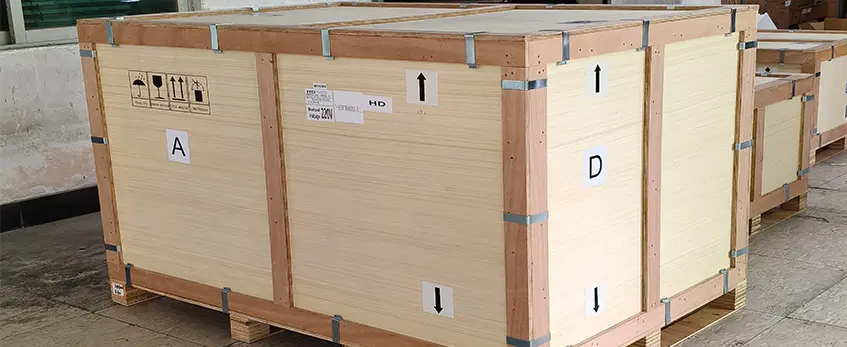
Getting your DTF printer with powder shaker up and running is straightforward when you break it down. Here’s a simple step-by-step rundown to help you start printing vibrant custom apparel quickly and smoothly.
Unboxing and Initial Assembly
Start by carefully unpacking all components, including the printer, powder shaker, power cables, and consumables. Place your DTF printer and shaker on a sturdy, level surface with ample space around for airflow and easy access. Attach any parts as per the manual—this usually means fitting film holders or powder shaker trays and connecting power.
Installing Software, Drivers, and RIP
Next, install your printer drivers and RIP software on your computer. The RIP software is essential for controlling print quality, white ink layers, and color management. Make sure you download the latest versions from the manufacturer’s site and follow the installation prompts. This ensures your Epson printhead DTF or whichever technology you have is fully optimized for speed and accuracy.
Loading Inks, Film, and Powder
Load your DTF inks into the printer cartridges or reservoirs. Use original or high-quality inks for lasting results. Next, feed the DTF transfer film—choosing the right size (A3, A4, or 24-inch) depending on your setup. Finally, fill the powder shaker with hot melt adhesive powder, which ensures powder is evenly applied and ready for curing.
Connecting the Powder Shaker and Calibration
Plug the powder shaker into its power source and link it to the printer if you have an integrated system or control it separately for shaker bundles. Calibrate the shaker speed and powder amount according to the film and ink drying times. Proper calibration ensures uniform powder coverage without clumps or waste.
First Test Print and Adjustments
Run your first test print on scrap film. Check for color accuracy, white ink opacity, film alignment, and powder application quality. Adjust your RIP settings, shaker speed, or powder amount as needed to get crisp, vibrant transfers. This test stage helps prevent material waste and makes sure your prints are ready for heat pressing.
For a smooth start, check out detailed guides on choosing the right film and inks like this DTF transfer film guide to match your printer and powder shaker combo perfectly. With this setup complete, you’ll be ready to produce professional-quality prints right away.
Daily Operation and Best Practices
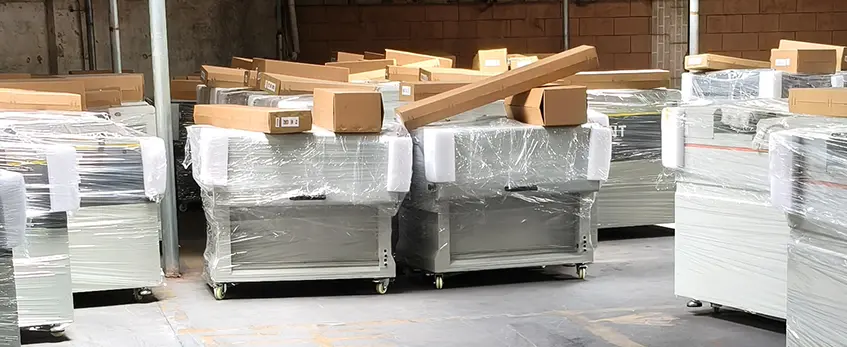
Running your DTF printer with powder shaker smoothly every day comes down to a solid routine and attention to details. Here are some tips to keep your workflow efficient and prints sharp.
Workflow Tips for Efficient Production
- Prep Materials Early: Always have your DTF inks, films, and hot melt adhesive powder ready before starting a batch.
- Use RIP Software: This helps manage print layouts, white ink layers, and color profiles with precision for consistent output.
- Batch Printing: Print multiple designs in one run to minimize downtime between jobs.
- Stay Organized: Keep your workspace clean and maintain a dedicated spot for your powder shaker and heat press to speed up transitions.
Achieving Optimal Print Quality
- Color Settings: Calibrate your RIP software to match your ink profiles and fabric types for vibrant colors.
- White Layer Management: White ink circulation is crucial to avoid clogs; adjust your white layer thickness in the software to suit the garment fabric.
- Resolution: Balance speed and quality by selecting printhead settings — Epson XP600 or i3200 offer different dpi options. Higher resolution boosts detail but slows production.
- Powder Application: Ensure the powder shaker evenly coats the print for strong adhesion and durability.
Safety Precautions
- Ventilation: Use a well-ventilated workspace or a fume extractor to reduce exposure from inks and heat press fumes.
- Powder Handling: Wear a mask and gloves when dealing with DTF powder to avoid inhaling fine particles.
- Cleanup: Regularly clean powder residue from your shaker and work area to prevent buildup that can affect print quality.
By following these daily operation practices, you’ll maximize your DTF printing output, minimize downtime, and ensure your prints come out looking great every time. For more detailed guidance on inks and films, check out this complete guide on DTF inks and film.
Maintenance and Troubleshooting
Keeping your DTF printer with powder shaker running smoothly means sticking to regular maintenance and knowing how to troubleshoot common issues. Here’s a straightforward guide to help you avoid downtime and extend the life of your equipment.
Daily/Weekly Routines to Prevent Clogs and Downtime
- Run white ink circulation daily to keep nozzles clear and prevent ink settling.
- Clean printheads carefully with manufacturer-approved solutions every week or as needed to avoid clogs.
- Wipe down rollers and film paths to remove any excess powder or ink residue.
- Check the powder shaker’s moving parts for dust buildup and clean to ensure smooth powder application.
- Calibrate your printer and shaker regularly to keep prints aligned and colors sharp.
Common Issues and Quick Fixes
- Nozzle clogs: If prints show missing lines or streaks, run a printhead cleaning cycle and do manual flushing if needed.
- Uneven powder distribution: Make sure your automatic powder applicator’s shaker is running properly without jams, and the powder is evenly spread on the film.
- Misalignment: Recalibrate the printer and powder shaker to fix layer shifts or improper registration.
- Ink drying inside tubes: Use recommended flushing solutions and keep white ink circulation active, especially for Epson printhead DTF systems.
Long-Term Care for Printheads and Shaker Components
- Replace printhead parts as advised to maintain high print quality and prevent costly repairs.
- Lubricate shaker mechanisms and check belts or motors to avoid wear that could disrupt powder distribution.
- Store your inks, powders, and films in controlled environments to prevent spoilage, which can affect print quality and machine performance.
Following these maintenance tips will keep your direct to film printer and DTF powder shaker dryer working efficiently, minimizing costly interruptions. For detailed guidance on ink and film choices, check out this useful resource on DTF transfer printing setup.
Cost of Ownership and ROI
When buying a DTF printer with powder shaker, understanding ongoing expenses is crucial for managing your budget and boosting profits. Here’s what to expect:
- Inks: Quality DTF inks are essential for vibrant, durable prints. Expect to invest regularly in both color and white ink, especially with systems having white ink circulation features to prevent clogging.
- Powder: Hot melt adhesive powder is used to make transfers stick properly. The powder needs replenishing often, depending on your print volume.
- Film: DTF films come in rolls or sheets and vary in quality and price. Choosing the right film affects your final print’s feel and durability.
- Electricity: Depending on your printer and shaker size (from A3 desktop to 24-inch production models) and heat press requirements, power consumption can add up, especially in high-volume setups.
Recouping Your Investment
Most small businesses see a return on investment between 6 to 12 months if you price your custom t-shirt printing competitively and maintain consistent order flow. Entry-level DTF printers ($3,000–$6,000) are quicker to pay off because of lower upfront costs, while professional-grade systems ($8,000+) offer higher speed and volume that drive bigger profits over time.
Scaling from Hobby to Full Production
- Start with a compact A3 or A4 DTF printer with powder shaker combo to keep costs low and learn the workflow.
- As orders grow, upgrade to larger 24-inch systems with advanced powder shakers for faster batch processing.
- Utilize automation features like auto-cleaning and white ink circulation to reduce downtime.
- Plan for additional accessories like RIP software and heat press equipment to improve efficiency.
For an in-depth look at managing your setup and maintenance for smooth operation, check out the detailed DTF machines maintenance guide and tips. This will help you optimize your investment and keep your printer running like new.
FAQs: Common Questions on Setup, Costs, Durability, and Compatibility
When choosing a DTF printer with powder shaker, it\’s normal to have questions about setup, expenses, and how well the equipment holds up over time. Here are answers to some of the most common concerns:
1. How difficult is the initial DTF transfer printing setup?
Most modern all-in-one DTF systems come with straightforward assembly instructions. You’ll usually just need to unbox, assemble the powder shaker, install software and drivers, load inks and film, then calibrate the machine. Many models, like those with Epson printheads, include user-friendly guides to simplify this process.
2. What are the typical costs involved?
Entry-level kits usually range from $3,000 to $6,000, ideal for startups or small businesses. For higher volume or professional use, costs can exceed $8,000, especially for larger printers with advanced shaker features. Don’t forget to budget for DTF inks, films, powders, and a good heat press system — essential for durable transfers.
3. How durable are prints using DTF technology?
DTF prints are known for vibrant colors, excellent wash resistance, and flexibility. When paired with quality DTF inks and film, especially hot melt adhesive powder, transfers last through many wash cycles without cracking or fading.
4. Are these printers compatible with common RIP software and heat presses?
Yes. Most DTF printer with powder shaker setups support popular RIP software for color management and layout control. Heat press compatibility depends on the film type used—whether cold peel or hot peel—which affects curing time and application. Check out resources on cold peel vs hot peel DTF film for more on this.
5. Is maintenance complicated?
Regular maintenance is manageable with daily white ink circulation and periodic cleaning recommended to prevent clogs and powder buildup. Automated features in some printers help reduce manual upkeep. Refer to your printer’s manual for detailed maintenance tips.
If you’re thinking of investing in gear like the reliable 60cm DTF shaker bundles or looking for quality inks, always balance your needs between budget, production volume, and desired print quality.





 English
  Español
  Deutsch
  Français