



DTF Printer Maintenance Tips to Prevent Banding and Color Issues
Understanding Banding and Color Issues in DTF Printing
When printing with a DTF printer, banding is one of the most common and visible problems. Banding appears as horizontal or vertical streaks, lines, or uneven color bands across your prints. This disrupts the smooth gradient and solid colors you expect and lowers overall print quality.
Besides banding, color issues like fading, inconsistent hues, or muddy spots often arise. These problems can make transfer designs look dull or inaccurate compared to your digital file.
DTF printing is particularly prone to these issues because it relies on delicate factors like precise printhead alignment, consistent white ink circulation, and stable environmental conditions. The water-based inks used in DTF, especially white ink, can settle or clog nozzles if not handled properly. Also, film tension and media feed calibration directly impact how ink lays down, increasing the chance of streaks or color shifts if off.
Understanding these common pitfalls is the first step to keeping your jinlong DTF printer running smoothly, ensuring consistently vibrant and banding-free transfers every time.
Root Causes of Banding and Color Problems in DTF Printing
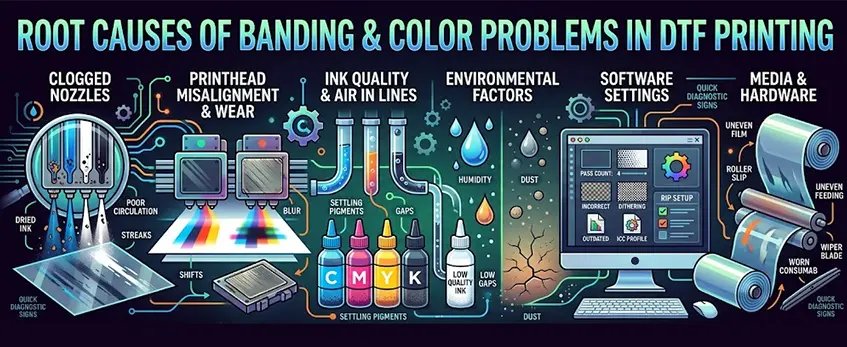
Banding and color issues in DTF prints often come down to a few key causes. Understanding these helps you catch problems early and keep colors consistent.
Clogged or Misfiring Nozzles
Dried ink or poor white ink circulation can block nozzles, causing streaks and uneven print density. This is a common culprit behind banding. Regular DTF printer nozzle cleaning is essential to avoid these spots.
Printhead Misalignment and Wear
If the printhead isn’t aligned perfectly or shows signs of wear, you’ll see lines or bands in your prints. Misalignment also throws color registration off, leading to blurry or shifted images.
Ink Quality, Settling, and Air in Lines
Using low-quality ink or letting pigments settle, especially in white ink bottles, causes inconsistent color output. Air bubbles in ink lines can create gaps or splashes, further ruining print uniformity.
Environmental Factors: Humidity and Dust
Extreme humidity—too high or too low—affects ink drying times and print adhesion, worsening banding risks. Dust or debris inside the printer can interfere with the media feed or clog nozzles.
Software and Settings Issues
Incorrect DTF RIP software settings like low pass counts, wrong dithering patterns, or outdated ICC profiles can cause banding and color shifts. Proper RIP configuration is key for smooth color gradients and sharp print quality.
Media and Hardware Factors
Loose film tension, roller slip, or worn consumables like dampers and wiper blades affect feeding and print consistency. These hardware issues show up as irregular bands or color patches.
Quick Diagnostic Signs
- Streaks or missing lines → likely clogged nozzles or printhead issues
- Shifting colors or blurry edges → printhead misalignment or RIP software problems
- Color inconsistency mid-print → ink settling, air bubbles, or environmental changes
- Uneven film feeding → roller slip or tension problems
By keeping an eye on these causes and signs, you can pinpoint the source of banding or color problems and take action before prints go to waste.
For more insight on preventing common DTF printer issues, check out this guide on common problems with DTF printer and shaker systems.
Essential Daily Maintenance Routine for jinlong DTF Printers
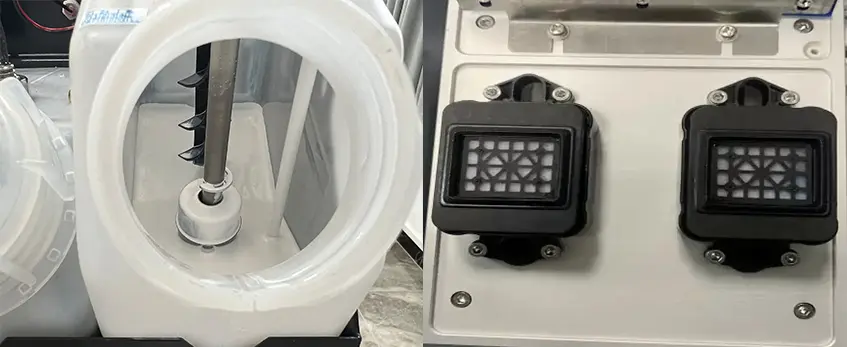
To prevent banding and color issues, daily maintenance on your jinlong DTF printer is a must. Here’s a straightforward routine to keep your printer running smoothly and prints consistent:
Shake white ink bottles gently before startup to keep the white ink well-mixed and prevent clogging or poor circulation. This helps maintain smooth white ink flow, which is critical for consistent color and coverage.
Perform a nozzle check daily to identify any clogged or misfiring nozzles early on. Carefully interpret the nozzle check patterns—missing lines or gaps indicate cleaning is needed.
Run light cleaning cycles judiciously only when necessary. Over-cleaning wastes ink and may reduce printhead life. Use the printer’s cleaning function to clear minor clogs without overdoing it.
Clean the capping station, wiper blades, and printhead area daily with recommended tools and cleaning solutions. This prevents dried ink buildup, which is a common cause of streaks and banding.
Inspect ink levels, dampers, and the waste ink pad frequently. Low ink or clogged dampers can cause inconsistent ink flow, leading to color shifts and print defects.
Cover the printer when idle to protect it from dust and environmental factors that could affect printhead performance and ink quality.
Here’s a printable daily DTF maintenance checklist you can follow to avoid surprises and maintain your printer’s health. Following these steps keeps your jinlong DTF machine in top shape and minimizes downtime caused by banding or color inconsistencies.
Maintaining your printer this way ensures you get consistent, high-quality transfers on DTF transfer film designed for professional results.
Weekly and Monthly Deep Maintenance Schedule for DTF Printers
Keeping your jinlong DTF printer in top shape means scheduling regular deep maintenance alongside daily care. Here’s a simple guide to what you should tackle weekly and monthly to avoid banding and color issues.
Weekly Tasks
- Full printhead cleaning and flushing: Thoroughly clean nozzles to prevent clogging from dried ink or air bubbles.
- Printhead alignment calibration: Check and adjust the printhead alignment to keep prints sharp and free from streaks.
- Roller and carriage cleaning: Remove dust, debris, and ink buildup to maintain smooth media feed and avoid roller slip.
- Humidity monitoring and adjustment: Keep your workspace humidity between 40-60% to prevent ink flow problems and prevent clogging. Consider using humidifiers or dehumidifiers as needed.
Monthly Tasks
- Deep clean the capping station and waste system: Clear ink residue to maintain proper printhead sealing and efficient waste ink absorption.
- Replace filters and dampers if necessary: Worn filters or dampers can cause ink flow instability leading to banding.
- Test color consistency: Print solid color blocks and gray scales to spot any shifts or inconsistencies early.
- Update RIP profiles and ICC: Keep your RIP software and color profiles current for accurate color management and smooth operation.
Seasonal Humidity Tips and Cleaner Warnings
- High or low humidity extremes can impact ink drying and print quality—adjust your environment seasonally.
- Avoid harsh or abrasive cleaners on your printer parts; they can damage delicate components like the printhead wiper blade.
- Always use manufacturer-recommended cleaning solutions and tools for jinlong DTF printers.
Sticking to this weekly and monthly deep maintenance routine will help you prevent common DTF print defects like banding and ensure consistent color accuracy. For detailed info on ink quality and print profiles, check out our guide to DTF Pro Ink and its benefits.
Troubleshooting Banding and Color Issues Step-by-Step

When you spot banding or color problems on your DTF prints, start simple and work your way through fixes:
- Run a nozzle check first. This helps identify clogged or misfiring nozzles. Clean the printhead with a light cleaning cycle if needed to clear any blockages.
- Verify printhead alignment DTF settings to ensure no misalignment is causing streaks or uneven color. Also, check your media feed calibration so the film moves consistently without slipping.
- Check your environment and ink circulation. Make sure the room humidity is stable (ideally 40-60%) and that white ink is well circulated to prevent settling or clogs in the lines.
- Try uni-directional printing or increase pass counts in your RIP software settings to reduce banding risks by allowing ink to lay down more smoothly.
- For color-specific issues, reprofile your ICC profiles, adjust the white underbase layer, or flush ink lines when you notice color shifts or inconsistencies mid-run.
- If banding appears intermittently or colors drift during printing, carefully check for partial nozzle clogs or environmental swings causing ink drying delays.
- When these steps don’t fix persistent problems, or hardware feels unresponsive, it’s time to reach out for professional support.
Following this structured troubleshooting routine can save time and keep your Jinlong DTF printer producing flawless, vibrant prints consistently. For best results, pair these steps with your DTF white ink maintenance and proper media handling with quality films like the DTF transfer film Double Pro series.
Optimization Tips for Flawless Prints and Color Accuracy
To get the best results from your jinlong DTF printer and avoid common banding and color problems, start by using high-quality, jinlong-compatible inks and films. The right consumables ensure consistent color vibrancy and avoid issues caused by poor ink quality or incompatible media.
Next, fine-tune your DTF RIP software settings. Adjust dithering patterns, ink limits, and color sequencing carefully to enhance print quality and reduce streaks. Proper RIP calibration helps maintain smooth gradations and consistent colors throughout your print runs.
Make routine test prints part of your workflow. Running regular nozzle checks, printing color charts, and banding test patterns can quickly detect early signs of clogs or misalignment before they impact production. These quick checks keep your printer in top shape and the colors accurate.
Keep your print environment clean and dust-free with proper ventilation. Dust and debris can cause nozzle blockages and print defects, so controlling humidity and airflow prevents these risks. Monitoring printer logs and usage reports is also key — early wear detection through these logs can save time and cost by addressing issues before they escalate.
By combining quality inks, precise software settings, routine tests, and a clean environment, you’ll consistently achieve professional-grade prints without banding or color inconsistencies in your DTF transfers. For more on managing color accuracy, check out our guide on why incorrect DTF temperature causes peeling or cracking.
Best Practices and Common Mistakes to Avoid
To keep your jinlong DTF printer running smoothly and avoid banding or color issues, stick to these best practices:
- Never skip daily maintenance checks. A quick nozzle check and white ink circulation ensure your printhead stays clear and consistent.
- Use only recommended consumables, like genuine DTF transfer films and inks. Low-quality supplies can cause clogging, color inconsistency, and printhead wear. For reliable film options, check out the 45cm single basic DTF transfer film.
- Avoid over-cleaning. Excessive cleaning wastes ink and risks damaging the printhead or wiper blades. Follow the nozzle cleaning guidelines carefully.
- Manage humidity levels between 40-60%. Too much moisture or dryness affects ink flow and print quality. A controlled environment prevents banding and color shifts.
- Optimize your workflow: batch printing jobs to reduce startup and shutdown cycles helps maintain consistent ink circulation and minimizes clogs.
- Proper shutdown is critical. Use the printer’s recommended shutdown procedure to protect nozzles and maintain alignment.
Following these tips will save you from common pitfalls and help your DTF prints stay sharp, vibrant, and streak-free.





 English
  Español
  Deutsch
  Français