
No products in the cart.

Jinlong
DTF Printer Head Problems from Poor Ink or Film Quality Explained
Why Printhead Problems Are So Common in DTF Printing
DTF printhead clogging is one of the most frequent issues users face, and it stems from the unique mechanics and vulnerabilities of DTF printer heads. Unlike other printing methods, DTF heads deal with specialized inks—especially white ink—that have thicker consistency and can easily cause DTF nozzle blockage. The printhead’s tiny nozzles are highly sensitive. When impurities or inconsistent ink viscosity enter the system, they quickly lead to clogs or streaks in your prints.
These delicate components work by ejecting precise ink droplets onto the DTF film. Any disruption—from dust, poor-quality ink, or incompatible film—can cause uneven ink flow or partial blockages. This vulnerability is why regular DTF printer head maintenance is essential. Without it, even minor issues grow into costly repairs or print failures. Knowing how your printhead operates and what stresses it faces is key to preventing common problems and extending your DTF printhead life.
How Poor Quality Ink Directly Damages the Printhead
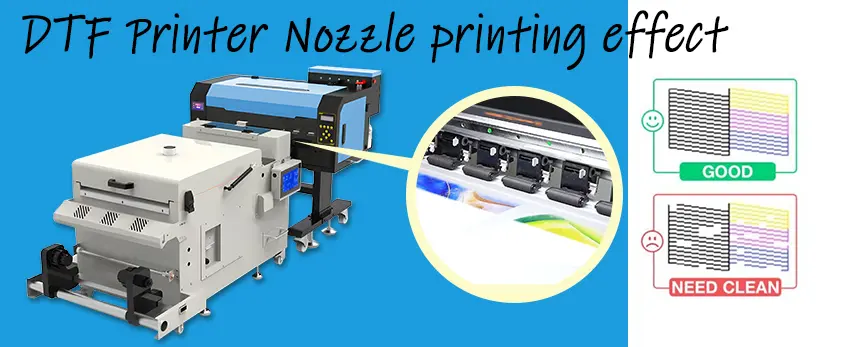
Poor quality DTF ink is one of the top reasons for DTF printhead clogging and failure. Cheap inks often contain impurities that can quickly block the tiny nozzles of your printhead. When ink particles aren’t properly filtered, they settle inside the printhead, causing DTF nozzle blockage. Over time, this leads to uneven spray patterns and streaks on prints.
Viscosity plays a big role too—inks that are too thick or thin disturb the smooth flow your printhead needs. This is especially true for white ink, which is notorious for white ink clogging DTF printer heads due to its heavy pigment load. Sedimentation happens when the ink particles settle and form sediment at the bottom of the cartridge or ink lines, creating blockages that are tough to clear.
Key signs of damage from poor quality ink include:
- Missing nozzles during printhead tests
- Uneven lines or banding on prints
- Frequent need for printhead cleaning
- Error messages related to ink flow or printhead temperature
Using low-grade ink sacrifices print quality and puts your investment at risk. To avoid costly downtime and repairs, opt for reliable inks that maintain optimal viscosity and purity. For a closer look at quality ink options designed for consistent results, check out how a DTF ink printer delivers high-quality prints on any fabric type.
The Hidden Role of Low-Quality DTF Film in Printhead Issues
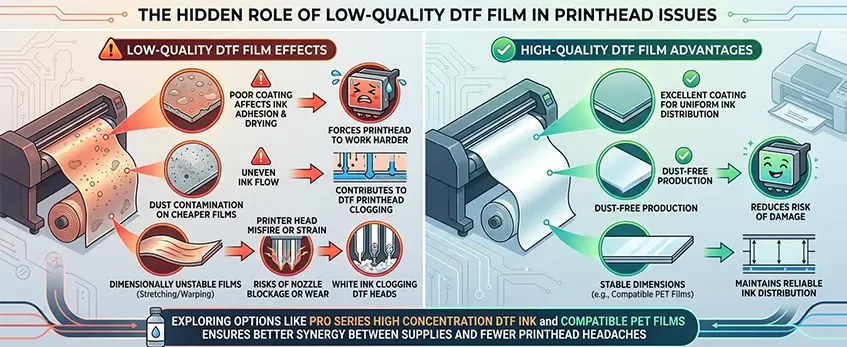
Low-quality DTF film often flies under the radar as a cause of DTF printer head problems, but it plays a big role. Poor film coating can affect how the ink adheres and dries, leading to inconsistent prints that force the printhead to work harder. Dust contamination on cheaper films is another culprit, causing uneven ink flow and contributing to DTF printhead clogging over time.
Dimensionally unstable films—those that stretch or warp easily—also cause indirect harm. When the film doesn\’t feed smoothly or shifts during printing, the printer head may misfire or strain, increasing risks of nozzle blockage or wear. These issues stack up, worsening problems like white ink clogging DTF heads, since white ink is especially sensitive to irregular surfaces.
Using high-quality, well-coated, and stable films helps maintain reliable ink distribution and reduces the risk of damage. Choosing the right film to match your printer and ink is a smart prevention strategy to protect your printhead and print quality. For example, exploring options like the pro series high concentration DTF ink and compatible PET films ensures better synergy between supplies and fewer printhead headaches.
Recognizing Early Warning Signs of Printhead Trouble
Catching DTF printer head problems early can save you time and money. Watch out for nozzle checks that show missing or weak lines—that’s a classic sign of DTF printhead clogging. Smudging or streaking in your prints, especially with white ink, often points to white ink clogging DTF printheads.
You might also see faded colors or inconsistent printing, which means the printhead is struggling. If your printer displays error messages related to ink flow or nozzle issues, don’t ignore them—they’re a sign your printhead needs attention.
Other subtle clues include unusual noises during printing or inconsistent drying times, which can relate back to low quality DTF film issues affecting print quality. Keeping an eye on these visual and operational signals helps you spot printhead trouble before it gets worse. For reliable ink details, consider checking out this resource on DTF white ink for inkjet print quality, opacity, and durability to better understand what your printhead tolerates.
Step-by-Step Troubleshooting and Immediate Fixes
When facing DTF printer head problems, quick action can save you a costly repair or replacement. Start with simple steps to tackle common issues like DTF printhead clogging or white ink clogging DTF heads:
- Run nozzle checks: This helps identify DTF nozzle blockage causes. If you see gaps, streaks, or missing lines, it’s a sure sign the printhead needs attention.
- Perform printhead cleanings: Use your printer’s cleaning function to clear dried ink or sediment buildup, especially if poor quality DTF ink has been used.
- Check the ink system: Inspect ink cartridges, tubes, and filters for clogs or air bubbles. Replace any damaged parts and refill with high quality DTF ink to prevent further damage.
- Clean the printhead manually if needed: For stubborn clogs, carefully clean the printhead with recommended cleaning solutions, avoiding harsh chemicals.
- Inspect your film and environment: Sometimes low quality DTF film or dust contamination indirectly cause printhead issues. Make sure the workspace is clean and you’re using compatible supplies.
- Know when to get professional help: If problems persist after these steps—a sign of Epson DTF printhead problems or serious clogging—it’s time to consult a technician or your supplier. DIY fixes have limits, and professional servicing can extend DTF printhead life.
Following these troubleshooting steps can resolve most DTF printing streaks fixes and prevent printhead damage from escalating. For more detailed info, check out the JL DTF604P DTF digital printer Pro series, which offers improved reliability and easier maintenance.
Prevention Strategies to Protect Your Printhead Long-Term
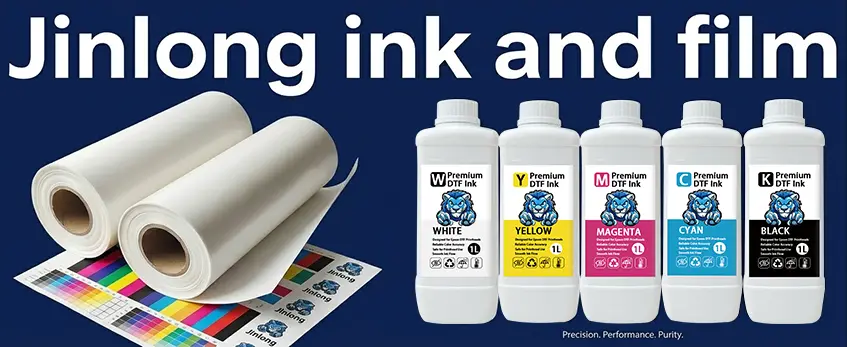
Protecting your DTF printer head over the long haul starts with smart prevention. Here’s how to keep your printhead safe from damage caused by poor quality ink or film:
- Choose Quality Inks and Films: Always go for high quality DTF ink and compatible films. Cheap inks often have impurities or improper viscosity that lead to DTF printhead clogging. For films, low quality DTF film can cause problems like dust contamination or poor coating, indirectly stressing your printhead. For insights on selecting reliable films, check out this guide on how to choose the best DTF film for high-quality prints.
- Regular Maintenance Routines: Conduct frequent nozzle checks and cleanings to catch early signs of white ink clogging DTF printheads or ink sediment buildup. Maintenance helps prevent stubborn DTF nozzle blockage causes.
- Control Your Environment: Keep your workspace dust-free and maintain a stable temperature and humidity to extend DTF printhead life. Dust and extreme conditions worsen wear and tear.
- Proper Storage of Consumables: Store ink cartridges and films sealed and in recommended temperature ranges. Exposure to air or heat accelerates degradation, affecting ink quality and film dimensions.
- Match Brands for Compatibility: Mixing brands can cause ink chemistry mismatches and DTF film compatibility problems—both lead to printhead damage. Stick with trusted brands known for consistent, high quality supplies.
Implementing these steps will significantly reduce costly DTF printer head problems and keep your prints sharp and reliable for every job.
Why Investing in Premium Supplies Pays Off
Choosing high quality DTF ink and film might seem costly upfront, but the benefits far outweigh the initial expense. Poor quality DTF ink often contains impurities and unstable viscosity levels that cause DTF printhead clogging and white ink clogging DTF issues. This not only leads to frequent maintenance but also shortens your printhead’s lifespan. On the other hand, premium inks ensure smoother flow and reduce DTF nozzle blockage causes, helping you extend DTF printhead life significantly.
Similarly, low quality DTF film issues like poor coating and dust contamination can cause indirect damage to your printhead by forcing harder cleanings and inconsistent printing. Investing in compatible, high-grade films such as the Jinlong DTF transfer film options guarantees better durability and fewer jams. You can explore the benefits of these reliable films on Jinlong’s DTF transfer film 60cm double STD series page.
When you compare the cost of replacing printheads or dealing with printhead repairs against buying premium supplies, the savings are clear. Premium supplies offer quality consistency that helps avoid printing streaks fixes and lowers total downtime. For businesses targeting top-tier output and reliability in the United States market, investing in the best DTF supplies for reliability, like Jinlong DTF products, means less hassle and more profit over time.


 English
 Español
 Deutsch
 Français