

No products in the cart.

Jinlong
A3 DTF Printer Buyer’s Guide 2026 Features Specs and Costs
Why the A3 Form Factor is the 2026 Industry Standard for Startups
If you’re diving into the custom apparel business startup in 2026, choosing the right DTF printer size is crucial. The A3 form factor (13\” x 19\”) hits the sweet spot—big enough to handle commercial volume but compact enough for tight spaces.
The \”Goldilocks\” Size: Why A3 Beats A4 and 60cm
- Bigger than A4, smaller than 60cm: A3 offers more print area than A4, letting you create larger, more detailed designs without the bulk and cost of a 60cm machine.
- Ideal for diverse projects: From small runs of custom tees to mid-sized batch orders, A3 fits perfectly.
Space vs. Output: Fits Home Office or Garage, Delivers Commercial Volume
- Compact footprint: Fits comfortably in a home office, garage, or small workshop without requiring industrial space.
- Commercial-level output: Despite its size, an A3 DTF printer can handle enough volume to keep up with growing demand, making it perfect for startups scaling up.
Versatility: Printing on Dark Cotton, Polyester, Denim, and Leather Without Pretreatment
- No pretreatment needed: Modern A3 DTF printers handle a wide range of fabrics—dark cotton, polyester, denim, and even leather—without extra steps.
- Direct-to-Film transfer technology ensures vibrant, durable prints on diverse textiles, saving time and reducing costs.
In 2026, the A3 DTF printer is the go-to choice for entrepreneurs who want professional results, flexibility, and efficient use of space. It’s the Goldilocks size that’s just right for serious startups aiming to grow.
Critical Specs: What Defines a \”Pro\” A3 Printer in 2026?
When shopping for a pro-level DTF printer A3 in 2026, some specs stand out as must-haves to ensure top performance and reliability.
Printhead Technology: Epson i3200 vs. XP600 Durability
The Epson i3200 printhead has become the industry favorite for its longer lifespan and sharper print quality compared to the XP600. It handles high-volume runs better, making it ideal for startups aiming for consistent output without frequent replacements.
Dual Head Systems for Speed
Modern A3 printers often feature dual printheads—one dedicated to CMYK colors and another solely for white ink. This setup dramatically boosts printing speed and maintains color vibrancy, especially important when printing on dark cotton, polyester, or leather.
White Ink Circulation System (WICS) Evolution
Clogging in white ink lines has been a challenge, but 2026 models use advanced damper-level circulation systems. This innovation keeps white ink moving smoothly, reducing downtime and maintenance headaches.
RIP Software Compatibility: Color Management Matters
Professional DTF printers now come compatible with RIP software like CadLink and Maintop. These programs offer precise color management, ensuring your textile pigment ink prints come out true-to-design every time.
Heating & Vacuum Platform
A reliable heating and vacuum platform is essential to prevent PET transfer film A3 size from buckling during printing. This stability ensures the ink sets evenly, reducing waste and improving wash fastness ratings.
For a seamless print-to-garment workflow, pairing your printer with the right powdering and curing equipment is key. Explore our detailed DTF printer with powder shaker workflow from printing to curing to optimize your setup.
The Jinlong DTF Advantage: Engineering for Reliability
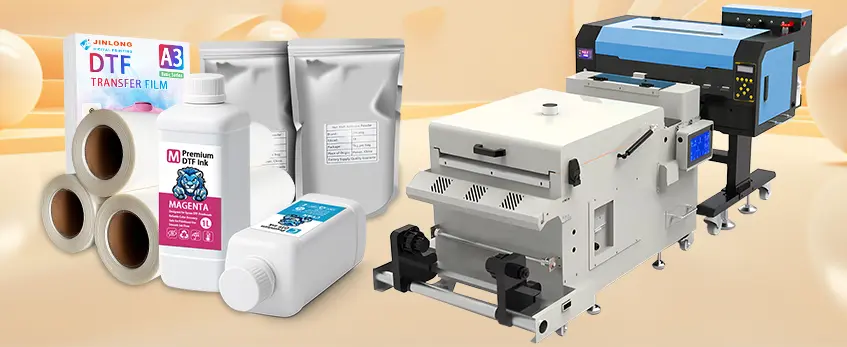
When it comes to A3 DTF printers, Jinlong stands out by combining industrial-grade components with a compact design that fits perfectly in small workspaces. Their printers are built tough to handle commercial volumes without taking up a ton of room—ideal for startups working out of a home office or garage.
Jinlong’s user-centric design makes daily operation and maintenance straightforward. Easy access panels let you quickly reach critical parts like the printheads and white ink circulation system, reducing downtime. Plus, their robust motherboard stability ensures consistent performance, minimizing printhead clogging and other common issues.
This blend of durability and smart design makes Jinlong A3 printers a reliable choice for anyone serious about direct-to-film transfer technology. For those looking to optimize their workflow, Jinlong’s engineering helps keep your business printing smoothly and efficiently.
The Complete Workflow: From Design to Finished Garment
Getting your custom apparel right with a DTF printer A3 means nailing each step—from design to the final press. Here’s what you need to know.
Preparation: File Formatting and Resolution
- Use 300 DPI for crisp, vibrant prints.
- Preferred formats: PNG or TIFF with transparent backgrounds.
- Make sure colors are set in CMYK+W mode for accurate output.
Printing: Monitoring Humidity and Temperature
- Keep room humidity between 40-60% to avoid ink drying issues and printhead clogging.
- Ideal printing temperature: 70-80°F (21-27°C).
- Use a white ink circulation system to maintain ink flow and prevent sediment buildup, especially with white ink-heavy designs.
Powdering & Curing: Manual vs. Automated
| Method | Pros | Cons |
|---|---|---|
| Manual Powdering | Low cost, simple setup | Inconsistent powder spread |
| Automated Powdering | Even coverage, faster output | Higher initial investment |
- Use TPU hot melt powder for strong adhesion and wash fastness.
- Curing ovens should maintain a steady DTF curing oven temperature around 160-170°C (320-338°F) for optimal powder melting.
Heat Pressing: Pressure, Temperature & Peeling
| Parameter | Hot Peel Film | Cold Peel Film |
|---|---|---|
| Pressure | Medium (30-40 PSI) | Medium to High (40-50 PSI) |
| Temperature | 320-330°F (160-165°C) | 320-330°F (160-165°C) |
| Peeling Time | Peel immediately while hot | Wait until fully cooled |
| Result | Softer feel, vibrant colors | Slightly stiffer, durable |
Correct heat press settings ensure the best wash fastness rating and print longevity.
For more on white ink technology and how it impacts your print quality, check out this detailed guide on white inkjet ink and how it works.
This workflow is essential for anyone starting a custom apparel business startup with a DTF printer A3, ensuring consistent, professional results every time.
The True Cost of Ownership (Beyond the Price Tag)

When buying a DTF printer A3, the initial price is just the start. Understanding the ongoing costs is key to running a profitable custom apparel business startup.
Consumables Breakdown: Cost per A3 Sheet
- Ink: Textile pigment ink quality matters. Expect to spend around $1.50 to $2.50 per A3 sheet depending on color coverage, especially with CMYK+W configurations.
- Film: Using high-quality PET transfer film A3 size ensures vibrant prints and durability. Costs vary, but budget roughly $0.50 to $1.00 per sheet. Check out the best options in choosing the best DTF film for high-quality prints in 2026.
- Powder: TPU hot melt powder is essential for adhesion and wash fastness. Powder usage costs about $0.20 to $0.40 per sheet depending on the garment and curing method.
Maintenance Parts: Budgeting Smart
Regular replacement of cap tops, wipers, and dampers is a must to keep your Epson i3200 or XP600 printheads clog-free. Set aside about 10-15% of your monthly consumables cost for these parts. Investing in a reliable DTF maintenance kit can save you downtime and expensive repairs.
ROI Calculator: How Many Shirts to Break Even?
To break even in the first six months, calculate your fixed and variable costs against your selling price per shirt. For example:
- Average cost per A3 print: $4.00 (ink + film + powder)
- Shirt selling price: $15.00
- Monthly fixed costs (printer lease, electricity, maintenance): $500
You’ll need to sell roughly 50 shirts per month to cover expenses and start turning a profit. Tracking your costs closely helps optimize pricing and production volume for your custom apparel business startup.
Understanding these numbers upfront gives you a clear picture of your DTF printer A3 investment and helps you plan for sustainable growth.
Maintenance: The Heartbeat of Your DTF Business
Keeping your DTF printer A3 in top shape is essential for consistent quality and long-term savings. Here’s what your daily routine should look like:
- Nozzle Checks: Start each day by running nozzle checks to ensure all printheads are firing correctly. This prevents clogging and maintains sharp, vibrant prints.
- Clean the Capping Station: Wipe down the capping station daily to avoid ink buildup that can cause printhead damage or poor ink flow.
If you’re not printing for more than 48 hours, follow the “Weekend Rule”:
- Perform a thorough cleaning cycle before and after the break.
- Seal the printheads properly to prevent drying.
- Consider a light purge to keep the white ink circulation system flowing smoothly and avoid sediment issues.
Controlling your workspace environment is just as important:
- Maintain humidity between 40-60% to prevent ink drying too fast or too slow, which affects print quality and can cause clogging.
- Stable temperature and clean air help protect your Epson i3200 or XP600 printheads and extend their lifespan.
For more detailed maintenance tips and how to handle common issues like powder shaker problems, check out this guide on common problems with DTF printers with powder shakers and how to fix them. Proper upkeep is the heartbeat of your DTF business—neglect it, and your printer’s performance will suffer.
Common Pitfalls & How to Avoid Them
Starting with a purpose-built DTF printer is crucial—avoid the temptation to buy converted photo printers. These machines often lack the durability and features needed for consistent direct-to-film transfer technology, leading to frequent printhead clogging and white ink sediment issues. Speaking of white ink, sediment buildup is a common headache. Make sure your A3 printer includes an advanced white ink circulation system (WICS) to keep the ink flowing smoothly and prevent costly downtime.
Ventilation is another critical factor many beginners overlook. DTF printing and curing release fumes that can affect indoor air quality. Proper fume extraction and ventilation systems are a must, especially if you’re running your custom apparel business startup in a home office or garage. This not only protects your health but also maintains a clean printing environment for optimal wash fastness rating and print quality.
By steering clear of these pitfalls, you’ll keep your DTF printer running smoothly and your prints looking professional. For more on curing techniques and heat press settings, check out our detailed guide on the best heat press for DTF.
Future-Proofing Your Investment
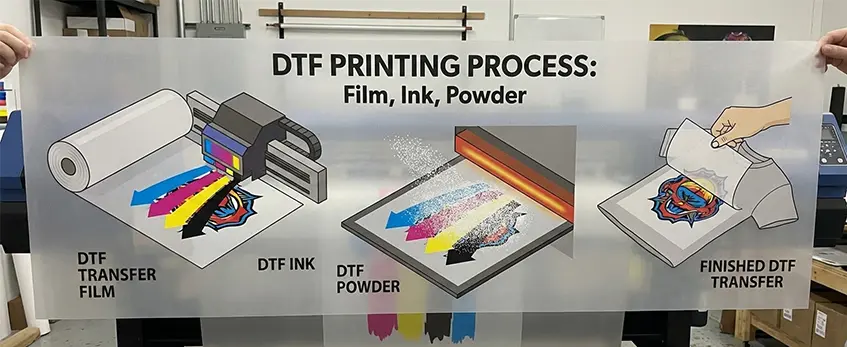
Staying ahead in the custom apparel game means investing in the latest 2026 trends like eco-friendly powders and breathable PET films. These materials not only reduce environmental impact but also improve comfort and wash fastness ratings, making your prints more appealing to eco-conscious customers.
When it comes to scalability, starting with a single A3 DTF printer is perfect for testing the waters. But as your order volume grows, upgrading to a fleet of Jinlong DTF printers can boost your commercial output without sacrificing print quality or speed. Jinlong’s industrial-grade components and user-friendly design make expanding your setup straightforward and reliable.
For beginners aiming to future-proof their DTF printing business, focusing on these innovations and knowing when to scale will ensure you stay competitive and profitable. For a deeper dive into automation options that help streamline your workflow, check out our detailed guide on the DTF printer with powder shaker for beginners.
Final Verdict: Is an A3 DTF Printer Right for You?
Choosing the right DTF printer A3 model is a big step for any custom apparel business startup. If you need a machine that balances size, versatility, and commercial volume, the A3 format (13\” x 19\”) is the sweet spot. It fits well in a home office or garage while delivering professional results on dark cotton, polyester, denim, and leather without pretreatment. Plus, with advanced features like Epson i3200 printheads and a reliable white ink circulation system, you get durability and consistent quality.
Checklist for Prospective Buyers:
- Size & Space: Fits small workspaces but handles commercial volume.
- Print Quality: Look for CMYK+W dual head systems and RIP software with strong color management.
- Maintenance: Easy access panels and a solid maintenance kit keep downtime low.
- Consumables: Factor in costs for PET transfer film A3 size, textile pigment ink, and TPU hot melt powder.
- Workflow: Supports automated curing ovens and offers flexible heat press pressure settings.
- Future-Proof: Compatible with eco-friendly powders and scalable to multi-unit fleets.
Before you invest, check out the full Jinlong DTF A3 series catalog to compare models and find the perfect fit for your startup. This will help you make a smart, future-proof choice for your DTF printing business in 2026 and beyond.





 English
 Español
 Deutsch
 Français