
No products in the cart.

Jinlong
Common Problems with DTF White Ink for Inkjet and How to Fix Them
White ink in DTF inkjet printing isn’t just another color—it’s the biggest pain point for many operators. Issues like clogging, sedimentation, and poor opacity disrupt production and eat into your profits. If you’re struggling with common problems with DTF white ink for inkjet, you’re not alone. These challenges demand a clear understanding of the ink’s chemical quirks and a solid maintenance routine. This guide cuts straight to the fixes you need—no fluff, just proven solutions—and shows why upgrading to Jinlong DTF white ink can save your printhead and boost your output.
Understanding the Core Issue: Why White Ink Fails
When working with DTF white ink for inkjet printing, many users face recurring problems rooted in the ink’s unique chemistry. The main culprit? Titanium dioxide sedimentation. White ink relies heavily on titanium dioxide, a dense pigment that provides the opacity and brightness necessary for crisp white underbases on DTF prints. However, this pigment naturally tends to settle and separate when left standing, causing the ink to fail in various ways.
This sedimentation effect leads to uneven ink consistency, which can clog printheads, reduce opacity, and cause color inconsistencies. Unlike regular CMYK inks, white ink\’s heavier particles require constant movement to stay suspended. Without a proper white ink circulation system (WIMS) or routine manual agitation, sediment sinks to the bottom of ink tanks, resulting in poor print performance.
Understanding this chemistry is essential: titanium dioxide particles will naturally gravitate, creating layers that must be actively managed. From manual shaking to advanced WIMS pumps, solutions address the sedimentation issue directly. Recognizing how titanium dioxide behaves in DTF ink helps troubleshoot problems early on and maintain consistent print quality with Jinlong DTF consumables and other quality DTF inks.
Problem 1: White Ink Sedimentation and Separation (In the Tank)
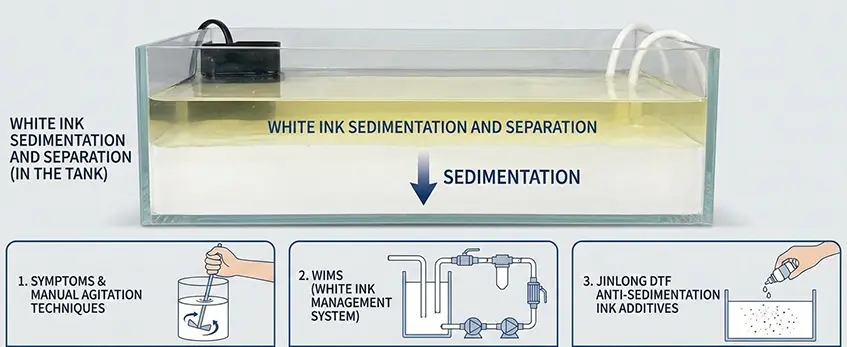
One of the biggest headaches with DTF white ink for inkjet printing is sedimentation — the titanium dioxide pigment tends to settle at the bottom of the ink tank, causing ink separation. This leads to inconsistent color output, clogged nozzles, and wasted ink.
Symptoms and Manual Agitation Techniques
You’ll usually spot this issue when prints start fading or show uneven opacity. To fix it quickly, manually shaking the ink tank before and during printing helps to redistribute the pigment. Some users gently stir with a clean tool or use a small magnetic stirrer to keep the suspension uniform.
WIMS (White Ink Management System) and Circulation Pumps
For a more automated approach, many DTF printers come equipped with a White Ink Management System (WIMS). This setup circulates the white ink continuously using built-in circulation pumps, preventing pigment from settling without manual effort. If your printer doesn’t have WIMS, consider upgrading or retrofitting circulation pumps to maintain ink stability during long runs.
Jinlong DTF Anti-Sedimentation Ink Additives
Another effective solution is using specialized ink additives designed to reduce sedimentation. Jinlong DTF consumables offer anti-sedimentation additives that improve titanium dioxide dispersion, making the white ink stay mixed longer and reducing downtime for cleaning. This helps ensure smooth printing, fewer clogging issues, and better overall print quality.
For detailed tips on handling DTF materials and optimizing your prints, check out our guide on the best TPU powder for DTF printing performance.
Problem 2: Printhead Clogging and Nozzle Dropouts
Printhead clogging is one of the most common problems with DTF white ink for inkjet printers. You’ll notice symptoms like banding, missing sections in prints, or sometimes zero ink flow from the nozzles. These issues happen because titanium dioxide particles in white ink tend to settle and block tiny nozzles over time.
Wet Cap Method to Keep Printheads Moist
To prevent clogging, keeping your printheads moist is key. Use the wet cap method daily—this means covering the printheads with a moist cap or cloth when the printer is idle. It prevents ink from drying and hardening in the nozzles, which reduces dropouts and maintains smooth ink flow.
Cleaning Cycles: When and How to Use Them
Don’t overdo your cleaning cycles—they waste ink and can wear out your printhead. Start with a nozzle check to identify blocked nozzles. If you see banding or missing lines, run a cleaning cycle. For stubborn clogs, use a DTF printhead cleaning solution specifically formulated for white ink to dissolve dried pigment safely without damaging the nozzles.
Damper Replacement and Its Role in Clogging Prevention
The damper plays a big role in preventing clogging by filtering ink and stabilizing flow. Over time, dampers can get clogged with sediment or dried ink, which chokes off ink supply and causes printhead issues. Regular damper replacement is crucial—check your printer’s guidelines, but roughly every 3-6 months is a good rule of thumb depending on usage. Replacing dampers helps maintain reliable ink flow and extends printhead life.
For more tips on identifying if your DTF printer is out of ink versus clogged nozzles, check out this detailed guide on how to tell if your DTF printer is out of ink vs clogged or low ink issues.
Following these steps ensures your white ink delivers consistent, vibrant prints without the frustration of nozzle dropouts or banding.
Problem 3: Poor Opacity (The White Isn\’t White Enough)
One of the most common issues with DTF white ink for inkjet is poor opacity—when the white underbase looks grey or transparent instead of solid. This can seriously affect the final print quality, especially on dark garments.
How to Identify Grey or Transparent White Underbase
If your prints show dull or see-through whites, it means the white ink layer isn’t dense enough. This often happens when the printer deposits too little ink or when pigment concentration is low.
Adjusting RIP Software White Ink Settings
Tweaking your RIP software’s white ink settings is a key fix. Increasing the white ink density or doubling the white underbase passes can make your whites pop. Make sure your RIP software supports custom white ink curves to optimize opacity.
Importance of Ink Quality and Pigment Load
The pigment load in your white ink also matters. High-quality DTF inks with greater titanium dioxide content (the main white pigment) deliver a richer, more opaque layer. Using trusted brands like Jinlong DTF white ink helps ensure vibrant opacity without clogging issues. Check out their pro-series white ink for a reliable option.
Increasing Print Resolution for Denser Undercase
Boosting print resolution can also improve white opacity. Higher DPI settings lay down more ink droplets per inch, thickening the white layer. Aim for at least 720 DPI for a solid underbase, but test your printer’s limits to avoid clogging.
By combining RIP software tweaks, high-quality ink, and optimal print resolution, you can significantly reduce poor opacity issues and get that bright, solid white every time.
Problem 4: Ink Run-off and Pooling (Bleeding)
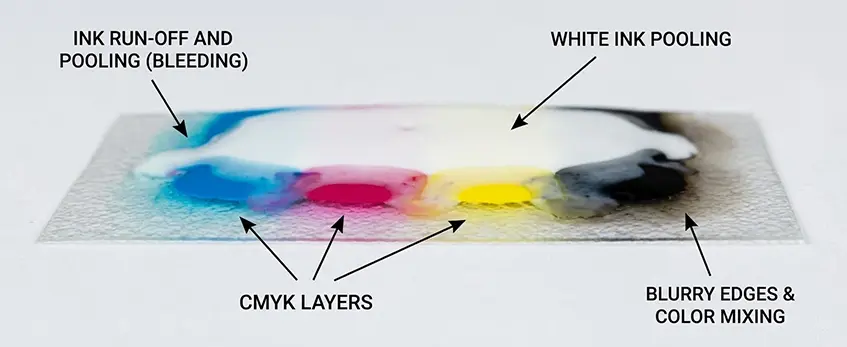
One common issue with DTF white ink for inkjet is ink run-off or pooling, where the white ink bleeds into the CMYK layers, causing smudging and color mixing. This usually shows up as blurry edges or washed-out prints, which can ruin detailed artwork.
Symptoms to Watch For:
- White ink spreading beyond its intended area
- Colors blending together or fading
- Uneven ink density or streaks
How to Fix Ink Run-Off and Pooling:
1. Check Film Coating and Ink Viscosity Compatibility
Make sure the DTF film coating matches your ink’s viscosity. Too thin ink can soak in too quickly, causing pooling, while overly thick ink can clump and run. Adjusting ink viscosity is key to preventing unwanted bleeding.
2. Adjust Heating and Platen Temperature
Proper curing stops the ink from spreading. Increasing platen temperature slightly can help the white ink dry faster and sit better on the film. Just be careful not to overheat, as that can cause cracking or peeling later on.
3. Control Humidity Levels
High humidity slows down ink drying and promotes pooling or bleeding. Try to keep your print area’s humidity between 40% and 60%. Using a dehumidifier in wetter climates is a good way to keep drying times consistent and optimum.
By fine-tuning these settings, you’ll see less white ink mixing with CMYK colors and get sharper, cleaner prints every time. Also, pairing your ink and film properly ensures excellent adhesion and minimizes run-off check out the TPU DTF hot melt adhesive powder that enhances finish quality.
Keeping these factors in balance lets you avoid bleeding problems and maintain solid, brilliant white underbases that stand out.
Problem 5: Cracking or Peeling After Transfer
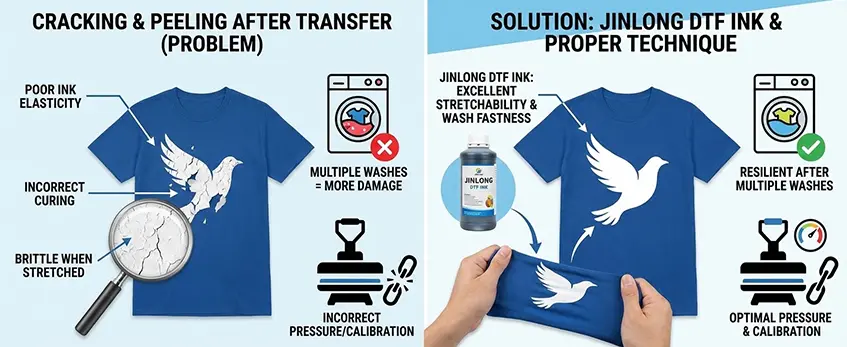
Cracking or peeling of your DTF white ink after transfer usually points to curing issues or poor ink elasticity. If the ink isn’t properly cured, it tends to become brittle, which leads to cracks when the fabric stretches or moves. Also, some inks lack the flexibility needed to withstand daily wear and washing.
To fix this, using Jinlong DTF ink is a smart move since it offers excellent stretchability and wash fastness. This means the white ink remains resilient and intact even after multiple washes. Alongside quality ink, proper pressure settings and heat press calibration are essential. Too much or too little pressure can affect how well the ink bonds to the fabric, causing cracks or peeling over time.
Tips to avoid cracking and peeling:
- Ensure your DTF transfer curing temperature matches Jinlong’s recommended settings.
- Adjust heat press pressure so it’s firm enough to fix the ink but gentle enough not to damage the film.
- Test small samples to dial in the perfect balance of heat, pressure, and time.
For more on getting perfect transfers, check out how to choose the best DTF heat press for beginners, which can make a major difference in your print durability.
The Golden Rules of Maintenance (Prevention Strategy)
Keeping your DTF white ink running smoothly isn\’t just about fixing problems when they pop up. A daily and weekly maintenance routine can save you time and money by preventing common issues like clogging, sedimentation, and poor print quality.
Daily Routine
- Tank Shaking: Give the white ink tanks a good shake or manual agitation each day. This helps combat titanium dioxide sedimentation and keeps the ink mixed evenly in the tank, preventing separation that could clog your printheads.
- Waste Ink Bottle Check: Always check your waste ink bottle to avoid overflow and potential damage to internal components.
- Nozzle Inspection: Run a nozzle check daily to catch any signs of printhead clogging early. Early detection helps prevent larger banding or nozzle dropout problems.
Weekly Routine
- Cleaning the Wiper Blade: Wiping blades collect dried ink and debris that can scratch or damage your printhead. Clean the wiper blades once a week to maintain smooth operation and avoid unnecessary wear.
- Capping Station Cleaning: The capping station keeps your printheads moist when idle. A clean capping station ensures proper sealing and prevents ink from drying out, reducing the chance of nozzle blockages.
Vacation Mode Procedures for Idle Printers Over 48 Hours
If your DTF printer will sit unused for more than two days, follow vacation mode steps to protect your white ink system:
- Use the wet cap method to keep printheads moist and avoid drying.
- Flush or circulate the white ink circulation system (WIMS) to prevent titanium dioxide sedimentation and pigment settling.
- Store the printer in a clean, dust-free environment at stable temperature and humidity levels to avoid ink degradation or film coating issues.
Sticking to these golden rules of maintenance minimizes downtime and extends the life of your printer and consumables. For more about managing DTF white ink issues and best practices, check out this detailed DTF white ink for inkjet printers guide, which covers the latest advances in ink formulation and printhead care.


 English
 Español
 Deutsch
 Français