

No products in the cart.

Jinlong
All in One DTF Printer vs Separate Printer and Powder Shaker Guide
Understanding All in One DTF Printer vs Separate Printer and Powder Shaker
What is an All-in-One DTF Printer?
An all-in-one DTF printer is a compact, integrated machine designed to streamline the Direct to Film (DTF) printing process. It combines the printer, automated powder shaker, and dryer into a single unit. This setup automates the hot melt powder application and drying, eliminating manual steps and reducing errors.
Key features of integrated DTF machines:
- Automated powder shaker and dryer: Ensures consistent powder application and curing.
- Compact footprint: Saves space in your shop or workspace.
- Simplified workflow: Reduces labor and speeds up production.
- Plug-and-play operation: Easier for beginners and small businesses.
- Consistent results: Minimizes variability, ideal for custom apparel shops.
What is a Separate Printer and Powder Shaker Setup?
A separate DTF printer and powder shaker setup uses individual machines for each stage of the DTF process. You print the design, manually or automatically apply powder with a dedicated shaker, and cure the film in a standalone dryer.
Modular DTF system components and typical configurations:
- DTF printer: Prints designs onto film.
- Powder shaker: Applies hot melt powder, can be manual or automated.
- DTF dryer: Cures the powder for transfer-ready prints.
- Flexible layout: Machines can be arranged to fit your space.
- Customizable workflow: Allows for upgrades and expansion as your business grows.
- Manual vs automated powdering: Some setups require manual handling, which can affect consistency.
DTF All-in-One Printer Pros and Cons vs Modular Systems
Understanding these two setups is key for anyone considering DTF printing. The integrated DTF printer with shaker is ideal for space-saving and easy operation, while the separate DTF printer and powder shaker setup offers flexibility and upgradability. Your choice depends on your production volume, shop layout, and future plans.
In :
- All-in-one DTF machines: Best for beginners, small shops, and those prioritizing efficiency.
- Modular DTF systems: Great for custom workflows, larger shops, and scaling up over time.
Both options have strengths and drawbacks, so knowing the difference helps you make a smart investment for your business.
Head-to-Head Comparison: All-in-One DTF Printer vs Separate Printer and Powder Shaker
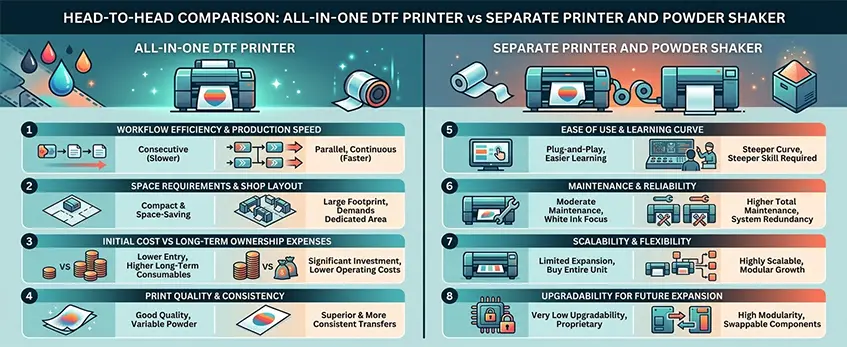
When you’re deciding between an all-in-one DTF printer and a separate printer plus powder shaker setup, it’s all about what works best for your shop. Here’s how they stack up:
Workflow Efficiency & Production Speed
- All-in-One DTF Printer:
Everything’s automated. Print, powder, and cure in one go. Less manual handling means faster turnaround and fewer mistakes. - Separate Printer & Shaker:
You move prints from printer to shaker. It takes more time, but you can run each part independently if you want.
Space Requirements & Shop Layout
- All-in-One:
Compact footprint. Fits in small shops and tight spaces. - Separate Setup:
Needs more room for each machine. Good for shops with extra space.
Initial Cost vs Long-Term Ownership Expenses
| Setup Type | Upfront Cost | Maintenance | Expansion Cost |
|---|---|---|---|
| All-in-One DTF Printer | Higher | Lower | Higher |
| Separate Printer/Shaker | Lower | Higher | Lower |
- All-in-One DTF machine cost: Usually higher upfront, but fewer parts to maintain.
- Separate Setup: Cheaper at first, but more moving parts can mean more repairs down the road.
Print Quality & Consistency
- All-in-One:
Integrated workflow means consistent powder coverage and curing, leading to reliable prints. - Separate Setup:
Quality can vary if you don’t get the powdering and curing just right.
Ease of Use & Learning Curve
- All-in-One:
Plug-and-play. Great for beginners—less to learn, fewer steps. - Separate Setup:
More manual steps. Takes longer to master.
Maintenance & Reliability
- All-in-One:
Designed for easy upkeep. Fewer connections, less risk of breakdowns. - Separate Setup:
Each component needs its own maintenance. More downtime if one part fails.
Scalability & Flexibility
- All-in-One:
Scales well for steady, mid-volume production. Not easy to upgrade or expand. - Separate Setup:
Modular. Add more printers or shakers as you grow. Swap out parts as needed.
Upgradability for Future Expansion
- All-in-One:
Limited—what you buy is what you get. - Separate Setup:
Flexible. Upgrade printers, shakers, or dryers as tech improves.
If you’re just getting started or need a compact solution, an all-in-one DTF printer is tough to beat for efficiency and ease of use. For bigger shops or those looking to scale, a modular DTF system gives you more room to grow.
Check out DTF printer recommendations for beginners and compare how the DTF printer for shirts on cotton, polyester, and blends fits your workflow.
Pros and Cons of Each DTF Setup
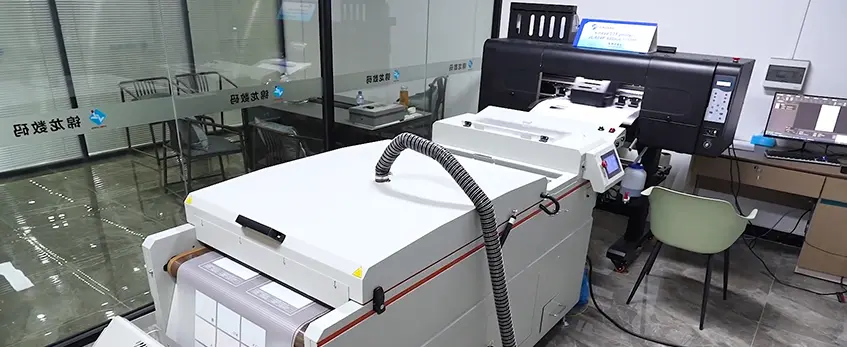
All-in-One DTF Printer: Advantages & Drawbacks
All-in-one DTF printers are game changers for small shops and startups. Here’s what to expect:
Pros:
- Simple workflow: Everything’s built into one machine—print, powder, and cure. No juggling separate units.
- Space saving: Compact footprint. Perfect for tight workspaces or home businesses.
- Ease of use: Less setup, fewer cables, and fewer moving parts. Great for beginners.
- Automated powder application: Integrated DTF printer with shaker means consistent powder coverage and less mess.
Cons:
- Limited flexibility: You’re locked into the machine’s features. Upgrades can be tricky.
- Maintenance: If one part breaks, the whole system could be down.
- Capacity: Some all-in-one models aren’t built for heavy, nonstop production.
Separate Printer and Powder Shaker: Pros & Cons
Going modular with a separate DTF printer and powder shaker setup has its own perks and pitfalls:
Pros:
- Scalable: Easy to upgrade just the printer or shaker as your production grows.
- Customizable workflow: Tailor your setup for specific jobs or volume.
- Higher capacity: Modular systems often handle bigger print runs, making them ideal for busy shops.
Cons:
- More space needed: You’ll need room for each machine and the workflow between them.
- Learning curve: More moving parts means more steps to master.
- Higher upfront cost: Buying separate units can cost more at the start.
If you’re weighing options for your business, check out the DTF kit for beginners for a hands-on look at what’s involved with each setup.
Choosing the Right DTF Setup for Your Business
Picking between an all-in-one DTF printer and a separate printer with powder shaker isn’t just about price—it’s about what fits your shop’s workflow and goals. Let’s break down the best DTF setup for your needs.
Best Option for Beginners and Low-Volume Users
If you’re just getting started or printing under 50 shirts a day, a DTF all-in-one printer is usually the way to go. These compact machines combine printing, powder application, and curing in one unit. You save space and cut down on manual steps. Plus, the learning curve is easier since you don’t have to juggle multiple machines. For more tips on choosing the best starter DTF printer, check out this DTF transfer printer buying guide.
Ideal Setup for Medium-Volume Custom Shops
Running a custom shop printing 50–200 transfers daily? A separate DTF printer and powder shaker setup offers more flexibility. You can upgrade each component as your business grows. Modular DTF systems let you handle bigger jobs and swap parts if needed. Automated powder shakers speed up production and improve consistency compared to manual powdering.
Recommended Approach for High-Volume Production
For shops printing hundreds or thousands of transfers a day, go modular and automate everything. Invest in a high-speed DTF printer, a dedicated powder shaker dryer combo, and a conveyor curing system. This setup maximizes workflow efficiency, reduces bottlenecks, and scales easily as demand grows.
Self-Assessment Checklist for Buyers
Here’s a quick checklist to help you decide:
- How many transfers do you print daily?
- Do you need to save space or can you dedicate a whole area to DTF?
- Is ease of use more important than flexibility?
- Do you want to upgrade parts as you grow?
- What’s your budget for initial setup and ongoing maintenance?
- Are you looking for a compact DTF printer bundle or a scalable, modular system?
If you’re unsure, start by reviewing what features matter most for your workflow in this DTF printer buying guide.
No matter your volume, the right DTF setup should fit your shop’s size, budget, and future plans.
Jinlong DTF Series: All-in-One Solution Spotlight
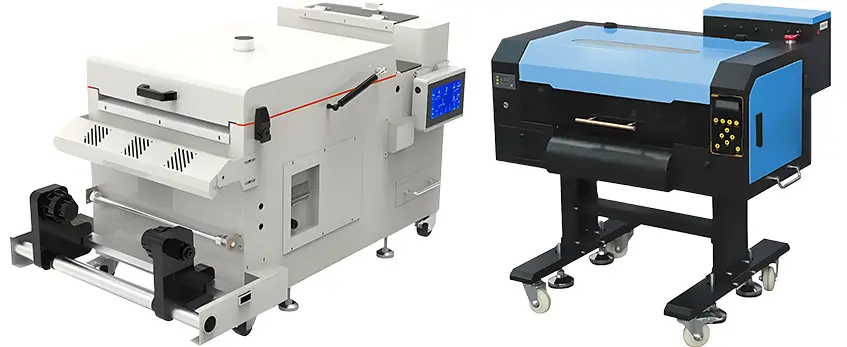
If you’re looking for an DTF printer that’s easy to use and delivers reliable results, the Jinlong DTF Series stands out. These integrated DTF printer and shaker combos are built for US shops that want a plug-and-play solution without the hassle of piecing together separate components.
User-Friendly Design & Consistent Results
Jinlong DTF machines are designed so anyone can get started fast. The controls are simple, the workflow is streamlined, and the powder application is fully automated. You don’t need to manually shake powder or fuss with alignment—just load your film, hit print, and let the machine handle the rest. This means you get consistent transfers, less wasted material, and fewer misprints.
Support, Reliability, & Standout Features
Jinlong DTF printers are backed by responsive support, so you’re not left hanging if something goes wrong. The machines are built with robust parts for daily use, and maintenance is straightforward—most users can handle routine cleaning and upkeep without a tech visit. Key features include:
- Integrated DTF printer with shaker: Saves space and simplifies setup.
- Automatic hot melt powder application: Smooth, even coverage every time.
- Compact DTF printer bundle: Fits easily in small shops or home businesses.
- DTF shaker dryer combo: No need for extra equipment.
How Jinlong Solves Common DTF Workflow Pain Points
Jinlong’s all-in-one setup tackles the biggest headaches in DTF printing. No more messy manual powdering or worrying about uneven coverage. The automated system keeps production moving, so you can focus on growing your business. Plus, if you’re new to DTF, Jinlong makes it easy to learn, cutting the usual steep learning curve.
For more details on how Jinlong’s all-in-one DTF solutions compare to modular setups and fit US shop needs, check out the 2026 buyer’s guide for best DTF printer shaker and oven combos or see the latest DTF printing techniques and trends.
Bottom line: Jinlong DTF Series is a top pick for American shops wanting efficiency, reliability, and simple operation in one compact package.
DTF Printer Setup Tips and Best Practices
Setting up your DTF (Direct to Film) printer right from the start is key for smooth operation and crisp prints. Here’s what I recommend for US shops looking to get reliable results every day.
Essential Accessories: Inks, Films, Powder
- DTF Inks: Go for high-quality CMYK inks to avoid color fading or clogging. Pro series inks, like DTF ink CMYK 1L 1000ml Pro Series, are a solid choice for vibrant, long-lasting prints.
- DTF Films: Use premium PET films—cheap films can cause peeling or poor transfer.
- Hot Melt Powder: Stick with consistent, fine-grain powder for even coverage. Automated powder shakers help, but manual powdering works for small batches.
Maintenance Routines: Prevent Clogs and Downtime
- Daily Head Cleaning: Run a nozzle check and clean print heads every day, especially if you print often.
- Humidity Control: Keep your workspace between 40-60% humidity to prevent ink drying in the lines.
- Weekly Checks: Inspect rollers, film feed, and powder shaker for buildup or jams. Clean these parts regularly.
Optimizing Workflow for Consistent, High-Quality Transfers
- Pre-Press Prep: Make sure your artwork is high-res and color profiles are set for DTF.
- Film Storage: Store DTF films flat and away from dust or moisture to avoid static and debris.
- Powder Application: Use an automated powder shaker for even, fast application—especially if you’re scaling up. If you’re working manually, shake gently and tap off excess.
- Curing: Use a shaker dryer combo or a heat press at the recommended temp and time for your powder and film.
Quick Tips:
- Keep backup inks and films handy to avoid production delays.
- Log maintenance and print jobs so you can spot issues before they become costly.
- If you’re new to DTF, check out what is DTF shirt printing for small businesses for more beginner tips.
With the right accessories, regular maintenance, and a dialed-in workflow, your all-in-one DTF printer or separate DTF printer and powder shaker setup will deliver consistent, high-quality transfers—without the headaches.





 English
 Español
 Deutsch
 Français