

No products in the cart.

Jinlong
DTF Printer Head Problems Fix Guide for Jinlong DTF Printers
The Heart of the Machine: Why DTF Printheads Fail
DTF printhead clogging remains the primary cause of print failure and costly downtime. At the core, the printhead is a precision piezoelectric device designed for fine ink droplet placement. However, constant exposure to titanium dioxide-based white ink uniquely challenges its performance. Unlike standard CMYK inks, white ink is laden with heavy pigments that settle quickly, causing sedimentation and clogging inside nozzles and dampers. This sediment buildup restricts ink flow, leading to missing lines during nozzle checks and weak white underbase prints.
Environmental stressors further accelerate printhead issues. Temperature swings and humidity levels outside the ideal 40-60% range change ink viscosity and drying behavior, making nozzles prone to blockage or damage. Low humidity dries the ink too fast on nozzle plates, while high humidity promotes condensation inside printhead channels.
The true cost hits when downtime sneaks in. Replacing or repairing printheads after severe clogging or physical damage is expensive. Investing time in proper maintenance and understanding white ink circulation systems can dramatically extend your printhead’s life. Saving the printhead means fewer interruptions, reduced material waste, and ultimately, better returns for your DTF operation.
Diagnosing DTF Printer Head Problems: What Your Printer is Telling You

When your DTF printer head starts acting up, the symptoms often reveal the root causes. Catching these signs early can save you time and money.
Banding (Horizontal Lines)
If your prints show unwanted bands or horizontal lines, it might be due to mechanical feed issues—like misaligned rollers—or nozzle blockage from dried ink. Run a nozzle check; missing lines usually point to clogged nozzles that need cleaning.
White Ink Starvation
White ink issues are common, especially the underbase looking weak, streaky, or patchy. This typically signals white ink circulation problems or sedimentation in the ink lines, which causes inconsistent ink flow and print quality.
Color Mixing and Contamination
When cyan starts bleeding into yellow or other colors blend strangely, damper pressure might be off or the dampers could be failing. This contamination can ruin color accuracy and requires damper inspection or replacement.
Head Strikes
Physical damage from curled DTF film striking the nozzle plate is a frequent problem. These head strikes cause scratches or blockage that degrade print performance. Be sure to handle films carefully to avoid this.
Ink Droplets and Splatter
Unexpected ink droplets or splattering often come from problems with the wiper blade not cleaning the printhead properly. Static electricity buildup can also cause ink to misfire or splash. Regular wiper blade maintenance and checking for static issues help keep prints clean.
Proper diagnosis helps you address these issues before they escalate. For white ink challenges, consider using a white ink circulation system to keep that critical titanium dioxide pigment flowing smoothly, as detailed in our complete guide to white inkjet ink for printing professionals.
Step-by-Step Fixes for Common Printhead Issues
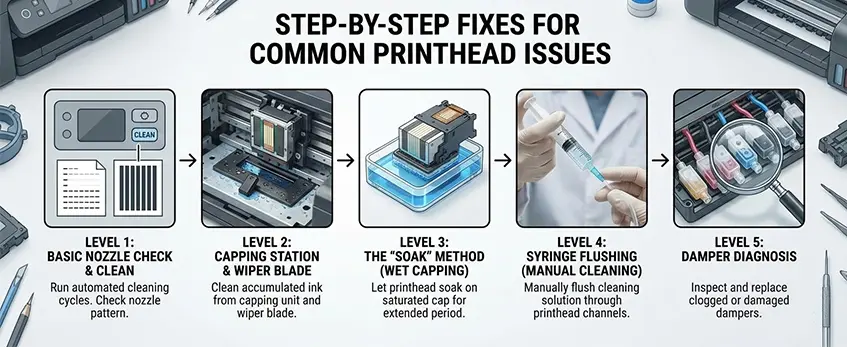
Dealing with DTF printhead clogging doesn’t have to be overwhelming. Here’s a clear, step-by-step guide to get your printer back in shape:
Level 1: Basic Nozzle Check & Clean
Start with a nozzle check to spot missing lines or gaps. Interpreting your nozzle pattern helps decide if a simple cleaning cycle will fix the issue or if a more intense power cleaning is needed. Frequent light cleans prevent serious clogging and extend printhead life.
Level 2: Capping Station & Wiper Blade
A dirty capping station or worn wiper blade can cause ink droplets and splatter. Regularly clean the capping station to avoid dried ink buildup. For wiper blades, manual cleaning with lint-free cloths and recommended solutions keeps the printhead surface clear and protects the nozzles.
Level 3: The “Soak” Method (Wet Capping)
For stubborn clogs, wet capping is effective. Soak the printhead overnight with a moisturizing liquid or printhead cleaning solution. This dissolves dried titanium dioxide white ink sedimentation or other ink blockages without damaging the delicate piezoelectric printhead.
Level 4: Syringe Flushing (Manual Cleaning)
If clogs persist, syringe flushing is next. Using a syringe filled with cleaning solution, carefully flush the intake spikes to clear blockages. Always wear gloves and follow safety precautions—this manual flushing technique is precise but requires care to avoid damage.
Level 5: Damper Diagnosis
Check the damper for air bubbles or blockages causing ink starvation symptoms. Air in the lines can lead to streaky prints and uneven white ink circulation. Replacing or servicing the damper may solve color mixing and printing inconsistencies related to pressure issues.
Taking these steps regularly can prevent costly downtime and preserve your printhead’s performance, especially when using white ink-heavy jobs. For ink circulation tips and related film maintenance, see detailed guides on DTF transfer film care and maintaining your printer setup.
Advanced Hardware Troubleshooting
When basic cleaning doesn’t cut it, dive into advanced hardware troubleshooting to tackle stubborn DTF printer head problems.
Cable Connections:
Check the flat cables connecting your printhead carefully. Ink corrosion or loose contacts are common culprits behind communication errors and incomplete prints. Gently disconnect and inspect the cables for discoloration or sticky residue. Clean with isopropyl alcohol if needed, and ensure connectors snap securely back into place. Ignoring these can lead to intermittent printhead failures or error messages.
Head Alignment:
Misaligned printheads cause blurry or doubled prints, especially with bi-directional printing. Use your printer\’s alignment utility to fine-tune the head position. This adjustment ensures nozzles fire ink precisely, preventing print banding causes linked to alignment issues. Properly aligned heads improve color accuracy and sharpness, critical when using detailed DTF transfer films like those in the A3 Double Pro Series.
Physical Damage Check:
Examine the nozzle plate for scratches or dings with a magnifying glass. Physical damage is often permanent and leads to printhead delamination or clogging. Minor scratches may cause inconsistent ink droplet placement, while severe damage means it\’s time for a replacement. Regular inspection helps you catch and fix issues before costly downtime hits your workflow.
Taking these advanced steps can save your printer head and keep your DTF prints flawless.
Prevention: The Jinlong DTF Maintenance Routine

Keeping your DTF printer head in top shape starts with a solid daily maintenance routine, and Jinlong has made this easy to follow.
Daily Start-Up & Shut-Down Protocols
Begin every print day by running a nozzle check to spot early clogs and perform a light cleaning cycle if needed. Before shutting down, always run a proper cleaning cycle and use the printer’s capping station to seal the printhead. This keeps the ink flowing smoothly and prevents sediment buildup, especially with tricky white inks.
Humidity Control
Maintaining a stable environment with 40-60% humidity is crucial. Too dry, and the nozzles can dry out and clog quickly; too humid, and ink consistency changes, causing poor drops. Investing in a small humidifier or dehumidifier for your workspace can extend your printhead’s life noticeably.
Ink Quality Matters
Use only premium Jinlong DTF certified inks. These inks balance the pigments and solvents perfectly to reduce sedimentation and clogging, especially titanium dioxide-based whites. Cheaper or generic inks often cause quicker printhead issues due to inconsistent formulas.
White Ink Circulation
Ensure your White Ink Management System (WIMS) is running correctly. This system keeps white ink particles suspended and circulating, preventing sedimentation that leads to clogging. Regularly check that the agitators and pumps are working, and clean the damper and filters to keep the flow steady.
By sticking to these maintenance basics, you reduce downtime, avoid costly repairs, and protect your investment in high-quality DTF printing. For a smooth printing experience, it’s also smart to pair this routine with quality materials like Jinlong’s reliable DTF transfer film that are designed to work seamlessly with your printer head system.
When to Replace the Printhead
Knowing when to replace your DTF printer head is key to avoiding costly downtime and print quality issues. Some signs point to permanent failure and mean it’s time to invest in a new printhead.
Signs of Permanent Failure:
- Delamination: When layers within the printhead separate, causing inconsistent ink flow.
- Circuit Shorts: Electrical faults that can’t be fixed with cleaning or resets.
- Physical Scratches: Damage on the nozzle plate from head strikes or debris that permanently affects nozzle accuracy.
Continuing to run a damaged printhead leads to wasted ink, film, and time, which adds up fast.
Cost-Benefit Analysis:
- Compare how much ink, film, and productivity you’re losing against the price of a replacement. Usually, a new printhead saves money long-term by restoring print quality and reducing maintenance headaches.
Choosing the Right Replacement:
- OEM (Original Equipment Manufacturer) printheads guarantee compatibility and reliability but may have a higher upfront cost.
- Generic printheads can be cheaper but might risk lower quality or shorter lifespan.
- For consistent results, especially when working with premium supplies like the Jinlong DTF transfer film double pro series, sticking with OEM printheads or high-quality alternatives designed for your printer is wise.
Keeping an eye on these factors will help you decide the best time and option for replacing your DTF printhead, minimizing downtime and maximizing your print investment.





 English
 Español
 Deutsch
 Français