



2026 DTF Printer with White Ink for Dark Fabrics High Opacity
The Science of White Ink in DTF Printing
White ink plays a crucial role in direct-to-film (DTF) printing, especially when working with dark fabrics. Unlike standard CMYK prints that struggle to pop on dark backgrounds, white ink acts as the white underbase, providing a solid foundation that boosts color vibrancy and sharpness.
Why White Ink Matters: The White Underbase Role and Impact
- Visibility and Vibrancy: White ink under the color layer prevents dark fabric from dulling or absorbing pigments.
- Color Accuracy: It ensures printed colors stay true to the original design.
- Adhesion: It works with TPU adhesive powders to bond ink firmly to fabric.
- Stretch Resistance: A quality white underbase maintains image integrity even when the fabric stretches.
CMYK vs. CMYK+W: Print Head Differences
| Feature | CMYK Only | CMYK+W Configuration |
|---|---|---|
| Ink Channels | Cyan, Magenta, Yellow, Black | Cyan, Magenta, Yellow, Black + White Ink |
| Print Head Setup | Standard print heads | Specialized heads for white ink handling |
| White Ink Handling | None | Requires dedicated circulation to prevent clogging |
| Print Quality on Darks | Limited | Vibrant and opaque prints |
DTF printers with white ink require print heads designed to fire dense white ink droplets without clogging. Unlike CMYK inks, white ink is thicker, so advanced print technology is essential for consistent output.
Opacity Factor: Quality Effects on Vibrancy and Stretch
Opacity defines how well the white ink layer blocks the fabric color beneath it. Higher opacity:
- Produces brighter, sharper colors.
- Prevents the fabric’s color from bleeding through.
- Enhances print durability, especially on stretchable materials like cotton and polyester blends.
Poor opacity results in dull prints that wear out faster, making opacity one of the top factors for professional-grade DTF printing.
Understanding the science behind white ink sets the foundation for choosing the right 2026-ready DTF printer with white ink. The next sections will explore key printer features, best printing practices, and maintenance tips to keep your prints flawless on dark fabrics.
Key Features of a 2026-Ready DTF Printer
To handle white ink printing on dark fabrics efficiently, a 2026-ready DTF printer comes with some crucial features designed to boost reliability and print quality.
White Ink Circulation System (WICS): Problems and Solutions
White ink tends to settle and clog printheads quickly, making a solid circulation system essential. The latest White Ink Circulation System (WICS) keeps the pigment suspended, reducing clogging and downtime. It constantly circulates ink through the white channels, preventing sediment buildup and ensuring smooth, consistent white layers. This means less cleaning and more printing time.
Printhead Technology: Durable, High-Density White Firing
2026 DTF printers use advanced printheads like the Epson i3200, designed for dense white ink firing. These printheads can handle thick white ink layers without damage, maintaining high resolution on challenging dark fabrics. Durable printheads reduce maintenance costs and improve overall uptime for busy shops.
RIP Software Capabilities: Automatic White Layer Choke
Smart RIP software now includes an automatic white layer choke feature that refines the edges of the white underbase. This prevents white ink bleeding and enhances opacity control. The software optimizes how the white layer is printed relative to the color layers, improving sharpness and vibrancy on dark garments. Efficient white channel setup through RIP software is a game-changer for professional results.
| Feature | Benefit |
|---|---|
| White Ink Circulation System | Prevents clogging, reduces downtime |
| High-Density Printhead | Durable, handles thick white ink layers |
| Automatic White Layer Choke | Sharp edges, no white ink bleed |
These features not only improve print quality but also ensure consistent results, even when handling complex designs on dark fabrics using TPU adhesive powder and DTF PET film transfer. For detailed info on textile pigment ink applications, check out our overview of why digital DTF is transforming the custom apparel industry.
Step-by-Step: Printing on Dark Fabrics
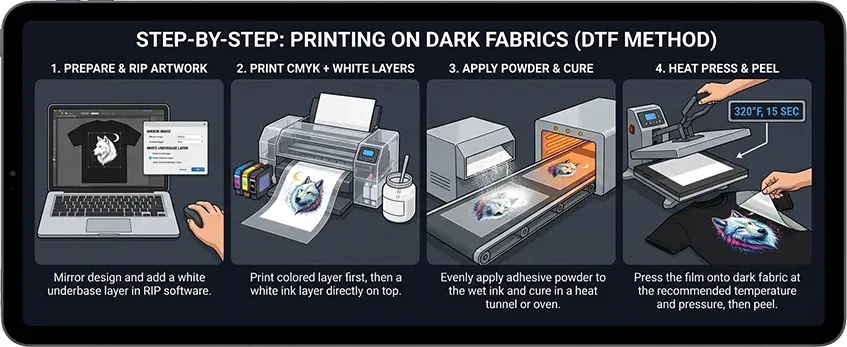
Printing on dark fabrics with a 2026-ready DTF printer featuring white ink requires careful preparation and process control to get vibrant, long-lasting results.
Image Preparation: Transparent PNG and White Channel Setup
Start with a high-quality transparent PNG file. Your design must include a separate white channel layer—this white underbase boosts opacity and ensures colors pop on dark materials. Use RIP software that supports automatic white layer choke to avoid white ink bleeding beyond your design edges.
Print Sequence: Color then White Ink Layer
Unlike standard CMYK printing, DTF with white ink prints in a distinct order. Your printer first lays down the color layers, followed by a dedicated white ink layer on top (CMYK then W). This sequence ensures the white ink acts as a reliable underbase on dark fabrics, enhancing vibrancy and wash fastness.
Powdering and Curing: TPU Adhesive Application and Bonding
After printing, apply a thin layer of TPU adhesive powder evenly over the white ink. This powder sticks only to the wet ink and solidifies your print during curing. Use a direct-to-film curing oven or heat source to melt the TPU powder, firmly bonding the ink to the DTF PET film transfer surface.
Heat Pressing: Temperature and Pressure Guidelines for Dark Fabrics
For best results on dark garments, heat press your transfer at around 320°F (160°C) for 15-20 seconds with firm pressure. Adjust time and temperature slightly depending on fabric type, but always aim for a consistent, smooth bond without scorching. Proper heat pressing locks in your design, maximizing durability and wash resistance.
Following these steps with a quality dtf printer with white ink will help you deliver vibrant, professional prints on dark fabrics every time. For optimized results, consider using top-tier DTF transfer films like the professional Jinlong DTF transfer films, trusted by industry pros.
Maintenance: Keeping the White Ink Flowing
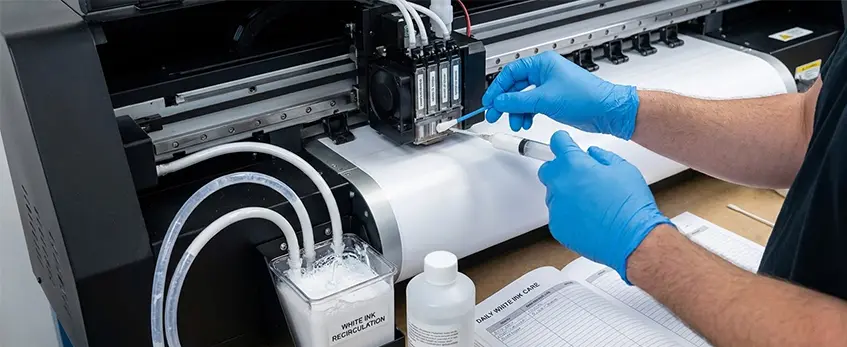
Maintaining white ink in your 2026-ready DTF printer is key to consistent print quality and avoiding costly downtime. White ink tends to settle and clog if not cared for properly, especially with the White Ink Circulation System (WICS) in place. Here’s a simple breakdown to help you keep everything running smoothly.
Daily vs. Weekly Maintenance Routines
| Task | Daily | Weekly |
|---|---|---|
| White ink circulation check | Ensure WICS is active | Deep clean ink lines |
| Printhead nozzle check | Run nozzle test patterns | Run automatic cleaning cycles |
| Ink cartridge inspection | Check ink levels & seals | Shake ink cartridges gently |
| Surface wiping | Clean printhead surface gently | Inspect for ink buildup |
Humidity & Temperature Control
- Ideal range: Keep your workspace between 68°F and 77°F with 40-60% humidity.
- Why it matters: Dry air or extreme temperatures thicken white textile pigment ink, causing clogs and weak White Underbase Opacity.
- Use a humidifier or air conditioner as needed to maintain stable conditions.
User-Friendly Maintenance Features in jinlong DTF Printers
jinlong’s 2026 DTF models come with features designed for easy upkeep:
- Automated White Ink Circulation System (WICS): Prevents sediment buildup and minimizes printhead clogging.
- RIP Software White Layer Choke: Automatically adjusts white ink thickness, reducing waste and maintenance needs.
- Accessible printhead design: Makes regular cleaning quick and mess-free.
- Automated powder shaker compatibility: Keeps TPU adhesive powder evenly distributed, lowering manual labor.
Consistent maintenance ensures your DTF printer with white ink prints sharp, vibrant designs on dark fabrics every time. For more on quality prints and machine care, check out how global apparel brands are switching to DTF in 2026.
Troubleshooting Common White Ink Issues
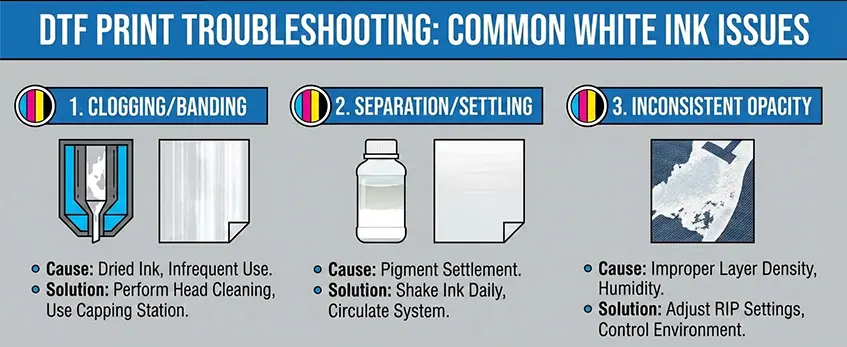
White ink is essential for vibrant prints on dark fabrics, but it can sometimes cause headaches. Here’s how to tackle the most common problems:
Pinholes in White Layer: Causes and Fixes
Pinholes happen when white ink sprays unevenly or bubbles form during printing. Causes include clogged nozzles, improper white ink circulation, or incorrect RIP software white channel settings. To fix this:
- Run regular printhead clogging prevention routines.
- Check your White Ink Circulation System (WICS) to keep ink flowing smoothly.
- Adjust the white layer choke in your RIP software to avoid over-thinning the white underbase opacity.
Weak or Dull Colors: Ink Limits and White Underbase Checks
If colors look faded, the white underbase may be too thin or inconsistent, letting dark fabric bleed through. Also, color ink layers might be underfed or not cured properly. To improve vibrancy:
- Verify the white channel thickness in your RIP software.
- Ensure you’re using quality textile pigment ink and a strong white underbase for maximum opacity.
- Double-check curing times in your direct to film curing oven for solid adhesion.
Peeling Issues: Diagnosing Hot Peel vs Cold Peel Errors
Peeling prints can ruin the final product. Hot peel errors happen when transfer film is peeled before the TPU adhesive powder cures fully, causing ink lift-off. Cold peel errors occur when peeling too late, leaving residue or weakening the print. To avoid peeling problems:
- Follow the correct heat press settings for cotton and dark fabrics—temperature, pressure, and timing are critical.
- Use an automated powder shaker to apply TPU adhesive evenly.
- Test your workflow to match hot peel or cold peel processes with your specific DTF PET film transfer setup.
Staying on top of these troubleshooting tips will keep your white ink prints vibrant and durable. For more on consumables that help maintain ink quality, check out guides on choosing reliable DTF materials for 2026.
Choosing the Right Machine for Your Business
Picking the right DTF printer with white ink for your business depends mainly on your production volume and budget. If you’re starting out or printing smaller batches, a desktop model is a solid choice — it’s affordable and compact, perfect for handling orders without wasting ink or materials. On the other hand, if your operation demands higher output, dual-head commercial models from the jinlong DTF lineup deliver speed and consistency, making them ideal for scaling up.
When it comes to consumables costs and ink efficiency, keep in mind that machines with advanced white ink circulation systems (WICS) and efficient CMYK+W print heads minimize waste and reduce ink clogging. This lowers your total cost of ownership long-term, especially important given the higher price of white textile pigment ink compared to standard CMYK inks. For best savings, check out jinlong’s optimized ink options here, designed specifically for high-quality, cost-effective printing.
Looking ahead, future-proof your investment by choosing a printer that supports the latest 2026 specs — this means better opacity with white underbase layers, enhanced printhead resilience, and updated RIP software with automatic white layer choke. These features guarantee vibrant, long-lasting prints on dark fabrics and keep you competitive as technology advances.
For U.S. businesses focused on reliability and quality, the jinlong DTF machine lineup offers robust options across all levels, from entry to commercial scale, plus excellent maintenance features. Whether your priority is high-resolution textile printing or fast turnaround times, jinlong’s printers ensure you meet customer demands efficiently and professionally.





 English
  Español
  Deutsch
  Français