



The Complete Guide to Professional White Inkjet Ink for Printing
If you’re a printing professional aiming to unlock vibrant, flawless prints on dark or tricky substrates, white inkjet ink is your secret weapon. But getting the most out of it? That’s where many run into challenges like clogging, opacity issues, or workflow headaches. This complete guide to white inkjet ink for printing professionals cuts through the noise—breaking down technical essentials, real-world applications, and must-know tips to make your prints pop every time. Whether you’re running a busy print shop or fine-tuning your production line, mastering white inkjet ink will elevate your output and save you time and money. Ready to dive in? Let’s get started.
Understanding White Inkjet Ink – The Essentials
What is White Inkjet Ink? Composition and Opacity Differences
White inkjet ink is a specialized type of ink designed to produce crisp, opaque white prints on various substrates, including dark or transparent materials where traditional CMYK inks fall short. Unlike standard colored inks, white ink relies on pigments—typically titanium dioxide—that provide high opacity and excellent coverage. Because white ink blocks light rather than allowing it to pass through or reflect color, it creates a solid base or highlight layer that enhances color vibrancy on challenging surfaces.
The composition of white ink differs significantly from regular inks. It contains a higher concentration of pigments to ensure opacity but also requires careful formulation to balance flow and prevent clogging. This means white ink often has a thicker, more viscous consistency compared to CMYK inks. Opacity is a key factor: the ink must deliver consistent coverage that’s bright and non-transparent even when printed thinly.
Core Properties: Viscosity, Drying Time, Lightfastness, Environmental Factors
White inkjet ink’s performance depends on several critical properties:
- Viscosity: A higher viscosity helps maintain opacity but requires printers built to handle thicker fluids—this impacts nozzle design and printhead maintenance.
- Drying Time: White inks may dry slower due to density and pigment load, making substrate choice and curing method crucial to avoid smudging or blocking.
- Lightfastness: Professional white inks are engineered to resist fading and yellowing over time, ensuring longevity, especially for outdoor applications.
- Environmental Factors: Temperature and humidity greatly impact white ink performance. Proper storage and printer environment control help maintain ink consistency and prevent clogging.
Why Professionals Need White Inkjet Ink: Subtractive vs. Additive Printing Models
White ink is indispensable in professional printing because it bridges the gap between subtractive and additive color models. Traditional CMYK printing is subtractive—colors appear by absorbing certain wavelengths of light. On white or light backgrounds, this works well. However, when printing on dark or transparent materials, the colors can appear dull or washed out.
Here’s where white ink comes into play. By laying down a white underbase (printing white ink first), printers create a neutral, bright foundation. This enables the true colors of cyan, magenta, yellow, and black inks to “pop” and display vibrantly. In this sense, white ink acts like an additive element, reflecting light and enhancing overall color accuracy and contrast on difficult substrates.
For professionals, white inkjet ink expands creative possibilities, allowing high-quality prints on textiles, labels, glass, and more, making it a must-have for modern production workflows.
Applications and Use Cases in Professional Printing
White inkjet ink plays a crucial role across several industries, especially where vibrant color and opacity matter. The main sectors benefiting from white ink include apparel printing, packaging, signage, and promotional items. For example, apparel printers often use opaque white ink as an underbase layer on dark fabrics to make colors pop. Packaging designers rely on white inkjet ink for crisp, clear graphics on transparent or colored materials. Signage makers use it to create standout visuals, while promotional product manufacturers apply white ink for sharp logos and text on diverse substrates.
When it comes to layering techniques, professionals commonly use:
- Underbasing: Printing a white layer beneath colored prints to boost vibrancy and opacity.
- Overprinting: Applying white ink on top of colors for special effects or highlights.
- Multi-layer builds: Repeating white and color layers to enhance coverage and texture.
Real-world case studies show these methods improve color accuracy and cutting down print times. For example, adding a DTF white underbase layer in apparel printing results in more consistent colors and faster drying, increasing production speed without sacrificing quality. For more insights on transfer films used with white inks, check out our detailed guide on DTF transfer films and their best applications.
Selecting the Right White Inkjet Ink and Compatible Equipment
Choosing the right white inkjet ink is key for smooth, high-quality printing. You’ll find two main types: OEM (original equipment manufacturer) inks and third-party options. OEM inks usually guarantee better clog resistance and reliable performance but can be pricier. Third-party inks, like those from jinlong, offer competitive quality with certifications for consistency and cost efficiency, making them popular for high-volume shops.
Printer compatibility matters, too. Not all inkjet printers support white ink channels—look for models designed specifically for white ink or direct-to-film (DTF) printing. Use a decision matrix based on your print volume, substrate types, and color needs to pick the most compatible printer.
For example, jinlong DTF white inks stand out with excellent opacity, smooth flow, and easy layering. They also work great with most professional DTF printers, reducing clogging issues while maintaining vivid color output on dark or transparent materials. To complement your setup, consider using jinlong’s DTF inks and pairing them with proper transfer films, like those found in their DTF transfer film lineup, to get the best print durability and brilliance.
Step-by-Step Implementation: From Setup to First Print

Getting started with white inkjet ink requires careful setup to ensure top-quality prints right from the first run. Here’s a straightforward approach:
Printer Preparation
- Install the white ink cartridge carefully, making sure there are no leaks or air bubbles.
- Prime the printheads to get the ink flowing smoothly and prevent clogging.
- Configure your RIP software to handle white ink layers correctly—this often means assigning white as a spot color or layer for underbasing or overprinting.
Design Workflow
- In Illustrator or Photoshop, prepare your design files with separate white ink layers. This helps define where the white ink will print, typically as an underbase on dark fabrics or as accent layers.
- Use spot channels for white ink areas to maintain control over opacity and layering effects.
Printing Process
- Decide between single-pass or multi-pass printing. Single-pass is faster but might reduce opacity on some fabrics; multi-pass allows for thicker, more opaque white layers.
- Pre-treat your substrates if needed—this step boosts ink adhesion and durability, especially on textiles.
- Finish with proper curing, either through heat or UV, depending on your ink type, to lock in the white ink for long-lasting prints.
For a reliable white inkjet ink solution that streamlines this workflow, consider leading options like jinlong DTF white inks. Their products support smooth cartridge installation and excellent RIP software integration, helping pros get consistent results from setup to first print. More on choosing the right DTF ink for vibrant, durable prints can be found in this detailed guide on choosing the right DTF ink for optimal print durability and vibrancy.
Optimization and Troubleshooting Common Challenges
Getting the best results with white inkjet ink means dialing in your setup and knowing how to fix common hiccups quickly. Here’s what to focus on:
Performance Tuning
- Coverage: Adjust ink density settings to ensure solid opacity without wasting ink or causing bleed-through.
- Waveform Adjustment: Fine-tune waveform settings in your RIP software for smooth ink droplet ejection, reducing clogging and uneven layering.
- Ink Density Calibration: Regularly calibrate ink density to balance color vibrancy and drying time, especially when printing multi-layer white underbases.
Frequent Issues and Fixes
- Clogging: White ink tends to clog due to its heavier pigment load. Prevent clogs by regularly circulating ink, cleaning nozzles, and using high-quality anti-clog additives designed for white ink cartridges.
- Uneven Layering: Inconsistent layers can occur if substrate priming isn’t complete or if printer passes aren’t aligned. Use precise layering techniques in your RIP software and adjust print head height for even coverage.
- Color Bleed: This often results from too much ink or improper curing. Cut down ink density, increase curing time, or try substrate pretreatment to keep colors crisp and sharp.
Quality Control Metrics
- Opacity Measurement: Use a densitometer or spectrophotometer to check white ink opacity levels, ensuring consistent coverage that matches your product’s needs.
- Pantone Matching: For color-critical jobs, adjust white underbase opacity and color layers to maintain exact Pantone colors. Layering white ink accurately helps boost color vibrancy and precision.
For more detailed insights on improving white ink performance, be sure to explore the benefits of DTF ink for your printing business and how advanced production techniques impact print speed and quality.
Maintenance, Safety, and Sustainability
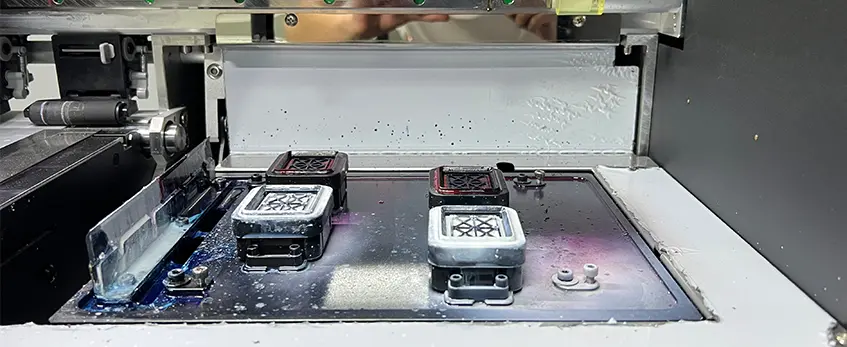
Keeping your white inkjet ink running smoothly means sticking to regular maintenance. That includes consistent ink circulation to prevent settling, frequent nozzle checks to catch clogs early, and proper storage away from heat and light to preserve ink quality. Simple cost-saving hacks like flushing printers during downtime and using compatible cleaning solutions can extend your ink’s life and reduce waste.
On the safety side, ensure your workspace has good ventilation to handle any fumes, especially if you’re using solvent-based inks. Always wear appropriate PPE, like gloves and masks, when handling inks or cleaning cartridges. Staying compliant with VOC regulations is key to avoiding fines and protecting your team’s health.
Sustainability is also a growing priority. Many pros now opt for low-VOC white inks that cut down harmful emissions. Recycling leftover ink containers and cartridges helps reduce landfill waste. Plus, look for suppliers offering green packaging—it’s a simple way to shrink your environmental footprint without changing your workflow.
For detailed tips on maintaining your printer and ink systems, check out our guide on XP600 DTF printer setup and maintenance tips for beginners, tailored to keep white inkjet printing hassle-free.
Advanced Techniques and Future Trends
White inkjet ink is evolving fast with some exciting pro-level innovations shaping the future. Metallic and fluorescent white inks are gaining traction, adding new dimensions and vibrant effects to prints, especially in packaging and promotional items. Inline automation is another big leap, allowing for smoother workflows and higher production speeds without sacrificing print quality.
For businesses scaling up, focusing on ROI is key. Training teams to handle advanced white inkjet printing techniques and optimizing turnaround times can boost efficiency and reduce waste. Faster setups and fine-tuned processes also help meet tight deadlines while maintaining consistent color accuracy.
Emerging trends like AI-driven color management are making it easier to achieve perfect white opacity and matching every time. Biodegradable inks and eco-conscious formulations are also on the rise, aligning with sustainability goals in the U.S. market. Plus, 3D printing integration with white inkjet technology is opening new creative avenues for custom textures and layered effects, especially in apparel and industrial design.
These advances ensure white inkjet ink stays relevant, competitive, and valuable for professionals aiming to deliver top-tier prints with innovation and efficiency.





 English
  Español
  Deutsch
  Français