



How to Know If Your DTF Printer Is Out of Ink Step-by-Step Guide
How to Know If Your Jinlong DTF Printer Is Out of Ink
Keeping an eye on ink levels in your Jinlong DTF printer is crucial for producing high-quality prints and maintaining smooth business operations. When ink runs low or runs out, you’ll notice a sharp drop in print quality—faded colors, streaks, and incomplete images can quickly affect your product’s look and customer satisfaction. Ignoring ink monitoring not only wastes materials but also slows down your workflow with unexpected printer stoppages and maintenance needs.
Regularly checking your ink levels helps you avoid costly downtime, ensures vibrant colors in every print, and keeps your Jinlong DTF printer running efficiently. By proactively managing your ink, you protect both your investment and your reputation for consistent, professional results.
Understanding the DTF Ink Systems
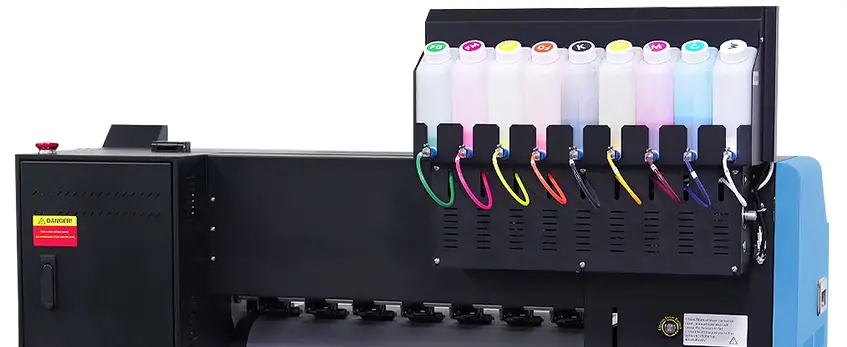
DTF printers, including Jinlong models, use separate ink systems for CMYK (cyan, magenta, yellow, black) and white ink. This setup is important because white ink behaves differently than the CMYK colors—it tends to settle or clog if not used regularly, making ink management a bit trickier.
When your ink is running low or empty, signs can vary between these inks. CMYK colors usually show fading, streaks, or uneven patches first, while the white ink often causes more obvious gaps or incomplete prints. Unlike some office printers, most DTF printers, including Jinlong, typically don’t have precise built-in ink level sensors. Instead, they rely on manual checks and software warnings to estimate ink status, which means you’ll need to stay vigilant.
Understanding this difference helps you catch low ink early, avoid printhead issues, and maintain high print quality for your business. For a deeper look at how the ink system works with your printer, the complete guide on DTF ink printer basics offers excellent insights.
Common Signs Your Jinlong DTF Printer Is Out of Ink
Knowing how to spot when your Jinlong DTF printer is out of ink can save you time and avoid wasted prints. Watch for these common signs:
- Faded or dull colors: When ink runs low, prints may look washed out or less vibrant, especially noticeable in CMYK colors.
- Streaks and gaps: Missing ink can cause streaks, white lines, or blank spots on your prints.
- Incomplete or patchy prints: Areas of the design may be missing or appear uneven.
- Slow or uneven ink flow: Prints may come out streaky or blotchy due to inconsistent ink distribution.
Physically, your Jinlong printer may also alert you with:
- Error messages or warning codes: These often indicate low or empty ink tanks.
- Control panel lights: Blinking or specific indicator lights often signal ink issues.
Keep in mind that white ink behaves a bit differently—it tends to settle or clog if the ink is low, which can cause whiteness to disappear or look patchy on your prints. Since many DTF printers, including Jinlong models, don’t have precise ink level sensors, these signs are key to knowing when it’s time to check and refill.
If you’re looking for a reliable printer equipped to handle these challenges, consider the Jinlong JL DTF604S model for its user-friendly alerts and ink management features.
How to Check Ink Levels on Your Jinlong DTF Printer
Checking ink levels on your Jinlong DTF printer is essential to avoid unexpected print issues. Here’s how you can keep an eye on your ink supply:
Control Panel Lights & Error Messages: Most Jinlong DTF printers have indicator lights or display warnings when ink runs low. Pay attention to these alerts as they’re your first heads-up for ink issues.
Using Connected Software: If your printer is hooked up to a computer, use the Jinlong DTF printer software to check the ink status. The software often shows approximate levels for CMYK and white ink, helping you monitor remotely.
Manual Ink Tank Inspection: Open the printer’s ink compartment and visually inspect the ink tanks or cartridges. White ink can settle or separate, so gently shake the bottle before checking. Always keep genuine Jinlong ink on hand for refilling.
Recommended Frequency: It’s a good idea to check ink levels daily if you print regularly, or before starting any long print jobs. This prevents mid-print failures and keeps your production smooth.
These easy steps will help you avoid surprises and maintain consistent print quality. For more insight on ink system maintenance and troubleshooting, explore tips on maintaining your DTF printer’s performance effectively.
Troubleshooting When You Suspect Low or Empty Ink
If your Jinlong DTF printer shows poor print quality, it’s important to figure out if the problem is really low ink or something else like a clogged printhead or hardware fault.
How to confirm ink depletion vs other issues:
- Check printed output for signs: Faded or washed-out colors often mean low ink, but streaks or incomplete prints can also point to clogged nozzles.
- Inspect ink tanks and cartridges: Make sure there’s ink physically present. Sometimes the ink looks fine but isn’t flowing properly.
- Run a nozzle check: Use your Jinlong DTF printer software to print a nozzle test pattern. Missing lines usually mean clogs, not just low ink.
- Look for error messages: Ink level warnings or codes can help, but not all Jinlong printers have precise ink sensors, so these aren’t always reliable.
What to do if ink looks normal but print issues persist:
- Clean the printhead with recommended maintenance cycles. Sometimes dried ink blocks nozzles even if the ink supply is full.
- Check for air bubbles or blockages in ink lines.
- Restart the printer and software to rule out glitch-related errors.
- If problems continue, consult the troubleshooting section in your manual or visit troubleshooting tips on Jinlong’s support resources.
This step-by-step approach helps avoid unnecessary ink refills and keeps your DTF printing smooth. For more detailed tips on maintaining your ink system, explore Jinlong DTF ink troubleshooting.
Preventing Ink-Related Issues in Your Jinlong DTF Printer
Keeping your Jinlong DTF printer running smoothly means staying on top of ink management. Here are some best practices to prevent ink-related problems before they start:
Use genuine Jinlong DTF ink: Always choose original ink designed for your printer. Genuine ink ensures color accuracy and prevents clogs that can happen with lower-quality alternatives. Check out the high-concentration DTF ink options made specifically for Jinlong printers.
Use compatible syringes and refill tools: When refilling cartridges or ink tanks, use syringes that fit perfectly with your ink system. This avoids spills, air bubbles, and contamination that can harm print quality and printer hardware.
Set up a routine maintenance cycle: Clean your printheads regularly to avoid buildup and ink drying inside nozzles. Jinlong DTF printers benefit from scheduled cleaning cycles that keep everything flowing right.
Schedule regular ink level checks: Without precise sensors, manual checks are crucial. Regularly inspect ink tanks and use your printer’s software indicators for any low ink warnings. This early detection helps you refill before the ink runs dry mid-print.
Keep your printer environment stable: Avoid dusty or overly warm areas which can accelerate ink drying or cause clogging. A clean, temperature-controlled setup supports ink lifespan and print consistency.
By following these tips, you reduce downtime, maintain vibrant colors, and extend your Jinlong DTF printer’s life — keeping your business efficient and your prints top-notch.
Low Ink Levels vs. Common Alerts

DTF printers like the Jinlong model sometimes show alerts that can be confusing. It’s important to tell the difference between real low ink warnings and false alerts to avoid unnecessary downtime or wasted ink.
How to Configure Notifications
- Use the Jinlong DTF printer software to set up custom ink level notifications. This helps you get timely alerts without too many false alarms.
- Regularly update your printer’s firmware and software, as updates often improve ink level detection accuracy.
- Check the printer control panel and software settings for the option to enable or disable certain alerts, tailoring notifications to your workflow.
Spotting False Alerts vs. Real Low Ink
- True low ink warnings often coincide with visible print issues such as faded colors, streaks, or incomplete prints.
- If you get a low ink alert but prints look fine, double-check the ink tanks physically. Sometimes sensors can misread levels due to bubbles or cartridge connection issues.
- Errors related to ink cartridges or white ink systems (common in DTF printers) might trigger alerts even if ink isn’t fully empty. Run a quick DTF nozzle check to be sure.
Remember, false alerts are common but can be minimized with proper maintenance and calibration. Keeping an eye on both the printer messages and print output quality is the best way to know when ink really needs a refill.
For more on maintaining great prints, check out tips on DTF transfer films and supplies that complement your ink management routine.
Why Choose Jinlong DTF for Reliable Ink Management
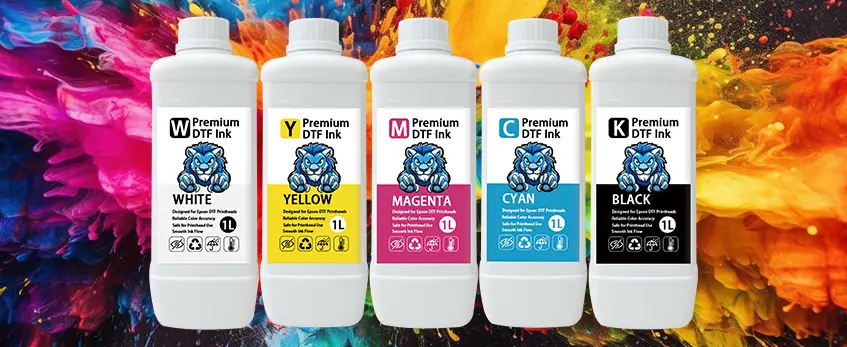
Jinlong DTF printers stand out when it comes to managing ink smoothly and efficiently, especially for U.S. customers who rely on consistency and quality. Here’s why:
| Feature | Benefit |
|---|---|
| Simple Ink Monitoring | Easy-to-read alerts help you catch low ink early, reducing downtime. |
| White Ink Compatibility | Specially designed system to handle white ink without frequent clogs or settling issues. |
| Customer Support Access | Responsive U.S.-based support helps quickly solve ink or printer troubles. |
| Clear Tutorials & Guides | Step-by-step instructions for ink refills, maintenance, and troubleshooting. |
| Quick Diagnostic Tools | Built-in diagnostics to differentiate ink issues from hardware faults. |
The printer’s ink sensor system may not be perfect, but Jinlong offers software and physical indicators that simplify checking ink status. Also, their support line can help troubleshoot complicated issues, saving time and ink waste.
If you want to learn more about making the most of your ink and printer, check out the detailed tips on DTF ink and print quality.
Overall, Jinlong’s combination of hardware features and support resources makes managing your DTF ink less of a hassle and more reliable for your business.
What to Do When Jinlong DTF Printer Ink Is Low or Out
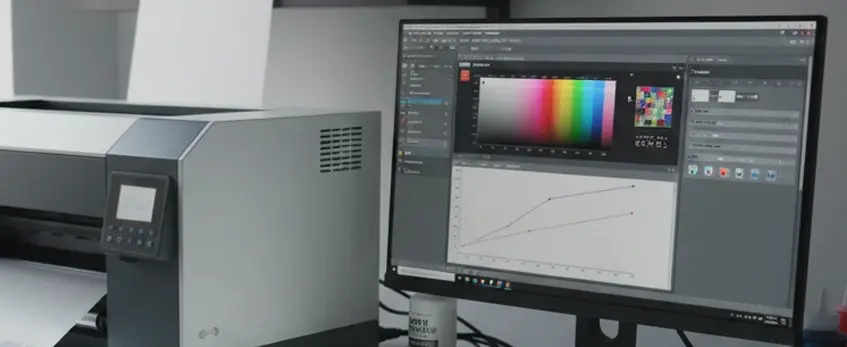
When your Jinlong DTF printer shows low or empty ink, taking quick and careful action is key to keeping your print quality consistent and avoiding downtime. Here’s a simple recap of what to do:
- Check Ink Levels Frequently: Use your printer’s control panel or connected software to monitor ink status before starting large print jobs.
- Inspect Ink Tanks Manually: Make it a habit to physically check the ink reservoirs to catch issues that sensors might miss.
- Refill with Genuine Jinlong DTF Ink: Always use recommended inks and compatible syringes or cartridges to avoid clogging and ensure vibrant colors.
- Run Printhead Cleaning Cycles: If your prints show streaks or gaps after refilling, run the printer’s cleaning routines to clear nozzles.
- Avoid Printing on Empty Ink: Never print when ink is low—it can damage the printheads and cause costly repairs.
- Schedule Routine Maintenance: Regular upkeep, including nozzle checks and ink system cleaning, prevents ink-related problems.
- Keep Spare Ink Ready: Staying stocked with genuine Jinlong ink helps you refill quickly and avoid interruptions.
Proactive ink monitoring and proper maintenance are your best defense against ink issues. For ongoing support and tips on how to keep your printer running smoothly, check out detailed guides on maintaining your Jinlong DTF printer and selecting the right DTF inks. Taking these steps regularly will help maintain consistent print quality and maximize your printer’s lifespan.
Frequently Asked Questions about Jinlong DTF Printer Ink
How often should I check ink levels?
It’s best to check your Jinlong DTF printer’s ink levels before every major print job or at least once a week if you run it frequently. This helps avoid unexpected downtime and keeps print quality consistent.
What are some preventive maintenance tips?
Use genuine Jinlong DTF inks and compatible syringes.
Regularly clean printheads and perform nozzle checks to prevent clogs.
Schedule routine maintenance cycles based on printer usage.
Inspect ink tanks manually to catch leaks or low levels early.
What if the ink low alert shows, but the printer isn’t printing?
This can happen if there’s an error with ink detection or a clogged nozzle. Try:
- Running a nozzle check and cleaning cycle.
- Restarting the printer and software.
- Checking ink tanks to confirm actual ink levels.
If the problem continues, consult customer support for detailed troubleshooting.
How do I reset ink or nozzle levels after a refill?
After refilling, use the Jinlong DTF printer’s software interface to reset ink counters and perform a nozzle check. This ensures the printer correctly monitors ink usage and maintains print quality.
Where can I buy genuine Jinlong DTF ink refills?
For reliable ink quality, purchase from official Jinlong suppliers. Visit the Jinlong DTF ink CMYK Pro Series page for authentic inks designed for your printer. Using genuine ink prevents common print issues and extends your printer’s life.
If you need help or more advice, don’t hesitate to reach out via Jinlong’s contact page.





 English
  Español
  Deutsch
  Français