



How to Choose the Best Desktop DTF Printer for Home or Studio
Understanding Desktop DTF: Converted vs. Purpose-Built
When looking for a desktop DTF printer, you’ll often come across two main types: converted photo printers and purpose-built DTF units. It’s easy to get caught in the \”modified\” trap—where regular inkjet photo printers are adapted with DIY kits to handle Direct to Film printing. While these conversions might seem budget-friendly, they come with significant trade-offs.
The \”Modified\” Trap: Why Converted Printers Fall Short
Converted photo printers often struggle with:
- Durability: These printers aren’t designed to handle the harsher DTF inks or powders, which can lead to frequent breakdowns.
- Ink delivery issues: Converted models usually lack specialized rollers and ink circulation systems needed to manage thick, pigmented white ink.
- Print quality inconsistencies: Without proper hardware, white ink settling and clogging are common, leading to downtime and wasted materials.
Why Purpose-Built Matters: Built for DTF Success
Purpose-built desktop DTF printers come equipped with:
- Robust materials and design: Built to withstand the demands of DTF inks and powders.
- Specialized rollers and transport systems: Ensuring smooth film feeding and even print layering.
- White Ink Circulation System (WICS): Prevents ink from settling, reducing maintenance and print failures.
These features translate to higher reliability and better print quality, especially during larger or repeated runs.
Verdict: Why Professional Desktop Units Suit Businesses Best
For home studios or small businesses aiming for consistent, high-quality results, investing in a dedicated desktop DTF printer is a smart choice. It means fewer interruptions, less maintenance hassle, and prints that confidently showcase your brand. Choosing a professional desktop DTF printer sets you up for success and growth in the competitive custom apparel market.
Critical Features to Evaluate for Desktop DTF Printers
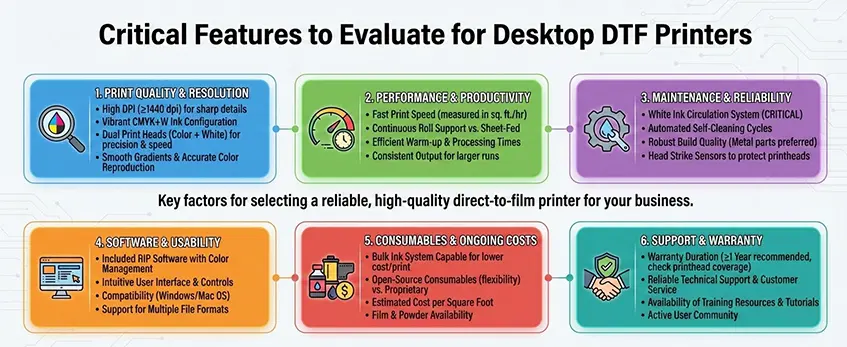
When picking a desktop DTF printer for home or studio use, focus on these key features to get the best value and performance.
Printhead Technology & Resolution
Your choice of printhead affects print quality, speed, and maintenance costs. Common options include:
| Printhead Model | Resolution | Speed | Replacement Cost | Best Use Case |
|---|---|---|---|---|
| Epson L1800 | 5760 x 1440 dpi | Moderate | Moderate | Entry-level, home use |
| Epson XP600 | 5760 x 1440 dpi | Faster | Lower | Small business, faster output |
| Epson i3200 | 1440 x 720 dpi | Fastest | Higher | Professional, heavy volume |
For home or small studio users, balancing speed with affordable maintenance is vital. XP600 offers a good mix of speed and cost, while L1800 suits beginners. The i3200 is more for pros with higher throughput needs.
White Ink Circulation System (WICS)
White ink settling is a big challenge in DTF printing. When white ink sits still, pigments separate and clog the printhead, causing downtime.
- Manual White Ink Circulation: Requires frequent cleaning and shaking.
- Automated Circulation: Keeps the white ink moving inside the printer, preventing settling and reducing maintenance.
A printer with a reliable white ink circulation system minimizes clogs and saves you time.
Format Size: A3 vs A4
Consider what you’ll print most often:
- A3 Size: Best for full-front T-shirt prints, providing ample coverage for standard adult shirts.
- A4 Size: Smaller prints, ideal for logos or kids’ shirts, but limited for full designs.
Also, look at feed styles:
- Sheet-fed: Simple, great for beginners, but slower.
- Roll-fed/Roll-to-roll: Better for continuous jobs and larger runs.
RIP Software Compatibility
RIP software handles crucial tasks like color management and white layer generation.
Key points to check:
- Support for your printer model.
- Easy color adjustment and accurate white ink layering.
- Beginner-friendly interface (e.g., CadLink and Maintop).
- Ability to streamline the printing workflow.
Good RIP software improves print quality and reduces wasted material, helping you get consistent results from your DTF printer.
By focusing on these core areas—printhead, white ink system, format size, and software—you ensure your desktop DTF printer fits your needs perfectly without wasting money. For more tips on keeping white ink flowing smoothly, check out this detailed guide on white ink jet ink and how it works.
Workflow and Environmental Considerations
When choosing a desktop DTF printer, it’s important to think about your workspace and environment to keep things running smoothly.
Footprint & Space
Measure your available desk space carefully. Desktop DTF printers need room not just for the printer itself but also for accessories like PET film transfer sheets, hot melt powder containers, and curing equipment. Make sure there’s enough clearance to load and unload prints comfortably without crowding your work area.
Ventilation & Safety
DTF printing involves curing powder that melts and bonds onto garments, which can release fumes during the heat process. Proper ventilation is a must—either a well-ventilated room with window access or an air purifier designed to handle fine particles. This keeps your workspace safe and odor-free, especially important for home studios or small business setups.
Temperature & Humidity
Stable room conditions help avoid common printing issues like ink drying too fast or running during printing. Ideally, keep your studio between 65°F and 75°F with moderate humidity (40-60%). Excessive dryness or dampness can affect ink adhesion and the quality of transfers, so a climate-controlled environment will protect your investment.
By planning your workspace well and maintaining a safe, controlled environment, you can ensure your desktop DTF printer delivers consistent and high-quality results every time. For more on consumables and curing, check out guides on DTF hot-melt adhesive powder to better understand how curing and powders work in your workflow.
Assessing the Total Cost of Ownership
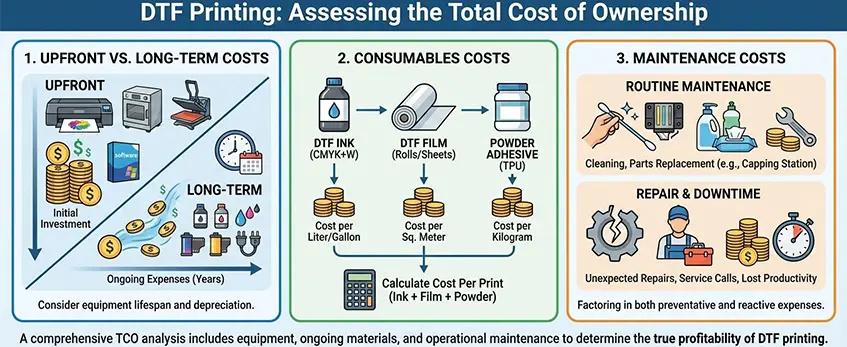
When choosing a desktop DTF printer, it’s easy to focus on the upfront price, but the total cost of ownership goes deeper. Beyond the sticker price, you want to consider ongoing expenses that affect your budget over time.
Upfront vs. Long-term Costs
- Initial investment: Desktop DTF printers range widely in price depending on features like printhead technology and build quality.
- Longevity: Cheaper models might save money up front but could have higher maintenance or replacement costs, making them more expensive down the road.
Consumables Costs
- DTF ink: You\’ll use both color and white inks regularly; white ink tends to settle and requires careful management, impacting cost.
- PET film: The transfer sheets are essential for the Direct to Film printing process, and their quality affects your final print.
- Hot melt powder: Don\’t forget the curing powder that melts to seal your prints; quality powder ensures durability but adds to expenses. Check out the available DTF transfer film options and adhesive powders designed to optimize your results while managing costs.
Maintenance Costs
- Printhead maintenance: Regular cleaning is vital to prevent clogging, especially with white ink circulation systems, affecting printer uptime and parts life.
- Replacement parts: Consider the availability and price of spare parts like printheads or rollers. Some printers have expensive or hard-to-find components, which can slow your workflow and increase total expenses.
Looking at these ongoing costs ensures you pick a desktop DTF printer that fits your home or studio budget without surprises.
Why Support is More Important than Specs
When it comes to choosing a desktop DTF printer, having strong support often matters more than just focusing on specs. The Direct to Film printing process has a learning curve—you need some technical skills to master ink management, layering white ink right, and curing prints properly.
Good after-sales service is critical. Look for brands that provide detailed tutorials, troubleshooting help, and easy access to spare parts. These resources save you time and frustration, especially if you’re new to DTF printing or running a small studio. Some printers might look great on paper but fall short when it comes to support, which can slow down your workflow or cause costly downtime.
Also, consider whether support is local or overseas. Having customer service nearby means faster responses, easier communication, and often better availability of replacement parts—all important for keeping your printer running and your business moving. For home or studio users in the US, accessible support can make the difference between smooth operation and constant headaches as you navigate the nuances of DTF printer maintenance and color management.
Why Jinlong DTF is the Smart Choice for Studios
When choosing a desktop DTF printer for your home or studio, Jinlong DTF stands out, especially for small business owners and studios focused on apparel printing. Jinlong’s desktop models are built with stability and ease of use in mind, making them perfect for users who want reliable performance without complicated setups.
Tailored for Small Business
Jinlong printers are designed to handle the demands of small businesses while fitting comfortably in home studios. Their compact footprint and robust construction ensure consistent prints day after day. This is ideal for custom T-shirt printing equipment that needs to run smoothly without constant adjustments.
Key Advantages
One major highlight is Jinlong’s superior white ink circulation system, which prevents ink settling and clogs, reducing downtime. This advanced feature keeps your workflow steady and improves print quality on each PET film transfer sheet. Plus, the plug-and-play setup means you can start printing faster, with less technical hassle.
Customer Success and Support
Jinlong doesn’t just stop at hardware. They actively support user growth and scaling by offering comprehensive after-sales service, including tutorials and troubleshooting help. This ensures you’re never on your own as you expand your business.
If you want a reliable, user-friendly desktop DTF printer optimized for small-scale apparel printing, Jinlong offers smart solutions that fit your needs and budget.
For more on printer sizes that fit various needs, check out the A3 DTF printer vs. A4 and A2 comparison.





 English
  Español
  Deutsch
  Français