



How RIP Software Improves DTF Color Accuracy and Reduces Ink Use
If you’re running a DTF printing operation and struggling with dull colors or ballooning ink costs, you’re not alone. How RIP software affects DTF color accuracy and ink consumption is a critical piece often overlooked in print workflows. The right RIP isn’t just about driving your printer—it governs color precision, white ink handling, and ink usage efficiency, directly impacting your bottom line. In this guide, you’ll get clear insights into why your RIP settings matter, how to avoid common pitfalls like oversaturation or wasted ink, and practical tips to dial in brilliant, consistent transfers with less ink. Ready to unlock smoother colors and smarter ink usage? Let’s dive in.
Understanding RIP Software in DTF Printing
Ever wonder why your Direct-to-Film (DTF) prints don’t always match your screen colors or waste too much ink? The secret often lies in the RIP software. RIP (Raster Image Processor) software is the backbone of DTF printing, handling everything from raster image processing to color separation, ink channel control, and final file prep tailored for DTF printers.
Unlike basic printer drivers, which often struggle with white ink handling or lack advanced color mapping, dedicated DTF RIP software gives you precise control. Basic drivers can’t manage white ink layering or optimize ink channels properly, leading to dull colors and excessive ink use.
Most professional RIP options for DTF come packed with features like:
- Advanced layering tools to control white ink underbase and overprint layers
- Customizable ICC profiles for accurate color matching
- Ink channel adjustments for smarter ink consumption
- Support for variable dot sizes and halftone patterns to improve print vibrancy and smooth gradients
Choosing the right RIP software ensures your DTF prints hit the mark on color accuracy and ink efficiency—something essential when using Jinlong DTF inks and films in the US market.
How RIP Software Directly Affects Color Accuracy
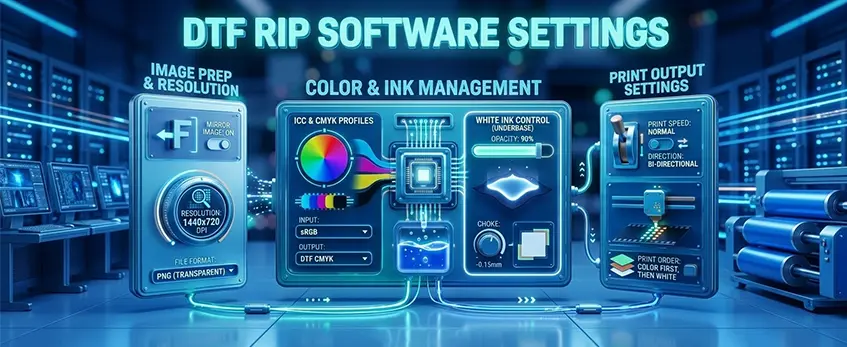
RIP software plays a huge role in getting your DTF prints to look just like your screen designs. One of the biggest factors is ICC profiles — these convert your RGB or CMYK artwork into printer-specific colors, ensuring what you see on your monitor matches the final print. Without proper ICC profiles for DTF printing, colors can come out off or dull.
Another critical part is white ink underbase control. RIP software manages the density, coverage, and layering of white ink, especially on dark garments. This underbase prevents unwanted color shifts and keeps your prints vibrant without bleeding or oversaturation.
For precision color matching, RIP programs often include spot color replacement and libraries, letting you nail exact Pantone shades or brand colors every time, which is essential for professional work.
To achieve smooth gradients and avoid common print issues like banding or moiré patterns, RIP software uses variable dot sizes and smart halftone patterns. These fine tune how ink is laid down for the best visual effects.
Poor RIP setup can cause noticeable problems — colors might appear oversaturated, too muted, or show metamerism (colors shifting under different lighting). Thankfully, many of these issues are fixable by adjusting ICC profiles, recalibrating white ink settings, or tweaking dot patterns.
For those using Jinlong DTF products, pairing your printer with the right RIP and customized ICC profiles enhances both color accuracy and print consistency. You can check out detailed tips on configuration and workflows for Jinlong\’s DTF transfer film options to get the best results.
The Impact of RIP Software on Ink Consumption
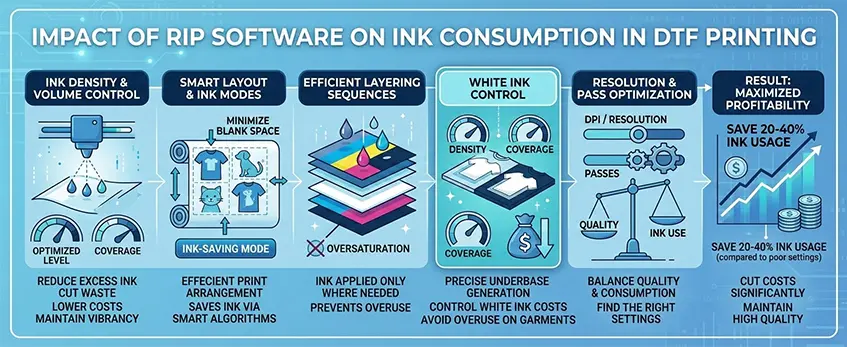
RIP software plays a huge role in managing ink consumption in DTF printing. By adjusting ink density and volume controls, you can cut down on excess ink laydown without losing the vibrancy your prints need. This means less waste and better cost control.
Many RIP tools include ink-saving modes that smartly reduce ink use where it’s not necessary. Features like smart nesting arrange your print jobs efficiently to minimize blank space and ink usage. Efficient layering sequences also ensure that ink, especially white ink, is used only where it’s needed, preventing oversaturation.
Speaking of white ink, precise underbase generation is critical. Proper control prevents overuse of white ink on both light and dark garments, which is often a major cost driver. RIP software lets you fine-tune the white ink layer’s density and coverage to avoid unnecessary ink consumption.
Resolution and pass settings matter too. While higher DPI boosts print quality and detail, it directly increases ink use. Finding the right balance between print resolution and ink consumption helps keep costs manageable without sacrificing color accuracy.
In real-world scenarios, poorly configured RIP settings can lead to 20-40% higher ink consumption, drastically pushing up expenses. By tuning your software parameters—like ink limits, layering, and white ink management—you can cut costs significantly while maintaining quality.
For users working with jinlong DTF transfer film products, optimizing your RIP settings around those materials ensures both color performance and ink efficiency.
Key RIP Settings to Optimize for Color Accuracy and Ink Efficiency
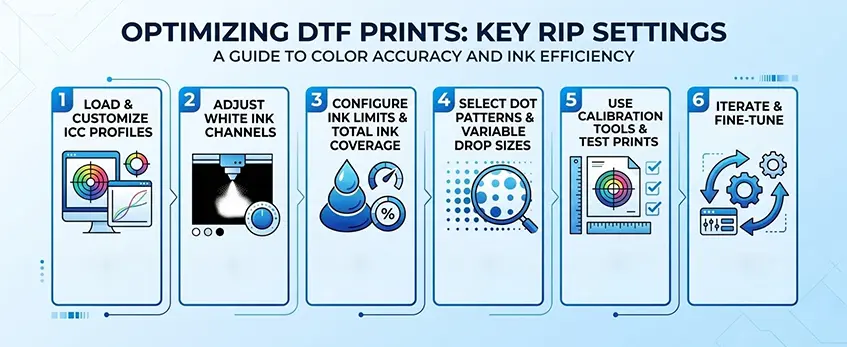
To get the best results from your DTF prints, fine-tuning RIP software settings is a must. Here’s a straightforward guide to optimizing color accuracy and ink use, especially with jinlong DTF inks and films:
Load and Customize ICC Profiles: Start by loading printer-specific ICC profiles designed for jinlong DTF inks and transfer films. These profiles ensure your RIP translates colors correctly from the original RGB or CMYK design to the printer. Custom tweaks might be necessary to match your environment and fabric types perfectly.
Adjust White Ink Channels: Control white ink density, choke, and spread carefully. This is crucial for solid underbase prints on dark garments, preventing ink bleed and unwanted color shifts. Lower density can save ink, but be cautious not to compromise coverage.
Configure Ink Limits and Total Ink Coverage: Set maximum ink limits in your RIP to avoid oversaturation that wastes ink and causes drying issues. Keeping total ink coverage within recommended levels keeps prints vibrant without excess ink use.
Select Dot Patterns and Variable Drop Sizes: Experiment with variable dot sizes and halftone patterns in your RIP software. Smarter dot placement smooths out gradients, reduces banding, and balances ink consumption with vibrant output.
Use Calibration Tools and Test Prints: Regularly run calibration prints to check color accuracy and ink volumes. Use RIP calibration utilities to update profiles and settings, then test with actual garments or your jinlong DTF transfer films to confirm performance.
Iterate and Fine-Tune: Don’t settle on your first settings. Adjust parameters in small steps and compare results. Fine-tuning helps find that sweet spot where your prints pop with accurate colors and your ink consumption stays efficient.
For those using jinlong DTF solutions, having the right RIP configuration makes a huge difference in consistency and print quality. To see how you can maximize your investment, explore detailed options for jinlong\’s DTF transfer films and compatible RIP workflows available on their product page.
Choosing the Right RIP Software for DTF Success
Picking the right RIP software is crucial for achieving top-notch color accuracy and ink efficiency in DTF printing. Here’s what to look for:
| Must-Have RIP Features | Why It Matters |
|---|---|
| Strong color management | Ensures exact color matching with ICC profiles |
| White ink tools | Controls underbase density, layering, and spread for dark & light fabrics |
| Ink optimization | Reduces ink waste while keeping print vibrancy |
| Epson-based DTF compatibility | Seamless integration with popular DTF printers |
Professional-grade RIP software pays off with:
- Long-term color consistency for repeat orders
- Lower operating costs from optimized ink use
- Advanced controls for dot size and halftoning improving gradients and print quality
Jinlong DTF supports users by integrating with high-performance RIPs tailored for their inks and films, helping prevent common issues like color shifts or excessive ink consumption. For example, using RIP settings fine-tuned for Jinlong inks ensures the best print vibrancy and efficient white ink layering — key to standout results on dark garments.
For DTF users looking to streamline their workflow, pairing Jinlong supplies with compatible RIP software is a smart move. Check out Jinlong’s TPU DTF hot melt adhesive powder alongside RIP options for a fully optimized print setup.
Choosing software that matches your Epson-based DTF printer and supports Jinlong DTF consumables unlocks the full potential of your prints — consistent, vibrant colors with lower ink costs every run.
Best Practices and Troubleshooting for DTF Printing
Keeping your DTF prints consistent starts with routine calibration and regular profile updates. Make it a habit to recalibrate your RIP software and update your ICC profiles for jinlong DTF inks and films regularly. This helps maintain color accuracy and ensures your prints stay vibrant over time.
When preparing artwork, always use sRGB color profiles and prioritize vector files whenever possible. This reduces unexpected color shifts in the RIP software and improves sharpness in your prints.
Common issues you might encounter include:
- Color mismatches: Often caused by outdated profiles or incorrect white ink layering. Fix this by reloading the correct ICC profiles and adjusting your white ink underbase settings.
- Excessive ink bleed: Usually linked to too much ink density or poor white ink spread. Lowering ink density and refining white ink choke can significantly reduce bleed.
- Poor wash fastness: Typically tied to ink curing or film quality; verify your curing process and consider high-performance DTF inks designed for durability.
To keep track of improvements, measure your results by monitoring ink usage metrics and color delta values. These metrics give you clear insight into how well your color management and ink density optimization are working, revealing potential cost savings and quality boosts.
For more in-depth info on ink characteristics and why white ink management matters, check out the detailed guide on white inkjet ink vs. standard ink.
Mastering these best practices will keep your DTF prints sharp, color-accurate, and cost-efficient every run.





 English
  Español
  Deutsch
  Français