



How DTF White Ink Settings Boost Color Vibrancy and Print Quality
If you’re aiming for vibrant, professional-grade DTF prints, mastering your white ink settings is non-negotiable. The white underbase isn’t just a backdrop—it’s the powerhouse that lifts your colors, controls opacity, and defines print quality, especially on dark or colored fabrics. Get these settings right, and your designs will pop with richer saturation and lasting durability; get them wrong, and you risk dull colors, cracking transfers, and wasted ink. In this guide, you’ll discover exactly how to fine-tune your DTF white ink density, choke, opacity, and limits—with proven, practical tips from Jinlong DTF—so your prints consistently hit that sweet spot between eye-catching vibrancy and soft, flexible feel. Let’s get into the essentials that elevate every print from ordinary to outstanding.
Understanding the Role of White Ink in DTF Printing
White ink plays a crucial role in DTF printing, acting as both a primer and an opaque base layer. Its primary function is to create a solid foundation that allows vibrant colors to stand out, especially on dark garments where colors tend to appear muted or dull without it. By laying down a consistent white underbase, the subsequent CMYK colors achieve their true saturation and brightness, enhancing overall print quality and color vibrancy.
On lighter fabrics, white ink still serves as a benefit by improving opacity and preventing the fabric’s color from dulling the print. This ensures even pastel and bright colors maintain their intended appearance.
Jinlong DTF white ink is notable for its high-opacity and strong coverage capabilities. This premium white ink formulation maximizes color vibrancy while providing consistent and reliable print performance. Its superior opacity reduces the need for excessive ink layers, helping balance print hand feel with sharp color definitions—a key advantage for high-quality DTF prints on various garment colors.
In , optimizing DTF white underbase settings with Jinlong’s high-opacity white ink directly impacts print quality, making it essential for vibrant, professional-grade DTG results on both dark and light garments.
Core DTF White Ink Settings and Their Direct Impact on Color Vibrancy
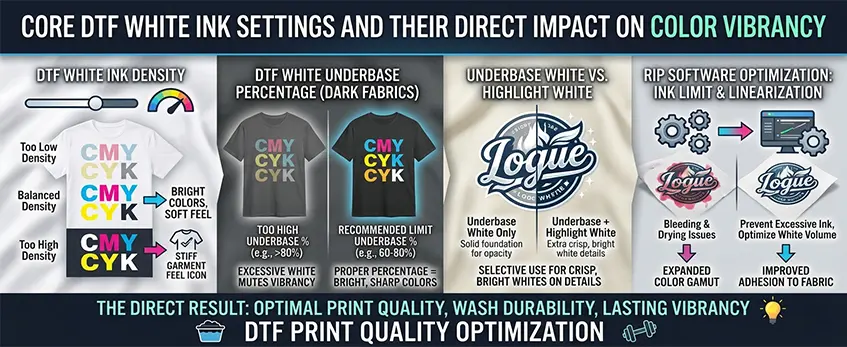
Getting the right white ink settings is key to making your DTF prints really pop. The density and opacity of white ink need a careful balance—too little, and your colors won’t be vibrant enough; too much, and prints risk looking over-saturated or stiff. Adjusting the DTF white ink density properly ensures your colors stay bright without compromising the feel of the garment.
For dark fabrics, managing the underbase percentage is critical. Setting it too high can cause dullness in the colors because too much white underbase can mute the vibrancy rather than enhance it. Keep the DTF white underbase settings within recommended limits to avoid that washed-out look.
There’s also a difference between highlight white and underbase white. The underbase white acts as a solid foundation beneath the CMYK layers for opacity, while highlight white is used selectively to maintain crisp, bright whites on details. Using both smartly helps achieve sharpness where it matters most.
Controlling the ink limit and linearization in your RIP software optimizes white ink volume, preventing excessive ink that can cause bleeding or drying issues. This fine-tuning expands your print’s color gamut and improves adhesion to fabric, ultimately boosting DTF print quality optimization. The right white layer settings contribute directly to wash durability and lasting vibrancy.
For users of Jinlong equipment, these adjustments are especially significant to maximize the benefits of their high-opacity white inks with strong coverage, essential for vibrant prints on any garment color. For a beginner-friendly walkthrough on tweaking these settings, check out this intro to DTF printing techniques.
Advanced White Ink Adjustments for Optimal Print Quality
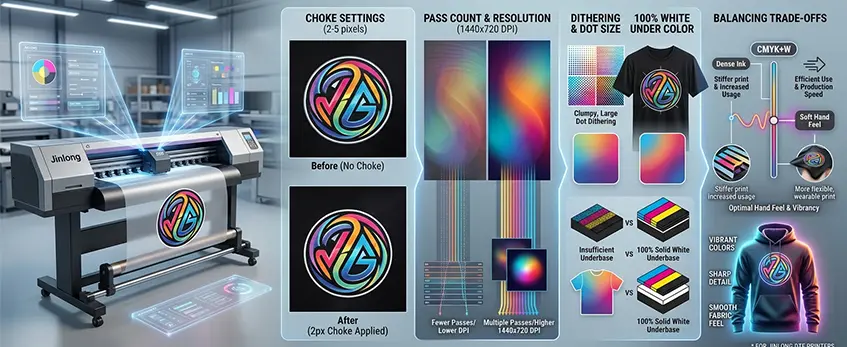
Fine-tuning your DTF white ink settings can make a big difference in color vibrancy and overall print quality. Here are some key adjustments to focus on:
Choke settings (2-5 pixels): Applying a slight choke removes unwanted white halos around your design edges, preserving sharpness and making prints look cleaner. This is essential for crisp outlines, especially on dark fabrics.
Pass count & resolution: Increasing pass count and choosing higher resolutions like 1440×720 DPI boost smoothness and color depth. More passes lay down ink evenly, while finer resolution sharpens details and improves color vibrancy for the CMYK+W white layer.
Dithering & dot size: Adjusting dithering patterns and dot size impacts texture and appearance. Smaller dots and fine dithering create smooth gradients and richer colors without over-saturating the fabric.
100% white under color pixels: Ensure your white underbase reaches full coverage beneath colored pixels to maximize pop and saturation on dark garments. This solid white base keeps colors bright and true.
Balancing trade-offs: Remember, pushing white ink too dense can affect hand feel, make prints stiffer, and increase ink usage, which slows production. Finding the right balance keeps prints vibrant without compromising softness or speed.
Optimizing these advanced white ink controls helps raise your DTF print quality to the next level—delivering vibrant colors with sharp detail while keeping efficient ink use and smooth fabric feel. For best results, combine these tweaks with proper ICC profiles and RIP software white channel settings tailored for your Jinlong DTF printer.
Step-by-Step Guide to Optimizing White Ink Settings with Jinlong DTF
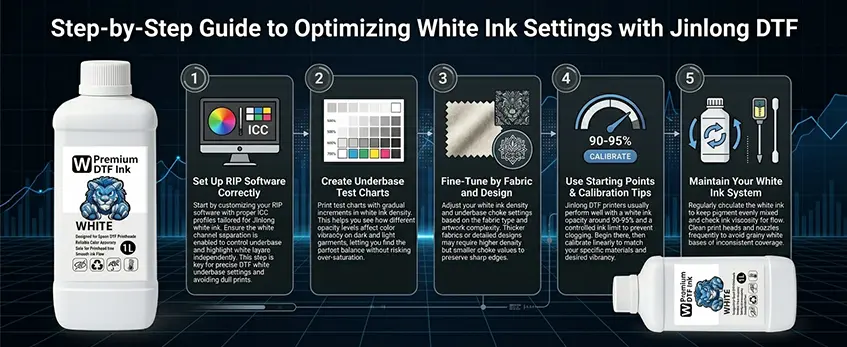
Getting your white ink settings right with Jinlong DTF printers is essential to boost color vibrancy and print quality. Here’s a straightforward way to dial it in:
Set Up RIP Software Correctly: Start by customizing your RIP software with proper ICC profiles tailored for Jinlong white ink. Ensure the white channel separation is enabled to control underbase and highlight white layers independently. This step is key for precise DTF white underbase settings and avoiding dull prints.
Create Underbase Test Charts: Print test charts with gradual increments in white ink density. This helps you see how different opacity levels affect color vibrancy on dark and light garments, letting you find the perfect balance without risking over-saturation.
Fine-Tune by Fabric and Design: Adjust your white ink density and underbase choke settings based on the fabric type and artwork complexity. Thicker fabrics or detailed designs may require higher density but smaller choke values to preserve sharp edges.
Use Starting Points & Calibration Tips: Jinlong DTF printers usually perform well with a white ink opacity around 90-95% and a controlled ink limit to prevent clogging. Begin there, then calibrate linearly to match your specific materials and desired vibrancy.
Maintain Your White Ink System: Regularly circulate the white ink to keep pigment evenly mixed and check ink viscosity for smooth flow. Clean print heads and nozzles frequently to avoid grainy white bases or inconsistent coverage.
Following these steps ensures you maximize your use of Jinlong DTF white ink, achieving vivid prints with excellent adhesion and lasting durability. For a deeper dive into setup and workflow, check out our detailed advice on why upgrading to a DTF transfers machine is the best move for your workflow.
Troubleshooting Common Issues Related to White Ink Settings
If your DTF prints show dull or faded colors, start by adjusting your white underbase and ICC profiles. Increasing the underbase density can boost color vibrancy, but keep an eye on not overdoing it to avoid dullness. Fine-tuning the ICC profiles helps ensure accurate color management and saturation.
White outlines or bleed often happen when the underbase extends beyond the color edges. Use the DTF underbase choke setting (typically 2-5 pixels) to tighten the white ink edges. Also, syncing powder application timing can prevent excess white powder from causing bleed and fuzzy outlines.
Grainy or uneven white bases can result from improper dithering patterns or low resolution. Increasing resolution settings (like 1440×720 DPI) and using smoother dithering can create a consistent, solid white base, improving overall print quality.
If your transfers feel stiff or start cracking, it’s usually tied to white ink volume and opacity. Too much white ink leads to thick layers that reduce the hand feel. Balance opacity with ink limit settings to keep prints flexible without sacrificing vibrancy.
Enhance wash durability by ensuring proper curing times and good adhesion between layers. Under-curing white ink can cause peeling, so follow recommended heat press settings carefully to lock in durability.
Finally, to reduce ink waste and avoid nozzle clogs, set an optimized white ink limit. Overloading white ink in the RIP software stresses the printer and causes maintenance issues. Regular cleaning and circulation routines also keep white ink flowing smoothly.
For a deeper dive into powder and film compatibility to improve transfer quality, check out our guide on hot peel DTF transfers for t-shirts, film types, and compatibility.
Best Practices and Pro Tips for Vibrant, High-Quality DTF Prints
To get the most out of your DTF white ink settings and boost color vibrancy, start with the right materials. Using high-quality films, powders, and inks designed to work well together enhances not just the white ink’s opacity but the overall print durability. For instance, pairing Jinlong’s DTF inks with their premium transfer films ensures strong adhesion and vivid colors. Check out Jinlong’s A4 Double Pro Series transfer film for reliable quality.
Design preparation plays a big role too. Always work in the correct color mode (CMYK+W) and keep your screen and print resolution at 300 DPI or higher. This helps maintain sharp edges and rich, vibrant levels that pop, especially on dark garments where white underbase is crucial.
When it comes to heat pressing, precise curing temperature and time dramatically impact white ink performance. Too much heat can stiffen the print, while too little leaves it prone to fading or cracking. Follow recommended pressing settings aligned with both your chosen film and powder, like those detailed for Jinlong TPU powders, to nail durability without sacrificing softness.
For businesses growing their output, scaling print settings is key. Optimize your white ink density and pass count so you maintain a balance between vibrancy and print speed — avoiding overuse of white ink while keeping colors bright and saturated.
Finally, leverage the unique advantages of Jinlong’s DTF white ink formulation. Its superior high-opacity formula produces strong coverage that translates into wider color gamut and cleaner color layers. This not only improves print quality but also supports better wash durability and less fading over time.
By combining these best practices—quality supplies, detailed design work, fine-tuned curing, efficient scaling, and Jinlong’s ink technology—you’ll achieve vibrant, professional-grade DTF prints every time.





 English
  Español
  Deutsch
  Français