



Heat Press Temperature for DTF Transfers How to Fix Too High or Too Low
If you’ve ever dealt with DTF transfers that peel, crack, or scorch, you know how frustrating it is to get the heat press temperature just right. Too high or too low, and your prints suffer—poor adhesion, fading, even garment damage. The truth? Temperature is hands down the most critical factor for flawless DTF transfer pressing settings. In this guide, you’ll discover how to spot temperature-related problems, fix them fast, and nail the optimal DTF heat press temperature every time. With jinlong DTF’s reliable film and powder, you’ll learn exactly how to avoid common mistakes and get durable, vibrant results across cotton, polyester, and more. Ready to master your heat press and transform your DTF game? Let’s dive in.
Understanding DTF Heat Press Basics
Getting the heat press temperature just right is crucial for perfect DTF transfers. Heat plays a key role in melting the adhesive powder on the print, allowing it to bond seamlessly with the fabric without damaging the ink layer or the garment itself. If the temperature is too low, the adhesive won’t melt fully, causing poor DTF adhesion issues like peeling or fading. Too high, and you risk scorching the fabric or cracking the design.
Heat always works together with time, pressure, and peel method to achieve that ideal bond. For example, a slightly lower temperature might just need more pressing time or firmer pressure to compensate. Similarly, whether you do a hot peel or cold peel depends on your material and film type.
Different film brands, fabric materials, and heat press models each have their own temperature tolerance and response. A polyester stretch shirt demands different settings than a cotton tee, while some DTF films melt more consistently at slightly varied temperatures. That’s why a one-size-fits-all approach rarely works.
Instead, it’s best to test across your materials and equipment. Experimenting with small temperature increments and carefully adjusting time and pressure will help you dial in the optimal DTF heat press temperature for your setup—ensuring durable, vibrant transfers every time.
Recommended Heat Press Settings for DTF Transfers
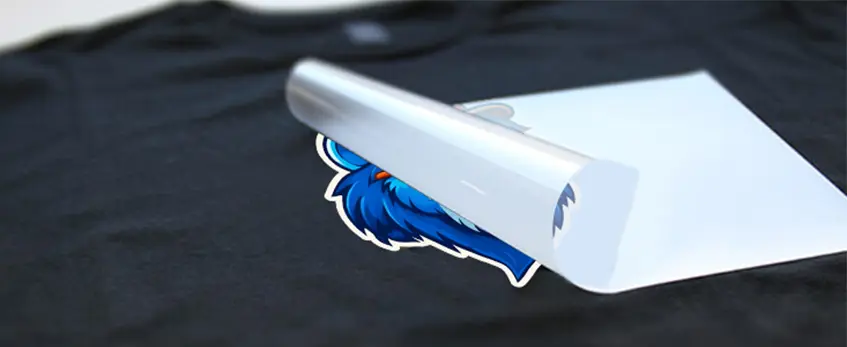
For optimal DTF heat press temperature, the tested baseline is 300–325°F (149–163°C). Pair this with a press time of 10–15 seconds and apply medium to firm pressure (40–60 PSI). These settings help the adhesive powder melt perfectly and bond the ink without damaging the fabric or design.
Peel Methods
- Hot peel is generally recommended for most fabrics.
- Cold peel suits specific fabrics or film types for better results.
Heat Press Settings by Fabric Type
| Fabric Type | Temperature (°F) | Time (sec) | Pressure (PSI) | Peel Method |
|---|---|---|---|---|
| Cotton / Blends | 310–320 | 12–15 | 45–60 | Hot peel |
| Polyester / Synthetics | 300–310 | 10–12 | 40–50 | Hot or cold peel |
| Nylon / Stretch | 300–305 | 10–12 | 40–50 | Cold peel |
Why Choose jinlong DTF Films?
Jinlong DTF films stand out for consistent performance with a forgiving temperature window. Their advanced adhesive powders ensure strong, vibrant transfers across different materials, reducing common heat press temperature problems like peeling or scorching.
For best results, try jinlong’s DTF Transfer Film 33cm Single Std Series or the 40cm Double Pro Series designed for durability and easy pressing. These films help you stick close to recommended heat press temperature and time for reliable, vibrant prints.
Signs Your Heat Press Temperature Is Too Low
If your DTF transfers show poor adhesion, edges lifting, or peeling after washing, chances are your heat press temperature is too low. You might also notice a dull finish with less vibrant colors. Scientifically, this happens because the adhesive powder hasn’t fully melted or bonded properly with the fabric and ink layer.
To fix this, increase your heat press temperature in 10–15°F increments while keeping an eye on the results. You can also try extending the press time slightly and make sure the pressure is set medium to firm (around 40–60 PSI). When re-pressing, always use a protective sheet to avoid direct heat damage to your design and fabric.
Making these adjustments helps ensure that the adhesive powder melts thoroughly, improving the bond strength and durability of your DTF transfers for long-lasting, high-quality prints.
Signs Your Heat Press Temperature Is Too High
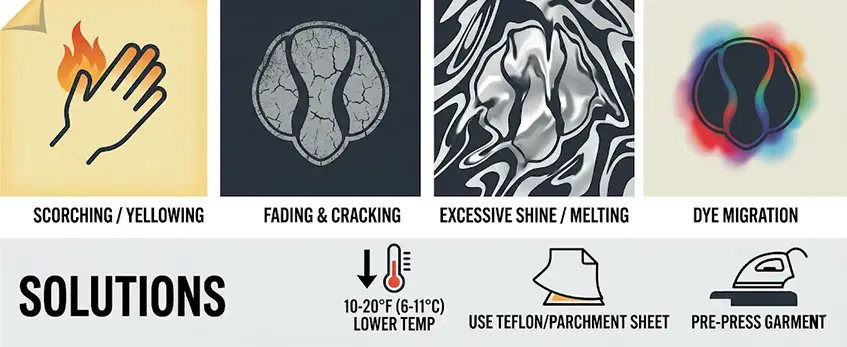
If your heat press temperature for DTF transfers is too high, you\’ll notice several warning signs that suggest over-cooking. Common symptoms include scorching or yellowing of the fabric, color fading, and cracking or brittleness of the design. You might also see an excessive shine on the print, melted areas in the design, or dye migration, especially when working with polyester materials.
These issues happen because over-curing damages the inks, adhesive powder, and fabric fibers, weakening the overall durability and look of your transfer.
To fix this, lower your heat press temperature by 10–20°F (about 6–11°C) increments and shorten the dwell time on the press. Using a Teflon or parchment sheet between the heat platen and your transfer protects the film and fabric from direct heat. Additionally, pre-pressing your garment to remove moisture and wrinkles can help create a more consistent bond without needing extra heat.
For consistently reliable results, consider using high-quality films like those from Jinlong DTF, which offer a forgiving temperature window to avoid common overheating mistakes. For detailed guidance, check out Jinlong’s DTF Transfer Film options.
How to Diagnose and Fix Temperature Issues Step by Step
Getting the heat press temperature right for DTF transfers can be tricky. Here’s a simple step-by-step approach to diagnose and fix any temperature problems:
Check Heat Press Accuracy: Use a reliable heat press thermometer or calibration tools to ensure your heat press is hitting the set temperature. Many presses run hotter or cooler than their display shows, so calibration is key.
Test Press on Scrap Fabric: Before working on final garments, press a few test transfers on scrap fabric or old T-shirts. This helps you spot any temperature-related issues without wasting good materials.
Evaluate Results Immediately and After Washing: Look for signs like peeling edges, cracks, or discoloration right after pressing and again after a wash test. Sometimes issues only appear after laundering, reflecting heat-related bonding problems.
Adjust One Variable at a Time: Start by tweaking the temperature in small increments (about 10°F). If the issue persists, then adjust the press time or pressure. Fixing one variable at a time helps you pinpoint the cause without confusion.
Document Successful Settings: Keep a log of temperature, time, pressure, peel method, fabric type, and results. This helps quickly replicate successful runs and avoid repeating mistakes.
Real-Life Jinlong DTF Troubleshooting: Jinlong DTF films offer a forgiving temperature range, but still benefit from calibration and testing. For example, one user found increasing the temp from 300°F to 310°F and maintaining medium pressure eliminated edge lifting on cotton blends. Another solution involved adding a cold peel step when working with delicate polyester fabrics to prevent dye migration.
By carefully diagnosing with step-by-step tests and keeping track, you can eliminate common DTF transfer problems caused by too high or too low heat press temperature. For more on selecting the right film type and prevention tips, check out our guide to different DTF film types and applications.
Additional Factors That Affect DTF Application Success
Getting the heat press temperature for DTF transfers right is crucial, but other factors play a big role in how well your transfers turn out.
Pressure impact: Too light pressure won’t fully bond the adhesive, causing edges to lift or peeling after washing. Too heavy pressure can flatten the ink or cause the film to distort. Aim for medium to firm pressure, typically around 40–60 PSI.
Press time and multiple presses: Sometimes one press isn’t enough, especially on thicker fabrics or with heavier powders. Adjust the dwell time between 10–15 seconds, and don’t hesitate to do a second quick press if needed.
Fabric preparation: Moisture and wrinkles interfere with transfer adhesion. Always pre-press your garments to remove moisture, wrinkles, and creases for better results.
Peel technique and timing: Knowing when to peel your DTF transfer—hot peel or cold peel—affects adhesion and finish. Hot peel is common, but some fabrics or jinlong DTF films might require cold peel for optimal results.
Environmental influences: Humidity and room temperature can affect powder melting and adhesive setting, so ensure you work in a dry, climate-controlled space.
Quality of DTF film and powder: Higher quality films, like those from jinlong, tend to have a wider temperature tolerance and consistent results. Low-quality powders may need tighter heat press temperature control and can cause more adhesion or peeling issues.
Considering all these factors alongside your heat press temperature and time helps avoid common DTF application problems. For example, selecting premium jinlong DTF transfer films can give you a more forgiving temperature window and better overall performance.
Best Practices for Consistent DTF Results with jinlong DTF
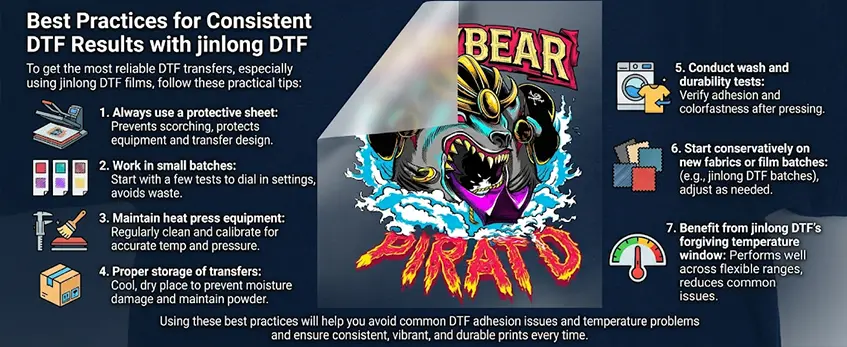
To get the most reliable DTF transfers, especially using jinlong DTF films, follow these practical tips:
- Always use a protective sheet: This prevents scorching and protects both your heat press and transfer design.
- Work in small batches: When adjusting your heat press temperature for DTF transfers, start with a few tests. This helps you dial in the best settings without wasting materials.
- Maintain heat press equipment: Regularly clean and calibrate your heat press to ensure accurate temperature and pressure. For more on heat press care, check out how auto heat press machines work.
- Proper storage of transfers: Keep your DTF transfers in a cool, dry place to avoid moisture damage and maintain powder adhesion quality.
- Conduct wash and durability tests: Always test transfers after pressing and washing to verify adhesion and colorfastness.
- Start conservatively on new fabrics or film batches: Different fabrics and new jinlong DTF film batches may require slight tweaks. Begin with lower temperature and time, then adjust as needed.
- Benefit from jinlong DTF’s forgiving temperature window: jenlong DTF films are designed to perform well within a flexible heat press temperature range, reducing common issues caused by too high or too low temperatures.
Using these best practices will help you avoid common DTF adhesion issues temperature problems and ensure consistent, vibrant, and durable prints every time.
Frequently Asked Questions about Heat Press Temperature for DTF Transfers
What is the best single temperature for DTF transfers?
Most users find a sweet spot between 300–325°F (149–163°C) works well for general transfers. This range melts the adhesive powder without causing damage. Start here, then tweak based on fabric and film type.
How do settings differ for cotton vs polyester?
| Fabric Type | Temperature (°F) | Time (Seconds) | Pressure | Peel Method | Notes |
|————-|——————|—————-|———-|——————|—————————-|
| Cotton | 300–315 | 10–15 | Medium | Hot peel | Standard, vibrant colors |
| Polyester | 320–325 | 8–12 | Medium-Firm | Cold peel preferred | Prevents dye migration |
| Blends/Nylon| 310–320 | 10–15 | Medium | Hot or Cold peel | Test to avoid scorching |
Can I use an iron instead of a heat press?
Using an iron can work in a pinch but struggles with consistent heat, pressure, and timing. This often causes uneven adhesion or peeling. A calibrated heat press is highly recommended for best durability and finish.
Why do transfers crack after washing?
Cracking usually means the heat press temperature was too low, or the dwell time wasn’t sufficient to fully cure the adhesive and ink. It also happens if pressure was too light or peel timing was off. Adjust temperature upwards in 10–15°F steps and double-check press time and pressure.
How often should I calibrate my heat press?
Calibrate your heat press at least once a month or when you notice inconsistent results. Temperature inaccuracies cause adhesion issues like peeling or scorching, so regular checks keep your transfers perfect.
Does the film brand affect ideal temperature?
Yes. Different DTF films, such as Jinlong DTF films, have unique formulations affecting optimal temperature ranges. Choosing a quality film ensures a forgiving temperature window and better overall performance.
For a detailed look at proper transfer settings and maintenance, consider reviewing heat press calibration tips and testing with Jinlong’s durable DTF films for reliable printing results.





 English
  Español
  Deutsch
  Français