



DTF Vinyl Printer for Beginners Setup Guide Materials and Tips
Understanding DTF Printing: Basics for Newcomers
If you’re new to DTF vinyl printing, it’s a fresh, fun way to create custom apparel that’s perfect for small businesses, crafters, and side hustlers. DTF stands for Direct to Film printing, and here’s how it works in a few simple steps:
- Print your design onto a special transfer film using a DTF printer.
- Apply a layer of hot melt adhesive powder evenly over the wet ink.
- Cure the powder by heating it, usually with a shaker or oven, so it sticks to the film.
- Transfer the design onto your fabric using a heat press.
This process lets you produce vibrant, detailed prints on various fabrics like cotton and polyester, making it a versatile option for custom t-shirts, hoodies, and more.
DTF vs. Heat Transfer Vinyl (HTV): Quick Comparison
| Feature | DTF Printing | Heat Transfer Vinyl (HTV) |
|---|---|---|
| Versatility | Works on most fabrics | Limited to flat, smooth surfaces |
| Cost | More affordable for complex designs | Higher per design, especially multi-color |
| Ease of Use | Easy once set up and calibrated | Simple but time-consuming for layers |
| Durability | Highly durable, flexible prints | Durable but prone to cracking over time |
| Design Complexity | Supports detailed gradients & colors | Best for simple, solid colors |
Who Should Use DTF Vinyl Printers?
Starting with DTF is ideal if you:
- Own a small business looking to expand apparel lines.
- Enjoy crafting and want to create custom designs at home.
- Run a side hustle eager to offer vibrant, durable prints.
- Want a user-friendly method without expensive equipment.
DTF printing is an accessible, cost-effective way to dive into custom apparel with professional-quality results — a perfect choice for beginners ready to grow their creative business!
Choosing the Right DTF Printer for Beginners
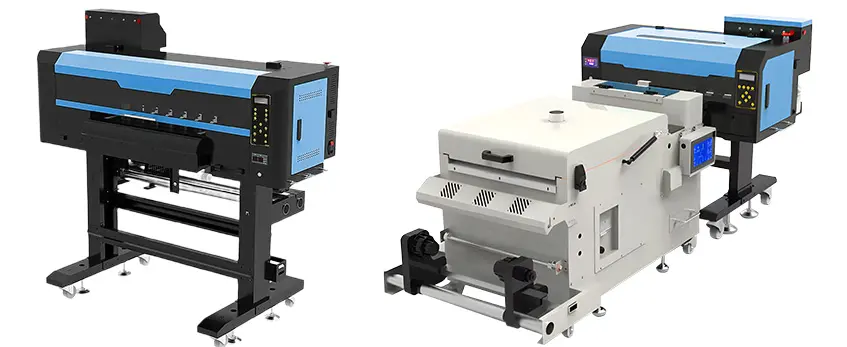
When picking your first DTF vinyl printer, a few key factors make a big difference. First, think about print size—do you want a compact A3 setup for small jobs, or a wider format for bigger designs? Next up is printhead quality. Epson-based printheads are popular because they handle white ink well and produce sharp prints. Speaking of white ink, make sure the printer has a good white ink circulation system—this keeps ink flowing smoothly and prevents clogs, which is crucial for beginners.
Ease of use is another big deal. Look for printers with straightforward controls and solid software support, so you can focus more on your creativity instead of troubleshooting. As for budget, entry-level models offer a great way to start without breaking the bank, while mid-range options give more features and reliability if you plan to grow your business.
Jinlong DTF printers really stand out for beginners because they combine user-friendly features with reliable performance. Plus, Jinlong offers strong customer support, which is super helpful your first time setting up and running your printer. They also provide starter bundles that include everything you need, making it easier to get going quickly.
If you’re interested in getting quality materials alongside your printer, check out their DTF transfer film A3 Double Pro Series and their reliable DTF ink CMYK 100ml STD Series—both great for beginners aiming for smooth, vibrant prints.
Essential Materials and Supplies Checklist for DTF Vinyl Printer Beginners
To get started with your DTF vinyl printer, having the right materials and supplies is key. Here’s a simple checklist to make sure you’re fully prepared:
Core Items
- DTF Printer: Choose one with good white ink circulation to ensure smooth printing.
- Transfer Film: Available in cold peel and hot peel options depending on your workflow and fabric type.
- Pigment Inks: You’ll need CMYK plus white ink for vibrant, full-color prints with an opaque base.
- Hot Melt Adhesive Powder: This powder sticks the print to the fabric during heat pressing.
Additional Tools
- Heat Press: Essential for curing the print and transferring it cleanly to fabric. For quick tests, an iron can work but isn’t recommended for consistent results.
- Curing Oven/Shaker: Used to evenly cure the adhesive powder. Alternatives exist, but these tools make the process easier and more reliable.
- RIP Software: Helps manage print profiles, color management, and layout for efficient printing.
Cleaning Supplies and Safety Gear
- Gloves & Ventilation: Protect your hands and ensure good airflow, especially when handling inks and powders.
- Cleaning Fluids and Cloths: Keep your printer heads and parts clean to avoid clogs and maintain quality.
Where to Source Quality Consumables Affordably
Check reputable suppliers that specialize in DTF inks and transfer films to avoid low-quality materials that can ruin prints. Buying kits or bundles can lower costs and simplify your setup.
For detailed advice on curing powder without damaging your film, see this guide on how to cure DTF powder with a heat press without causing film warping. Also, consider eco-friendly powder options as new products are emerging in this area for safer, more sustainable printing.
Step-by-Step DTF Printer Setup Guide
Getting your DTF vinyl printer ready is simple if you follow the right steps. Start by unboxing your printer in a well-ventilated area with stable humidity around 50% or higher to avoid ink drying issues. Prepare a clean workspace with enough room for your printer, inks, and supplies.
Next, install your inks carefully—especially the white ink, which needs gentle stirring before filling to keep it consistent and avoid clogs. Load your DTF transfer film properly, making sure it’s aligned and tensioned as per the printer instructions. Then, connect your printer to your computer via USB or Wi-Fi.
For software, install your RIP software and set up the correct printer profiles. This includes basic calibration steps like color adjustment and white ink circulation settings. Once everything’s installed, run essential tests: perform a nozzle check to ensure no clogs, clean the printhead if needed, and print a test transfer to verify print quality.
For a detailed overview on DTF transfer film types and handling tips, check out this guide on A3 DTF transfer film explained: types, coatings, and applications. This helps you understand how to prep your materials for the best results. With your DTF printer set up right, you’re all set to start printing your custom designs!
Printing Your First DTF Transfer: Walkthrough
Getting started with your first DTF vinyl printer transfer can seem tricky, but breaking it down step-by-step makes it manageable.
Design Preparation
Use design software like Adobe Illustrator or Photoshop, working at 300 DPI for sharp prints. Remember to include a white underbase layer—this white ink layer helps colors pop on darker fabrics and is a must in Direct to Film printing beginners’ workflows. Keep your design colors in CMYK for the best print results.
Printing Process
Load your DTF transfer film correctly into the printer. Start by printing the white ink base first, then print the color layers on top. This ensures your design is vibrant and opaque.
Applying Powder
While the print is still wet, evenly apply the hot melt adhesive powder. Make sure to coat the whole design but avoid clumps. This powder helps the print stick to your fabric during transfer.
Curing
Proper curing is key. Use a powder curing dryer or shaker to heat the powder until it melts and evenly adheres to the film. Typically, this means around 160-170°F (70-75°C) for a few minutes until the powder fuses completely without overheating. For more on controlling temperature and avoiding powder clumps, check this guide on temperature control of DTF powder dryers.
Transferring to Fabric
Set your heat press to about 320°F (160°C), medium pressure, and press for 15-20 seconds. Afterward, peel the film—hot or cold peel depends on your film type (cold peel transfer film or hot peel). Cold peel is generally more beginner-friendly as it provides cleaner results with less risk of smudging.
By following these key steps, you\’ll get crisp, durable transfers that stand up well on cotton, polyester, or blends—perfect for custom t-shirt printing DTF projects.
Pro Tips for Success and Common Beginner Mistakes to Avoid

Getting the best results from your DTF vinyl printer means keeping a solid routine and knowing what to watch out for. Here are some pro tips and common pitfalls beginners face.
Maintenance Routine:
- Daily cleaning: Run basic head cleanings and nozzle checks to prevent clogs.
- White ink circulation: White ink tends to settle and clog nozzles fast, so regularly shake and circulate it to keep flow smooth.
- Weekly deep cleaning: Use recommended cleaning solutions to avoid buildup and maintain print quality.
Troubleshooting Common Issues:
- Clogging: If your prints show missing lines or spots, clean the printhead and check ink flow.
- Banding: This often results from dirty nozzles or incorrect RIP settings — spray clean and adjust your software.
- Poor adhesion: Make sure you’re applying powder evenly on the wet print and using the right heat press settings.
- Color issues: Check ink cartridges, adjust color profiles, and make sure white ink is printed correctly as underbase.
Best Practices for Consistent Quality:
- Humidity control: Keep your workspace around 50% humidity to avoid ink drying issues or powder clumping.
- Powder quality: Use fine, good-quality hot melt adhesive powder for better bonding.
- Consistent workflow: Stick to a clear process—from printing to powder, curing, and pressing—to avoid mistakes.
Scaling Up Efficiently:
- Use batch printing and create gang sheets (multiple designs printed on one large sheet) to save time and materials.
- Plan your production flow so you can powder, cure, and press in groups rather than one-off prints.
For more detailed guidance on heat press settings and equipment, you might want to check out our recommendations for the best DTF heat press for beginners. Keeping these tips in mind will help you power through common beginner challenges and build your DTF printing skills smoothly.
Advanced Tips and Next Steps
When you’re comfortable with the basics of your DTF vinyl printer, it’s time to focus on fabric compatibility and pre-treatment. DTF printing works great on cotton, polyester, and blends, but pre-treating your fabric can improve ink adhesion and durability. For example, lightly spraying a pre-treatment solution on polyester fabrics helps the ink stick better and colors pop more.
Post-press care is just as important to keep your custom apparel looking fresh. Advise customers to wash garments inside out in cold water, avoid bleach, and tumble dry on low or air dry. Proper care extends the life of your DTF transfer and keeps designs vibrant.
As your side hustle or small business grows, consider upgrading your setup. Moving up to higher-end DTF printers with wider print sizes or integrated powder shake systems can boost productivity. You can also explore batch printing or gang sheet layouts to save time and materials.
For ongoing success, rely on communities and resources tailored for DTF printing beginners and pros alike. Jinlong DTF support offers useful guides, videos, and advice to help you troubleshoot and improve your prints as you scale. Check out detailed info on DTF inks and supplies to stay informed about new products and best practices.
Taking these next steps will help you get the most out of your DTF vinyl printer and keep your custom apparel business thriving.





 English
  Español
  Deutsch
  Français