



DTF Temperature Guide Best Heat Press Settings for Perfect Transfers
Understanding DTF Heat Press Basics
When working with DTF heat press settings, mastering the key elements—temperature, dwell time, pressure, and peel type—is essential for perfect transfers. The adhesive powder on the DTF film activates and melts as heat and pressure are applied, bonding the ink firmly to the fabric. This process depends heavily on precise temperature control and the right pressing time.
We recommend using a reliable flatbed heat press with accurate temperature readings—never rely solely on the machine’s built-in gauge. A separate thermometer helps maintain the best temperature for DTF transfers. Protect your transfers with parchment or Teflon sheets to prevent scorching and ensure even heat distribution.
Keep in mind, DTF heat press settings vary due to several factors:
- Quality of DTF film and adhesive powder
- Ink load and density on the transfer
- Fabric type and composition
- Room temperature and humidity during pressing
Adjusting your heat press accordingly will maximize adhesion and durability, avoiding common issues with cracking or fading. Understanding these basics sets the foundation for consistent, professional DTF prints every time.
Standard Jinlong DTF Heat Press Settings for Optimal Results
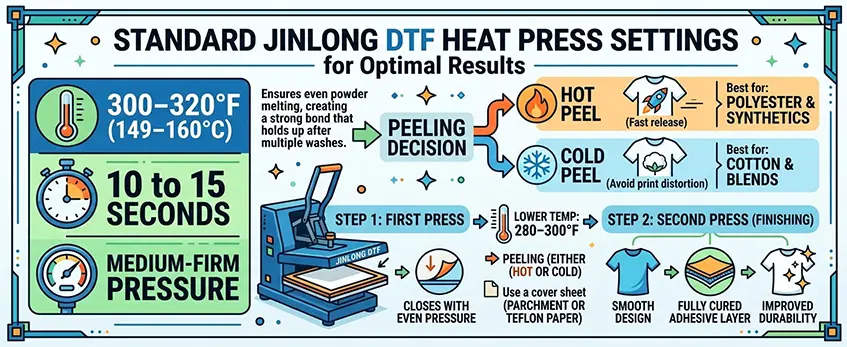
For the best DTF heat press settings with Jinlong DTF, aim for a temperature between 300–320°F (149–160°C), with a pressing time of 10 to 15 seconds and medium-firm pressure. This range ensures that the adhesive powder melts evenly, creating a strong bond that holds up well after multiple washes.
During the first press, apply even pressure across the transfer. Depending on your material and specific project, choose between a hot peel or cold peel:
- Hot peel is great for polyester and synthetic fabrics, releasing the film quickly after pressing.
- Cold peel works best for cotton and blends to avoid print distortion.
After peeling, use a second press at a slightly lower temperature (around 280–300°F) with a cover sheet like parchment or Teflon paper. This smooths out the design and improves durability by fully curing the adhesive layer.
Jinlong’s premium powder is specially formulated to perform consistently within these settings, giving you vibrant colors and superior wash resistance that lasts. For more tips on pairing Jinlong films and powders, check out our detailed DTF transfer film options.
Fabric-Specific DTF Heat Press Settings
Getting the best DTF heat press settings means adjusting for fabric types. Here’s a quick guide that works well across common materials:
100% Cotton: Set your heat press between 310–325°F (155–163°C) for about 12–15 seconds. Use medium-firm pressure and go for a cold peel to avoid damaging the soft fibers. This helps the adhesive powder activate perfectly while keeping the fabric comfy.
Polyester and Synthetics: Lower the temperature a bit to 290–305°F (143–152°C). Press for 10–12 seconds with medium pressure. A hot peel usually works best here since these fabrics handle heat differently and help the transfer stick better.
Cotton-Poly Blends (like 50/50): Aim for 305–315°F (152–157°C), pressing 12–14 seconds with medium-firm pressure. This middle ground balances the heat sensitivities of cotton and polyester for durable, smooth prints.
Stretchy, Nylon, and Performance Fabrics: Use cooler temps: 275–295°F (135–146°C) for 8–12 seconds. Apply lighter pressure to avoid stretching or distorting the material during pressing.
Specialty Items (hats, hoodies, bags): These call for customized heat press settings and careful positioning. Hats, for example, might need a curved platen or adjusted pressure spots. Hoodies with zippers or bags often require shorter press times and moderate heat to protect zippers, lining, or padding.
By dialing in your temperature, pressing time, and pressure based on fabric type, you’ll get crisp, durable images every time. For more tips on adhesive powders and how they work with heat, check out our TPU DTF hot melt adhesive powder guide.
Step-by-Step Application Process for Perfect Transfers
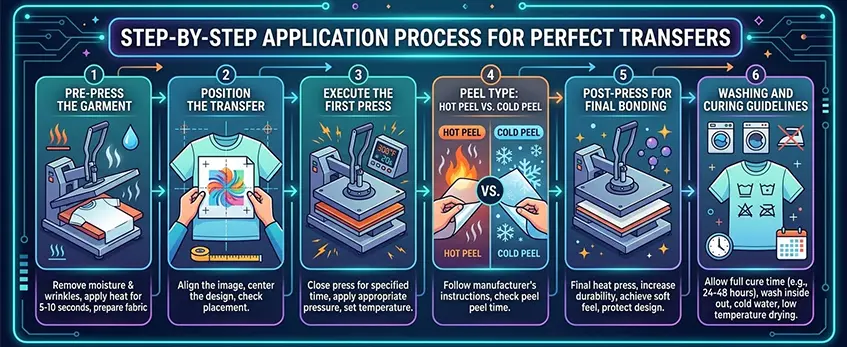
Getting the perfect DTF transfer starts with a solid process. Follow these steps to nail your DTF heat press settings and get consistent, high-quality results.
1. Pre-press the Garment
Before applying the transfer, pre-press your garment for 3-5 seconds at the recommended temperature to remove any moisture and wrinkles. This helps the adhesive bond better and prevents issues like bubbling or poor adhesion.
2. Position the Transfer
Place your DTF transfer film carefully on the garment. Use alignment tools or a simple ruler to ensure it\’s straight and centered. This step is key to avoiding crooked prints, especially on multiple garments.
3. Execute the First Press
Set your heat press to the recommended temperature (usually around 300–320°F for Jinlong DTF film), with medium-firm pressure. Press for 10–15 seconds, making sure to apply even pressure across the entire design.
4. Peel Type: Hot Peel vs. Cold Peel
Hot Peel: Remove the film immediately while still warm for polyester or synthetic fabrics.
Cold Peel: Wait until the print cools down before peeling when working with cotton or blends.
Choosing the right peel type according to your fabric helps prevent cracking and ensures transfer durability.
5. Post-Press for Final Bonding
After peeling, cover the print with parchment paper or a Teflon sheet, then press again at a slightly lower temperature for 5–8 seconds. This seals the print and smooths out any rough edges.
6. Washing and Curing Guidelines
For maximum longevity, wait at least 24 hours before the first wash. Use cold water and gentle cycles to preserve the print. Avoid bleach and high heat drying. Following these steps increases the durability of your DTF prints on t-shirts and other apparel.
For more on the complete digital DTF workflow, including printing and powdering, check out our detailed digital DTF workflow guide.
Troubleshooting Common DTF Transfer Issues
Even with the best DTF heat press settings, sometimes issues pop up. Here’s how to fix the most common problems and keep your prints looking sharp.
Adhesion Failure
If your transfer isn’t sticking right, it’s usually due to insufficient time, pressure, or powder coverage. Try:
- Increasing your pressing time by a few seconds
- Applying firmer pressure during pressing
- Making sure the adhesive powder is evenly and fully covered on the film
Cracking or Stiff Feel
Over-pressing or peeling at the wrong time can cause your prints to crack or feel stiff. Avoid this by:
- Using medium-firm pressure instead of heavy pressure
- Following recommended peel types—hot peel or cold peel—based on your fabric and film settings
Scorching or Yellowing
This happens when your DTF transfer temperature is too high or heat is uneven across the press. To prevent this:
- Lower your press temperature slightly within the recommended range (e.g., 300–320°F)
- Use quality parchment or Teflon sheets to protect the fabric
- Check that your heat press maintains an even temperature with a reliable thermometer
Fading After Washes
Fading usually signals under-pressing or low-quality materials. Make sure to:
- Press long enough with the right pressure to fully activate the adhesive powder
- Use premium DTF films and powders, like those recommended by Jinlong for lasting prints
- Follow proper curing and washing instructions for the garment
Tips for Consistent Results Across Different Heat Presses
- Calibrate each heat press to confirm temperature and pressure accuracy
- Test transfers on scrap garments before moving to final pieces
- Adjust settings slightly based on fabric and machine model to maintain optimal DTF heat press settings
For more detailed troubleshooting and tips, check out our guide on how to do DTF transfer without cracking or peeling.
Pro Tips from Jinlong DTF Experts
To get the best results with your DTF heat press settings, always start by testing on scrap materials. This helps you dial in the perfect temperature, pressing time, and pressure before working on your final piece. Don’t skip this step—it saves you from costly mistakes.
Make sure to calibrate your heat press regularly. Even slight temperature fluctuations can affect your DTF transfer temperature and cause adhesion issues or color fading. Using an accurate thermometer helps maintain consistency.
Keep an eye on environmental factors like humidity and altitude. These can impact how your adhesive powder melts and bonds. You might need to tweak your pressing time or temperature slightly depending on local conditions to ensure smooth, durable prints.
For best results, pair Jinlong DTF films and powders together. Our premium powder is formulated to melt evenly at recommended Jinlong DTF heat press settings, giving you transfers with superior wash resistance and vibrant colors. Using matched products simplifies your process and guarantees top-notch outcomes.
Finally, regular maintenance of your heat press is key. Clean your platen regularly and check for even pressure distribution to avoid scorching or uneven bonds. Well-maintained equipment extends your press’s life and maintains print quality, making every transfer a success.
For a deeper dive into how DTF printing works from design to heat press, check out our complete guide on how to DTF printing works from design to heat press.





 English
  Español
  Deutsch
  Français