



DTF Printer Meaning Explained How It Works Benefits and Uses
If you’ve recently heard the term DTF printer tossed around in the custom apparel world and wondered, “What is this all about?” you’re not alone. DTF stands for Direct-to-Film printing, and it’s quickly reshaping how small businesses, hobbyists, and print shops create vibrant, durable designs on everything from t-shirts to tote bags. Unlike other printing methods, DTF offers a unique process that’s beginner-friendly yet powerful enough for serious production. In this guide, you’ll get a straightforward, no-fluff explanation of what a DTF printer means, how it works, and why it’s becoming a go-to choice in 2025—and beyond. Ready to see if DTF is the right fit for your printing journey? Let’s jump in.
How DTF Printing Works – Step-by-Step Process
If you’re curious about DTF printer meaning and how Direct to Film printing actually works, here’s a quick, easy rundown of the process:
Design creation and RIP software
First, you create your design using graphic software (think Adobe Illustrator or Photoshop). Then, you use RIP software to convert that design into a printable format optimized for your DTF printer. This step controls color management and ink layering for the best results.
Printing CMYK + white ink onto PET film
Next, the printer lays down the colors (CMYK) and a special white ink base directly onto a clear PET film. That white layer is crucial—it ensures colors pop on dark or colored fabrics.
Automatic powder shaker & adhesive application
Right after printing, the film moves to a powder shaker. Here, a fine adhesive powder coats the wet ink precisely, sticking only where the ink is printed.
Curing the powder (oven or built-in dryer)
The powdered film then passes through a curing oven or built-in dryer to melt and fix the adhesive powder firmly onto the print. This step makes sure your design stays put.
Heat press transfer onto fabric
Finally, you place the cured film on your garment and use a heat press to transfer the design. The heat activates the adhesive again, bonding the print permanently to the fabric.
Bonus:
This step-by-step process makes DTF printing a versatile and reliable choice, especially when you want vibrant prints on cotton, polyester, and more.
Key Components of a DTF Printer Setup
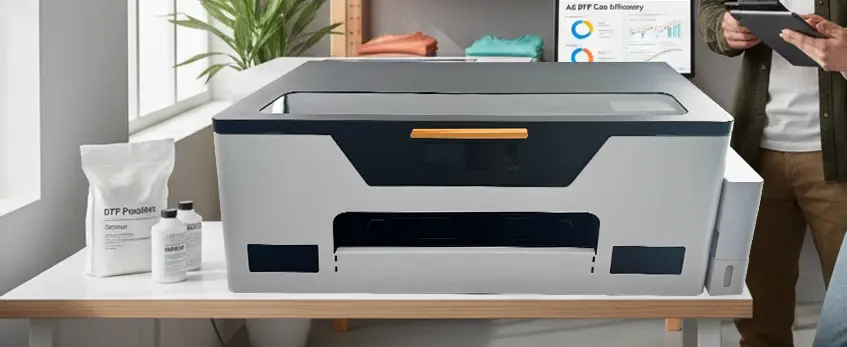
A reliable DTF printer setup starts with modified Epson-based printers like the L805, 1390, L1800, or XP-15000. These models are popular because their printheads handle DTF inks well and offer excellent color accuracy for CMYK and white channels.
Speaking of inks, DTF-specific inks are essential — you’ll need vibrant CMYK colors plus an opaque white ink to create that solid underbase on dark fabrics. Regular inks won’t work here.
Next is the PET film, which comes in two main types: hot-peel and cold-peel. Hot-peel films require you to peel the film while still warm after curing, while cold-peel films come off after cooling down. Both have pros and cons depending on your workflow and fabric type.
The powder adhesive is another key part. It’s usually available in fine or medium grain sizes. This powder sticks to the wet ink, melts during curing, and bonds the print onto your fabric when heat pressed. Choosing the right powder grain affects the print’s feel and durability.
To cure the powder properly, you’ll need a curing oven or a built-in drawer dryer. This step melts the adhesive so your transfer sticks perfectly.
Finally, a heat press is necessary to apply the design from the PET film onto the fabric. Look for presses that can maintain consistent heat and pressure, which make a big difference in the print quality and durability.
For a reliable supply of quality PET film, check out the DTF transfer film options that work well with most DTF setups.
DTF vs DTG vs Screen Printing – Honest Comparison Table
Here\’s a quick breakdown of how DTF printing stacks up against DTG and Screen Printing across key areas:
| Feature | DTF Printing | DTG Printing | Screen Printing |
|---|---|---|---|
| Cost per Print | $0.60–$1.50 (A3/A4 size) | Usually higher ink & pretreat cost | Low cost for large runs, high setup cost |
| Fabric Compatibility | Works on cotton, polyester, blends, leather, nylon | Best on cotton, blends less ideal | Works on most fabrics but limited on synthetics |
| Wash Durability & Feel | Excellent (60+ washes), slightly stiffer hand feel | Soft hand feel, good durability | Durable, soft feel varies by ink |
| Setup Time & Learning | Moderate, easier for beginners | Longer setup, needs pretreatment | Long setup, high skill required |
| Minimum Order Qty | Great for small to medium runs | Best for small batches | Best suited for large orders |
DTF shines as a versatile, cost-effective option, especially if you want vibrant prints on various fabrics without pre-treatment. DTG is great for soft, breathable prints but can get pricey on polyester or non-cotton blends. Screen printing still rules for big runs but requires time and skill to set up.
For a deeper look into DTF-specific materials like powder adhesive and transfer films, check out resources like the DTF ink and film guide to ensure you pick the right supplies for your operation.
Advantages of DTF Printing (Why People Are Switching)
DTF printing stands out because it works on a wide range of fabrics—cotton, polyester, nylon, leather, and blends are all fair game. Unlike some other methods, you don’t need to pre-treat fabrics, which saves time and hassle. The process produces vibrant colors thanks to the opaque white underbase, especially noticeable on dark garments, giving designs a bright, sharp look. Plus, DTF prints hold up well in the wash, lasting through 60+ washes without fading or cracking. For many small businesses and startups, the lower initial investment compared to industrial DTG printers makes DTF a smart, budget-friendly choice.
Disadvantages & Limitations You Should Know

While DTF printing offers many perks, it comes with a few drawbacks you should consider:
Slightly stiffer hand feel: DTF prints can feel a bit firmer compared to DTG. That said, improvements in ink and powder formulations are closing this gap quickly.
Glossy finish on some films: Depending on the PET film used, the print may have a shiny or glossy look that might not suit all designs or customer preferences.
Powder mess risk: Applying the adhesive powder needs care. If your setup isn’t spot on, powder dust can create a mess and affect print quality.
Consumable costs add up: Film and powder are ongoing expenses, so factor those into your budget along with inks and maintenance.
Understanding these limitations upfront helps you set realistic expectations and optimize your DTF printer setup for the best results. For more on selecting quality consumables, check out the DTF transfer film options that work well with standard DTF printers.
Real-World Applications & Best Use Cases
DTF printing has gained popularity because it fits a wide range of uses, especially in small to medium-sized businesses. Here are some of the most common and effective applications:
- Custom T-shirts & Hoodies: Perfect for printing vibrant, durable designs on cotton, polyester, and blends. Ideal for local apparel stores or event merch.
- Small-run Streetwear Brands: Allows startups and smaller brands to produce limited runs without huge setup costs, keeping production flexible and creative.
- Personalized Gifts & Etsy/POD Shops: Great for customized, made-to-order products on platforms like Etsy or print-on-demand (POD) businesses, thanks to its quick turnaround and quality results.
- Sports Jerseys & Workwear: DTF printing works well on polyester and performance fabrics commonly used in jerseys and uniforms, maintaining colorfastness through washes.
- Bags, Hats, and Non-Apparel Items: Its adhesive powder and versatile ink system help print on a variety of materials beyond just fabric, expanding your product range.
For those interested in starting or scaling these applications, understanding the full DTF transfer process and how to control powder application can help improve quality and consistency. Check out this breakdown of the complete DTF workflow and powder shaker importance to get the best results in your printing business.
DTF Printing Cost Breakdown (2026 Updated)
In 2026, the average cost per A3 or A4 DTF print typically ranges from $0.60 to $1.50 USD, depending on factors like ink coverage, film type, and powder amount. Here\’s a quick breakdown:
- Ink Consumption: DTF uses CMYK plus white ink, with white usually being the most expensive. Using efficient RIP software helps reduce ink waste.
- Film Cost: PET transfer films vary by type—hot peel or cold peel—with prices impacting overall costs. You can check options like the DTF transfer film 40cm double pro series for quality and pricing.
- Powder Adhesive: Powder usage depends on the grain size (fine vs. medium). It’s important to apply just enough to avoid waste or mess.
Profitability improves with volume—higher print runs allow you to negotiate better prices on supplies, reduce per-print labor, and maximize machine uptime. For smaller orders, keep in mind the cost of consumables per shirt may be on the higher end of the scale, but DTF’s low setup costs still make it very attractive compared to other methods.
Understanding these costs upfront helps you price your products competitively and plan your business better.
How to Choose the Right DTF Printer in 2026
-

JL-DTF301B A3 DTF Printer XP600 【Applicable to beginner sets】
View more View more -
JL-DTF302S DTF Digital Printer
View more View more -
JL-DTF602S DTF Digital Printer Best Product Print Quality Package
View more View more -
JL-DTF604S DTF Digital Printer Best Product Print Quality Package
View more View more -
JL-DTF604P DTF Digital Printer [Pro Series]
View more View more


![JL-DTF604P DTF Digital Printer [Pro Series]](http://jinlongprints.com/wp-content/uploads/2025/07/JL-DTF604P-300x300.webp)
Picking the right DTF printer depends a lot on your needs, budget, and the volume you plan to run. Here’s a quick guide to help you decide:
A4 vs A3 vs 24-Inch Roll Printers
| Printer Size | Best For | Pros | Cons |
|---|---|---|---|
| A4 Printers | Small hobbyists, sample printing | Compact, affordable | Limited print size |
| A3 Printers | Small to medium businesses | Good size vs price balance | Slightly larger footprint |
| 24-inch Roll | Large production & bulk orders | Large prints, continuous rolls | Higher upfront cost, bigger |
Key Features to Look For
- Auto-cleaning system: Keeps printheads fresh and extends lifespan.
- White ink circulation: Prevents white ink from clogging during idle times.
- Dual-printhead models: Speeds up printing, great for higher volumes.
- Reliable RIP software compatibility: Ensures smooth design workflow.
Why jinlong DTF Printers Stand Out
Jinlong offers a solid range of DTF printers known for durability and consistent print quality, especially with white ink handling. Their models come with features like auto-cleaning and efficient ink circulation, making them a dependable choice for newcomers and pros alike. For a detailed overview, the best DTF printer options from Jinlong are worth checking out.
Budget Ranges
| Budget Level | Price Range (USD) | Typical Users |
|---|---|---|
| Entry-Level | $2,000 – $5,000 | Beginners, small side hustles |
| Mid-Range | $5,000 – $12,000 | Growing businesses, moderate runs |
| Production | $12,000+ | Full-scale production, high volume |
Choosing the right size and features upfront saves time and money. Whether you want to print casually or scale fast, matching the printer to your goals is key. Remember, the right DTF printer setup paired with quality consumables like ink and film also impacts success. For deeper info on inks and films, explore everything about DTF ink quality.
Getting Started: Tips for Beginners
Starting with DTF printing can be rewarding, but setting up the right workspace is key. You’ll want a clean, well-ventilated area to handle inks, powders, and films safely without dust settling on prints. Proper ventilation helps reduce fumes from the curing oven and adhesive powders.
Choosing the right RIP software matters a lot. Beginners often start with user-friendly free options like ImagePrint or RasterLink, moving up to paid versions for more control and color management. These programs help convert your artwork for DTF printers with better precision.
Watch out for rookie mistakes like using the wrong PET film type, inconsistent powder application, or skipping regular printhead cleaning. These can lead to clogs, poor adhesion, or faded prints. Checking guides and tutorials beforehand can save a lot of headaches.
A solid maintenance routine is what saves thousands down the line. Keep your white ink circulating regularly to avoid clogs (learn more about how Jinlong’s automatic white ink circulation system works), clean your printheads gently, and properly store films and powders to extend their life. Consistent upkeep means fewer interruptions and more profitable printing days.
Frequently Asked Questions (FAQ)
Is DTF better than DTG?
DTF and DTG each have strengths. DTF works well on a wider range of fabrics, including polyester and nylon, and doesn’t need pre-treatment. DTG is great for soft hand feel on 100% cotton but generally costs more upfront and requires more setup. For versatility and lower startup cost, many users find DTF a better fit in 2026.
Can I use a regular inkjet printer for DTF?
No, standard inkjet printers can’t handle DTF printing out of the box. DTF requires specially modified Epson-based printers and specific CMYK + white inks. Using the right hardware and DTF printing software ensures quality and durability.
How long do DTF prints last?
DTF prints typically last 60+ washes without major fading or cracking, making them highly durable. Proper curing with powder adhesive and heat pressing are key to longevity, plus using high-quality ink and film.
Hot peel vs cold peel film – which is better?
Hot peel film is peeled immediately after heat pressing, which speeds up production, while cold peel needs cooling before removal, offering slightly better image stability for delicate designs. Choice depends on your process speed and fabric type.
Is DTF printing profitable in 2026?
Yes, DTF printing remains profitable for small businesses and custom shops thanks to low startup costs, versatile fabric compatibility, and reasonable consumable pricing. Volume printing further lowers cost per print, improving margins. For tips on growing your DTF business, visit this helpful DTF printer forum.





 English
  Español
  Deutsch
  Français