

Es befinden sich keine Produkte im Warenkorb.


Jinlong
DTF RIP Software Guide Controlling Color White Ink Output
What is RIP Software and Why Do DTF Printers Need It?
RIP-Software steht für Raster Image Processor. It translates your design files—whether vectors or pixels—into tiny dots that printers can read and print precisely. Think of it as the essential middleman between your computer artwork and the DTF printer’s hardware.
| Merkmal | Zweck |
|---|---|
| Raster Image Processing | Converts graphics to printer-readable dot patterns |
| Ink Channel Management | Separates color and white ink layers properly |
| Print Optimization | Controls ink limits, resolution, and halftones |
The DTF Difference
Unlike standard print drivers, DTF RIP software supports White Ink Spot Channels. This means it can create an underbase of white ink beneath the color layers—something regular drivers simply can’t handle. Without this, prints on dark fabrics lack vibrancy and opacity.
Why Jinlong DTF Printers Rely on Quality RIP Software
Jinlong DTF printers excel in hardware, featuring piezoelectric printheads and precise ink delivery systems. But without equally advanced RIP software to control:
- White ink layers
- Color matching
- Ink limits and density
you won’t get the top-tier results you expect. The right RIP software amplifies the Jinlong DTF\’s capabilities, ensuring crisp, vivid prints and reliable production.
Kurz gesagt: If you want your Jinlong DTF printer to perform perfectly, you must pair it with robust RIP software designed for ultimate control over color, white ink, and output.
The Science of Color: How RIP Controls Vibrancy and Accuracy
DTF RIP software plays a key role in managing color vibrancy and accuracy from your screen to the final print. One core element is ICC-Profilierung, which matches input colors from your design files with output profiles calibrated for your specific ink, DTF film, and printer. This profile ensures the printer accurately reproduces the intended hues instead of generic colors.
Since screens use RGB color while printers work with CMYK ink mixtures, the RIP handles the essential translation between these color spaces to make sure designs come out true to life. Without this, printed colors can look dull or off-target compared to what you see on your monitor.
Controlling ink limits and density is another important task of the RIP software. It carefully manages how much ink is laid down to prevent ink bleeding and oversaturation, which can ruin sharp details and cause drying issues. This keeps your prints crisp and clean.
Zum Schluss, linearization ensures smooth gradients and correct gray tones, a subtle but vital part of quality printing. By adjusting how the inks are output, the RIP helps avoid banding and ensures that shadow details in your designs look natural.
Proper color management through RIP software is the backbone of top-quality DTF printing, bringing digital designs to life with vivid, accurate colors every time. For best results, pair this with quality DTF materials like our hochwertige DTF-Transferfolie designed for consistent output.
Mastering the White Ink Layer (The Most Critical DTF Feature)
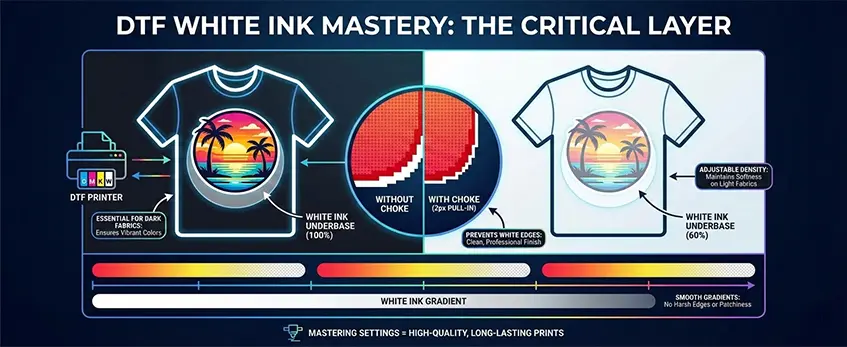
One of the biggest differences in DTF RIP software is how it handles the white ink layer, which is essential for vibrant prints on dark fabrics. The software automatically generates a DTF spot channel that lays down white ink precisely under the color pixels, creating the perfect underbase. This white layer ensures colors stay bright and true to the design.
To prevent unwanted white edges around your prints, RIP software uses choke settings, shrinking the white layer by about 2 pixels so it doesn’t peek beyond the color edges. This “pull-in” technique keeps the print clean and professional.
Adjusting the white ink density is another critical control. For example, you’ll want 100% white ink opacity on black shirts to keep colors sharp, but on lighter fabrics, dialing it down to around 60% helps maintain softness and reduces ink buildup. Good RIP software also handles gradients smoothly, allowing white ink to fade gently in halftones rather than producing harsh edges or patchiness.
Mastering these white ink settings is key to achieving high-quality, long-lasting prints that stand out on any fabric. For more on how white ink plays into DTF printing, check out the detailed differences between DTF printers with white ink vs CMYK-only models.
Output Control: Resolution, Speed, and Ink Cost

When working with DTF RIP software, controlling output settings is crucial to balance print quality, speed, and ink usage. Here’s what you need to know:
Pass Counts and Resolution: The number of passes your printer makes affects both speed and quality. For faster prints, a 4-pass setting gets the job done quickly but may compromise detail. For sharper, more vibrant results, opt for 8 or 12 passes—this increases print time but boosts resolution and color accuracy.
Halftoning Methods: Halftone screening controls how dots are arranged on your print. Stochastic screening uses randomly placed dots that can produce smoother gradients and reduce banding, whereas amplitude screening arranges dots in regular patterns, which might be faster but sometimes less natural-looking. Choosing between them depends on your design’s complexity and desired finish.
Ink Cost Calculation: One of the advantages of advanced DTF RIP software is the ability to estimate ink consumption before printing. Knowing the exact ink cost helps you price jobs accurately and avoid surprises. It considers factors like ink density, white ink usage, and total coverage.
Fine-tuning these output controls in your RIP software will help you maximize efficiency and profitability while maintaining the quality you expect from your Jinlong DTF printer. For best practices on printer maintenance that help keep output consistent, check out tips on DTF printer head problems and reducing downtime.
Workflow Efficiency Features for Print Shops
To keep DTF printing fast and cost-effective, RIP software offers smart workflow tools essential for busy print shops:
Nesting (Gang Sheets)
- Automatically arranges multiple designs on one film sheet
- Minimizes film waste, cutting costs and saving time
- Maximizes printer use for higher throughput
Knock-Out Black
- Removes black ink under dark areas on black shirts
- Lets the shirt color show through, reducing ink use
- Improves garment feel by lowering ink thickness
Multi-Printer Support
- Manage and send jobs to multiple Jinlong DTF printers from one software station
- Streamlines production in high-volume shops
- Ensures consistent settings across all machines
| Merkmal | Nutzen Sie | Ergebnis |
|---|---|---|
| Nesting (Gang Sheets) | Save film and time | Lower material costs |
| Knock-Out Black | Ink savings and soft hand | Cost reduction + better quality |
| Multi-Printer Support | Centralized control | Increased shop efficiency |
These RIP workflow features improve print shop productivity while maintaining high-quality output and controlling costs. For those using Jinlong hardware, look for RIP software designed to integrate seamlessly for smooth operations. For a deeper dive into ink quality, check out Jinlong’s range of DTF ink options here or explore the latest DTF printers ideal for small businesses.
Popular DTF RIP Options Compared
When choosing the right DTF RIP software for your Jinlong printer, compatibility and features matter a lot. Here’s a quick overview of some popular choices:
| Software | Wesentliche Merkmale | Jinlong Compatibility | Am besten für |
|---|---|---|---|
| CADLink Digital Factory | Advanced ICC color management, gang sheet nesting, knock-out black support | Fully compatible | Print shops needing precise color control and efficiency |
| AcroRIP | Easy spot channel setup, white ink choke control | Works well with Jinlong | Users wanting quick setup and reliable white ink handling |
| Hauptmenü | Customizable halftoning, multi-printer support | Kompatibel | Shops running multiple Jinlong machines |
All these RIPs handle Unterlage mit weißer Tinte und DTF spot channel generation effectively, which is critical for vibrant and accurate prints. Plus, they let you tweak ink limit settings and resolution easily.
For Jinlong printers, using a dedicated RIP like these ensures you maximize hardware potential and maintain consistent print resolution (DPI) and color fidelity. If you want an eco-friendly workflow, check out how these integrate with advanced materials and settings for better ink usage and less waste, supporting sustainable options in textile printing.
Explore more on optimizing your Jinlong setup with smart software choices and accessories tailored for DTF printing success.
Troubleshooting Common RIP Issues
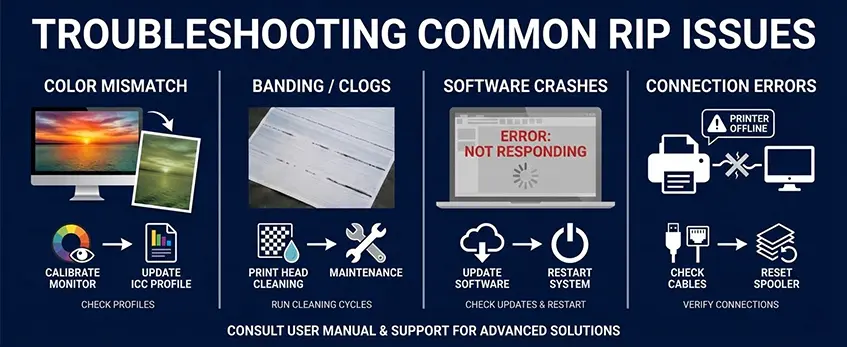
When using DTF RIP software, some common issues can pop up but are usually easy to fix once you know what to check:
| Ausgabe | Ursache | Schnelle Lösung |
|---|---|---|
| Colors Washed Out | Incorrect or missing ICC profile | Update or reload the correct ICC color profile to match your ink and film. |
| White Ink Not Sticking | Ink volume settings too low or improper white ink choke | Increase white ink volume limits and adjust white ink choke settings to ensure proper underbase coverage. |
| Banding | Nozzle clog or software feeding problem | Clean printhead nozzles and check RIP feed settings for consistency. |
Tips to avoid these issues:
- Always calibrate your printer with the right ICC profiles for accurate color management.
- Use RIP software settings to control white ink density and avoid gaps in the white ink underbase.
- Regularly maintain your piezoelectric printhead to prevent clogs that cause banding.
For detailed printing tips and color calibration, see our guide on bewährte Verfahren zum Drucken und Testen einer DTF-Farbkarte.
Balancing Hardware and Software
The best Jinlong DTF printers deliver outstanding results when paired with quality DTF RIP software. This combination ensures precise color management, proper white ink underbase control, and optimal print resolution. Without the right RIP instructions, even top-tier hardware can’t reach its full potential. To get consistent, vibrant prints and efficient output, it’s essential to use RIP software designed to handle Jinlong’s piezoelectric printhead control and advanced color profiles.
If you’re setting up your print shop or upgrading your workflow, explore recommended RIP options like CADLink Digital Factory or AcroRIP settings tailored for Jinlong printers. Also, don’t hesitate to reach out to support for ICC color profiles and fine-tuning advice that match your specific ink and film choices. For more on resolving white ink issues or boosting print durability, check out our DTF printer with white ink problems and how to fix them guide. Getting your software and hardware aligned is the key to professional, cost-effective DTF printing in today’s competitive U.S. market.





 English
  Español
  Deutsch
  Français