

Es befinden sich keine Produkte im Warenkorb.


Jinlong
Digital DTF Equipment Guide Printers Shakers Ovens Software Explained
Wenn Sie in die Welt des individuellen Bekleidungsdrucks einsteigen wollen, Digital DTF Equipment Guide: Printers, Shakers, Ovens, and Software is exactly what you need to build a strong foundation. Whether you’re a beginner, small business owner, or hobbyist, understanding how to select and operate each piece of this puzzle is critical for producing vibrant, durable designs on any fabric. From choosing the right DTF-Drucker with reliable white ink flow, to mastering consistent powder application and perfect curing in ovens, plus navigating the best RIP-Software—this guide breaks it all down. Ready to avoid costly mistakes and unlock your full production potential? Let’s dive into a step-by-step path toward smooth, professional DTF printing success in 2026 and beyond.
What Is Digital DTF Printing and Why Equipment Matters
Digital Direct to Film (DTF) printing is a modern method for transferring vibrant, durable designs onto a wide range of fabrics and materials. Unlike Direct to Garment (DTG) printing, which prints directly onto textiles, DTF involves printing your artwork onto a special transfer film. This film is then coated with adhesive powder, cured, and heat-pressed onto the fabric. This process offers several advantages over DTG, including compatibility with more fabric types (like polyester and blends), better wash durability, and lower startup costs for small businesses.
Proper equipment integration is crucial for a smooth, high-quality digital DTF workflow. From printers with reliable white ink circulation systems to precise powder shakers and curing ovens, each piece of equipment plays a vital role in ensuring consistent results. Beginners often ask about balancing speed and print quality, handling adhesive powders correctly, and choosing the right software to manage color profiles and print queues. Addressing these questions early helps avoid common pitfalls and sets the foundation for long-term success in DTF printing.
Choosing the Right DTF Printer: Features, Specs, and Recommendations
Das Richtige auswählen DTF-Drucker means balancing features, budget, and ease of use, especially if you want reliable results without headaches. Here’s what to look for:
| Merkmal | Was zu beachten ist | Warum es wichtig ist |
|---|---|---|
| Druckkopf-Technologie | Precision heads like Epson or Kyocera | Sharp prints, smooth gradients |
| Druckbreite | From 33cm to 60cm+ | Match your product size and volume |
| Weißes Tintensystem | Continuous circulation to avoid clogs | Keeps white ink flowing clean and smooth |
| Geschwindigkeit vs. Qualität | Adjustable print speed settings | Choose faster prints or higher detail |
| Wartung | Easy cleaning cycles, self-flush | Saves downtime and costly repairs |
| Kompatibilität der Tinten | Pigment vs. eco-solvent inks | Affects durability and color vibrancy |
| Handhabung von Filmen | Roller systems, tension controls | Prevents wrinkles and misalignment |
| Benutzerfreundlichkeit | User-friendly control panels | Quicker learning curve |
Standalone Printers vs. All-in-One Bundles
- Standalone Printers give flexibility if you already have powder shakers or ovens.
- All-in-One Bundles include printers, shakers, ovens, and sometimes heat presses — great for beginners setting up a full workflow.
Jinlong DTF Series Highlights
Jinlong’s lineup, like the JL DTF604P Drucker, often features:
- Advanced white ink circulation systems for no-clog printing
- Wide print widths ideal for apparel and large transfers
- Balanced speed and quality to boost productivity
- Compatibility with a range of transfer films and inks
Performance Tips:
- Regularly check white ink circulation to prevent clogs
- Use recommended films such as Jinlong’s DTF-Übertragungsfolie
- Adjust speed based on print detail and production schedule
Choosing the right digital DTF printer sets the stage for consistent, high-quality transfers without wasting time or materials.
Powder Shakers and Automatic Shaker-Dryer Units: Application and Consistency
The adhesive powder plays a crucial role in DTF printing, helping the printed film bond firmly to the fabric during heat pressing. Choosing the right powder shaker is key to achieving consistent, high-quality transfers. Manual shakers offer simplicity and control but can lead to uneven powder distribution if not handled carefully. Automatic shaker-dryer units improve consistency by evenly applying and drying the powder while reducing dust and manual labor.
Powder granule size affects the shake quality and film adhesion—finer powders spread more uniformly but can be messier. Adjust shaker settings to match your film type and environmental factors like humidity, which can impact powder flow and adhesion. Proper film alignment during shaking ensures uniform coverage and avoids thick or thin spots that affect transfer durability.
When deciding between standalone powder shakers and shaker-oven combinations, consider your workflow speed and space. Standalone shakers provide flexibility, while shaker-oven units streamline the process by combining powder application and curing in one step, saving time and space.
For setup and troubleshooting:
- Calibrate shaker speed and duration for even powder spread.
- Align films precisely to avoid powder spillage.
- Maintain humidity around 50% to prevent powder clumping.
- Use dust management tools like enclosed shakers or local ventilation to keep your workspace clean.
- Follow safety guidelines—wear masks and gloves to avoid inhaling powder.
Proper shaker use and maintenance not only boost transfer quality but also extend equipment life, supporting a smooth, efficient DTF workflow. For detailed tips on powder types and shaker settings, check out resources like the comprehensive Jinlong DTF ink and powder guide.
Curing Ovens and Heat Management for Durable Transfers
Curing is a crucial step in Digital DTF printing to ensure transfers stick well and last through washes. Getting the right curing temperature, time, and airflow is key to durable results.
Key Curing Parameters
| Parameter | Empfohlener Bereich | Anmerkungen |
|---|---|---|
| Temperatur | 320°F – 355°F (160°C – 180°C) | Depends on film and powder type |
| Zeit | 3 – 6 minutes | Adjust by oven and batch size |
| Luftstrom | Moderate, consistent | Prevents uneven curing and hot spots |
Oven Options: Pros and Cons
| Typ | Profis | Nachteile |
|---|---|---|
| Dedicated DTF ovens | Precise temp control, good airflow | Höhere Anfangskosten |
| Shaker-oven combos | Space-saving, automates powder drying | Less customizable temp control |
| Heat press alternatives | Affordable, easy to use | Manual timing, uneven airflow |
Optimal Curing Tips
- Follow manufacturer guidelines for temperature and duration.
- Watch for signs of under-curing such as powder peeling or poor adhesion.
- Avoid Überhärtung, which can yellow prints or damage film.
- Use energy-efficient settings where possible to keep power costs low.
Ventilation and Safety
Small-shop environments benefit significantly from proper ventilation to handle fumes and maintain air quality. Consider:
- Installing exhaust fans or vents near ovens.
- Keeping a fire extinguisher handy due to high heat use.
- Regularly cleaning ovens to reduce dust or powder buildup.
For a smoother curing process in your Digital DTF workflow, check out the detailed steps and tips on how to print DTF on black shirts using hot peel or cold peel film, which also covers curing nuances.
Good heat management ensures your transfers stay vibrant and durable, a must-have for any serious DTF operation.
RIP Software and Design Workflow: From File to Print
RIP software is crucial in digital DTF printing, acting as the bridge between your design files and the printer. Its main roles include precise color management, proper white ink layering, and efficient queue control to keep your prints consistent and vibrant. Managing white ink correctly is vital since it anchors your colors on dark fabrics, preventing dull or faded results.
Popular RIP software options offer features like ICC profiling for accurate color matching and beginner-friendly interfaces to streamline the printing process. Many are fully compatible with Jinlong DTF printers, allowing seamless integration and easier setup for newcomers and pros alike.
A typical RIP workflow breaks down into these steps:
- Entwurfsvorbereitung: Create or finalize your image with the right resolution and color profile.
- RIP Adjustments: Set parameters such as ink density, white ink layers, and print speed.
- File Output: Process the file into the RIP’s printable format.
- Printer Integration: Send the file directly to your Jinlong DTF printer for output.
Common issues you might encounter include color shifts—often fixed by recalibrating ICC profiles—and banding, which usually requires cleaning printheads or adjusting print speeds. Keeping your software updated and correctly configured minimizes these problems.
For high-quality transfers, pair your workflow with reliable consumables like the DTF-Transferfolie von Jinlong, which works perfectly with most RIP setups to ensure optimal print clarity and durability.
Building a Complete DTF Workflow: Integration, Setup, and Optimization
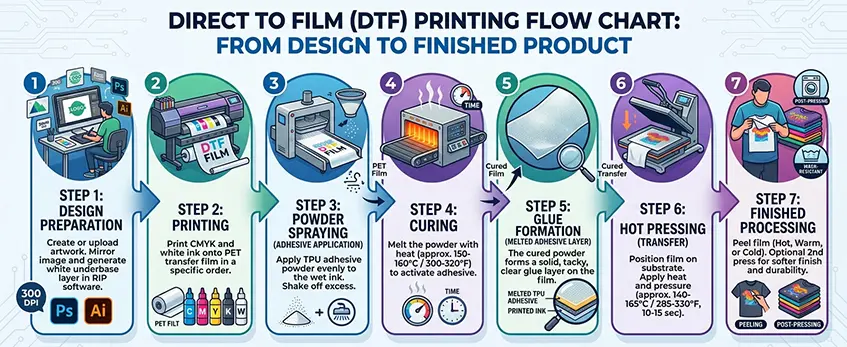
Creating a smooth DTF workflow means managing every step carefully—from design to finishing. The typical flow looks like this: design → print → powder → curing → weeding → heat pressing → finishing. Each stage needs the right tools and setup for consistent, high-quality results.
Key Steps in Your DTF Workflow
- Entwurf: Start with high-resolution artwork, optimized for your software and printer.
- Drucken: Use your DTF printer to lay down base colors and white ink properly.
- Puder: Apply adhesive powder evenly—powder shakers help with consistency.
- Aushärten: Cure the powder with ovens or shaker-oven combos to bond the ink and powder.
- Unkraut jäten: Remove excess film carefully without damaging your design.
- Heißpressen: Transfer the design onto the garment under the right temperature and pressure.
- Finishing: Final inspection and any touch-ups for durable prints.
Integrating Jinlong DTF Equipment
When setting up Jinlong DTF printers and accessories, dedicate enough space and plan your electrical setup to avoid bottlenecks. Jinlong equipment often requires:
- Stable voltage power supply.
- Proper ventilation for curing ovens.
- Clear, organized workflow space from printer to powder shaker and oven.
For detailed tips on ink handling and power needs, check out how proper ink storage and printer operation can dramatically improve your process.
Scaling and Maintenance for Longevity
- Start with a regular maintenance schedule: clean printheads, shaker units, and ovens weekly.
- Keep spare parts like printheads and powder shaker elements on hand to reduce downtime.
- Plan for space expansion and additional machines as order volume grows—modular setups work best.
- Track your workflow timing to optimize each step and scale efficiently.
Following these tips will keep your DTF production running smooth and profitable, especially when using Jinlong’s reliable equipment tailored for small to mid-sized U.S. print shops.
Cost Breakdown, ROI, and Buying Considerations for 2026
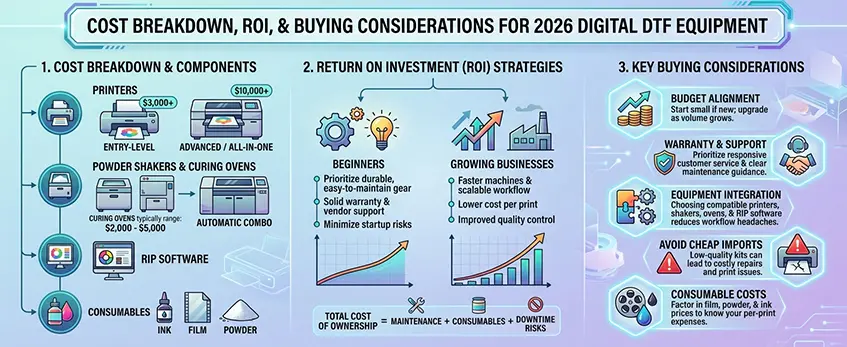
When budgeting for digital DTF equipment in 2026, it\’s important to factor in all key components: printers, powder shakers, curing ovens, RIP software, and consumables like ink and film. Entry-level DTF printers can start around $3,000, while advanced models—especially all-in-one systems—may run $10,000 or more. Automatic shaker-oven combos price accordingly but can save time and improve consistency long-term. Good quality DTF curing ovens typically range from $2,000 to $5,000 depending on size and features.
Return on investment (ROI) hinges on how well you match equipment to your business stage. Beginners should prioritize durable, easy-to-maintain gear with solid warranty and vendor support to minimize startup risks. Growing businesses need faster machines and scalable workflow setups that offer lower cost per print and improved quality control. Keep in mind total cost of ownership, including maintenance, consumables, and possible downtime.
Here are key buying considerations:
- Budget alignment: Start small if you’re new; upgrade as volume grows.
- Warranty and support: Prioritize brands with responsive customer service and clear maintenance guidance.
- Equipment integration: Choosing compatible printers, shakers, ovens, and RIP software reduces workflow headaches.
- Avoid cheap imports: Low-quality kits can lead to costly repairs and print issues. For trusted gear and performance tips, check out this guide on Häufige Probleme mit minderwertigen DTF-Bausätzen und wie man sie vermeiden kann.
- Consumable costs: Factor in film, powder, and ink prices to know your per-print expenses.
By carefully balancing upfront investment with long-term savings, you can build a digital DTF setup that grows with your business while maximizing quality and efficiency.
Maintenance, Troubleshooting, and Best Practices for Digital DTF Equipment
Keeping your digital DTF printing setup in top shape means consistent daily and weekly care routines for your printers, powder shakers, curing ovens, and RIP software. Here’s a quick breakdown to make maintenance straightforward:
Daily and Weekly Care Routines
- Printers: Clean printheads to prevent nozzle clogs; run white ink circulation systems regularly to avoid sediment buildup; check for proper film feeding and ink flow.
- Powder Shakers: Empty and clean powder compartments to prevent clumping; adjust shaker settings to ensure even powder coverage; inspect for leftover powder dust.
- Curing Ovens: Wipe down interior surfaces to remove powder residue; verify temperature settings and airflow are consistent.
- Software: Update RIP software regularly and back up profiles to avoid workflow interruptions; calibrate color profiles to keep transfers accurate.
Common Troubleshooting Tips
- Nozzle Clogs: Run printer’s cleaning cycles immediately if you spot streaks or missing colors on prints; use high-quality inks like those from the reliable DTF-Tinte CMYK Pro Serie to reduce clog risks.
- Curing Defects: Watch for signs of under-curing (sticky prints) or over-curing (yellowing or cracking); adjust temperature and curing time based on your oven specs.
- Film Feeding Issues: If films wrinkle or jam, check film alignment and humidity conditions; maintain shelf life by storing film properly.
Safety, Ventilation, and Environmental Tips
- Always ensure your workspace has adequate ventilation, especially near ovens and powder shaker ovens, to minimize dust and fumes.
- Use dust filters or extraction systems around powder stations to protect eyes and lungs.
- Follow electrical safety guidelines for all equipment, particularly with higher-power printers and ovens.
- Keep workspace clean to avoid cross-contamination of powder and inks, which can negatively affect print quality.
By integrating these maintenance and troubleshooting best practices into your routine, you’ll maximize uptime and prolong the life of your digital DTF equipment, helping your business run smoothly and efficiently. For deeper tips on how to avoid blurry prints and maintain sharp results, check out this guide on warum die Druckergebnisse Ihres Tierfilms unscharf aussehen.





 English
  Español
  Deutsch
  Français