



Common Problems with DTF Printer and Shaker Systems Expert Solutions
Common DTF Printer Problems and Quick Resolutions
Digital Textile Printing using DTF (Direct-to-Film) technology is a game-changer — until common issues slow down your workflow. Let’s tackle the top printer challenges and how you can quickly resolve them.
Printhead Clogging and White Ink Sedimentation
Symptoms:
- Nozzle lines missing or distorted prints
- White ink appears thick, grainy, or uneven
Causes:
- White ink settling due to inadequate circulation
- Dried ink residue blocking nozzles
Step-by-Step Fixes:
- Activate white ink circulation system daily to keep sedimentation in check.
- Clean printheads regularly with manufacturer-approved cleaning solutions.
- Run nozzle check patterns and perform printhead cleaning cycles until the print is sharp.
- If clogs persist, gently flush the printhead with cleaning fluid.
- Store ink cartridges properly, avoiding extreme temperatures or long idle periods.
Ink Smudging, Bleeding, or Uneven Colors
Symptoms:
- Ink smears when touched
- Blurred edges or colors running into each other
- Uneven color density across prints
Causes:
- Insufficient drying time or temperature settings
- Ink saturation too high or low on film
- Humidity affecting ink absorption
Solutions:
- Adjust curing temperature and speed in your DTF curing settings to optimize drying.
- Calibrate ink density through printer software to prevent oversaturation.
- Control room humidity between 40-60% for consistent ink performance.
- Use proper transfer film compatible with your ink type.
Film Feeding and Alignment Errors
Symptoms:
- Misaligned prints or cut marks
- Film skewing or jamming during the printing process
- Irregular borders or inconsistent image placement
Causes:
- Improper film loading or tension settings
- Worn or dirty rollers affecting feed precision
- Software calibration out of sync with hardware
Fixes:
- Load film carefully, ensuring flat and even tension without wrinkles.
- Clean and inspect rollers regularly to prevent slippage.
- Recalibrate printer alignment settings, following the manual’s step-by-step guide.
- Use the printer’s alignment test print function before big runs.
Keeping these core issues in check with regular preventive measures can save hours of downtime. Stay ahead by understanding symptoms early and applying these clear fixes. Your DTF printer will thank you with sharp, vibrant prints every time.
Frequent DTF Shaker System Challenges
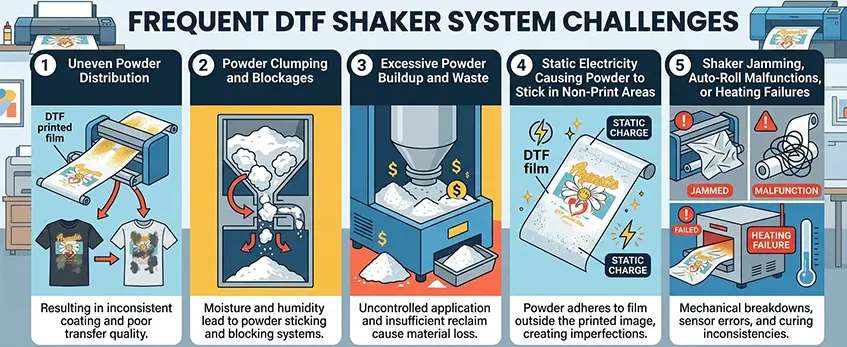
DTF shaker systems are essential for a smooth powder application process, but they come with their own set of common issues. Knowing the symptoms, causes, and quick fixes can save you time and reduce waste.
Uneven Powder Distribution
Symptoms: Uneven or patchy powder coverage on the film, resulting in inconsistent transfer quality.
Causes: Incorrect shaker speed settings, powder hopper inconsistencies, or poor powder flow due to moisture.
Solutions:
- Adjust shaker speed to ensure smooth, even powder flow.
- Regularly clean and level the powder hopper.
- Store hot melt adhesive powder in a dry place to prevent clumping. For the right powder, check out our TPU DTF hot melt adhesive powder.
Powder Clumping and Blockages
Symptoms: Build-up of clumps inside the shaker or powder feeding system, leading to jams or uneven application.
Causes: High humidity, poor powder quality, or inadequate powder shaking motion.
Fixes:
- Use a desiccant or humidity control near the shaker system.
- Regularly shake or stir the powder inside the hopper to prevent clumps.
- Replace old or poor-quality powder to maintain fluidity.
Excessive Powder Buildup and Waste
Symptoms: Thick layers of unused powder accumulate, increasing waste and cleanup time.
Causes: Overfeeding powder due to incorrect shaker speed or film speed settings.
Solutions:
- Calibrate shaker and film feed speeds to match exactly.
- Use powder waste reduction tips such as finer powder particles and proper shaker calibration.
- Check for and clear any powder residue regularly.
Static Electricity Causing Powder to Stick in Non-Print Areas
Symptoms: Powder sticks where it shouldn’t, causing messy prints and contamination of other areas.
Causes: Static buildup due to low humidity or faulty grounding of the equipment.
Fixes:
- Use a humidifier in your workspace to keep humidity in the ideal range.
- Ensure all shaker components are properly grounded.
- Use anti-static sprays if needed.
Shaker Jamming, Auto-Roll Malfunctions, or Heating Failures
Symptoms: Shaker stops abruptly, film roll doesn’t advance, or heat oven doesn’t maintain temperature.
Causes: Mechanical wear, electrical faults, or thermostat issues.
Solutions:
- Inspect and lubricate moving parts regularly.
- Check wiring and sensors for damage.
- Monitor and adjust DTF curing temperature settings carefully to avoid heating failures.
- Don’t hesitate to call for professional support if you notice persistent auto-roll issues.
Addressing these frequent shaker system issues promptly is key to maintaining a reliable DTF printing process with minimal downtime. For a deeper dive into printer ink maintenance that complements your shaker system, check our guide on white ink circulation for DTF printers.
Integration Issues Between Printer and Shaker
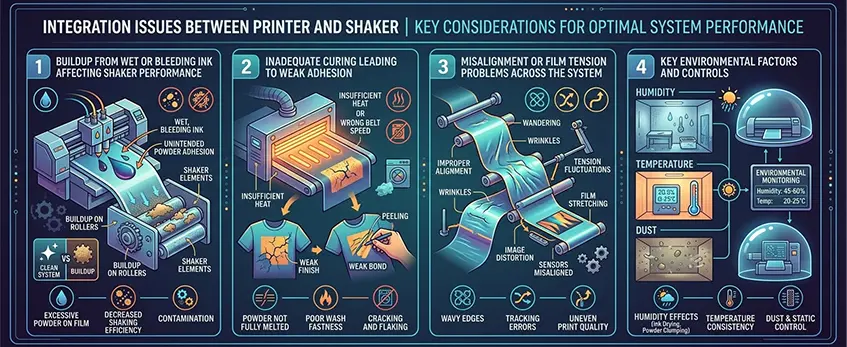
Seamless operation between your DTF printer and shaker is crucial for efficient printing and transfer quality. Here are some common integration problems and how to fix them.
Buildup from Wet or Bleeding Ink Affecting Shaker Performance
Symptoms: Powder doesn’t stick properly or creates clumps on the film; shaker jams more frequently.
Causes: Ink hasn’t dried fully before powder application, or excessive bleeding during printing.
Solutions:
- Adjust your drying time and temperature settings—ensure ink cures enough before shaking powder on.
- Use consistent, high-quality DTF transfer films designed for quick ink absorption and drying, like our single pro series DTF transfer film.
- Regularly clean the shaker to prevent buildup that can cause jamming.
Inadequate Curing Leading to Weak Adhesion
Symptoms: Transfers peel off easily or show inconsistent adhesion after heat pressing.
Causes: Ink and powder layers are not fully cured or heated properly during the curing stage.
Solutions:
- Verify and fine-tune your curing temperature and time according to the powder’s specifications—reference guides like the TPU powder melting temperature and heat press settings.
- Ensure your shaker oven is functioning correctly to maintain consistent heat.
- Perform routine temperature checks on the curing equipment to avoid temperature drops or spikes.
Misalignment or Film Tension Problems Across the System
Symptoms: Prints appear crooked, uneven powder spread, or film jams between printer and shaker.
Causes: Poor film feeding alignment or tension issues between devices cause wrinkling and shifting.
Solutions:
- Regularly calibrate your printer and shaker film feeders to keep tension uniform and alignment precise.
- Check rollers and sensors for wear or damage—replace parts as necessary to maintain smooth film transport.
- Secure the film rolls tightly and avoid over-tightening to prevent tearing or wrapping issues.
Keeping these integration issues in check ensures your DTF printing and powder shaking processes work in sync, reducing waste and improving transfer quality for the U.S. market’s demands. Regular tuning and maintenance are key to avoiding costly setbacks.
Key Environmental Factors and Controls
Controlling your workspace environment is essential for smooth operation of your DTF printer and shaker system. Environmental factors like humidity, temperature, and dust directly impact ink performance, powder behavior, and overall print quality.
Humidity Control: Too much moisture causes white ink sedimentation and clogs, while dry air can lead to static buildup that makes powder stick in unwanted areas. Aim for a stable environment around 40-60% humidity. Use dehumidifiers or humidifiers as needed.
Temperature Settings: Keep the room temperature consistent between 68°F and 77°F. Extreme heat can cause hot melt adhesive powder clumping, and low temperatures slow drying and curing times, affecting adhesion strength.
Dust and Air Quality: Dust particles can cause printhead nozzle blockages and uneven powder distribution. Make sure your printing area is clean, and consider air filtration for dust control.
Static Electricity Management: Static is a common challenge in DTF powder shaker troubleshooting. Use anti-static mats or ionizing blowers to reduce static buildup, preventing powder from sticking to non-print areas.
By maintaining these environmental controls, you\’ll reduce frequent issues like ink bleeding, powder clumping, and film feeding problems in your DTF printing line. This proactive approach extends equipment life and keeps transfer results consistent.
For more on handling common printhead issues caused by white ink, check out the detailed solutions on DTF printer head problems and white ink solutions.
Preventive Maintenance Schedule for Long-Term Reliability
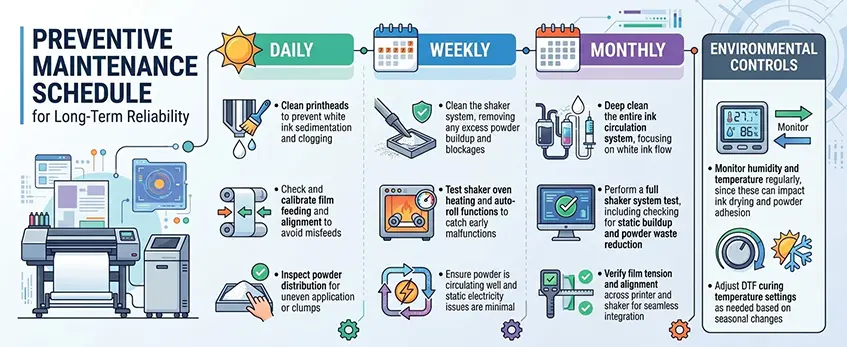
Keeping your DTF printer and shaker in top shape means setting up a solid preventive maintenance schedule. Regular care helps avoid common issues like printhead clogging, powder clumping, and film feeding problems, ensuring smooth operation and reducing downtime.
Key Maintenance Tasks
Daily:
- Clean printheads to prevent white ink sedimentation and clogging.
- Check and calibrate film feeding and alignment to avoid misfeeds.
- Inspect powder distribution for uneven application or clumps.
Weekly:
- Clean the shaker system, removing any excess powder buildup and blockages.
- Test shaker oven heating and auto-roll functions to catch early malfunctions.
- Ensure powder is circulating well and static electricity issues are minimal.
Monthly:
- Deep clean the entire ink circulation system, focusing on white ink flow.
- Perform a full shaker system test, including checking for static buildup and powder waste reduction.
- Verify film tension and alignment across printer and shaker for seamless integration.
Environmental Controls:
- Monitor humidity and temperature regularly, since these can impact ink drying and powder adhesion.
- Adjust DTF curing temperature settings as needed based on seasonal changes.
Why It Matters
Sticking to this preventive maintenance routine keeps your printer’s white ink flowing smoothly and powder shaker running without jams or waste. Plus, it helps avoid weak adhesion or transfer issues caused by curing or alignment problems. For more detailed guidance on preventing and fixing common printer and shaker problems, check out how RIP software impacts color accuracy and ink use, which ties into overall system performance.
With proper care, your DTF system will deliver consistent, high-quality prints and reduce costly repairs or premature upgrades. Regular maintenance is the best way to ensure long-term reliability and maximize your print investment.
When to Upgrade Equipment or Call Support
Knowing when to upgrade your DTF printer and shaker system or call for professional help can save you time and money. Here are clear signs to watch for:
Frequent, unresolved issues: If you’re regularly dealing with printhead clogging, white ink sedimentation, or DTF powder shaker troubleshooting that doesn’t improve despite maintenance, it might be time to consult support or consider an upgrade.
Decreased print quality or adhesion: Persistent ink smudging, bleeding, or transfer adhesion issues that impact your finished products signal that equipment performance is slipping or that parts need replacing.
Shaker system malfunctions: When shaker jamming, auto-roll failures, or heating problems persist and can’t be fixed with basic troubleshooting, professional service is necessary to avoid production delays.
Outdated technology: Older models might lack efficient white ink circulation or up-to-date powder distribution controls, making it harder to maintain consistent results and control static electricity during printing.
Increased downtime and maintenance costs: If your preventive maintenance routine no longer keeps the system running smoothly, and repairs are frequent and costly, investing in an upgraded DTF printer or shaker may provide better reliability.
Bringing in expert support from certified technicians or upgrading to the latest models ensures you maintain top-quality production and reduce costly powder waste issues. Proper climate and humidity control for DTF environmental factors should also be considered during upgrades to boost long-term performance.
For reliable ink supplies compatible with newer setups, check out options like the DTF ink white 1L 1000ml STD series that ensure optimal printhead function and color output.
Frequently Asked Questions
Here are some quick answers to common questions about DTF printer and shaker systems to help keep your setup running smoothly:
Q: Why does my printhead clog often with white ink?
A: White ink sedimentation is the usual culprit. Make sure to run a regular printhead maintenance schedule and keep white ink well-circulated to avoid clogging. Using quality inks like those in the DTF ink white 100ml pro series can also help.
Q: How can I fix uneven powder application?
A: Uneven powder distribution often means you need to clean the shaker system or adjust powder flow settings. Keeping your shaker free of clumps and controlling static electricity minimizes this issue.
Q: What causes film feeding problems in DTF printers?
A: Misalignment or tension in the film feed path is often the cause. Check for debris, ensure rollers are clean, and adjust film tension as needed. Using high-quality DTF transfer film helps maintain smooth feeding.
Q: Why is there powder buildup and waste?
A: Excessive powder can result from shaker malfunctions or incorrect powder amount settings. Regular maintenance and monitoring heating temperatures in the shaker oven reduces waste.
Q: How do I prevent static electricity from affecting powder placement?
A: Static causes powder to stick where it shouldn\’t, so controlling humidity and using anti-static mats or devices in your printing area help a lot with DTF static electricity control.
Q: What are signs of inadequate curing?
A: Weak transfer adhesion and cracking prints point to insufficient heat or time during curing. Adjust your DTF curing temperature settings and verify shaker oven performance regularly.
Q: When should I upgrade my DTF printer or shaker system?
A: If maintenance fixes don’t resolve frequent jamming, misalignment, or repeated adhesion issues, it might be time to consider an upgrade or professional support to avoid costly downtime.
For more technical tips, check out this guide on DTF transfer film properties to optimize your film selection and process.
If you run into other issues or need detailed troubleshooting, don’t hesitate to reach out to your equipment support team.





 English
  Español
  Deutsch
  Français